
- Community Home
- Internet
- Are you getting spam? Here’s how to stop it.
Options
- Subscribe to RSS Feed
- Mark Topic as New
- Mark Topic as Read
- Float this Topic for Current User
- Bookmark
- Subscribe
- Mute
- Printer Friendly Page
Are you getting spam? Here’s how to stop it.

Options
- Mark as New
- Bookmark
- Subscribe
- Mute
- Subscribe to RSS Feed
- Permalink
- Report Inappropriate Content
09-22-2021 08:41 AM - edited 11-08-2021 12:09 PM
Hi Bell community,
Have you been getting spam emails – messages you didn’t sign up for from senders you don’t recognize? Some try to get you to click on a link or open a document that might be a virus. Others are phishing attempts – ways to get your credit card number or other personal information. Like that wealthy stranger who just needs your bank account info to send you tons of money.
If you think an email is suspicious, don’t reply to it and don’t click on any links.
What you can do is use the tools in Bell email to mark the message as spam, so our anti-spam team can check it out and block the sender.
Junk email
Junk email is different from spam. It’s just email you aren’t interested in, even though it comes from legitimate companies. If you don’t want to hear about every sale, every day, from that store you shopped at one time, use the unsubscribe link in the email. By law in Canada, all companies sending email marketing have to include an unsubscribe link – even if it’s really small and kind of hard to find at the bottom of the message.
There’s no point in marking junk emails as spam, since our anti-spam team will see they’re from legitimate companies and won’t permanently block them.
You can easily block a sender yourself, though, or even a whole domain (e.g. @junk.com). Here’s how:
- In your inbox, check the box beside the message you want to block.
- Select More, then choose either Block sender or Block domain.
You can also block senders in Bell webmail by opening the Settings menu (gear icon), selecting either Mail or Security, depending which version of webmail you’re using, and using the Block sender options.
Learn more about using Bell email.
Labels:
- Labels:
-
Bell Email
3
17
17.9K
17 REPLIES 17

Options
- Mark as New
- Bookmark
- Subscribe
- Mute
- Subscribe to RSS Feed
- Permalink
- Report Inappropriate Content
01-02-2022 09:00 PM
Great advice

Options
- Mark as New
- Bookmark
- Subscribe
- Mute
- Subscribe to RSS Feed
- Permalink
- Report Inappropriate Content
06-27-2023 05:11 PM
This is what I've always done, but I've noticed the last two weeks or so the option is greyed out! So now I just delete them but I'm still getting lots of spam mail because they have thousands of email addresses.
Why cannot I block anyone like I used to?

Options
- Mark as New
- Bookmark
- Subscribe
- Mute
- Subscribe to RSS Feed
- Permalink
- Report Inappropriate Content
06-30-2023 03:12 PM
Hi there @jelo1988
Thank you for your post and welcome to the Community.
We wanted to check in to see if you are still having issues blocking senders?
If so, are you able to share what device you are using and if you've tested on another device
How are you accessing your email? If through web-browser, have you tried clearing your browser cookies / cache?
Looking forward to hearing back.
Options
- Mark as New
- Bookmark
- Subscribe
- Mute
- Subscribe to RSS Feed
- Permalink
- Report Inappropriate Content
08-24-2023 11:52 AM
This has continued to be a problem for me. Some days it might be couple other days is at least 10-15 a day. I have two sympatico emails and both are equally getting bombarded.

Options
- Mark as New
- Bookmark
- Subscribe
- Mute
- Subscribe to RSS Feed
- Permalink
- Report Inappropriate Content
09-01-2023 02:55 PM
Same issue for me and a friend. The last week has been a bombardment of Spam and marking them as spam is not doing any good. @Bell
Options
- Mark as New
- Bookmark
- Subscribe
- Mute
- Subscribe to RSS Feed
- Permalink
- Report Inappropriate Content
09-01-2023 03:24 PM - edited 09-01-2023 03:24 PM
This has been a problem for a while but the last couple of weeks have been unbearable. Almost everytime I check my email it is spam at least two items. I have set filters in webmail, I used block domain and sender to no avail. Its almost like the more I try to block the worst it gets. There has to be something done this is getting out of hand.

Options
- Mark as New
- Bookmark
- Subscribe
- Mute
- Subscribe to RSS Feed
- Permalink
- Report Inappropriate Content
09-03-2023 09:09 AM
Which is more beneficial. Username or domain? Doing SPAM on my S10 isn't cutting it.

Options
- Mark as New
- Bookmark
- Subscribe
- Mute
- Subscribe to RSS Feed
- Permalink
- Report Inappropriate Content
09-06-2023 03:29 PM
Something must be broken at Bell simpatico because as everybody has noted below the increase in spam emails of the last month has been unbearable! You sure don’t make it easy to market spam or junk with all the layers. You have to go through too bad you just can’t right click on the email have a quick choice of what to do with it.
These emails are so outrageously spam I don’t know why simpatico mail can’t do a broad filter to read these out. We pay enough money monthly for the use of Bell mail!

Options
- Mark as New
- Bookmark
- Subscribe
- Mute
- Subscribe to RSS Feed
- Permalink
- Report Inappropriate Content
11-13-2023 11:52 AM
Any updates on this? I have the same problem as stated above . I mark everyspam as spam, but I get more everyday. Lately it's been around 10-20 per day, always fake Nor.ton, fake McAfee, fake Netflix.
Options
- Mark as New
- Bookmark
- Subscribe
- Mute
- Subscribe to RSS Feed
- Permalink
- Report Inappropriate Content
11-14-2023 07:14 PM
Hi there. My spam is out of control despite blocking the emails. They all seem to be trying to convince me that my Norton antivirus is expired. I don’t have Norton. Some are misspelled but it would help greatly if I could block messages based on the words in the subject line. I don’t see that feature. Thx.
Options
- Mark as New
- Bookmark
- Subscribe
- Mute
- Subscribe to RSS Feed
- Permalink
- Report Inappropriate Content
11-14-2023 10:54 PM
You have to go to mail settings and then mail filters. What I do is create a filter and name it the same name as the subject line. I noticed once I did that they calmed down. Any new words I just keep adding them. It’s such a pain. I also unsubscribe as I noticed that in the top corner on my iPhone you could do that.

Options
- Mark as New
- Bookmark
- Subscribe
- Mute
- Subscribe to RSS Feed
- Permalink
- Report Inappropriate Content
11-20-2023 09:19 AM
I keep receiving email with "Norton Security" in the subject line but from an endless series of different email addresses. If there's a way to block messages with "Norton Security" in the subject line it would greatly reduce the several daily unsolicited emails I receive daily.
Simply blocking sender and domain has proven virtually worthless.
Options
- Mark as New
- Bookmark
- Subscribe
- Mute
- Subscribe to RSS Feed
- Permalink
- Report Inappropriate Content
11-24-2023 03:25 PM
Hi there @Amigo3
Thank you for your post and welcome to the Community.
You can set up a filter for the subject line. Go to Settings > Mail > Mail Filter.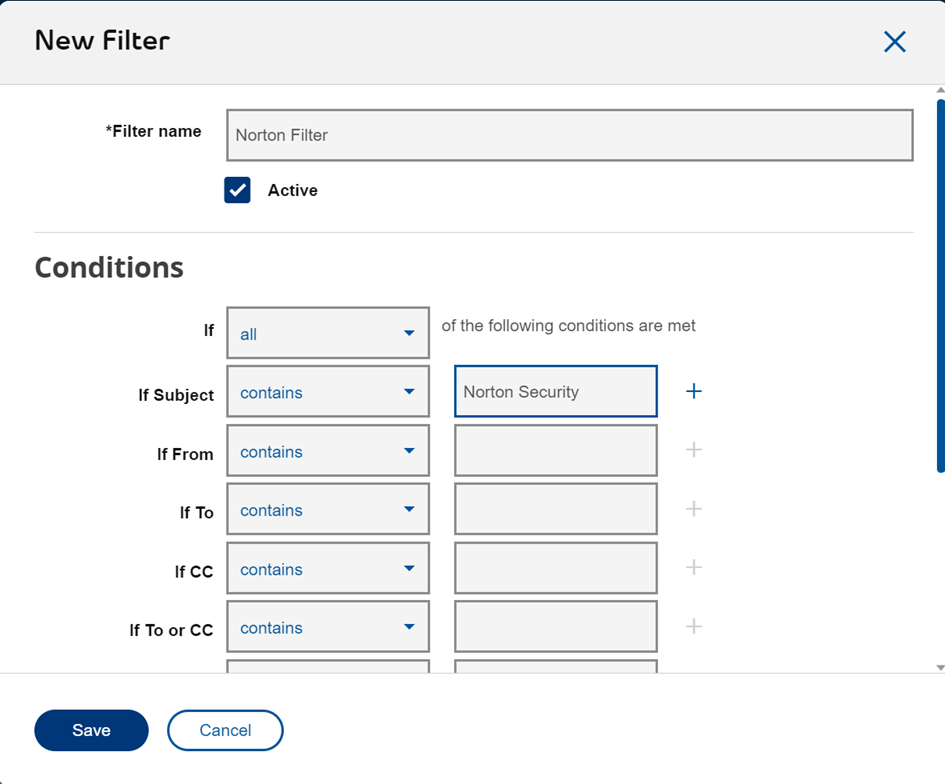
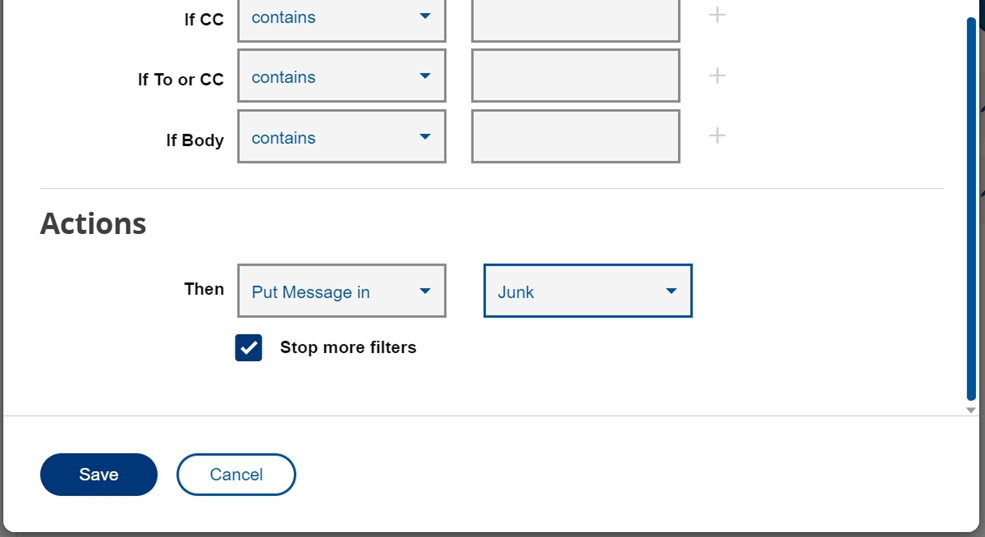
If you have any further questions, please do not hesitate to contact the Community.
Options
- Mark as New
- Bookmark
- Subscribe
- Mute
- Subscribe to RSS Feed
- Permalink
- Report Inappropriate Content
11-26-2023 08:21 AM
It would appear the measure you outlines has little impact; I suspect it's due to sophisticated internet criminal activity that sends out thousands of such emails hourly.
By reviewing the sender email address it appears they all originate from the Netherlands. If that is the case then perhaps there's a way Bell customers can block an entire country.

Getting started
New to our forum? These guides will help you find your way around quickly.
- Welcome to the Community!
- Log in/Register
- Community guidelines
- Community help
- Meet the Moderators
- Bell Community All-Stars
- How to send a private message
- Existing customers, login to MyBell to see exclusive offers
- What's on Crave
- What's on Free Preview
- Mobility phone & device catalog
- Latest in the Community




