- Community Home
- Internet
- Re: Upgraded to 8g but not getting 8g…
Options
- Subscribe to RSS Feed
- Mark Topic as New
- Mark Topic as Read
- Float this Topic for Current User
- Bookmark
- Subscribe
- Mute
- Printer Friendly Page

Options
- Mark as New
- Bookmark
- Subscribe
- Mute
- Subscribe to RSS Feed
- Permalink
- Report Inappropriate Content
09-13-2022 11:34 PM
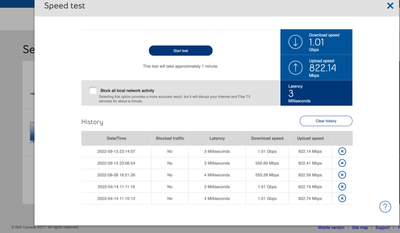
My 1 Gb download speed regularly goes down to 550 Mb, and seemed to be limited there until I restart my modem. It stays fine for a few days, but eventually seemingly goes back to the 550 Mb limits... restarting the modem re-established the download speed I am subscribed for... anyone else noticed this issue?
1
117
58.2K
1 helpful reply
Accepted Solutions

Options
- Mark as New
- Bookmark
- Subscribe
- Mute
- Subscribe to RSS Feed
- Permalink
- Report Inappropriate Content
03-27-2023 07:30 AM - last edited on 03-27-2023 09:48 AM by BellPatricia
Status update,
A big shout out to @BellPatricia for assisting me with my issue. She passed my concern to a colleague of hers and a fix was applied to my account. Not sure what the issue was or what fix was applied but I have steady 3GB up and down for the last three days. That,\'s a huge improvement from dropping out every 10 hours or so daily.
Hopefully this is the fix. I would like to know more about what the problem was if possible.
Anyhow, thanks again Patricia. Greatly appreciated.
Cheers
117 REPLIES 117


Options
- Mark as New
- Bookmark
- Subscribe
- Mute
- Subscribe to RSS Feed
- Permalink
- Report Inappropriate Content
09-14-2022 09:06 AM
Hi @DoubleP ,
My speeds have been consistent. You should to talk to Bell support about your download speed issue, but first I think you should run the Virtual Repair Tool: https://support.bell.ca/Troubleshooting_tools_and_Help/Internet . It could help diagnose any problems.
I am a Community All-Star and customer. I'm here to help by sharing my knowledge and experience. My views on Bell and the Community Forum are my own and not the views of Bell or any of its affiliates.
Options
- Mark as New
- Bookmark
- Subscribe
- Mute
- Subscribe to RSS Feed
- Permalink
- Report Inappropriate Content
09-17-2022 02:17 PM
Talking with a bell technician, over the chat, he initiated a firmware upgrade on the HH4000. It has been two days now, the speed is still 1Gb, as it should be. So far so good, hopefully the firmware update did the trick.
Options
- Mark as New
- Bookmark
- Subscribe
- Mute
- Subscribe to RSS Feed
- Permalink
- Report Inappropriate Content
09-17-2022 04:26 PM
Good to know there's a stable 1Gb. What firmware version are you on now? I'm still at 1.75, and an update is being pushed out.
I am a Community All-Star and customer. I'm here to help by sharing my knowledge and experience. My views on Bell and the Community Forum are my own and not the views of Bell or any of its affiliates.
Options
- Mark as New
- Bookmark
- Subscribe
- Mute
- Subscribe to RSS Feed
- Permalink
- Report Inappropriate Content
09-20-2022 06:28 AM
nope... today it unfortunately went down again to what seems a deliberate 550 Mbs limit cap...


Options
- Mark as New
- Bookmark
- Subscribe
- Mute
- Subscribe to RSS Feed
- Permalink
- Report Inappropriate Content
09-21-2022 03:11 PM
Great work and troubleshooting guys! This definitely seems odd.
@DoubleP we've sent you a private message so we can gather more information. Please check your Messages within your profile avatar in the top right corner.
Unsure how to check or send a private message? See How to send a private message
Options
- Mark as New
- Bookmark
- Subscribe
- Mute
- Subscribe to RSS Feed
- Permalink
- Report Inappropriate Content
12-31-2022 03:38 PM - last edited on 04-21-2026 08:52 AM by BellPatricia
This morning, a technician came over and re-routed my fiber to a different neighborhood connection, hoping this would help. The WAN devices in my sector are mostly Alcatel switches, so... no faulty Huawei. I doubt that the technician's action, despite his best efforts, will make a difference.
But I am still hopeful; Anyhow; talking with a Bell Network engineer, he applied a temporary fix to hopefully prevent my profile to be switched to a slower speed. Apparently, under certain conditions, some Juniper appliances switch clients to a erroneous speed profile.
Options
- Mark as New
- Bookmark
- Subscribe
- Mute
- Subscribe to RSS Feed
- Permalink
- Report Inappropriate Content
12-31-2022 04:19 PM
Hi @DoubleP
Fingers crossed that the temporary fix will hold!
Your comment was very interesting:
" Apparently, under certain conditions, some Juniper appliances switch clients to a erroneous speed profile."
I know that some people have an incorrect speed profile, especially when they've upgraded their service, but I didn't know it can sometimes be caused by a Juniper appliance.
Cheers,
ZaneP
I am a Community All-Star and customer. I'm here to help by sharing my knowledge and experience. My views on Bell and the Community Forum are my own and not the views of Bell or any of its affiliates.
Options
- Mark as New
- Bookmark
- Subscribe
- Mute
- Subscribe to RSS Feed
- Permalink
- Report Inappropriate Content
12-31-2022 04:34 PM
I am hoping this will work as well.
I had a hunch that it was a speed profile bug since the first moments I noticed the very precise and consistent download speed limit adjustments (550mbps on first modem and 190mbps for the replacement modem) because each time, my upload speed remained stable and un-changed (820mbps)...
I am not sure what conditions are creating this bug, not sure if it is related to clients consumption or external factors.
The Juniper appliances needing a fix is also news to me... Hoping our friends at Bell are able to find a more permanent fix sooner than later.
Technical support scripts should also be updated in order to avoid repeating the very long troubleshooting journey I had to undertake.
Options
- Mark as New
- Bookmark
- Subscribe
- Mute
- Subscribe to RSS Feed
- Permalink
- Report Inappropriate Content
01-22-2023 05:27 PM - last edited on 04-21-2026 08:51 AM by BellPatricia
Status update: since a Bell Network Engineer did a manual workaround to prevent my client profile to be switched to a lower speed, my Internet download speed has remained stable for nearly a month; a clear improvement since it was usually dropping after 2-3 days following a reboot.
Options
- Mark as New
- Bookmark
- Subscribe
- Mute
- Subscribe to RSS Feed
- Permalink
- Report Inappropriate Content
03-22-2023 10:58 AM
Hello,
While searching for anyone who was experiencing issues wih dropped speed I stumbled upon this thread.
I am currently subscribed to Bells 3gb up and down service. Modem is HH4000. I run advanced dmz and use the 10 gb link to attach to my pfsense server. Server and switches are all 10 gb fiber. System has worked flawlessly until about 10 days ago. My daughter asked me if I was doing anything to the server as connection was wonky according to her.
I jumped on my terminal and first thing I noticed was my ppoe ip had dropped to 76.xxx.xxx.x. I thought that weird as quite frankly It is always in the 178.xxx.xxx.x range. Performed speed tet from terminal and it was 192mbps down and 3175mbps up. repeated and approx. same. Went to modem and did speed test from there and it was the same. rebooted modem and it did not correct. Unplugged modem for 5 minutes and speed was back. I thought problem solved. 15 hours later speed drops out. Called tech support to explain problem. I will sum it up quickly instead of giving you the daily breakdown.
Speed on download drops off every day. Modem reboot fixes issue but several times received eror 2000 or 2001 which requires factory rest to connect. This includes new modem.
Summary,
first tech visit check light -19
Clean all connection ends. Inspect box in front of house. Clean connection points. Go to main box up street and inspect. Didn't like look of cable at termination point inside house. Redid end. Replace patch cord from termination point to modem. Light check -18. Reboot modem good to go. He stated after see modem tests that he had never seen anything like that and if it happened again to call in and hve it escalated.
Next day speed gone. Call into support and backend stated they could see something wrong and suspected issue at central server. After an hour tech says problem is at my end and they will send a tech . I asked how we went from problem at central server to my end and he said previos tech did not change to different pigtail on main box. tech came. witnessed speed on modem. He was stumped as well. Light reading -18. He went and switched pigtail and inspect my connections. reboot modem good to go. We already know that that fixes it. He stated the same thing He is limited to what he can do and it appears to be issue on backend. Call in to have it escalated if it happens again.
Next day failed. Called in and it was a disaster. Woman wouldn't escalate and did some programming and told me the problem wont come back. Spent next 2 hours dealing with factory resets trying to connect. Once going somehow my ppoe password was gone. Call back in and tech put it in and said for some reason it had beed disabled.
Monday night failed again. Called in and tech was great took it up the ladder and they couldn't find anything on the line to cause the issue. They could see the slow speed from the speed test off the modem but couldn't detect an issue. Said they were going to send a level 3 tech out on Tuesday.
Internet failed yesterday morning (download drop off) by 10am. Tech arrived by 11. Showed him speed test from modem. He didnt haave an answer for that. Went outside and checked light strength at box on side of house. -15.
Decided to run new patch cable from box into house. He did not terminate in patch box inside house. tested light. - 15. Plugged direct into modem. Modem would authorize. Reboot, modem gave error 2000. Reboot error 2000 and 2001. Factory rest and it connected or at least said it did but had no access outside. Speed test failed. Rebooted again and good to go. He said he didnt know what to do. Everything checks out and he can explain the speed drop on on leg only. Again, call in if it fails again.
Failed this morning when I checked. I don't know what to do or how to ramp this up.
I have made a couple of observations.
I have had to call in 3 times now to get my ppoe password functional in order for my pfsense box to authenticate wan.
Each time it drops Wan ip will change from 178.xxx.xxx.xx to 76.xxx.xxx.xx.
Don't know if any of those observations are relevant or not.
I did use the virtual repair tool. It advised it made some tweeks but detected a speed issue and call tech support.
If anyone can suggest who I can reach out to at bell or request escalation it would be appreciated.
As a side note, nothing in my firewall configuration has changed or been changed prior to this problem starting nor after.
Thanks in advance.
Options
- Mark as New
- Bookmark
- Subscribe
- Mute
- Subscribe to RSS Feed
- Permalink
- Report Inappropriate Content
03-23-2023 12:27 PM
Hi there @rob400, welcome to the Bell Community 🙂
Thank you for the details, and for all of the troubleshooting that you've done already. We want an opportunity to take a closer look, and have sent you a private message. Please check your Messages within your profile avatar in the top right corner.
Unsure how to check or send a private message? See How to send a private message
- Patricia
Options
- Mark as New
- Bookmark
- Subscribe
- Mute
- Subscribe to RSS Feed
- Permalink
- Report Inappropriate Content
03-27-2023 07:30 AM - last edited on 03-27-2023 09:48 AM by BellPatricia
Status update,
A big shout out to @BellPatricia for assisting me with my issue. She passed my concern to a colleague of hers and a fix was applied to my account. Not sure what the issue was or what fix was applied but I have steady 3GB up and down for the last three days. That,\'s a huge improvement from dropping out every 10 hours or so daily.
Hopefully this is the fix. I would like to know more about what the problem was if possible.
Anyhow, thanks again Patricia. Greatly appreciated.
Cheers

Options
- Mark as New
- Bookmark
- Subscribe
- Mute
- Subscribe to RSS Feed
- Permalink
- Report Inappropriate Content
08-30-2023 09:13 PM
To the user above, i had the exact same issue speed dropped to 1.72Gbps I fixed my problem by going into the giga hub and doing a factory reset. it will reset the modem to factory specs then will redownload all of the configurations from bell. it will take about 5min to complete. My internet has been rock stable ever since. I have found out that if you play with advanced dmz turn it on/off it sometimes causes this to happen. and a factory reset fixes it. please post back if it fixes it for you.

Options
- Mark as New
- Bookmark
- Subscribe
- Mute
- Subscribe to RSS Feed
- Permalink
- Report Inappropriate Content
10-20-2023 04:39 PM - edited 10-20-2023 04:40 PM
I have just reset my Gigahub to factory settings and re-entered my configuration. We'll see if the new firmware makes a difference. The speed and latency are good so far:
Date / Heure Trafic bloqué Latence Vitesse en aval Vitesse en amont
| 2023-10-20 16:36:45 | Oui | 2 Millisecondes | 3,25 Gbit/s | 3,24 Gbit/s | after factory reset |
I will report back if this fixes the problem.

Getting started
New to our forum? These guides will help you find your way around quickly.
- Welcome to the Community!
- Log in/Register
- Community guidelines
- Community help
- Meet the Moderators
- Bell Community All-Stars
- How to send a private message
- Existing customers, login to MyBell to see exclusive offers
- What's on Crave
- What's on Free Preview
- Mobility phone & device catalog
- Latest in the Community


