- Community Home
- Internet
- Re: How do I get the Internet speed that matches m...
Options
- Subscribe to RSS Feed
- Mark Topic as New
- Mark Topic as Read
- Float this Topic for Current User
- Bookmark
- Subscribe
- Mute
- Printer Friendly Page

Options
- Mark as New
- Bookmark
- Subscribe
- Mute
- Subscribe to RSS Feed
- Permalink
- Report Inappropriate Content
09-13-2022 11:34 PM
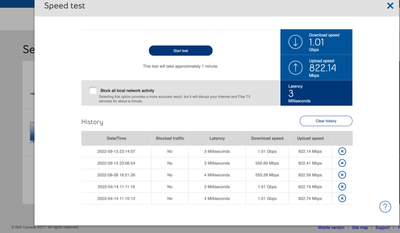
My 1 Gb download speed regularly goes down to 550 Mb, and seemed to be limited there until I restart my modem. It stays fine for a few days, but eventually seemingly goes back to the 550 Mb limits... restarting the modem re-established the download speed I am subscribed for... anyone else noticed this issue?
1
117
58.2K
117 REPLIES 117

Options
- Mark as New
- Bookmark
- Subscribe
- Mute
- Subscribe to RSS Feed
- Permalink
- Report Inappropriate Content
10-11-2024 07:38 PM
I thought I'd follow-up on my post for those who are interested.
A few days after, still noodling on the sudden speed drop, I called Bell Tech Support. Long story, short: first the Tech said my speed is not affected by the fact there are other Fibe users online (sorry @Vanadiel but that's a holdover from the cable days). Then he did numerous tests which verified I had the right serice profile and that I was 3Gbps into the modem, which should net me approx 2.5Gbps over my Cat5E/Cat6/Cat7 network (I was getting a constant 2.35 Gbps prior to whatever has happened). He could not explain why I was suddenly getting only 1.8Gbps post-modem. He ordered me a new modem and a Bell Service Tech arrived the next afternoon. After installation: no change. The Tech was flabbergasted. He said he'd had a lot of calls regarding speed and that the only thing he was able to do, was replace the modem and made sure it had the current firmware.
Which leads me to my new theory 😛 If I am getting 3Gbps in but only 1.8 Gbps out, maybe this is due to the last firmware update, a glitch?
In any case, I'm going to live with it for now but if Bell puts my rate up again in the next year (they did it 60 days into my initial service already!!), with this speed I'll be better off with someone else for a lower price.
C14


Options
- Mark as New
- Bookmark
- Subscribe
- Mute
- Subscribe to RSS Feed
- Permalink
- Report Inappropriate Content
10-11-2024 07:58 PM - edited 10-11-2024 08:01 PM
Well I disagree on the Tech stating speed is not affected by the fact there are other fibe users online.
Traffic Management Policy Bell
You would not have congestion if other fibe users truly do not affect your speed. I can almost guarantee what you are experiencing is congestion, because your profile speed test is providing you with the correct speed, yet your internet speed is not able to always reach that connection speed.
Most of the network facilities that make up the Internet are shared by many users at the same time. This is also true for the network facilities we use for our Internet Services. While we are constantly investing in our network in order to ensure a high-quality Internet service, significant increases in traffic demand may occasionally result in congestion on our shared networks.
We have designed our Internet quality management system to minimize the impact for most users during congestion periods. This system identifies types of Internet traffic that are more sensitive to congestion and delays and prioritizes that traffic when necessary. Internet traffic is identified and, if necessary, prioritized based on four groups:
"You may notice a decrease in download/upload speeds if you are using non-time-sensitive applications until the temporary network congestion has passed."
I am a Community All-Star and customer. I'm here to help by sharing my knowledge and experience. My views on Bell and the Community Forum are my own and not the views of Bell or any of its affiliates.
Options
- Mark as New
- Bookmark
- Subscribe
- Mute
- Subscribe to RSS Feed
- Permalink
- Report Inappropriate Content
10-11-2024 08:08 PM
I'm not sure - and I am not trying to offend you. Please take the conversation lightly. I respect your position.
But the hiccup in the congestion theory is simple: if it were true, hypothetically at 3am I should be getting higher speeds then, say, 6pm or 8pm. But I'm not. Instead I get the same (lower) speed *all the time.*
"Traffic demand may occasionally result in congestion" implies there will be highs and lows, so to speak. I simply have had a permanent and persistent drop of more than 500Mbps, each day every day, since August. So while what you've posted is possibly true, it's not explaining what I am describing, my experience.
Peace.
C14
Options
- Mark as New
- Bookmark
- Subscribe
- Mute
- Subscribe to RSS Feed
- Permalink
- Report Inappropriate Content
10-11-2024 08:34 PM
No offense taken. I have the same issue with my upstream only, never goes above 400 Mbps. It used to provide exactly 942 Mbps for the first year I had the service.
I tried everything, including removing my home hub completely and run directly from the GPON. Always limited to 400 Mbps. It has to be traffic management or a hardware problem on Bell's side. Cannot be the home hub in my scenario because it's sitting on the shelve...
I did hear through the grapevine that during Covid there was such a big explosion in internet traffic as everybody was stuck/working from home, that apparently they implemented some kind of compression technology to increase capacity of the existing network. The fact it only affects my upstream while my downstream is exactly 1500 Mbps leads me to believe the compression system could also be a culprit.
I have given up on the issue as I have ruled out everything on my end and have ruled out the home hub. I have no issue running 10/10 Gbps internally, so I know for sure I can reach the required upload speed.
I am a Community All-Star and customer. I'm here to help by sharing my knowledge and experience. My views on Bell and the Community Forum are my own and not the views of Bell or any of its affiliates.
Options
- Mark as New
- Bookmark
- Subscribe
- Mute
- Subscribe to RSS Feed
- Permalink
- Report Inappropriate Content
10-11-2024 08:42 PM
😉
"It has to be traffic management or a hardware problem on Bell's side"
I lean to "hardware" in this but I could stand firm with "on Bell's side"
The challenge to solving this problem is: the Techs and the wonderful Moderators, here, all treat the problem respectfully, urgently, but singularly. What if everyone's problem -- yours, mine, theirs -- is not singular but systemic?
Anyhow -- we'll see what happens.

Options
- Mark as New
- Bookmark
- Subscribe
- Mute
- Subscribe to RSS Feed
- Permalink
- Report Inappropriate Content
10-28-2024 05:11 PM - last edited on 10-29-2024 07:23 AM by BellAlexander
Hello
Speedtest on my modem shows 320 Mbps (10 times less than I expect to see)
I checked all settings, physical connections and rebooted the modem, but the modem test shows 320 Mbps consistently. I have 2.5Gb LAN in my home, the optical connection is stable and there are no breaks. and I expected to receive a service that corresponded to the tariff....
Could it be that Bell limits the speed on its equipment?

Options
- Mark as New
- Bookmark
- Subscribe
- Mute
- Subscribe to RSS Feed
- Permalink
- Report Inappropriate Content
10-28-2024 06:53 PM
Thank you for your question. Can you please run the virtual repair tool on the MyBell web page or in the MyBell app? It may give some idea if where the issue might lie.
I am a Community All-Star and customer. I'm here to help by sharing my knowledge and experience. My views on Bell and the Community Forum are my own and not the views of Bell or any of its affiliates.
Options
- Mark as New
- Bookmark
- Subscribe
- Mute
- Subscribe to RSS Feed
- Permalink
- Report Inappropriate Content
10-28-2024 09:09 PM
Thanks for the advice, but I've already completed this quest. Since this situation definitely does not depend on the time of day and therefore is not related to the load on the operator's network, and the optical connection is either there or not, and immediately with a given bandwidth, such is the essence of the technology.


Options
- Mark as New
- Bookmark
- Subscribe
- Mute
- Subscribe to RSS Feed
- Permalink
- Report Inappropriate Content
10-29-2024 11:51 AM
Hi @Aleksei
We'd like to take a closer look into this and have sent you a private message.
Please check your Messages within your profile avatar in the top right corner.
Unsure how to check or send a private message? See How to send a private message
Options
- Mark as New
- Bookmark
- Subscribe
- Mute
- Subscribe to RSS Feed
- Permalink
- Report Inappropriate Content
10-30-2024 02:03 PM - last edited on 04-21-2026 12:40 PM by BellPatricia
Thank you very much for your assistance in quickly resolving my problem!

Options
- Mark as New
- Bookmark
- Subscribe
- Mute
- Subscribe to RSS Feed
- Permalink
- Report Inappropriate Content
10-30-2024 05:21 PM
We have had ongoing connection issues since install. 3GB service, In mid September we spoke to a level 2 support and had an onsite and they seemed to have resolved the issue until about a week ago. We are back to the very unstable internet connection. Our ping goes over 9000ms and we are unable to connect or access, last time our download would be 700mb instead of the 3gb.
Options
- Mark as New
- Bookmark
- Subscribe
- Mute
- Subscribe to RSS Feed
- Permalink
- Report Inappropriate Content
10-30-2024 06:08 PM
Wired or wireless connection?
I am a Community All-Star and customer. I'm here to help by sharing my knowledge and experience. My views on Bell and the Community Forum are my own and not the views of Bell or any of its affiliates.
Options
- Mark as New
- Bookmark
- Subscribe
- Mute
- Subscribe to RSS Feed
- Permalink
- Report Inappropriate Content
10-30-2024 06:14 PM
It doesn't matter, right from the modem embedded web page. So the answer is either.
Options
- Mark as New
- Bookmark
- Subscribe
- Mute
- Subscribe to RSS Feed
- Permalink
- Report Inappropriate Content
10-30-2024 06:19 PM
There is currently a bug with the home hub where the embedded speed test might show incorrect speed measurements.
I am a Community All-Star and customer. I'm here to help by sharing my knowledge and experience. My views on Bell and the Community Forum are my own and not the views of Bell or any of its affiliates.
Options
- Mark as New
- Bookmark
- Subscribe
- Mute
- Subscribe to RSS Feed
- Permalink
- Report Inappropriate Content
10-30-2024 06:27 PM - edited 10-30-2024 06:28 PM
It isn't just the speed test, ping is 10000ms. device's struggle to connect or don't connect to any sites. speed test from a browser on a computer are slow or fail.

Getting started
New to our forum? These guides will help you find your way around quickly.
- Welcome to the Community!
- Log in/Register
- Community guidelines
- Community help
- Meet the Moderators
- Bell Community All-Stars
- How to send a private message
- Existing customers, login to MyBell to see exclusive offers
- What's on Crave
- What's on Free Preview
- Mobility phone & device catalog
- Latest in the Community


