- Community Home
- My account
- Re: Fibe TV-Modify channel option is unavailable s...
Options
- Subscribe to RSS Feed
- Mark Topic as New
- Mark Topic as Read
- Float this Topic for Current User
- Bookmark
- Subscribe
- Mute
- Printer Friendly Page

Options
- Mark as New
- Bookmark
- Subscribe
- Mute
- Subscribe to RSS Feed
- Permalink
- Report Inappropriate Content
11-02-2022 09:26 AM - last edited on 01-15-2024 11:11 AM by BellNick
1
24
41.2K
3 helpful replies
Accepted Solutions

Options
- Mark as New
- Bookmark
- Subscribe
- Mute
- Subscribe to RSS Feed
- Permalink
- Report Inappropriate Content
12-19-2022 02:36 PM - edited 12-19-2022 03:54 PM
Hey everyone, thank you for bringing this to our attention.
We've flagged this to the right team and they are investigating further. We will post an update once there is news to share.
- Patricia
Options
- Mark as New
- Bookmark
- Subscribe
- Mute
- Subscribe to RSS Feed
- Permalink
- Report Inappropriate Content
01-05-2024 10:04 AM - last edited on 01-08-2024 12:00 PM by BellNick
Hello everyone,
Thank you for sharing this information with the Bell community.
Our technical team is actively working to resolve this issue and we will update you as soon as new details become available.
In the meantime, if you're experiencing this issue and need help modifying your TV channels, please send a private message to myself (@BellPatricia) or @BellNick.
- Patricia


Options
- Mark as New
- Bookmark
- Subscribe
- Mute
- Subscribe to RSS Feed
- Permalink
- Report Inappropriate Content
08-20-2025 04:09 PM - edited 08-20-2025 04:09 PM
Good Day & Welcome to the Bell Community Forum.
@Helen1 I wish there was something more that I could do for you, but I cannot.
This is a known problem. The Bell technical team is working to resolve this issue and will update you as soon as any new details become available.
In the interim, if you're experiencing this issue and need help modifying your TV channels, please review this Helpful reply and send a private message to one of the moderators that is mentioned.
Unsure how to check or send a private message? See How to send a private message
Take care.
I am a Community All-Star and customer. I'm here to help by sharing my knowledge and experience. My views on Bell and the Community Forum are my own and not the views of Bell or any of its affiliates.
24 REPLIES 24

Options
- Mark as New
- Bookmark
- Subscribe
- Mute
- Subscribe to RSS Feed
- Permalink
- Report Inappropriate Content
11-04-2022 08:23 AM
Hi there @Milos
Thank you for your post and welcome to the Community.
We'd like to have this looked into and have sent you a private message.
Please check your Messages within your profile avatar in the top right corner.
Unsure how to check or send a private message? See How to send a private message

Options
- Mark as New
- Bookmark
- Subscribe
- Mute
- Subscribe to RSS Feed
- Permalink
- Report Inappropriate Content
12-14-2022 05:02 PM
Hi Patricia Do you have a solution for this problem? Mine was supposed to be escalated to a tech. Thanks

Options
- Mark as New
- Bookmark
- Subscribe
- Mute
- Subscribe to RSS Feed
- Permalink
- Report Inappropriate Content
12-19-2022 01:24 AM
Any update on this issue? It was escalated to the tech team last week but I still cannot modify my channels .
Options
- Mark as New
- Bookmark
- Subscribe
- Mute
- Subscribe to RSS Feed
- Permalink
- Report Inappropriate Content
12-19-2022 02:36 PM - edited 12-19-2022 03:54 PM
Hey everyone, thank you for bringing this to our attention.
We've flagged this to the right team and they are investigating further. We will post an update once there is news to share.
- Patricia

Options
- Mark as New
- Bookmark
- Subscribe
- Mute
- Subscribe to RSS Feed
- Permalink
- Report Inappropriate Content
01-07-2023 10:06 AM
When you get an error message when trying channel lineup, it says "contact us".
So try that. I've done it and have gotten the stock response, "known issue, not solution coming etc."
This means it gets escalated up the management chain.
If enough people complain about it (squeeky wheel gets the grease), maybe they'll move on this issue.
Options
- Mark as New
- Bookmark
- Subscribe
- Mute
- Subscribe to RSS Feed
- Permalink
- Report Inappropriate Content
01-09-2023 10:24 AM
Finally fixed this morning after a really bad survey following a phone call for a channel change. Someone took me seriously and understood that it wasn't a problem on my side but them.
Options
- Mark as New
- Bookmark
- Subscribe
- Mute
- Subscribe to RSS Feed
- Permalink
- Report Inappropriate Content
01-09-2023 07:59 PM
I contact them last week, they said someone will call me by january 7th....here i am still waiting and cant make any modifications. Is there any update?

Options
- Mark as New
- Bookmark
- Subscribe
- Mute
- Subscribe to RSS Feed
- Permalink
- Report Inappropriate Content
01-09-2023 09:17 PM
There was a “scheduled” maintenance today before 6 am. It probably sorted out some users’ issues.
Options
- Mark as New
- Bookmark
- Subscribe
- Mute
- Subscribe to RSS Feed
- Permalink
- Report Inappropriate Content
01-10-2023 08:32 AM
I am back with channels changing again now. We will see if it stays up.
Options
- Mark as New
- Bookmark
- Subscribe
- Mute
- Subscribe to RSS Feed
- Permalink
- Report Inappropriate Content
01-13-2023 07:45 PM
I can now see my channel lineup! Finally. I hope it continues to work.
I got bell fiber optic installed with a new modem today.
I had an issue with previous tenants new address showing up on a confirmation e-mail I received after
ordering a new service from my TV. My Tv service was not linked to my other two Bell services for some
reason. Maybe that caused a glitch in MyBell and installing a new modem and whatver else the tech did
caused the services to link together.
Keeping fingers crossed.
Got great customer service from Desta at Bell. Very professional.
Options
- Mark as New
- Bookmark
- Subscribe
- Mute
- Subscribe to RSS Feed
- Permalink
- Report Inappropriate Content
01-26-2023 11:29 AM
For all of you impacted by this problem I am happy to report that my issue has been resolved. I have struggled with the problem since moving to Bell back in October 2022, I submitted multiple tickets and worked with 1st level and second level support personnel only to be told it only affect some Bell customers and there is no forecast on the resolution of the issue.
I had been also struggling with a billing issue on my homophone so I reached out to Bell again and had them escalate to an escalation manager. The escalation manager informed me that there was an issue with my profile and she would look into it and get back to me. She contacted me 2 days later and let me know the billing issue was resolved and the fix to my profile had also resolved my inability to manage my channels via the Bell App and the MyBell portal.
Happy to report and confirm I can now update any channels listing. A huge thank you to Jennifer from Bell for taking this on and resolving all my issues! For those of you still struggling with this keep contacting them and have them escalate.

Options
- Mark as New
- Bookmark
- Subscribe
- Mute
- Subscribe to RSS Feed
- Permalink
- Report Inappropriate Content
02-05-2023 02:03 AM
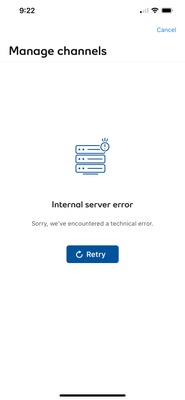
Hi Patricia, it’s still not working for me. I continue to get the same “Internal Server Error” message (screenshot below). I have been trying about once a week on the app, and on Chrome (laptop PC), same result. This has been ongoing since early Dec 2022.

Options
- Mark as New
- Bookmark
- Subscribe
- Mute
- Subscribe to RSS Feed
- Permalink
- Report Inappropriate Content
01-05-2024 10:04 AM - last edited on 01-08-2024 12:00 PM by BellNick
Hello everyone,
Thank you for sharing this information with the Bell community.
Our technical team is actively working to resolve this issue and we will update you as soon as new details become available.
In the meantime, if you're experiencing this issue and need help modifying your TV channels, please send a private message to myself (@BellPatricia) or @BellNick.
- Patricia

Options
- Mark as New
- Bookmark
- Subscribe
- Mute
- Subscribe to RSS Feed
- Permalink
- Report Inappropriate Content
01-09-2024 09:46 AM
Anyone else’s randomly start working? I checked today and it was good to go on the bell app. Finally

Getting started
New to our forum? These guides will help you find your way around quickly.
- Welcome to the Community!
- Log in/Register
- Community guidelines
- Community help
- Meet the Moderators
- Bell Community All-Stars
- How to send a private message
- Existing customers, login to MyBell to see exclusive offers
- What's on Crave
- What's on Free Preview
- Mobility phone & device catalog
- Latest in the Community


