- Community Home
- Internet
- Re: Is my 3Gbps Fibe being throttled?
Options
- Subscribe to RSS Feed
- Mark Topic as New
- Mark Topic as Read
- Float this Topic for Current User
- Bookmark
- Subscribe
- Mute
- Printer Friendly Page

Options
- Mark as New
- Bookmark
- Subscribe
- Mute
- Subscribe to RSS Feed
- Permalink
- Report Inappropriate Content
09-13-2022 11:34 PM
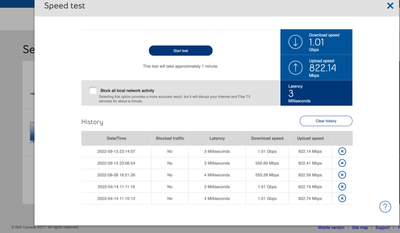
My 1 Gb download speed regularly goes down to 550 Mb, and seemed to be limited there until I restart my modem. It stays fine for a few days, but eventually seemingly goes back to the 550 Mb limits... restarting the modem re-established the download speed I am subscribed for... anyone else noticed this issue?
1
117
58K
117 REPLIES 117


Options
- Mark as New
- Bookmark
- Subscribe
- Mute
- Subscribe to RSS Feed
- Permalink
- Report Inappropriate Content
02-26-2024 03:10 PM
If you live near a dense populated area it's possible others have added WiFi points, and they might affect your WiFi signal strength a bit.
Just something else to look at.
I am a Community All-Star and customer. I'm here to help by sharing my knowledge and experience. My views on Bell and the Community Forum are my own and not the views of Bell or any of its affiliates.

Options
- Mark as New
- Bookmark
- Subscribe
- Mute
- Subscribe to RSS Feed
- Permalink
- Report Inappropriate Content
03-04-2024 02:43 PM
I have since checked - the ethernet works connected to the modem for acceptable speeds. I moved the Gigahub closer to the door of the room next to the one my laptop is in, and while the speeds are closer to 700mb downloading, it's still not hitting 1gb.
As a reminder, my homehub -was- reaching 1gb speeds when it was my modem, so I'm not sure why on my 3gb plan, this new Gigahub isn't hitting that speed even at a closer range? Considering downgrading my plan at this point, I can't really keep going back and forth with phone and community support for something that seems like it should work fine from the start.

Options
- Mark as New
- Bookmark
- Subscribe
- Mute
- Subscribe to RSS Feed
- Permalink
- Report Inappropriate Content
03-06-2024 03:29 PM
Hi there @surgeonkerosene
Are you able to share what speeds you are receiving through ethernet connection and which ethernet port on the modem you are using (LAN 1, 2.. or the 10GB port)?
Are you able to share which modem you had prior to the Gigahub?
Looking forward to hearing back.

Options
- Mark as New
- Bookmark
- Subscribe
- Mute
- Subscribe to RSS Feed
- Permalink
- Report Inappropriate Content
03-08-2024 06:49 AM
Hi there; I am a new user and a new Bell Fibe Internet customer in Toronto and I am experiencing a similar issue.
I have the 3GB service available and subscribed to this. They gave me a Giga Hub 4000 and I was getting the subscribed speeds (3gb down, 3gb up) for the first week or so, and was very happy with the service.
Then I checked about a week ago and the download speed seems to have been throttled at 1.7gb. The upload speed remained at 3gb which is odd, so it's not a cable problem, I think.
I power cycled the modem, and after a couple of tries - 30 seconds off - the download speed came back for a couple of days. now its back down to 1.7gb. Again the upload speed was constant at 3gb. See the last 4 tests below.

Am I going to have to reset the modem constantly to get the subscribed speed or is there a permanent fix for this? What is causing this drop in download speed?
I am more than a little annoyed at this problem. Thanks in advance for your help.
Options
- Mark as New
- Bookmark
- Subscribe
- Mute
- Subscribe to RSS Feed
- Permalink
- Report Inappropriate Content
03-08-2024 11:28 AM
Hi there @Wocky123
Thank you for your post and welcome to the Community.
We'd like to take a closer look into this and have sent you a private message.
Please check your Messages within your profile avatar in the top right corner.
Unsure how to check or send a private message? See How to send a private message
Options
- Mark as New
- Bookmark
- Subscribe
- Mute
- Subscribe to RSS Feed
- Permalink
- Report Inappropriate Content
03-08-2024 06:57 PM - edited 03-08-2024 06:59 PM
Thank you for your reply. I have sent you a PM hopefully you get it as I am learning how to navigate this forum.
I used the self repair tool this morning and it reset my modem, and once again my download speed was restored to what it should be:

I will keep monitoring this and call tech support if it continues. In the mean time if you or anyone knows what is causing this, please let me know!!
I am doing nothing special with my modem and did not change any settings. I am using the WIFI function and 2 pods for my house. I have a few connected LAN lines using a 2.5gb switch fed by the 10gb modem port.
Getting great service overall but would like to fix this issue. Thanks
Options
- Mark as New
- Bookmark
- Subscribe
- Mute
- Subscribe to RSS Feed
- Permalink
- Report Inappropriate Content
03-16-2024 11:47 AM
Hi @BellNick
I am actually not able to connect to ethernet as my macbook does not have an ethernet port.
Before Gigahub I had a Home Hub 4000.
Current speeds are sitting worse than before, in the same room directly in front of the modem with my macbook.

Wi-Fi checkup tool returned this:

Honestly, I can't be on this forum every day looking for answers. Can you send a tech, or explain what I'm paying for if it's only 3gb to modem and not wifi within my apartment? It makes no sense to me and at this point I shouldn't be paying for it, it's ridiculous and it's making me want to switch to another provider.
Options
- Mark as New
- Bookmark
- Subscribe
- Mute
- Subscribe to RSS Feed
- Permalink
- Report Inappropriate Content
03-16-2024 05:23 PM - last edited on 04-21-2026 10:45 AM by BellPatricia
3 Gbps over Wifi is impossible. I am not aware of any consumer WiFi protocol that enables 3 Gbps over a WiFi connection regardless of internet provider.
You can see some actual real world speed tests using WiFi6e here. 1.5 is about the maximum if it's the only Wifi device and 5 feet away from the access point. At 75 feet it drops below 1 Gbps.
I am a Community All-Star and customer. I'm here to help by sharing my knowledge and experience. My views on Bell and the Community Forum are my own and not the views of Bell or any of its affiliates.
Options
- Mark as New
- Bookmark
- Subscribe
- Mute
- Subscribe to RSS Feed
- Permalink
- Report Inappropriate Content
03-19-2024 02:22 PM
Hi there @surgeonkerosene
There are a couple of other options we would recommend. First, we would recommend using the Bell speed testavailable through our site. Second, we would recommend checking to see if there any are updates available for your device. Additionally you can also try splitting your SSID's to connect to a different band. Unsure how to do this? Please check out our support thread Splitting SSID for IOT device configurationfor further information.

Options
- Mark as New
- Bookmark
- Subscribe
- Mute
- Subscribe to RSS Feed
- Permalink
- Report Inappropriate Content
09-30-2024 02:41 PM
I've had 3Gbps Fibe internet since July 2023.
I have a Cat5e ethernet network so I've been receiving consistent and reliable symmetrical 2.3Gbps D/L and 2.3 Gbps U/L (1ms ping, 0ms jitter) since day one (which is what I should expect with my configuration).
However, I noticed recently that my D/L speed is now 1.8Gbps, while upload remains the same. I've swapped out cables and even directly connected to the 10Gbps port, with no change.
HH4000 (Giga Hub Firmware v. 2.3) speed check reports 3Gbps symmetrical but all other measurement tools report the same downgraded D/L.
Am I being throttled or is their a defect with my Giga Hub?
Thanks, in advance.
Carbon14
Options
- Mark as New
- Bookmark
- Subscribe
- Mute
- Subscribe to RSS Feed
- Permalink
- Report Inappropriate Content
09-30-2024 05:58 PM
If the speed test directly from the modem shows your profile speed (3/3) then it's not a connection issue.
That leaves only a few possibilities:
- Speed test site congestion.
- Device is unable to reach projected speed.
- Network is congested.
I am a Community All-Star and customer. I'm here to help by sharing my knowledge and experience. My views on Bell and the Community Forum are my own and not the views of Bell or any of its affiliates.
Options
- Mark as New
- Bookmark
- Subscribe
- Mute
- Subscribe to RSS Feed
- Permalink
- Report Inappropriate Content
09-30-2024 06:38 PM - edited 09-30-2024 06:39 PM
Hi @Vanadiel - thank you for your response. While I'd tend to agree with your hypotheses in isolation, they don't quite jibe with my experience. And please, take my response as an attempt to resolve my issue, and not simply arguing 😄
I appreciate you are trying to help me.
1. Speed site congestion - if this is the case then all the speed sites are congested. Until 2 months ago, I achieved the expected speed for more than a year. 2 months of congestion seems unlikely.
2. Device is unable to reach the speed - the device (MacBook Pro) achieved the speeds for just over a year, regularly, relentlessly, flawlessly.
3. Network congestion - if you mean internal network, that's not possible. If you mean external, again, that means these sites have been overloaded for months, which does not seem likely.
I am not convicted that the modem reporting its internal optical results as 3/3 is necessarily what it is allowing out through the ethernet port. That's something I'd love to know.
More-so: what I'd really LOVE is for a Bell technician to review my account/access and verify I am not inadvertently under any throttling policy/profile. It just doesn't make sense to lose +300Mbps speed for no reason.
Sincerely,
C14
Options
- Mark as New
- Bookmark
- Subscribe
- Mute
- Subscribe to RSS Feed
- Permalink
- Report Inappropriate Content
09-30-2024 07:26 PM
With network congestion, I was referring to internet congestion locally. In the end each customer line get's put together with x amount of traffic from other customer lines, as nobody has their own private connection to the internet.
There used to be a lot of discussion about this back in the day with the DSL versus cable internet arguments, where the argument was that DSL is individual to each customer and cable was shared with multiple other customers in the area so therefore DSL was better as it was not shared. Practically the DSL channels would be bundled at some point anyways, so in the end it's really the same locally.
I have the same thing happening to me. I used to get a perfect 944 Mbps upstream for the first 6 months or so. For the past few years I am lucky if I can get 400 Mbps upstream. I have tried everything, including completely removing the home hub from the equation and use the fibre line directly into my own equipment using the Bell supplied GPON module for the actual fibre connection.
Guess what: still limited to 400 Mbps.
So my conclusion is that there's not enough bandwidth available in my area for the upstream channels and therefore it's now 400 Mbps. I don't see any other explanation for it as I removed everything from the equation that can be removed.
So I am thinking you are in a similar boat, as your speed test from within the modem shows correct profile speed. Mine does the same btw, modem speed test is a perfect 1.5/1. Practically it reaches 1.5/0.4 though, and trust me I tried everything.
Bell does not throttle connections btw, so once you rule out everything else it's "network congestion". They do prioritize certain network traffic once congestion is reached: Internet traffic Management Practices.
I am a Community All-Star and customer. I'm here to help by sharing my knowledge and experience. My views on Bell and the Community Forum are my own and not the views of Bell or any of its affiliates.
Options
- Mark as New
- Bookmark
- Subscribe
- Mute
- Subscribe to RSS Feed
- Permalink
- Report Inappropriate Content
09-30-2024 07:50 PM
Man!
"my conclusion is that there's not enough bandwidth available in my area"
This might be it ... !
<I'll pursue. BELL tech: please check>
Options
- Mark as New
- Bookmark
- Subscribe
- Mute
- Subscribe to RSS Feed
- Permalink
- Report Inappropriate Content
10-01-2024 11:06 AM
After sleeping on this, @Vanadiel I think you are most likely right. There's been a big sales push in the neighbourhood in the last year and your explanation is most plausible. I got the idea of throttling from the Fibe 1.5 ads, which show asynchronous transmission; I supposed that might be the explanation for my situation. But I think your conclusion is correct. Thanks for taking the time to help.
C14

Getting started
New to our forum? These guides will help you find your way around quickly.
- Welcome to the Community!
- Log in/Register
- Community guidelines
- Community help
- Meet the Moderators
- Bell Community All-Stars
- How to send a private message
- Existing customers, login to MyBell to see exclusive offers
- What's on Crave
- What's on Free Preview
- Mobility phone & device catalog
- Latest in the Community


