- Community Home
- Internet
- Download speed drops
Options
- Subscribe to RSS Feed
- Mark Topic as New
- Mark Topic as Read
- Float this Topic for Current User
- Bookmark
- Subscribe
- Mute
- Printer Friendly Page

Options
- Mark as New
- Bookmark
- Subscribe
- Mute
- Subscribe to RSS Feed
- Permalink
- Report Inappropriate Content
09-13-2022 11:34 PM
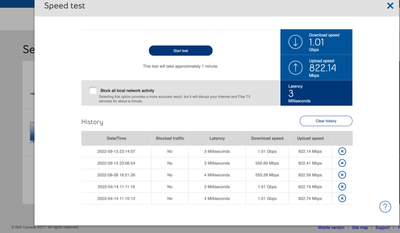
My 1 Gb download speed regularly goes down to 550 Mb, and seemed to be limited there until I restart my modem. It stays fine for a few days, but eventually seemingly goes back to the 550 Mb limits... restarting the modem re-established the download speed I am subscribed for... anyone else noticed this issue?
1
117
58.2K
117 REPLIES 117

Options
- Mark as New
- Bookmark
- Subscribe
- Mute
- Subscribe to RSS Feed
- Permalink
- Report Inappropriate Content
06-03-2025 02:51 PM
Hi Bell mods, I'm using this thread for the exact same issues as everyone here.
I just subscribed to Fiber 3 gbps with Bell. Everything went smooth during the installation. However, I am only getting 330 mbps when testing the internet speed test in the Modem dashboard page, in my computer (gigabit lan), my macbook air through an usb-c dock, and through wi-fi on various devices. All the aforementioned devices show a download speed limited to 330 mbps for both download and upload speeds.
I am using no third-party equipment, no VPN connections. I'd appreciate if someone could help me, thanks!

Options
- Mark as New
- Bookmark
- Subscribe
- Mute
- Subscribe to RSS Feed
- Permalink
- Report Inappropriate Content
06-03-2025 03:38 PM
Thank you for your concern. Have you run the Virtual Repair Tool? What were the results?
I am a Community All-Star and customer. I'm here to help by sharing my knowledge and experience. My views on Bell and the Community Forum are my own and not the views of Bell or any of its affiliates.
Options
- Mark as New
- Bookmark
- Subscribe
- Mute
- Subscribe to RSS Feed
- Permalink
- Report Inappropriate Content
06-03-2025 04:16 PM - edited 06-03-2025 04:49 PM
Hey thanks for sharing this tool. However, it ended up saying "Looks like you need more help".
The modem reboot also solved nothing, I am still facing the same issue. Weirdly, almost every single internet speed test on the modem shows 329 mbps down and 337 mbps up. There seems to be a weird hard limit on the internet speed.
I forgot to note, but every single ethernet port gives the same result and with multiple different ethernet cables.
Update : the issue was resolved through a chat with tech support. It seems like the modem needed a software update which is unavailable to us users (this is kinda problematic imo). So if anyone else sees the same problem, try the Virtual Repair Tool first, then start a chat with an agent to resolve the software issue.
Options
- Mark as New
- Bookmark
- Subscribe
- Mute
- Subscribe to RSS Feed
- Permalink
- Report Inappropriate Content
06-04-2025 05:52 AM
Thank you for your reply. You did exactly the right thing in speaking to Tech Support after finding an issue through the Virtual Repair Tool. I'm glad you found a resolution to your issue.
I am a Community All-Star and customer. I'm here to help by sharing my knowledge and experience. My views on Bell and the Community Forum are my own and not the views of Bell or any of its affiliates.

Options
- Mark as New
- Bookmark
- Subscribe
- Mute
- Subscribe to RSS Feed
- Permalink
- Report Inappropriate Content
08-25-2025 01:54 AM
Hello,
We signed up for 3Gb and we are consistently getting speeds under 500Mb for download and even lower for upload.
Please help, thanks!

Options
- Mark as New
- Bookmark
- Subscribe
- Mute
- Subscribe to RSS Feed
- Permalink
- Report Inappropriate Content
08-25-2025 05:07 AM
Good Day & Welcome to the Bell Community Forum.
You mentioned that you are consistently getting speeds under 500Mb for download and even lower for upload. Please explain. Do you have a Giga Hub modem?
As a starting point, could you run a Speed Test and let us know what the results of this were?
To accurately measure your overall Gigabit Fibe 3.0 Gbps speed, you can do so by logging in to your modem and select Speed Test. This will measure the maximum upload & download speed to your Bell Giga Hub. To do so follow these instructions: Speed Test instructions. or open up any browser & login directly to your Bell Home Hub 4000/Giga Hub modem: 192.168.2.1/?c=dashboard
Have you tried to run the virtual repair tool? Bell Virtual Repair Tool It detects and fixes most issues with Fibe Internet. It will check if the Bell hardware and network outside your home are working, as well as reboot and optimize the settings of the equipment inside your home. If a technician visit is required, the tool will help you book a repair appointment.
Depending on the results of this test, you may need to contact Bell Internet Tech support.
- Have you tried to do any troubleshooting? Internet: troubleshooting tools, virtual repair tool and support
- Are you using a hard wired or wireless connection from your modem to a laptop or a computer?
- Have you run the Wi-Fi check-up tool? Internet and Wi-Fi: optimizing device speeds
- Have you power cycled your modem off recently?
- Have you discussed your speed issue with Bell Internet Tech Support?
If none of the above seems to resolve your problem, please call Bell at: 1 866 310-BELL (2355)
Let us know.
Take care.
I am a Community All-Star and customer. I'm here to help by sharing my knowledge and experience. My views on Bell and the Community Forum are my own and not the views of Bell or any of its affiliates.

Options
- Mark as New
- Bookmark
- Subscribe
- Mute
- Subscribe to RSS Feed
- Permalink
- Report Inappropriate Content
02-01-2026 11:09 AM - last edited on 02-01-2026 11:37 AM by BellKris
Last week I upgraded to the 1GB service and installed the Giga Hub.
Right away I saw that my download speed was capped at 550mbs. I've spoken to two first line techs already but they can't see the problem. Their only solution is to send me new modems.
I've told them that there are discussions about this in the forum and to escalate the issue but that doesn't seem to be a priority for them. Hopefully someone familiar with the problem will see this.

Options
- Mark as New
- Bookmark
- Subscribe
- Mute
- Subscribe to RSS Feed
- Permalink
- Report Inappropriate Content
02-01-2026 11:55 AM
Perform a speed test from within the modem menu: Speed Test
Post results from that test here.
I am a Community All-Star and customer. I'm here to help by sharing my knowledge and experience. My views on Bell and the Community Forum are my own and not the views of Bell or any of its affiliates.
Options
- Mark as New
- Bookmark
- Subscribe
- Mute
- Subscribe to RSS Feed
- Permalink
- Report Inappropriate Content
02-01-2026 12:06 PM
| 2026-02-01 10:46:10 | No | 1 Milliseconds | 550.00 Mbps | 813.00 Mbps | |
| 2026-01-31 14:05:01 | No | 1 Milliseconds | 537.00 Mbps | 813.00 Mbps | |
| 2026-01-31 13:35:42 | No | 1 Milliseconds | 550.00 Mbps | 1.02 Gbps |

Options
- Mark as New
- Bookmark
- Subscribe
- Mute
- Subscribe to RSS Feed
- Permalink
- Report Inappropriate Content
02-02-2026 10:04 AM
Hi @rpi
Thank you for your post and welcome to the Community.
We'd like to take a closer look into this and have sent you a private message.
Please check your Messages within your profile avatar in the top right corner.
Unsure how to check or send a private message? See How to send a private message

Options
- Mark as New
- Bookmark
- Subscribe
- Mute
- Subscribe to RSS Feed
- Permalink
- Report Inappropriate Content
03-13-2026 01:31 PM - last edited on 03-13-2026 01:37 PM by BellPatricia
Is anyone else having this issue?
I recently upgraded to the 8 Gbps plan last week Thursday. Had 8Gbps for 2 days then Saturday was getting 3.4 Gbps until Monday. Went through Virtual Repair and even started with a Giga Hub 2 reboot before that which the Virtual Repair tool did 3/4 times after.
Contacted support that Saturday. Apparently my profile was only temporarily on 8Gbps and now it was switched to perm. Change was supposed to take about 2 hrs but that did not work.
Called back after 2 hrs, was told by the agent that my Gig Hub 2 (which just came out over the summer and which I had since Sept) was defective. Apparently a new one was being sent...it never arrived (supposed to be 2 days) but either way, speedtest.net was giving 8130Mbps down (uploads were never lower than 7600Mbps) by Monday.
Now it's Friday and the same issue...3.41Gbps down again.
Want to know if anyone else is going through this as well. With the download speed not the circus with support.
Options
- Mark as New
- Bookmark
- Subscribe
- Mute
- Subscribe to RSS Feed
- Permalink
- Report Inappropriate Content
03-15-2026 01:58 PM - edited 03-15-2026 02:01 PM

And just like that, after 2 days it's back. I'm going to predict this will happen this Thursday...
Options
- Mark as New
- Bookmark
- Subscribe
- Mute
- Subscribe to RSS Feed
- Permalink
- Report Inappropriate Content
03-16-2026 09:57 AM - last edited on 03-18-2026 07:14 AM by BellAlexander
Hi @davidfreeborn
Thank you for your post and welcome to the Community.
We'd like to take a closer look into this and have sent you a private message.
Please check your Messages within your profile avatar in the top right corner.
Unsure how to check or send a private message? See How to send a private message
Options
- Mark as New
- Bookmark
- Subscribe
- Mute
- Subscribe to RSS Feed
- Permalink
- Report Inappropriate Content
04-02-2026 04:12 PM - last edited on 04-02-2026 05:00 PM by BellNick
It would appear that this is not resolved...


Options
- Mark as New
- Bookmark
- Subscribe
- Mute
- Subscribe to RSS Feed
- Permalink
- Report Inappropriate Content
04-12-2026 07:45 AM
It's not. I was told the they're looking into it but it's been a long time in my opinion. I get 8Gb synchronous for 2 days (actually it's 8 down/7.8 up) then 3Gb down and 7.8up for 3/4 days. I switched about a month ago from a stable 3Gb and lifetime $70 off but if I choose to go up/down I loose it...I am really regretting now and not happy. Btw, I just checked and 3rd day in a row I get 8Gb up/down sooo...we'll see I guess?

Getting started
New to our forum? These guides will help you find your way around quickly.
- Welcome to the Community!
- Log in/Register
- Community guidelines
- Community help
- Meet the Moderators
- Bell Community All-Stars
- How to send a private message
- Existing customers, login to MyBell to see exclusive offers
- What's on Crave
- What's on Free Preview
- Mobility phone & device catalog
- Latest in the Community


