- Community Home
- My account
- Re: Channel Line up
Options
- Subscribe to RSS Feed
- Mark Topic as New
- Mark Topic as Read
- Float this Topic for Current User
- Bookmark
- Subscribe
- Mute
- Printer Friendly Page

Options
- Mark as New
- Bookmark
- Subscribe
- Mute
- Subscribe to RSS Feed
- Permalink
- Report Inappropriate Content
11-02-2022 09:26 AM - last edited on 01-15-2024 11:11 AM by BellNick
1
24
41.2K
24 REPLIES 24

Options
- Mark as New
- Bookmark
- Subscribe
- Mute
- Subscribe to RSS Feed
- Permalink
- Report Inappropriate Content
04-26-2024 11:00 AM - last edited on 04-26-2024 11:33 AM by BellPatricia
Why can't I update my channels online?


Options
- Mark as New
- Bookmark
- Subscribe
- Mute
- Subscribe to RSS Feed
- Permalink
- Report Inappropriate Content
04-26-2024 11:47 AM
Good day & Welcome to the Bell Community Forum.
Let us start from the beginning & I will do my best to help you.
- Which Bell TV Service do you subscribe to? Fibe TV, Fibe App or Bell Satellite?
- Which plan do you subscribe to? Good, better, Best, or Starter?
- If you have a Bell modem, could you provide me the model number?
- How are you accessing your subscription? Fibe HD PVR, receivers, Fibe TV box , streamer, computer, Fibe TV App, etc.
- Have you tried logging in to MyBell with your web browser & selecting your TV service? You should be able to select > Modify TV channels.
- Have you contacted Bell Customer Service to discuss this problem?
Contact Bell | Bell Mobility, Internet, TV and Home phone | Bell Canada
There are many other reasons for not being able to be access & update your online channels. Can you assist me in providing some further specifics?
Let us know & we will work with you.
Take care.
I am a Community All-Star and customer. I'm here to help by sharing my knowledge and experience. My views on Bell and the Community Forum are my own and not the views of Bell or any of its affiliates.

Options
- Mark as New
- Bookmark
- Subscribe
- Mute
- Subscribe to RSS Feed
- Permalink
- Report Inappropriate Content
09-12-2024 04:08 PM - last edited on 08-21-2025 01:20 PM by BellPatricia
I have great news to report: the problem has been solved and corrected. I was contacted by Geoff who is with a higher level of client support within the Bell customer service office, and he escalated the issue and had it corrected and resolved. From what I understand it is some kind of billing/programming hiccup that can happen when clients upgrade their Internet service to fiber-to-the-home. I have tried 2 example program changes on my own: I first added a new channel directly by selecting add program on my TV screen, and then I deleted the change using the Bell mobile app. Both features worked as I expected.
I do hope Bell can find an easier solution/fix than having to escalate this issue up the chain of command. It would save a lot of time and frustration on behalf of the customer.
By thanks again to everyone in the Forum and to Geoff with Bell. I've returned to a happy customer.
marcco

Options
- Mark as New
- Bookmark
- Subscribe
- Mute
- Subscribe to RSS Feed
- Permalink
- Report Inappropriate Content
01-06-2025 11:28 AM - last edited on 01-06-2025 11:58 AM by BellNick
How do I modify the my channel line up? Now before you say through the app or online it DOES NOT WORK, i have called Bell and told them that I can not see my channel line up or modify my channel line up either through the app - where I get a message that say "Internal server error - sorry we encountered a technical error" and online I get a message stating that states - The information you're looking for is currently unavailable online - Please contact us to get help from a customer service rep". Now this issue has been going on since October/ November 2024. So I contact Bell tech support and they could not help me.
I am frustrated that I can not see the channels I have in my package - Good - package and the a la carte channels. I am pretty sure I am paying for extra channels that I no longer want with all the channel changes that Bell is doing.
Any suggestions would be greatly appreciated. Is Rogers the way to go now? Since Bell no longer has the Food Network or HGTV?

Options
- Mark as New
- Bookmark
- Subscribe
- Mute
- Subscribe to RSS Feed
- Permalink
- Report Inappropriate Content
01-06-2025 11:50 AM
Did you try logging with a computer, you mentioned an app, if so, try chrome sometimes edge is finicky, you should be able to change packages then or change your Alacarte channels
Options
- Mark as New
- Bookmark
- Subscribe
- Mute
- Subscribe to RSS Feed
- Permalink
- Report Inappropriate Content
01-06-2025 12:05 PM
Hi Nash - yes I have tried different browsers - thank you for your suggestion.

Options
- Mark as New
- Bookmark
- Subscribe
- Mute
- Subscribe to RSS Feed
- Permalink
- Report Inappropriate Content
08-20-2025 12:37 PM - last edited on 08-20-2025 12:44 PM by BellPatricia
I cannot change or modify TV programming on MyBell. It says service not available and it’s been like that for over 2 years and no one seems to know why.
Options
- Mark as New
- Bookmark
- Subscribe
- Mute
- Subscribe to RSS Feed
- Permalink
- Report Inappropriate Content
08-20-2025 04:09 PM - edited 08-20-2025 04:09 PM
Good Day & Welcome to the Bell Community Forum.
@Helen1 I wish there was something more that I could do for you, but I cannot.
This is a known problem. The Bell technical team is working to resolve this issue and will update you as soon as any new details become available.
In the interim, if you're experiencing this issue and need help modifying your TV channels, please review this Helpful reply and send a private message to one of the moderators that is mentioned.
Unsure how to check or send a private message? See How to send a private message
Take care.
I am a Community All-Star and customer. I'm here to help by sharing my knowledge and experience. My views on Bell and the Community Forum are my own and not the views of Bell or any of its affiliates.

Options
- Mark as New
- Bookmark
- Subscribe
- Mute
- Subscribe to RSS Feed
- Permalink
- Report Inappropriate Content
05-28-2026 09:01 AM - last edited on 05-28-2026 09:22 AM by BellNick
Good morning.
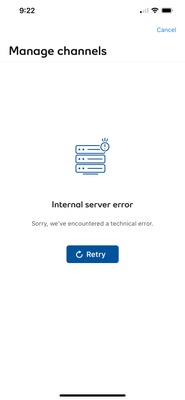
Last week, we ordered a Fibe TV and Internet package that includes the Pick 10 service. We received a message on the MyBell app that our TV service is activated and that we should be able to modify our channels. Unfortunately, we keep encountering an ‘Internal server error’ after we reach the Manage Channels screen. Screenshot below:
We also tried going through our account on the website to modify our channels there, but kept getting the message that the order is (still) processing and to wait up to 72 hours, etc. and the Modify TV channels button greyed out.

After these unsuccessful attempts, we contacted Bell via chat and by phone. During a call yesterday, the rep said that the internal server problem was on their end and that it should be resolved within 24 hours.
We really want to modify our channels, considering we have already prepaid for the Pick 10 service. If anyone out there has any constructive solutions, please post them in the replies.
Thanks in advance!

Options
- Mark as New
- Bookmark
- Subscribe
- Mute
- Subscribe to RSS Feed
- Permalink
- Report Inappropriate Content
05-28-2026 05:32 PM
Hi @Maple2go
Thank you for your post and welcome to the Community.
It is possible that if your service has been recently installed, it may take a couple days for any back-end orders to complete which may cause this error. Should you require assistance with changing your channels, I've sent you a private message.
Please check your Messages within your profile avatar in the top right corner.
Unsure how to check or send a private message? See How to send a private message

- « Previous
-
- 1
- 2
- Next »
Getting started
New to our forum? These guides will help you find your way around quickly.
- Welcome to the Community!
- Log in/Register
- Community guidelines
- Community help
- Meet the Moderators
- Bell Community All-Stars
- How to send a private message
- Existing customers, login to MyBell to see exclusive offers
- What's on Crave
- What's on Free Preview
- Mobility phone & device catalog
- Latest in the Community


