- Community Home
- Internet
- Re: Download speed drops
Options
- Subscribe to RSS Feed
- Mark Topic as New
- Mark Topic as Read
- Float this Topic for Current User
- Bookmark
- Subscribe
- Mute
- Printer Friendly Page

Options
- Mark as New
- Bookmark
- Subscribe
- Mute
- Subscribe to RSS Feed
- Permalink
- Report Inappropriate Content
09-13-2022 11:34 PM
My 1 Gb download speed regularly goes down to 550 Mb, and seemed to be limited there until I restart my modem. It stays fine for a few days, but eventually seemingly goes back to the 550 Mb limits... restarting the modem re-established the download speed I am subscribed for... anyone else noticed this issue?
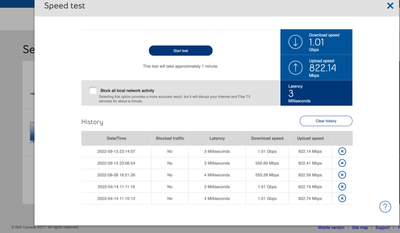
Solved! Go to Solution.
1
293
49.2K
293 REPLIES 293

Options
- Mark as New
- Bookmark
- Subscribe
- Mute
- Subscribe to RSS Feed
- Permalink
- Report Inappropriate Content
12-16-2023 11:10 AM
so i finally heard back from tech support and modem change again ""bad modem"" so going on #5
And the case manager was supposed to get back to me on friday after an agreed 2 week waiting period to find a solution since this started in october and no news
on the 11 oct contacted bell resolution and next morning a experts called me and said that they would look in to the problem and call me back the following day we are now the 16 and beside having to spend one More day att home to have a tec comes service the installation (modem #5) and day 6 att home still no head way
and for some reason now my download speed is higher the upload but all together really bad

the expression no new is good new clearly doesn't apply here
i keep seeing privet ms of help being sent out it be really nice to get one and actually move forward with the multiples problems that are ongoing

Options
- Mark as New
- Bookmark
- Subscribe
- Mute
- Subscribe to RSS Feed
- Permalink
- Report Inappropriate Content
12-16-2023 11:18 PM
Hello @BellPatricia and @Bell_Dom,
I have the same problem. Changed the router + Nokia fiber box twice already with 2 technicians visits.
Every week, or sometimes every 2 days, my 500mbps download/upload connection that I'm paying for, goes down from 500 download / 500 upload to 64 download /500 upload.
It only gets fixed if I reboot the router.
I have tried bridge mode with another much higher-quality router than the Home Hub 2000, I have tried resetting to factory settings and having only the Home Hub and nothing else - nothing fixes it.
Can you please get in touch with me to finally fix this issue? It's been going on for 6 months+
If it continues, I'm definitely going to look for a different provider. This is the worst internet service provider experience I've ever had.
Thank you.

Options
- Mark as New
- Bookmark
- Subscribe
- Mute
- Subscribe to RSS Feed
- Permalink
- Report Inappropriate Content
12-18-2023 01:26 PM
Good afternoon @MTY2503 & @500mbpsNow60,
Welcome to the Bell Community 🙂
We have sent you each a private message so we can gather more information, and take a closer look. Please check your Messages within your profile avatar in the top right corner.
Unsure how to check or send a private message? See How to send a private message
- Patricia
Options
- Mark as New
- Bookmark
- Subscribe
- Mute
- Subscribe to RSS Feed
- Permalink
- Report Inappropriate Content
12-30-2023 01:42 AM
Hi @BellPatricia , I am facing this issue with my Bell Home Internet. I pay for 1.5 Gbps download, but I am getting max speed of 64 Mbps on all devices. Modem speed test also shows this speed when doing speed test. I have Giga Hub modem.

Options
- Mark as New
- Bookmark
- Subscribe
- Mute
- Subscribe to RSS Feed
- Permalink
- Report Inappropriate Content
12-30-2023 12:08 PM
I am suddenly having the same issue. My download speed is maxing out at 190 Mbps while my upload speed is around 1.10 Gbps. Rebooting corrects it for a few days. I was thinking it had something to do with firmware 1.19.6 on the gigahub but then I stumbled upon this thread and see this issue has been around for some time.

Options
- Mark as New
- Bookmark
- Subscribe
- Mute
- Subscribe to RSS Feed
- Permalink
- Report Inappropriate Content
12-31-2023 03:17 AM
Hi @BellPatricia , currently facing this issue with my Bell Home Internet. I'm subscribed for 1.5 Gbps plan, but I'm only getting max speed of 64-160 Mbps on all devices. Modem speed test also shows this speed when doing speed test. I have Giga Hub modem. Please assist
Options
- Mark as New
- Bookmark
- Subscribe
- Mute
- Subscribe to RSS Feed
- Permalink
- Report Inappropriate Content
01-02-2024 09:06 AM
Hi there @_BB @kibosh & @Stevemab,
Welcome to the Bell Community, and thank you for reaching out.
We would be happy to take a look at this, and we have sent you each a private message. Please check your Messages within your profile avatar in the top right corner.
Unsure how to check or send a private message? See How to send a private message
- Patricia
Options
- Mark as New
- Bookmark
- Subscribe
- Mute
- Subscribe to RSS Feed
- Permalink
- Report Inappropriate Content
01-17-2024 12:09 PM - last edited on 01-17-2024 12:10 PM by BellPatricia
So far so good. My profile was adjusted a few weeks ago with @BellPatricia's help and I have not experienced the speed drops since. Thanks!

Options
- Mark as New
- Bookmark
- Subscribe
- Mute
- Subscribe to RSS Feed
- Permalink
- Report Inappropriate Content
01-17-2024 05:42 PM
Sounds like a similar issue to mine. I just upgraded to 3GB service today, but I can't get more than 550ish Mbps download speed on the modem speed test. I am getting around 3000Mbps for upload.
I've tried virtual repair multiple times, didn't do anything. Rebooted, no change.
I tried talking to support, but they kept telling me it was because I had too many devices connected and using the bandwidth... I didn't have any devices connected and blocked traffic for the speedtests. They are sending out a tech tomorrow to take a look.
However, I've come across a few posts here, reddit and on dsl forums that mention I need to make sure my account has an accurate speed profile and that the service is correctly provisioned for my new 3GB service. Something about resetting an HSI profile?
I've also come across posts where people say that new/beta firmware needed to be pushed to the modem to fix issues like mine. Or comments like "The internet package associated with your account gets overidden by mistake; this is a known issue that Bell engineers can patch manually for you. "
Is this something you can help with @BellPatricia ?

Options
- Mark as New
- Bookmark
- Subscribe
- Mute
- Subscribe to RSS Feed
- Permalink
- Report Inappropriate Content
01-17-2024 06:53 PM - last edited on 01-18-2024 07:51 AM by BellDRock
I upgraded from the 3Gbps service to the 8Gbps and this is a serious issue that is being ignored by Bell. The claim is modem firmware. My first modem the speed test always reported 8+ Gbps in the early stages of the rollout and as the market became saturated if I can get more 5 Gbps on a speed test i am lucky. Bell needs to make a statement to their customers as to the next steps on how they are going to fix this issue or begin to give us credits for not being able to deliver the symmetrical speed as advertised. Will they get the firmware to resolve the issue are they going to get a modem that can sustain the advertised speeds?


Options
- Mark as New
- Bookmark
- Subscribe
- Mute
- Subscribe to RSS Feed
- Permalink
- Report Inappropriate Content
01-17-2024 07:05 PM
If you perform a speed test from within the modem, what is the result?Modem speed test
I am a Community All-Star and customer. I'm here to help by sharing my knowledge and experience. My views on Bell and the Community Forum are my own and not the views of Bell or any of its affiliates.

Options
- Mark as New
- Bookmark
- Subscribe
- Mute
- Subscribe to RSS Feed
- Permalink
- Report Inappropriate Content
01-17-2024 07:52 PM
Who is claiming "modem firmware"? Also we need to put a definition on "market saturation".
There may be a few things going on. like a network infrastructure problem upstream of you. Maybe there's an XGS-PON problem. A splitter needs to be swapped?
Start with, per @Vanadiel, testing the service being delivered by Bell to your modem. Test it hourly. Post results here.
I am a Community All-Star and customer. I'm here to help by sharing my knowledge and experience. My views on Bell and the Community Forum are my own and not the views of Bell or any of its affiliates.
Options
- Mark as New
- Bookmark
- Subscribe
- Mute
- Subscribe to RSS Feed
- Permalink
- Report Inappropriate Content
01-17-2024 08:19 PM - edited 01-17-2024 08:35 PM
First off, thanks for the quick replies, I appreciate your time.
Not sure exactly who is claiming firmware, would have to search through posts again, but believe it was on dsl forum and someone mentioned _dom did it for a similar problem they had.
Regardless, I've got no idea what the issue is, so may not be applicable to me at all.
Speedtest results from today:



Options
- Mark as New
- Bookmark
- Subscribe
- Mute
- Subscribe to RSS Feed
- Permalink
- Report Inappropriate Content
01-17-2024 08:52 PM - edited 01-17-2024 08:54 PM
I spent almost three months trying to get the speed drop issue resolved, I should be getting 3Gbps, but every couple of weeks the download speed would drop to 64 Mbps, the moderators here were very responsive and they would apply a fix whenever I posted about my issue. The last time I had an issue it was resolved again, but it seems whatever they did worked since I have not experienced any speed drops since Aug 23!

Options
- Mark as New
- Bookmark
- Subscribe
- Mute
- Subscribe to RSS Feed
- Permalink
- Report Inappropriate Content
01-18-2024 03:34 AM
I have the same issue a little different. I pay for 1000mbps download and 750mbps upload and im only getting around 100mbps down and up, I had 2 bell technicians already come and check out the issue they said upgrade to the gigahub. I said no cause i doubt that will fix the issue because when i reset the modem it provides the full 1000mbps for a less than 30 seconds than caps around 100mbps. I did all these tests on the ps5 and pc.
when I only have the pc connected to the modem it doesn't slow down getting around 900mbps download but as soon as I connect any other devices it slows down all devices including the pc to 100mbps

Getting started
New to our forum? These guides will help you find your way around quickly.
- Welcome to the Community!
- Log in/Register
- Community guidelines
- Community help
- Meet the Moderators
- Bell Community All-Stars
- How to send a private message
- Existing customers, login to MyBell to see exclusive offers
- What's on Crave
- What's on Free Preview
- Mobility phone & device catalog
- Latest in the Community


