- Community Home
- Internet
- Download speed drops
Options
- Subscribe to RSS Feed
- Mark Topic as New
- Mark Topic as Read
- Float this Topic for Current User
- Bookmark
- Subscribe
- Mute
- Printer Friendly Page

Options
- Mark as New
- Bookmark
- Subscribe
- Mute
- Subscribe to RSS Feed
- Permalink
- Report Inappropriate Content
09-13-2022 11:34 PM
My 1 Gb download speed regularly goes down to 550 Mb, and seemed to be limited there until I restart my modem. It stays fine for a few days, but eventually seemingly goes back to the 550 Mb limits... restarting the modem re-established the download speed I am subscribed for... anyone else noticed this issue?
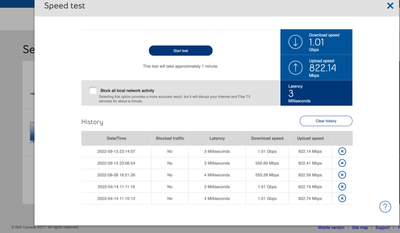
Solved! Go to Solution.
1
293
48.6K
293 REPLIES 293

Options
- Mark as New
- Bookmark
- Subscribe
- Mute
- Subscribe to RSS Feed
- Permalink
- Report Inappropriate Content
07-30-2023 09:20 AM
Hi @BellPatricia ,
the same is happening to me too. I subscribed to bell gigabit 3 (up and down) and I only get 1 giga down. Any ideas or fixes? Thank you!


Options
- Mark as New
- Bookmark
- Subscribe
- Mute
- Subscribe to RSS Feed
- Permalink
- Report Inappropriate Content
07-31-2023 12:47 PM
Hi there @Taurus7774 @Thevv & @clementbar,
Thank you very much for posting in the Bell Community.
We are happy to help in any way we can, and have reached out each of you via private message. Please check your Messages within your profile avatar in the top right corner.
Unsure how to check or send a private message? See How to send a private message
- Patricia

Options
- Mark as New
- Bookmark
- Subscribe
- Mute
- Subscribe to RSS Feed
- Permalink
- Report Inappropriate Content
08-04-2023 07:21 AM - last edited on 04-07-2024 01:43 PM by BellPatricia
Before monday I was on a 500/500 plan with an HH3000 modem and my Asus setup for PPPoE, everything was working fine
I'm now on a 1.5G plan with the Giga modem and it's a nightmare, many time a day internet slowdown, freeze etc. I need to reboot. Speed tests may show 0 (zero) download, or 700 Mbps or fail! The CPU of the Giga is between 75-100% most of the time and I see tons of message like this in the logs:
ppp0:TR69 ConnectionRequest: processing request from ACS
ppp0:Request for a new authenticated connectio
The setup on my side is the same as with the HH3000, ie PPPoE connection, WiFi disabled, no DMZ etc
Rebooting the Giga makes things goes better for a while only
I've talked with Bell support many times, they've done some magick on their side but nothing works. I will receive a replacement Giga modem soon but i'm quite sure hardware is not involved here, it seems more related to some setup on some "endpoint" in the Bell universe, Something strange, yesterday I changed my b1 password (web, giga, asus) based on some comment somewhere and internet was stable most of the day. Like it "pushed" some auth data on some "endpoints"...but the problem came back this night
Firmware is 1.16.5
Please HELP


Options
- Mark as New
- Bookmark
- Subscribe
- Mute
- Subscribe to RSS Feed
- Permalink
- Report Inappropriate Content
08-05-2023 10:27 AM
Good morning @DenisF,
Thank you for your post, and welcome to the Bell Community.
We want to take a look at this, and have sent you a private message to get some more information. Please check your Messages within your profile avatar in the top right corner.
Unsure how to check or send a private message? See How to send a private message
- Patricia

Options
- Mark as New
- Bookmark
- Subscribe
- Mute
- Subscribe to RSS Feed
- Permalink
- Report Inappropriate Content
08-14-2023 09:41 AM
Recently Bell has been inconsistent with speeds for Fibe. Before, the modem was fixed 3Gbps UpDown and now 1.7Down2Down. I just Upgraded to the 8Gbps, and the speeds are showing 6Gbps down and 4 Gbps up. The excuse is the modem can only show up to a certain amount, and if I want the full 8 Gbps, I will have to hard wire into the modem with a network cable. The speed test between the modem and Bell should report the package enrolled into.

Options
- Mark as New
- Bookmark
- Subscribe
- Mute
- Subscribe to RSS Feed
- Permalink
- Report Inappropriate Content
08-26-2023 11:53 AM
I have had problems since day one as well. This manifests as requiring a refresh to get a page to load fully, common sites not loading at all and variable speeds that seem to kick back up when I go to do a speed test. At one point after a long series of tests the modem itself came back saying it had 64.48 Mbps download speed on what is supposed to be a 1.5 Gbps line.
I taught a college course on networking. It seems the trouble is on Bell's side since I have a number of devices having the same issues. From what I have seen here it is either an unfixable design issue with the modem or more likely either a misconfigured network, oversold bandwidth or throttling by Bell's network. It is troubling that there does not seem to be a cogent reply here saying precisely what the issue has been, what the fix has been, and some reasonable indication that this will not continue to be an ongoing issue.
Please advise the status of this issue and provide details that will convince other network folk that Bell is honestly trying to deliver its promised bandwidth. Please reply here so that others can get the benefit of the reply. That will save you time dealing one-on-one and save others time if you can provide sensible information.
Options
- Mark as New
- Bookmark
- Subscribe
- Mute
- Subscribe to RSS Feed
- Permalink
- Report Inappropriate Content
08-26-2023 12:04 PM - edited 08-26-2023 12:06 PM
I honestly believe Bell is over sold on bandwidth because i have been through a modem exchange and the speed issues still exist. Very early in the morning like 4ish to 5ish is when the modem speed test gives a close enough report to the speed being paid for and during the day, peak times, is when the capacity is being pushed to the limits and the speed test reports half and sometimes less than half of the expected speeds. Bell should compensate us via credits for failing to deliver symmetrical speeds as advertised.
Options
- Mark as New
- Bookmark
- Subscribe
- Mute
- Subscribe to RSS Feed
- Permalink
- Report Inappropriate Content
08-29-2023 12:14 PM
Thank you for reaching out to the Bell Community.
We wanted to check in and see if you are still experiencing this?
If you are, we invite you to please share a screen shot of your recent speed test using the Windows speed test app
- Patricia
Options
- Mark as New
- Bookmark
- Subscribe
- Mute
- Subscribe to RSS Feed
- Permalink
- Report Inappropriate Content
08-30-2023 09:13 PM
To the user above, i had the exact same issue speed dropped to 1.72Gbps I fixed my problem by going into the giga hub and doing a factory reset. it will reset the modem to factory specs then will redownload all of the configurations from bell. it will take about 5min to complete. My internet has been rock stable ever since. I have found out that if you play with advanced dmz turn it on/off it sometimes causes this to happen. and a factory reset fixes it. please post back if it fixes it for you.
Options
- Mark as New
- Bookmark
- Subscribe
- Mute
- Subscribe to RSS Feed
- Permalink
- Report Inappropriate Content
08-30-2023 09:23 PM
I am having this EXACT problem myself. Same 1.5gigabit line, same 64mbps lock every couple days. Rebooting the modem always fixes the issue, but it always comes back shortly after. I posted on dslreports, and the bell tech told me it was likely a speed policy issue and the folks here could fix it for me. I’m really hoping he is right!
Options
- Mark as New
- Bookmark
- Subscribe
- Mute
- Subscribe to RSS Feed
- Permalink
- Report Inappropriate Content
08-30-2023 09:29 PM - edited 08-30-2023 09:30 PM
No windows speed test here. This is the speed test built into the modem. As of now 9.27 pm 08/30 off peek the speed is 8d/7u. Tomorrow during on peek the speed might fall below the expected 8/8(du)
Options
- Mark as New
- Bookmark
- Subscribe
- Mute
- Subscribe to RSS Feed
- Permalink
- Report Inappropriate Content
08-30-2023 09:38 PM
I ran a second speed test as at 9:33 pm 08/30 results 6Gbps down / 4.69 Gbps up. The service is unreliable. Third run 5.9 Gbps down / 4.78 Gbps up.

Options
- Mark as New
- Bookmark
- Subscribe
- Mute
- Subscribe to RSS Feed
- Permalink
- Report Inappropriate Content
08-31-2023 11:16 AM
Hi there @SeanAVB,
Thanks for your reply.
When you notice the speed slow down, can you please do a speed test using the Windows speed test app as suggested above, and share the results with us here?
- Patricia
Options
- Mark as New
- Bookmark
- Subscribe
- Mute
- Subscribe to RSS Feed
- Permalink
- Report Inappropriate Content
08-31-2023 11:20 AM
Good day @Jmujrb,
Thank you for reaching out to the Bell Community.
We'd like to take a look, and have sent you a private message. Please check your Messages within your profile avatar in the top right corner.
Unsure how to check or send a private message? See How to send a private message
- Patricia
Options
- Mark as New
- Bookmark
- Subscribe
- Mute
- Subscribe to RSS Feed
- Permalink
- Report Inappropriate Content
08-31-2023 11:27 AM
Patricia: As mentioned above, I'm not a Windows user. My concern is with the speed between the modem and bell and not my LAN link to the outside.

Getting started
New to our forum? These guides will help you find your way around quickly.
- Welcome to the Community!
- Log in/Register
- Community guidelines
- Community help
- Meet the Moderators
- Bell Community All-Stars
- How to send a private message
- Existing customers, login to MyBell to see exclusive offers
- What's on Crave
- What's on Free Preview
- Mobility phone & device catalog
- Latest in the Community





