- Community Home
- TV & Streaming
- Re: Adding extra channels to an existing favorite ...
Options
- Subscribe to RSS Feed
- Mark Topic as New
- Mark Topic as Read
- Float this Topic for Current User
- Bookmark
- Subscribe
- Mute
- Printer Friendly Page

Options
- Mark as New
- Bookmark
- Subscribe
- Mute
- Subscribe to RSS Feed
- Permalink
- Report Inappropriate Content
02-09-2024 02:56 PM
I created a favorite channel list with Fibe TV remote. I now want to add a few more channels to the list. How do I do this?
I've tried everything. I go into "Change favorites", pick my list, add the few extra channels and click Save. But stations don't show up in the Guide. When I go back into settings, the stations I added show in checked boxes, but again they're not appearing in the Guide.
Any ideas? Thanks
Solved! Go to Solution.
0
16
4,458
1 helpful reply
Accepted Solutions
Options
- Mark as New
- Bookmark
- Subscribe
- Mute
- Subscribe to RSS Feed
- Permalink
- Report Inappropriate Content
02-26-2024 02:14 PM - last edited on 02-26-2024 02:16 PM by BellPatricia
Problem solved thanks to @BellPatricia and Bell escalation team.
Not really sure how or why this happened, but under "Settings" - ""Device" - "Menu and guide" - "Customize guide", I had unchecked all the boxes for all the channels. By simply checking all the boxes for all channels (and saving), all my preferred channels now show up in my Favourite guide.
16 REPLIES 16
Options
- Mark as New
- Bookmark
- Subscribe
- Mute
- Subscribe to RSS Feed
- Permalink
- Report Inappropriate Content
02-09-2024 07:17 PM
This is the newest Fibe remote, the one with individual buttons for Netflix, Crave and Prime (just switched from Satellite last week).
I ended up adding 27 channels to my favorite channel list, but only 4 of those 27 show up in my custom Guide.


Options
- Mark as New
- Bookmark
- Subscribe
- Mute
- Subscribe to RSS Feed
- Permalink
- Report Inappropriate Content
02-10-2024 07:05 AM
I trust the Fibe TV box you are referring to is the VIP7802 & the remote is the Voice Remote with Google Assistant.
The following web link will take you to the support page for your remote control & Fibe TV box. You should review all of the contents in each of the sections as there is a wealth of valuable tips & How to's that will enhance your viewing experience.
Have you rebooted your receiver recently? If not, then it would not hurt to do so at this time. To complete this task, simply unplug the box from the power source, wait 20 seconds, plug it back in. It will take 2-5 min. to connect back to Bell. The picture will come & go 1-2 times, you will see a Bell Blue Logo, then picture, then sound. Your guide is now updating to the current version & you are now ready to move on to the next check point.
Before trying to add any of these channels to your Favourites list, have you confirmed that they are included in your tv package subscription? This can easily be verified on MyBell. If all of these channels are included in your package, you can now check that the channels are listed & selected in your Menu Guide settings.
You should open the first section of the support page that I have included. This can be completed by selecting the link provided and opening it in any web browser.
Watching shows with your Fibe TV Voice remote.
- Select > Customizing the channel guide.
- Follow the instructions using your remote control & verify that these channels have been added to the Guide. If not, then you must do so. When finished, save your changes.
- Go to the section > Managing a Favourites channel list. There are a couple of methods that you can choose from to create, add, modify channels & a Favourites list. Once again with your remote, follow these instructions, making your changes & saving them at the end.
Fibe TV Voice Remote (bell.ca)
Once you have completed the above, your Guide & Favourites list should reflect the channels you have & the Favourites you wish to be included on your list.
Thank you for contacting the Bell Community Forum. Let us know if you require any further assistance.
Take care.
I am a Community All-Star and customer. I'm here to help by sharing my knowledge and experience. My views on Bell and the Community Forum are my own and not the views of Bell or any of its affiliates.
Options
- Mark as New
- Bookmark
- Subscribe
- Mute
- Subscribe to RSS Feed
- Permalink
- Report Inappropriate Content
02-11-2024 01:54 AM
Still not working. I deleted altogether my existing favorite channel list. I rebooted the receiver.
I created a new favorite list, a total of 84 channels. But only 61 appear in the Guide, with 23 not appearing. I entered the individual channel numbers for all 23, and confirmed I do receive them. I confirmed that these 23 channels are all properly checked off in the channel selection menu.
As an example, these are just of few of the 23 that don't appear in my Guide: 1257 (CTV Regina), 1340 (Movie Time), 1411 (OLN), 1524 (National Geographic) and 1616 (Smithsonian).

Options
- Mark as New
- Bookmark
- Subscribe
- Mute
- Subscribe to RSS Feed
- Permalink
- Report Inappropriate Content
02-12-2024 01:44 PM
Hi @Sports4K,
Welcome to the Bell Community, and thank you for trying out all of the suggestions above from @WelshTerrier.
Is this affecting more than one receiver in your home?
Can you try logging into the Bell Fibe TV app on another device and check to see if your Favorites list displays properly?
If you continue to have trouble we also recommend a factory reset of your receiver.
Please try that out, and let the Community know how everything is going.
- Patricia
Options
- Mark as New
- Bookmark
- Subscribe
- Mute
- Subscribe to RSS Feed
- Permalink
- Report Inappropriate Content
02-12-2024 02:23 PM
BellPatricia....No, it's just affecting the receiver/remote for our main TV. The second receiver/remote on another TV works fine. I can add the 23 channels to a Favorite list on our secondary TV.
Not sure where to find a Favorite list on the Bell Fibe TV app.
I've tried (a few times each) the following: 1 - a Remote reset, 2 - Restart Fibe TV and 3 - Reboot system. But problem persists.
I should note that these 23 channels are all channels in the "Better" TV package I upgraded to last week (previously just had the "Good" package).
Options
- Mark as New
- Bookmark
- Subscribe
- Mute
- Subscribe to RSS Feed
- Permalink
- Report Inappropriate Content
02-13-2024 04:14 PM - edited 02-13-2024 04:15 PM
Thanks for the information @Sports4K,
Are you able to try a Factory reset to see if that resolves this?
Simply press the Multi Function button on your Fibe TV Box, and then use your remote to choose the Factory reset option.
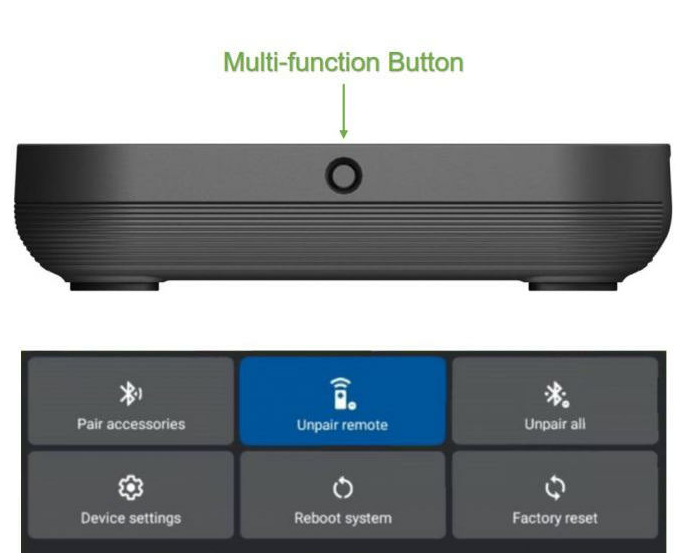
Keep us posted,
- Patricia
Options
- Mark as New
- Bookmark
- Subscribe
- Mute
- Subscribe to RSS Feed
- Permalink
- Report Inappropriate Content
02-13-2024 05:06 PM - edited 02-13-2024 05:08 PM
Did a Factory reset. Problem persists.
I'm thinking now that Bell needs to send me a new receiver and remote.
I've been on the phone with Bell for numerous hours in the last week. Someone was supposed to call me today but I've heard nothing. I was told they were escalating to the "back office".
Options
- Mark as New
- Bookmark
- Subscribe
- Mute
- Subscribe to RSS Feed
- Permalink
- Report Inappropriate Content
02-14-2024 03:41 PM
Thanks for trying that out as well @Sports4K
Did you end up receiving a call back about this?
We are here for you if you still need support, and we have reached out via private message for more information. Please check your Messages within your profile avatar in the top right corner.
Unsure how to check or send a private message? See How to send a private message
- Patricia
Options
- Mark as New
- Bookmark
- Subscribe
- Mute
- Subscribe to RSS Feed
- Permalink
- Report Inappropriate Content
02-26-2024 02:14 PM - last edited on 02-26-2024 02:16 PM by BellPatricia
Problem solved thanks to @BellPatricia and Bell escalation team.
Not really sure how or why this happened, but under "Settings" - ""Device" - "Menu and guide" - "Customize guide", I had unchecked all the boxes for all the channels. By simply checking all the boxes for all channels (and saving), all my preferred channels now show up in my Favourite guide.

Options
- Mark as New
- Bookmark
- Subscribe
- Mute
- Subscribe to RSS Feed
- Permalink
- Report Inappropriate Content
10-21-2025 05:49 PM - last edited on 10-22-2025 08:01 AM by BellDRock
It's so time consuming to have to go to options, add to favourites list for each channel. A shortcut on the remote perhaps? I have the Arris 4K DVR VIP5662W receiver. I have changed the settings in the menu/ guide to subscribed and popular channels only but there are so many in that last that I either don't get it wouldn't watch
Options
- Mark as New
- Bookmark
- Subscribe
- Mute
- Subscribe to RSS Feed
- Permalink
- Report Inappropriate Content
10-22-2025 05:39 AM - last edited on 10-22-2025 08:04 AM by BellDRock
Good Day.
Thank you for posting your question. You can add or remove Favorite channels in bulk or one at a time using your remote control on the VIP5662w PVR.
You can customize your Fibe TV service by creating a simplified program listing that contains only the channels you watch often.
There are two ways to add, remove & make changes to your existing Favorites list:
Method 1: via Options
- While watching live TV or viewing the GUIDE, press Options on your remote control.
- Select Change favourites >
- Select > My favorites.
- Press Select to add or remove channels from the list. Follow the onscreen instructions to save your changes.
Method 2: via MENU
- Press MENU on your remote control.
- Select Settings > Menu and guide.
- Select Favourite channels > Select Manage lists.
- Select > My favorites.
- Press Select to add or remove channels from the list. Follow the onscreen instructions to save your changes.
How to create a favourites list on Bell Fibe TV
Take care.
I am a Community All-Star and customer. I'm here to help by sharing my knowledge and experience. My views on Bell and the Community Forum are my own and not the views of Bell or any of its affiliates.
Options
- Mark as New
- Bookmark
- Subscribe
- Mute
- Subscribe to RSS Feed
- Permalink
- Report Inappropriate Content
10-22-2025 12:09 PM
Thanks for the reply. I knew about those options. I was just hoping there was a short cut to add channels on the remote, like you can record a show by highlighting it in the guide and pressing record on the remote. I got a new receiver and will have to go through and add them one by one

Options
- Mark as New
- Bookmark
- Subscribe
- Mute
- Subscribe to RSS Feed
- Permalink
- Report Inappropriate Content
11-30-2025 01:56 PM - last edited on 12-01-2025 09:20 AM by BellDRock
Hello,must be an easy way to find out what NFL games i can watch on my current package,with out scrolling thru the entire bell lineup and finding out i must subscribe ,rogers was so much easier
Options
- Mark as New
- Bookmark
- Subscribe
- Mute
- Subscribe to RSS Feed
- Permalink
- Report Inappropriate Content
11-30-2025 02:23 PM - last edited on 12-01-2025 09:16 AM by BellDRock
Hello,finally found out what NFL channels i get,201,202 and 401.i added to my favourites list.,but i see no fav botton on my remote?

Getting started
New to our forum? These guides will help you find your way around quickly.
- Welcome to the Community!
- Log in/Register
- Community guidelines
- Community help
- Meet the Moderators
- Bell Community All-Stars
- How to send a private message
- Existing customers, login to MyBell to see exclusive offers
- What's on Crave
- What's on Free Preview
- Mobility phone & device catalog
- Latest in the Community


