- Community Home
- TV & Streaming
- How to change batteries in Bell TV remote
Options
- Subscribe to RSS Feed
- Mark Topic as New
- Mark Topic as Read
- Float this Topic for Current User
- Bookmark
- Subscribe
- Mute
- Printer Friendly Page

Options
- Mark as New
- Bookmark
- Subscribe
- Mute
- Subscribe to RSS Feed
- Permalink
- Report Inappropriate Content
03-04-2024 10:20 PM - last edited on 03-05-2024 08:22 AM by BellPatricia
What is the trick to opening up the Bell Streaming Remote so I can put in batteries??
Solved! Go to Solution.
Labels:
- Labels:
-
Remote Control
1
10
4,919
3 helpful replies
Accepted Solutions


Options
- Mark as New
- Bookmark
- Subscribe
- Mute
- Subscribe to RSS Feed
- Permalink
- Report Inappropriate Content
03-05-2024 05:55 AM
Thank you for your question. Instructions for changing the batteries on any Bell remote can be found here. https://support.bell.ca/fibe_tv/receivers/fixing_your_fibe_tv_remote_control . I have found that wiping the remote with a microfiber cloth to remove any oil or grease and to have a dry hand (thumbs usually work best) makes sliding the battery cover easier.
I am a Community All-Star and customer. I'm here to help by sharing my knowledge and experience. My views on Bell and the Community Forum are my own and not the views of Bell or any of its affiliates.

Options
- Mark as New
- Bookmark
- Subscribe
- Mute
- Subscribe to RSS Feed
- Permalink
- Report Inappropriate Content
03-05-2024 06:22 AM
Changing the batteries in this remote is a little tricky. The cover has two pressure sensitive clips that are very fragile & clip to the case. Turn the remote over with the back of the remote facing you. You will need to hold the remote with both hands. Place one thumb on the indented circle & apply slight pressure. With your other thumb, push down simultaneously with your thumb applying pressure on the plastic cover direction arrow, & slide the cover in the direction that the arrow is pointing towards. This will release the plastic battery cover clips.
Thank you for your question.
Take care
I am a Community All-Star and customer. I'm here to help by sharing my knowledge and experience. My views on Bell and the Community Forum are my own and not the views of Bell or any of its affiliates.

Options
- Mark as New
- Bookmark
- Subscribe
- Mute
- Subscribe to RSS Feed
- Permalink
- Report Inappropriate Content
04-30-2024 03:08 PM - edited 04-30-2024 05:27 PM
Hey there @coopie,
Thanks for reaching out to the Bell Community.
It sounds like you might have the Slim remote.
You can slide the remote control battery cover down to expose the battery compartment. It is located on the back/lower portion of your remote.
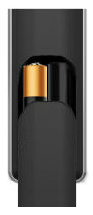
Let the Community know if you have any other questions,
- Patricia
10 REPLIES 10
Options
- Mark as New
- Bookmark
- Subscribe
- Mute
- Subscribe to RSS Feed
- Permalink
- Report Inappropriate Content
03-05-2024 05:55 AM
Thank you for your question. Instructions for changing the batteries on any Bell remote can be found here. https://support.bell.ca/fibe_tv/receivers/fixing_your_fibe_tv_remote_control . I have found that wiping the remote with a microfiber cloth to remove any oil or grease and to have a dry hand (thumbs usually work best) makes sliding the battery cover easier.
I am a Community All-Star and customer. I'm here to help by sharing my knowledge and experience. My views on Bell and the Community Forum are my own and not the views of Bell or any of its affiliates.
Options
- Mark as New
- Bookmark
- Subscribe
- Mute
- Subscribe to RSS Feed
- Permalink
- Report Inappropriate Content
03-05-2024 06:22 AM
Changing the batteries in this remote is a little tricky. The cover has two pressure sensitive clips that are very fragile & clip to the case. Turn the remote over with the back of the remote facing you. You will need to hold the remote with both hands. Place one thumb on the indented circle & apply slight pressure. With your other thumb, push down simultaneously with your thumb applying pressure on the plastic cover direction arrow, & slide the cover in the direction that the arrow is pointing towards. This will release the plastic battery cover clips.
Thank you for your question.
Take care
I am a Community All-Star and customer. I'm here to help by sharing my knowledge and experience. My views on Bell and the Community Forum are my own and not the views of Bell or any of its affiliates.

Options
- Mark as New
- Bookmark
- Subscribe
- Mute
- Subscribe to RSS Feed
- Permalink
- Report Inappropriate Content
04-29-2024 08:14 AM
I see that I'm not the only guy with this problem... but there's no indented circle and no ldirectional arrow on the plastic cover, and I can't get the bloomin' cover off. Any more ideas??
Options
- Mark as New
- Bookmark
- Subscribe
- Mute
- Subscribe to RSS Feed
- Permalink
- Report Inappropriate Content
04-29-2024 08:33 AM
Good Day & Welcome to the Bell Community Forum.
Which remote control are you having difficulty in changing the batteries? Please advise.
Programming, fixing or replacing your Bell Fibe TV remote
FYI Only. If the batteries in the remote are very old & have leaked / crystalized beneath the cover & battery connectors, you may not be able to release & open the battery cover. Try wiping the back & cover area with an alcohol hand swab or a Qtip dipped in Isopropyl alcohol.
Take care.
I am a Community All-Star and customer. I'm here to help by sharing my knowledge and experience. My views on Bell and the Community Forum are my own and not the views of Bell or any of its affiliates.
Options
- Mark as New
- Bookmark
- Subscribe
- Mute
- Subscribe to RSS Feed
- Permalink
- Report Inappropriate Content
04-29-2024 09:03 AM
Thanks for answering... it's a long skinny remote for Bell Fibe. No serial numbers visible. 24 cm x 4 cm...Not so old that the batteries would have corroded... I hope.
Options
- Mark as New
- Bookmark
- Subscribe
- Mute
- Subscribe to RSS Feed
- Permalink
- Report Inappropriate Content
04-30-2024 03:08 PM - edited 04-30-2024 05:27 PM
Hey there @coopie,
Thanks for reaching out to the Bell Community.
It sounds like you might have the Slim remote.
You can slide the remote control battery cover down to expose the battery compartment. It is located on the back/lower portion of your remote.
Let the Community know if you have any other questions,
- Patricia
Options
- Mark as New
- Bookmark
- Subscribe
- Mute
- Subscribe to RSS Feed
- Permalink
- Report Inappropriate Content
12-22-2024 08:10 AM - edited 12-22-2024 09:34 AM
Well, I had to Google this too. Bell, you got to get with your remote supplier. NO indent, NO arrow and add a backlight (while I'm at it). I will save some of you some time. Our batteries were totally corroded, no we don't live in a salt mine. But if bell had put the usual signs of indent and arrow, this would not have been so difficult to work with. We cleaned everything off with vinegar and all is back to normal. Yes, eventually lots of pushing down with thumb on top towards the bottom of the remote on where the catch is not the back of the remote got it off. (plus a little prying with a hobby flathead screwdriver)
Just wanted to save anyone with the same problem. We couldn't figure out how the guy in the video on Youtube just clicked the cover off no problem!


Options
- Mark as New
- Bookmark
- Subscribe
- Mute
- Subscribe to RSS Feed
- Permalink
- Report Inappropriate Content
09-18-2025 04:21 PM - last edited on 09-18-2025 04:59 PM by BellPatricia
Hi @SSteve. I have the same problem, I've only had the slimline remote for 2 weeks and can't open the cover. I've tried all of the suggestions listed. I have arthritis in my thumbs which doesn't help matters and I live alone. My question is, how long did you have your remote before you tried opening the cover? It seems unlikely that my remote batteries have corroded unless I have a remote that's been in stock for awhile. Thank you.
Options
- Mark as New
- Bookmark
- Subscribe
- Mute
- Subscribe to RSS Feed
- Permalink
- Report Inappropriate Content
09-18-2025 05:07 PM - edited 09-18-2025 05:13 PM
Good Day & Welcome tothe Bell Community Forum.
@OrleansUser Changing the batteries in the Bell Slim & Bluetooth Slim remote may be a little tricky if you have arthritis in your thumbs.
The cover has one pressure sensitive clip that is very fragile & clips to the case.
Turn the remote over with the back of the remote facing you. You can hold this remote with one hand. Place one thumb on the opening cover & apply slight pressure. Push down simultaneously with your thumb applying pressure on the plastic cover & slide the cover off in the direction pointing towards you. This will release the plastic battery cover clip.
The batteries are incased inside of this area. If the batteries are old and corroded, there will be white powdery substance covering the battery terminals. You can try loosing & removing the batteries carefully so as not to damage the battery terminals.
If you are lucky, you may be able to do this easily. Before installing new batteries, you must ensure that this area completely cleaned.
If the batteries in the remote are very old & have leaked / crystalized beneath the cover & battery connectors, you may not be able to release & open the battery cover. Try wiping the back & cover area with an alcohol hand swab or a Q-tip dipped in Isopropyl alcohol.
Once opened, you will need to do the same inside of the battery compartment.
Only use high-quality alkaline batteries that are available from trusted brands like Duracell and Energizer, etc.
Thank you for your question.
Take care
I am a Community All-Star and customer. I'm here to help by sharing my knowledge and experience. My views on Bell and the Community Forum are my own and not the views of Bell or any of its affiliates.
Options
- Mark as New
- Bookmark
- Subscribe
- Mute
- Subscribe to RSS Feed
- Permalink
- Report Inappropriate Content
09-18-2025 05:28 PM
Thanks for the reply. I tried doing what you said, still no luck. I'll go to a Bell Store on Monday and ask one of the staff to open it for me. Don't know if I'm doing it wrong or don't have the thumb strength to do it. Really dislike this remote. I've had numerous remotes over the years. It's bad enough that there's no lever but to also not provide an indentation or arrows is mind-boggling. Also dislike some of the buttons on it (back button, Guide button). They're too flat and hard to see in dim lighting. I wish they offered different styles of remotes to work with Fibe TV.

Getting started
New to our forum? These guides will help you find your way around quickly.
- Welcome to the Community!
- Log in/Register
- Community guidelines
- Community help
- Meet the Moderators
- Bell Community All-Stars
- How to send a private message
- Existing customers, login to MyBell to see exclusive offers
- What's on Crave
- What's on Free Preview
- Mobility phone & device catalog
- Latest in the Community


