
- Community Home
- Internet
- Bell Home Hub 4000 Error 1201
Options
- Subscribe to RSS Feed
- Mark Topic as New
- Mark Topic as Read
- Float this Topic for Current User
- Bookmark
- Subscribe
- Mute
- Printer Friendly Page

Options
- Mark as New
- Bookmark
- Subscribe
- Mute
- Subscribe to RSS Feed
- Permalink
- Report Inappropriate Content
02-28-2022 06:20 PM - last edited on 02-19-2026 12:23 PM by BellAlexander
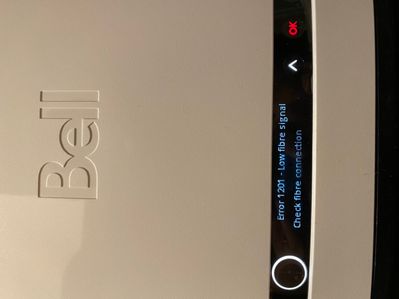
Today my bell internet Fibre 50 FTTH stopped working. My device still showed connection to the Wifi but there was no internet. The modem showed “Error 1201 - Low fibre signal Check fibre connection”. Restarting modem couldn’t fix the problem.
❗AI Summary:
Users experiencing the "Error 1201 - Low fibre signal " have identified several potential causes and solutions, primarily pointing to issues with the physical fibre optic connection. The error indicates that the modem is receiving a weak or no light signal through the fibre optic cable, preventing internet access.
Key causes identified by the Bell Community:
Discussions in the Bell Community Forum and other online platforms highlight a range of possible reasons for the error:
- Damaged or disconnected fibre optic cable: This is the most commonly cited cause. The cable could be cut, bent, or damaged externally, such as by landscaping activities. It could also be disconnected at the street-level utility box.
- Faulty or improper connections: The error can occur if the fibre optic cable is not securely connected to the modem or the wall socket. Additionally, the end of the fibre optic cable that plugs into the modem can become dirty and obstruct the signal. In some cases, the connector itself may be faulty.
- External infrastructure or equipment problems: Issues with your Bell modem or other network equipment can lead to this error. Issues may originate from outside the home, such as a problem at a node or demarcation point.
- Incorrect provisioning: A less common but possible cause is a "speed profile" or programming error on the user's account, which would require correction by Bell.
Solutions and troubleshooting steps from the Bell Community:
Forum members and Bell moderators have suggested several troubleshooting steps, ranging from simple checks to requiring technical help:
- Basic troubleshooting: The initial steps include rebooting the modem and ensuring the fibre optic cable is securely connected. However, users often report that a simple reboot does not resolve this specific error.
- Cleaning the fibre connector: Some users have had success by carefully unplugging the fibre optic cable from the modem (holding it by the green housing) and cleaning the tip with a lint-free cloth and rubbing alcohol.
- Use Virtual Repair: The Bell Community Manager recommended using Virtual Repair. This tool can check for local outages, inspect external equipment, reboot your system, and optimize settings. If the issue persists, the tool can help schedule a technician visit.
- Check for outages: It's worth checking if there is a known service outage in your area. How to check for Internet outages in your area or Outage Check.
- Contact Bell Support: Should the above fail to identify or resolve the issue, a technician may be required. Technicians can diagnose and repair issues with the external wiring, connectors, or other infrastructure problems that are beyond the user's control. Should you need to book a technician, reach out using Live Chat or you can dial *611 from any Bell mobile device.
Labels:
4
4
226K
2 helpful replies
Accepted Solutions
Options
- Mark as New
- Bookmark
- Subscribe
- Mute
- Subscribe to RSS Feed
- Permalink
- Report Inappropriate Content
03-02-2022 12:10 PM
Try disconnecting and then reconnecting the fiber connector. Make sure the tip of the connector is clean since even a tiny thread of lint can obstruct the signal.

Options
- Mark as New
- Bookmark
- Subscribe
- Mute
- Subscribe to RSS Feed
- Permalink
- Report Inappropriate Content
03-09-2022 08:14 AM
One thing always to remember to do when encountering an internet, Fibe TV or Fibe Home Phone issue is to run the Virtual Repair tool. If you can, run it from your smartphone as the The Virtual repair tool will:
- Look for service outages in your area
- Check the equipment outside your home
- Reboot all your hardware
- Optimize the settings for your service
If it can’t solve the problem, the tool will even help you book a technician appointment if the issue calls for it.
Check out our NEW How To's for internet and more info on Virtual Repair at Internet not working? Try these quick fixes.
4 REPLIES 4
Options
- Mark as New
- Bookmark
- Subscribe
- Mute
- Subscribe to RSS Feed
- Permalink
- Report Inappropriate Content
03-02-2022 12:10 PM
Try disconnecting and then reconnecting the fiber connector. Make sure the tip of the connector is clean since even a tiny thread of lint can obstruct the signal.
Options
- Mark as New
- Bookmark
- Subscribe
- Mute
- Subscribe to RSS Feed
- Permalink
- Report Inappropriate Content
03-09-2022 08:14 AM
One thing always to remember to do when encountering an internet, Fibe TV or Fibe Home Phone issue is to run the Virtual Repair tool. If you can, run it from your smartphone as the The Virtual repair tool will:
- Look for service outages in your area
- Check the equipment outside your home
- Reboot all your hardware
- Optimize the settings for your service
If it can’t solve the problem, the tool will even help you book a technician appointment if the issue calls for it.
Check out our NEW How To's for internet and more info on Virtual Repair at Internet not working? Try these quick fixes.

Options
- Mark as New
- Bookmark
- Subscribe
- Mute
- Subscribe to RSS Feed
- Permalink
- Report Inappropriate Content
10-16-2026 08:40 AM - last edited on 10-16-2026 09:03 AM by BellPatricia
On Tuesday at 10am my bell fiber internet went out with a 1201 error. The support technician sent someone to fix the problem the next day, however their incompetence had them send the technician to a cottage in a whole other province. Then Bell couldn't send someone until the next day and I had to wait even longer. Thursday, when the technician arrived they couldn't fix the issue and delayed repairs again to the next day. No new ticket number given, no estimated time for repairs, no other update other than they need to come back tomorrow to fix the issue. I have a remote job and need internet connection. It's been nearly 72 hours, and knowing Bell's technical support service it's going to go behind that. I live in the city which you would think have better support than our in the country. Bell has provided embarrassing customer support and caused significant harm towards my ability to work.
Options
- Mark as New
- Bookmark
- Subscribe
- Mute
- Subscribe to RSS Feed
- Permalink
- Report Inappropriate Content
10-16-2026 11:34 AM
Hi @Lake1
Welcome to the Bell community.
We are very sorry to hear about this inconvenience and we want to help ensure that your services are restored.
I will reach out to you via private message shortly to gather more details. Please check your Messages within your profile avatar in the top right corner.
Unsure how to check or send a private message? See How to send a private message

Getting started
New to our forum? These guides will help you find your way around quickly.
- Welcome to the Community!
- Log in/Register
- Community guidelines
- Community help
- Meet the Moderators
- Bell Community All-Stars
- How to send a private message
- Existing customers, login to MyBell to see exclusive offers
- What's on Crave
- What's on Free Preview
- Mobility phone & device catalog
- Latest in the Community





