- Community Home
- Internet
- Re: Download speed drops
Options
- Subscribe to RSS Feed
- Mark Topic as New
- Mark Topic as Read
- Float this Topic for Current User
- Bookmark
- Subscribe
- Mute
- Printer Friendly Page

Options
- Mark as New
- Bookmark
- Subscribe
- Mute
- Subscribe to RSS Feed
- Permalink
- Report Inappropriate Content
09-13-2022 11:34 PM
My 1 Gb download speed regularly goes down to 550 Mb, and seemed to be limited there until I restart my modem. It stays fine for a few days, but eventually seemingly goes back to the 550 Mb limits... restarting the modem re-established the download speed I am subscribed for... anyone else noticed this issue?
1
117
58.1K
117 REPLIES 117

Options
- Mark as New
- Bookmark
- Subscribe
- Mute
- Subscribe to RSS Feed
- Permalink
- Report Inappropriate Content
04-12-2026 11:12 AM
It took them a couple of weeks until they resolved my issue. There is probably an undocumented bug in their Systems and front line support doesn’t know anything about it. They’ll just keep replacing the modem until something gives. Do let up until it’s solved.

Options
- Mark as New
- Bookmark
- Subscribe
- Mute
- Subscribe to RSS Feed
- Permalink
- Report Inappropriate Content
04-13-2026 09:22 AM - edited 04-13-2026 09:28 AM
So I changed my plan from 3Gbps to 8Gbps beginning of March (activated on March 5th).
I did not get a new modem as I had the Giga Hub 2. However I was told a new one would be mailed as the current one appears to be defective however a couple days later I got 8Gbps again. I did not call and say anything so I assume the replacement was never sent.
There were no other changes. Only the package (speed).
Btw, I've had 8Gbps down and 7.8Gbps up for 4 days now so far so perhaps a bug may have been resolved. Normally it last 2 days then for 3 to 4 days the dl speed drops to 3.45.
Options
- Mark as New
- Bookmark
- Subscribe
- Mute
- Subscribe to RSS Feed
- Permalink
- Report Inappropriate Content
04-14-2026 08:46 AM - edited 04-14-2026 08:48 AM
Welp...that was a new record. 4 days straight of 8Gbps dl. Now back down to to 3.45 Gbps dl...

Options
- Mark as New
- Bookmark
- Subscribe
- Mute
- Subscribe to RSS Feed
- Permalink
- Report Inappropriate Content
04-17-2026 06:31 PM - edited 04-17-2026 06:32 PM
I just realized that was not for me lol...
But now it's been 3 days of 3.4ish down and 7.85 up

Options
- Mark as New
- Bookmark
- Subscribe
- Mute
- Subscribe to RSS Feed
- Permalink
- Report Inappropriate Content
04-20-2026 08:47 PM
I have 1.5 download speed and constantly buffering. My devices keep disconnecting. Supposedly fixed. I stopped using the cable source for the buffering issue. I'm very unhappy and don't know what to do next. Few devices on. Bell speed shows a different upload and download speed than other reliable speed tests. Bell supposedly updated the programming but constantly fighting this issue. I have turned on and off the modem reset everything and I am told everything is fine. I have few devices on my wifi. I in the past had problems with 12 devices online. Now it is only showing my two devices. What else can I check. Independent speed tests show 100 downloads Bell 1.7. Can anyone give me advice. Can my internet be hacked without it showing up?

Options
- Mark as New
- Bookmark
- Subscribe
- Mute
- Subscribe to RSS Feed
- Permalink
- Report Inappropriate Content
04-21-2026 10:04 AM
Hi @Stubbs
Thank you for your post and welcome to the Community.
Are you able to perform a speed test from within the modem GUI and share the results?
When you experience these issues, have you attempted to use our Virtual Repair Tool ? It's great for remotely detecting and resolving issues.
Does any error code or message appear on your modem that you can share?
You've indicated that in the past you had problems with 12 devices, but now it's only showing 2. Are you indicating that 2 devices are having connection problems or are you only able to connect 2 devices? Can you share which devices these are and what exactly you're experiencing on them?
Looking forward to hearing back.
Options
- Mark as New
- Bookmark
- Subscribe
- Mute
- Subscribe to RSS Feed
- Permalink
- Report Inappropriate Content
04-22-2026 05:58 PM
I tried and it said that there was a problem and right away. That could not be addressed that way. I have a bad migraine and no home computer hooked to wifi so I will have to deal with it later.

Options
- Mark as New
- Bookmark
- Subscribe
- Mute
- Subscribe to RSS Feed
- Permalink
- Report Inappropriate Content
04-27-2026 03:50 PM - last edited on 04-27-2026 03:52 PM by BellPatricia
I have the 500mpbs plan and months ago got upgraded to the 3gpbs plan. I tested a few days ago and noticed that my speed was consistently 1.08 down and 941mbps up. Today I decided to try the virtual help. It seemed to reboot everything. Good start. But now I'm back to 550mpbs down and 548mbps up. I'm told via reddit that I likely have the wrong speed profile on bell's end.
Options
- Mark as New
- Bookmark
- Subscribe
- Mute
- Subscribe to RSS Feed
- Permalink
- Report Inappropriate Content
04-28-2026 08:50 AM
I've been at 3.4 down and 7.8 up since April 14th. Before switching I constantly got 3.2 synchronous on the 3Gbps plan. They thought it was the profile but it's a whole other issue now...

Options
- Mark as New
- Bookmark
- Subscribe
- Mute
- Subscribe to RSS Feed
- Permalink
- Report Inappropriate Content
04-28-2026 08:54 AM
Hi there @dubsy54321
Welcome to the Bell community. 🙂
We are happy to help in any way that we can, and would like to get some more details.
- Did you do a speed test when the upgrade was done originally and see the expected speeds?
- Do you see the 3gpbs internet package active in your MyBell profile?
- Are you running a third party speed test, or checking the results directly in your modem GUI?
- Do you use your own router or connect devices directly to the Bell modem?
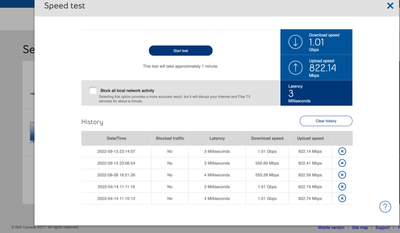
- Please share which modem you have, and a screen shot of your speed test in the modem GUI (192.168.2.1).
We hope to hear from you soon,
Options
- Mark as New
- Bookmark
- Subscribe
- Mute
- Subscribe to RSS Feed
- Permalink
- Report Inappropriate Content
04-28-2026 09:09 AM
Hello @BellPatricia
- I did originally see the expected speed increase when I tested at the modem UI
- under my package I see the promo "Fibe 3.0 speed upgrade"
- all tests done on the modem GUI
- I'm using the bell hub as the router
- I have the bell giga hub
- screenshot attached

Options
- Mark as New
- Bookmark
- Subscribe
- Mute
- Subscribe to RSS Feed
- Permalink
- Report Inappropriate Content
04-28-2026 10:39 AM
Thanks for the additional info @dubsy54321
We would like to review your Internet profile and have sent you a private message. Please check your Messages within your profile avatar in the top right corner.
Unsure how to check or send a private message? See How to send a private message
Options
- Mark as New
- Bookmark
- Subscribe
- Mute
- Subscribe to RSS Feed
- Permalink
- Report Inappropriate Content
05-13-2026 04:04 PM
So it would appear my issue was resolved. I've been getting full dl speeds since April 28th.
Issue was an error in the 'BRAS policy' and 'was still shaped at 3GB'. So just in case for all others, ask if the BRAS policy has been changed as well.

- « Previous
- Next »
Getting started
New to our forum? These guides will help you find your way around quickly.
- Welcome to the Community!
- Log in/Register
- Community guidelines
- Community help
- Meet the Moderators
- Bell Community All-Stars
- How to send a private message
- Existing customers, login to MyBell to see exclusive offers
- What's on Crave
- What's on Free Preview
- Mobility phone & device catalog
- Latest in the Community





