- Community Home
- How To's
- Internet How To's
- How to manage your connected devices with the Bell...
Options
- Subscribe to RSS Feed
- Mark as New
- Mark as Read
- Bookmark
- Subscribe
- Printer Friendly Page
- Report Inappropriate Content
27% helpful
(4/15)

BellDRock
Community Manager
Options
- Article History
- Subscribe to RSS Feed
- Mark as New
- Mark as Read
- Bookmark
- Subscribe
- Printer Friendly Page
- Report Inappropriate Content
on 08-16-2023 02:28 PM
The Bell Wi-Fi app allows you to manage and view information regarding your connected devices and their activity right from your fingertips. Here is how to view devices connected to your Wi-Fi network:
1. Open the Bell Wi-Fi app and log in with your MyBell username and password.
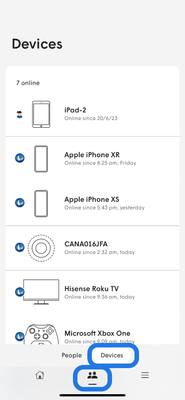
2. Touch the People icon at the bottom of the home screen.
3. Touch Devices.
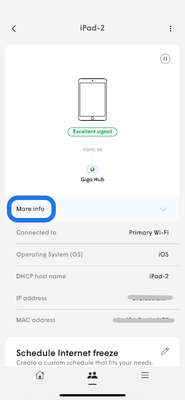
4. Select a device to learn more about it, then More info
- Under the device name, you’ll see its connection quality rating, what channel it’s on and other device details.
5. To rename a device or assign it to a user, touch the device you want to rename, and then touch the three dots in the top right corner. You can then select Nickname or Assigned to in order to edit.
 |
 |
Getting started
New to our forum? These guides will help you find your way around quickly.
- Welcome to the Community!
- Log in/Register
- Community guidelines
- Community help
- Meet the Moderators
- Bell Community All-Stars
- How to send a private message
- Existing customers, login to MyBell to see exclusive offers
- What's on Crave
- What's on Free Preview
- Mobility phone & device catalog
- Latest in the Community
Popular links


Labels
-
2.4GHz
1 -
5GHz
1 -
Bell Email
1 -
Bell Wi-Fi App
4 -
Bell Wifi App
1 -
Block
1 -
Change Feature
1 -
Check Usage
1 -
Error 1201
1 -
Error Code
1 -
Error Code 1000
1 -
Error Code 1100
1 -
Error Code 1101
1 -
Error Code 1102
1 -
Error Code 1202
1 -
Error Code 2000
1 -
Error Code 2001
1 -
Error Code 2002
1 -
Ethernet
4 -
Features
1 -
Fibe
2 -
Fibe Internet
1 -
Fibre
2 -
Giga hub
9 -
HH1000
3 -
HH2000
7 -
HH3000
10 -
HH4000
10 -
Home Hub
6 -
Home Hub 1000
1 -
Home Hub 2000
1 -
Home Hub 3000
1 -
Home Hub 4000
1 -
Internet
4 -
Internet Fibe
1 -
Internet Security
1 -
Internet Speed
2 -
Internet Usage
1 -
Manage Wi-Fi
1 -
Modem
2 -
My Bell App
2 -
MyBell
1 -
Outage
1 -
Parental Controls
1 -
Phishing
1 -
Pods
2 -
Reset Password
1 -
Service Interruption
1 -
Spam
1 -
Speed Test
2 -
Troubleshooting
1 -
Usage
1 -
Virtual Repair
2 -
Whole Home
1 -
Wi-Fi
6 -
Wi-Fi app
5 -
Wi-Fi Checkup Tool
2 -
Wi-Fi modem
4 -
Wi-Fi Pods
2 -
WiFi
2
- « Previous
- Next »