- Community Home
- Internet
- Re: Download speed drops
Options
- Subscribe to RSS Feed
- Mark Topic as New
- Mark Topic as Read
- Float this Topic for Current User
- Bookmark
- Subscribe
- Mute
- Printer Friendly Page

Options
- Mark as New
- Bookmark
- Subscribe
- Mute
- Subscribe to RSS Feed
- Permalink
- Report Inappropriate Content
09-13-2022 11:34 PM
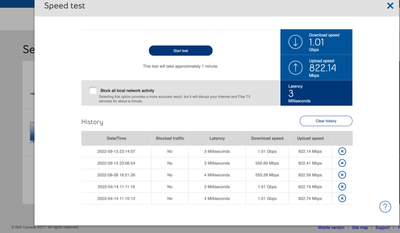
My 1 Gb download speed regularly goes down to 550 Mb, and seemed to be limited there until I restart my modem. It stays fine for a few days, but eventually seemingly goes back to the 550 Mb limits... restarting the modem re-established the download speed I am subscribed for... anyone else noticed this issue?
Solved! Go to Solution.
1
293
48.6K
2 helpful replies
Accepted Solutions

Options
- Mark as New
- Bookmark
- Subscribe
- Mute
- Subscribe to RSS Feed
- Permalink
- Report Inappropriate Content
03-27-2023 07:30 AM - last edited on 03-27-2023 09:48 AM by BellPatricia
Status update,
A big shout out to @BellPatricia for assisting me with my issue. She passed my concern to a colleague of hers and a fix was applied to my account. Not sure what the issue was or what fix was applied but I have steady 3GB up and down for the last three days. That,\'s a huge improvement from dropping out every 10 hours or so daily.
Hopefully this is the fix. I would like to know more about what the problem was if possible.
Anyhow, thanks again Patricia. Greatly appreciated.
Cheers
Options
- Mark as New
- Bookmark
- Subscribe
- Mute
- Subscribe to RSS Feed
- Permalink
- Report Inappropriate Content
03-27-2023 08:57 AM
Awesome news!
It turns out that quite a bit of clients are experiencing the same issue, I would argue most (if not all) clients do but only a select few pay attention to their internet speed. The problem seems to be with Bell's integrated solution to manage internet package for client accounts; something in the workflow overides the bandwith clients are subscribing for and it get switched to a different (typically slower) speed.
This is by now a known issue that Bell engineers can patch manually for you. I got my problem fixed at the time by reporting my issue to the https://www.dslreports.com/forum/sympatdirect. This forum is monitored by technicians and someone should be able to help relatively quickly.
I am hoping that Bell will fix this backend automation issue for good, but in the meantime I am glad to see that people like @BellPatricia are intercepting these messages and are relaying the information to the appropriate support staff!
293 REPLIES 293


Options
- Mark as New
- Bookmark
- Subscribe
- Mute
- Subscribe to RSS Feed
- Permalink
- Report Inappropriate Content
09-14-2022 09:06 AM
Hi @DoubleP ,
My speeds have been consistent. You should to talk to Bell support about your download speed issue, but first I think you should run the Virtual Repair Tool: https://support.bell.ca/Troubleshooting_tools_and_Help/Internet . It could help diagnose any problems.
I am a Community All-Star and customer. I'm here to help by sharing my knowledge and experience. My views on Bell and the Community Forum are my own and not the views of Bell or any of its affiliates.
Options
- Mark as New
- Bookmark
- Subscribe
- Mute
- Subscribe to RSS Feed
- Permalink
- Report Inappropriate Content
09-15-2022 08:25 AM
rebooting the modem restore the full speed for about 1 day. today, the modem speed test shows that the speed is throttled at 550mb once again.

Options
- Mark as New
- Bookmark
- Subscribe
- Mute
- Subscribe to RSS Feed
- Permalink
- Report Inappropriate Content
09-15-2022 08:33 AM
thank you. one of the first thing the virtual repair tool is rebooting the modem... since the download speed problem goes away for a few hours after a modem reboot, everything looks fine.
Options
- Mark as New
- Bookmark
- Subscribe
- Mute
- Subscribe to RSS Feed
- Permalink
- Report Inappropriate Content
09-17-2022 02:17 PM
Talking with a bell technician, over the chat, he initiated a firmware upgrade on the HH4000. It has been two days now, the speed is still 1Gb, as it should be. So far so good, hopefully the firmware update did the trick.
Options
- Mark as New
- Bookmark
- Subscribe
- Mute
- Subscribe to RSS Feed
- Permalink
- Report Inappropriate Content
09-17-2022 04:26 PM
Good to know there's a stable 1Gb. What firmware version are you on now? I'm still at 1.75, and an update is being pushed out.
I am a Community All-Star and customer. I'm here to help by sharing my knowledge and experience. My views on Bell and the Community Forum are my own and not the views of Bell or any of its affiliates.
Options
- Mark as New
- Bookmark
- Subscribe
- Mute
- Subscribe to RSS Feed
- Permalink
- Report Inappropriate Content
09-17-2022 06:52 PM
1.7.5 as well… I did not pay attention to what it was before, tbh. You think an update is being pushed out above this version?
Options
- Mark as New
- Bookmark
- Subscribe
- Mute
- Subscribe to RSS Feed
- Permalink
- Report Inappropriate Content
09-17-2022 09:12 PM
1.7..6 is being pushed out. I know some people have had it since the first week of September.
I am a Community All-Star and customer. I'm here to help by sharing my knowledge and experience. My views on Bell and the Community Forum are my own and not the views of Bell or any of its affiliates.
Options
- Mark as New
- Bookmark
- Subscribe
- Mute
- Subscribe to RSS Feed
- Permalink
- Report Inappropriate Content
09-20-2022 06:28 AM
nope... today it unfortunately went down again to what seems a deliberate 550 Mbs limit cap...


Options
- Mark as New
- Bookmark
- Subscribe
- Mute
- Subscribe to RSS Feed
- Permalink
- Report Inappropriate Content
09-21-2022 03:11 PM
Great work and troubleshooting guys! This definitely seems odd.
@DoubleP we've sent you a private message so we can gather more information. Please check your Messages within your profile avatar in the top right corner.
Unsure how to check or send a private message? See How to send a private message
Options
- Mark as New
- Bookmark
- Subscribe
- Mute
- Subscribe to RSS Feed
- Permalink
- Report Inappropriate Content
12-29-2022 09:12 AM
This problem is still there. I has regular drops of download speed last fall that Bell technicians believed they would fix via a modem replacement.
I received a new modem in October and I was hoping it would help resolve the stability of my 1Gbps service. Unfortunatly this isnt the case. I noticed my download speed being capped around 200mbps since novembre, I was too busy to reach out to technical service and start again the waltz of 1st level support rebooting my modem, fixing the problem for a couple of days only for having it capped again to 200mbps after a couple days.

From my screenshot, the download speed drops around the 190mbs after a few days of uptime; rebooting the modem re-instate the proper download speed, but only temporarily.
Being from the IT Infrastructure industry, I asked around if any of my collagues experienced similar issues and I was told that the fibre optic signals strenght management were problematic on Bell networks still using Huawei network switches that were not fully compatible/up to date with the modem provided in customers' household; the signal strenght monitoring between the swith and the modem was erroneous, causing the switch to downgrade signals and impacting service to my modem (systematically downgrading my download speed to a fifth of what it should be) Bell technicians who replaced these Huawey switches fixed the issue.
Hoping this insight could help solving my issue in some way
Options
- Mark as New
- Bookmark
- Subscribe
- Mute
- Subscribe to RSS Feed
- Permalink
- Report Inappropriate Content
12-29-2022 10:29 AM
Hi @DoubleP ,
Unfortunately you're not the only person who's posted about this issue lately. Have a look at this thread, in which someone describes a very similar problem.
https://forum.bell.ca/t5/Internet/Internet-Speed/td-p/11665
If the modem replacement didn't solve this, and If it's a Bell infrastructure problem you need to make a Bell engineering team aware of it.There's not much the first level of tech support can do for you, but you could call and request a conversation with a higher level of support.
If you're not making any headway then you have a couple of options:
1. Use the resolve-a-concern route. https://support.bell.ca/resolve-a-concern
2. Post the issue in the DSLR, Bell Direct forum (link below). This forum is monitored by some Bell tech employees, and they are very responsive to getting problems solved. Your post is private: the content can be seen only by you and the Bell techs. You will need to create a user account to post in this forum.
Give them very specific information, including your suspicion that a network switch may be the problem.
https://www.dslreports.com/forum/sympatdirect
Hope this helps. Keep us posted!
Cheers,
ZaneP
I don't work for Bell, I'm just a customer
I am a Community All-Star and customer. I'm here to help by sharing my knowledge and experience. My views on Bell and the Community Forum are my own and not the views of Bell or any of its affiliates.
Options
- Mark as New
- Bookmark
- Subscribe
- Mute
- Subscribe to RSS Feed
- Permalink
- Report Inappropriate Content
12-31-2022 03:38 PM
This morning, a technician came over and re-routed my fiber to a different neighbourhood connection, hoping this would help. The WAN devices in my sector are mostly Alcatel switches, so... no faulty Huawei. I doubt that the technician's action, despite his best efforts, will make a difference.
But I am still hopeful; the DSL Report tip was excellent, @ZaneP, funny enough, I have been there in the past, completely forgot about its existence... Anyhow; talking with a Bell Network engineer, he applied a temporary fix to hopefully prevent my profile to be switched to a slower speed. Apparently, under certain conditions, some Juniper appliances switch clients to a erroneous speed profile.
Options
- Mark as New
- Bookmark
- Subscribe
- Mute
- Subscribe to RSS Feed
- Permalink
- Report Inappropriate Content
12-31-2022 04:19 PM
Hi @DoubleP
Fingers crossed that the temporary fix will hold!
Your comment was very interesting:
" Apparently, under certain conditions, some Juniper appliances switch clients to a erroneous speed profile."
I know that some people have an incorrect speed profile, especially when they've upgraded their service, but I didn't know it can sometimes be caused by a Juniper appliance.
Cheers,
ZaneP
I am a Community All-Star and customer. I'm here to help by sharing my knowledge and experience. My views on Bell and the Community Forum are my own and not the views of Bell or any of its affiliates.
Options
- Mark as New
- Bookmark
- Subscribe
- Mute
- Subscribe to RSS Feed
- Permalink
- Report Inappropriate Content
12-31-2022 04:34 PM
I am hoping this will work as well.
I had a hunch that it was a speed profile bug since the first moments I noticed the very precise and consistent download speed limit adjustments (550mbps on first modem and 190mbps for the replacement modem) because each time, my upload speed remained stable and un-changed (820mbps)...
I am not sure what conditions are creating this bug, not sure if it is related to clients consumption or external factors.
The Juniper appliances needing a fix is also news to me... Hoping our friends at Bell are able to find a more permanent fix sooner than later.
Technical support scripts should also be updated in order to avoid repeating the very long troubleshooting journey I had to undertake.

Getting started
New to our forum? These guides will help you find your way around quickly.
- Welcome to the Community!
- Log in/Register
- Community guidelines
- Community help
- Meet the Moderators
- Bell Community All-Stars
- How to send a private message
- Existing customers, login to MyBell to see exclusive offers
- What's on Crave
- What's on Free Preview
- Mobility phone & device catalog
- Latest in the Community


