- Community Home
- Internet
- Re: Upgraded to 8g but not getting 8g…
Options
- Subscribe to RSS Feed
- Mark Topic as New
- Mark Topic as Read
- Float this Topic for Current User
- Bookmark
- Subscribe
- Mute
- Printer Friendly Page

Options
- Mark as New
- Bookmark
- Subscribe
- Mute
- Subscribe to RSS Feed
- Permalink
- Report Inappropriate Content
09-13-2022 11:34 PM
My 1 Gb download speed regularly goes down to 550 Mb, and seemed to be limited there until I restart my modem. It stays fine for a few days, but eventually seemingly goes back to the 550 Mb limits... restarting the modem re-established the download speed I am subscribed for... anyone else noticed this issue?
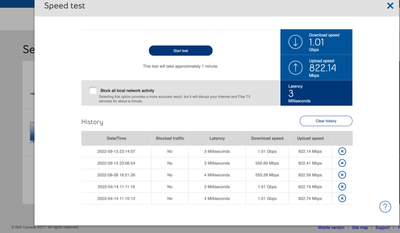
Solved! Go to Solution.
1
293
47.7K
293 REPLIES 293

Options
- Mark as New
- Bookmark
- Subscribe
- Mute
- Subscribe to RSS Feed
- Permalink
- Report Inappropriate Content
12-05-2023 05:16 PM
Hello,
Posted in DLS Reports, but trying here as per @Bell_Dom. Recently upgraded to 1.5Gbs plan with a new Gigahub. Usually works fine with advertised speeds over Ethernet, however, randomly I will be throttled to 100MBs (92 specifically). Sometimes restarting the Gigahub will fix the issue but generally it does not. All connections were double checked, directly connected to PC. Doing a speed test directly on the hub shows full speeds.
Any advice?
Thanks.

Options
- Mark as New
- Bookmark
- Subscribe
- Mute
- Subscribe to RSS Feed
- Permalink
- Report Inappropriate Content
12-06-2023 07:45 AM
Hi Everyone,
I've been with Bell for 4 years now, started with a gigabit fibe package where speeds were consistently 750 mbps but then dropped to 500.
Called technical support a few times but to no avail. Switched to 500 mb plan and speed dropped to a consistent 375mbps since then.
Now I've upgraded to the 1.5 gigabit plan but my speed download speed went up to 600 mbps, but upload is 945 mpbs (only 1 hardwired device was connected to the network when running the test).
Seems like other users on this thread have had a similar speed throttling issue, hopefully it's an easy fix.
I'm willing to provide any information required to help get this resolved once and for all.
Thanks


Options
- Mark as New
- Bookmark
- Subscribe
- Mute
- Subscribe to RSS Feed
- Permalink
- Report Inappropriate Content
12-06-2023 10:33 AM
When discussing speed testing, it's usually a good idea to also include a bit of information regarding your specific setup, if you have any. Like for example are you using a firewall, your own router, any managed switches, wired or WiFi testing etc....
It helps save time and keeps the thread shorter with relevant information.
I am a Community All-Star and customer. I'm here to help by sharing my knowledge and experience. My views on Bell and the Community Forum are my own and not the views of Bell or any of its affiliates.
Options
- Mark as New
- Bookmark
- Subscribe
- Mute
- Subscribe to RSS Feed
- Permalink
- Report Inappropriate Content
12-06-2023 05:01 PM - edited 12-06-2023 05:03 PM
You're absolutely right @Vanadiel, I should have clarified my setup situation.
My speed test was run by a direct ethernet connection from my laptop to the new Gigahub modem. All other devices, Wifi and ethernet were disconnected for the speed test (confirmed by going to the Bell modem setup page and seeing only 1 device connected to the network). Speed test was run on Speedtest.net. Connected to the 10GB port on the modem with a CAT 6 26 AWG ethernet cable. Result was 600 mpbs download, 945 mpbs upload.
Speed to my modem was 1.6 Gbps, it's the modem to device that's being throttled somehow..
While it could be that my device cannot support a higher speed, it can support 945 mbps of upload, so I would suspect to be able to get at least 945 mbps of download.
I am happy to provide more information to help you better understand my situation.
Options
- Mark as New
- Bookmark
- Subscribe
- Mute
- Subscribe to RSS Feed
- Permalink
- Report Inappropriate Content
12-06-2023 05:12 PM - edited 12-06-2023 05:14 PM
Internet speed tests are hit and miss. Download being slower than upload is common. Depends often on congestion in your area. Typically a lot more download bandwidth is consumed than upstream bandwidth.
A good way if you have the ability, is to test from LAN to LAN using 2 computers and transferring files between them.
That should give you your actual device capabilities. That way you can determine if the issue is with the modem (highly unlikely), or with the internet speed test site (more likely).
I am a Community All-Star and customer. I'm here to help by sharing my knowledge and experience. My views on Bell and the Community Forum are my own and not the views of Bell or any of its affiliates.

Options
- Mark as New
- Bookmark
- Subscribe
- Mute
- Subscribe to RSS Feed
- Permalink
- Report Inappropriate Content
12-07-2023 08:42 AM - edited 12-07-2023 08:51 AM
I went a full month on 1.19.5.4 and was perfect. Now on 1.19.6. I had tv freezing and called into Bell. They seems to fix that but find my wifi speed is slower when doing tests for. What it was on previous version. When I use app to do wifi check up it says I am not on speed does not match your profile. So some of the same issues appear to have returned before 1.19.5.4

Options
- Mark as New
- Bookmark
- Subscribe
- Mute
- Subscribe to RSS Feed
- Permalink
- Report Inappropriate Content
12-11-2023 05:35 PM - edited 12-11-2023 05:36 PM
same thing here 3 modem later 5 tec visit and soon 2 month going round and round
apparently its a platform migration problem
this is sad 😔
Options
- Mark as New
- Bookmark
- Subscribe
- Mute
- Subscribe to RSS Feed
- Permalink
- Report Inappropriate Content
12-11-2023 05:50 PM - edited 12-11-2023 05:50 PM
WOW practicly the same thing started mid October and still no fix
can you help me plz
Options
- Mark as New
- Bookmark
- Subscribe
- Mute
- Subscribe to RSS Feed
- Permalink
- Report Inappropriate Content
12-12-2023 08:30 PM - edited 12-12-2023 08:53 PM
Hello @BellPatricia
Back in May/June 2023, I experienced a recurrent speed drop issue on my Fibe Gigabit 3.0 connection where the download speed would suddenly get stucked at 60-100mbps and the only workaround to fix the issue was to manually reboot the modem, but then the issue would occurs again after a few days. At that time, I decided to post on DSLReports Forem under Bell Canada Direct and immediately got the help of an amazing staff (@Bell_Dom) who knew exactly what was the problem and how to fix it.
@Bell_Dom told me that there was a known bug on one of the equipment on Bell's side that would assign a wrong downstream speed policy to some customers. To prevent or reduce the chance of this bug from happening again, he applied a fix on his side to force the right speed profile on my line. This fixed my speed drop issue for about 6 months but unfortunately, since the last 2 weeks, I start getting this problem again and it's happening even more often than before.
Now I don't know where to contact to get my issue fixed since they decided to stop providing assistance via Bell Canada Direct Forum on DSLReports, so I am trying my shot here. I would really appreciate if a Moderator could put me in contact with an Engineer or Technical agent to help me again with this issue.
Thank you


Options
- Mark as New
- Bookmark
- Subscribe
- Mute
- Subscribe to RSS Feed
- Permalink
- Report Inappropriate Content
12-13-2023 06:05 PM
Hi there @MTY2503
Thank you for your post and welcome to the Community.
Are you able to share where you are testing your speeds?
Is the speed drop on WiFi or ethernet connection and have you tested both?
Are you able to share a screenshot of a speed test from the modem?
Are you using any third party equipment such as a router?
Looking forward to hearing back.
Options
- Mark as New
- Bookmark
- Subscribe
- Mute
- Subscribe to RSS Feed
- Permalink
- Report Inappropriate Content
12-13-2023 08:26 PM - edited 12-13-2023 08:27 PM
hi so im taking the reading of the connection speed in reel time on my PC
and on mobile in wifi parameter most time my mobile get drop to 2.4 att 72 mpbs evane now whit 2 pods im in a plain bungalow no phical barrior and max when att far 15 maby 20 feet from hub and 10 feet max from a pod
and i acutely upgraded my network card on my laptop to have 2.4_5 and 6 frequency to try and help
then bell push a update on my hub 2 days ago and now 6 dosent work even whit the pods so tec support gonna need to check whit engineer again
and most time with speed test i get high upload and lo download anywhere from 150mpb down 7 or 800 + -up to 400+ - - down always high upload ans crap download
im att 1.2gb whit wifi and constant flux in speed most time att the same repeat speeds and hard weird connection att 1.gbs patch in 10g port
i have difficulty running spotify and getting no result
i have sent a msg to management in last ditch effort (and here in forum) and sadly will be leaving bell if no result in the next days
Options
- Mark as New
- Bookmark
- Subscribe
- Mute
- Subscribe to RSS Feed
- Permalink
- Report Inappropriate Content
12-14-2023 05:46 PM
Hi there @MTY2503
Whereas you've indicated you spoke with our technical support team, did they indicate any timeframe or advise when they would get back to you?
Options
- Mark as New
- Bookmark
- Subscribe
- Mute
- Subscribe to RSS Feed
- Permalink
- Report Inappropriate Content
12-14-2023 06:05 PM
yes resolution experts was suppose to call me back yesterday and tec support today
not surprise att this point att least 4 case manger and 2 tec support have said they where gonna fallow my case and get back to me and ZIP
i will say that this is a first whit this third tec support he is one of the only one that acutely follows up
so ya i'm left hanging AGAIN

Options
- Mark as New
- Bookmark
- Subscribe
- Mute
- Subscribe to RSS Feed
- Permalink
- Report Inappropriate Content
12-15-2023 01:57 PM
Hello @BellPatricia @Bell_Dom,
I've recently had a technician visit and set up my Bell Pure Fibre Connection. Everything on his end was good i.e. signal strength etc. However, the speeds I'm getting are nowhere near what I am paying for. I am paying for 1500 DOWN/ 940 UP.
After running multiple tests I get the following results:

I would be really grateful if you could get in touch with me to help with this issue.

Options
- Mark as New
- Bookmark
- Subscribe
- Mute
- Subscribe to RSS Feed
- Permalink
- Report Inappropriate Content
12-15-2023 02:34 PM
Hi @KalJay,
Thanks for reaching out, and welcome to the Bell Community 🙂
We want to take a look, and we have sent you a private message so we can get some more information. Please check your Messages within your profile avatar in the top right corner.
Unsure how to check or send a private message? See How to send a private message
- Patricia

Getting started
New to our forum? These guides will help you find your way around quickly.
- Welcome to the Community!
- Log in/Register
- Community guidelines
- Community help
- Meet the Moderators
- Bell Community All-Stars
- How to send a private message
- Existing customers, login to MyBell to see exclusive offers
- What's on Crave
- What's on Free Preview
- Mobility phone & device catalog
- Latest in the Community


