- Community Home
- Internet
- Download speed drops
Options
- Subscribe to RSS Feed
- Mark Topic as New
- Mark Topic as Read
- Float this Topic for Current User
- Bookmark
- Subscribe
- Mute
- Printer Friendly Page

Options
- Mark as New
- Bookmark
- Subscribe
- Mute
- Subscribe to RSS Feed
- Permalink
- Report Inappropriate Content
09-13-2022 11:34 PM
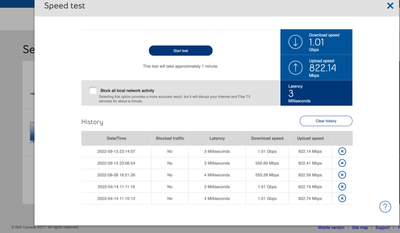
My 1 Gb download speed regularly goes down to 550 Mb, and seemed to be limited there until I restart my modem. It stays fine for a few days, but eventually seemingly goes back to the 550 Mb limits... restarting the modem re-established the download speed I am subscribed for... anyone else noticed this issue?
Solved! Go to Solution.
1
293
49.9K
293 REPLIES 293

Options
- Mark as New
- Bookmark
- Subscribe
- Mute
- Subscribe to RSS Feed
- Permalink
- Report Inappropriate Content
09-29-2024 02:08 PM
Hello,
Recently, I upgraded my package from Gigabit Fibe 1.5 to Gigabit Fibe 3.0. an issue with not having the same download and upload speed with an ethernet (wired) connection. I have the same problem, my upload speed is much slower than the download speed.
My download speed is 2,367.4 Mbps and my upload speed is 761.9 Mbps.
I have contacted Bell support multiple times. A technician in person and remote technicians were unable to provide any solution.
I have disconnected all the devices (WiFis) to my modem and these reports are the results of having only an ethernet-wired connection to my bell modem.
@BellPatricia I look forward to your support to resolve this issue.




Options
- Mark as New
- Bookmark
- Subscribe
- Mute
- Subscribe to RSS Feed
- Permalink
- Report Inappropriate Content
09-29-2024 02:20 PM
Can't see the pictures as they will take a while to show up, but is this is a speed test from within the modem, or using an external speed test site?
I am a Community All-Star and customer. I'm here to help by sharing my knowledge and experience. My views on Bell and the Community Forum are my own and not the views of Bell or any of its affiliates.
Options
- Mark as New
- Bookmark
- Subscribe
- Mute
- Subscribe to RSS Feed
- Permalink
- Report Inappropriate Content
09-29-2024 04:34 PM
The pictures I believe are loaded now 🙂
One is in the modem itself for the test and the other speed test was done at https://bellcanada.speedtestcustom.com/
Options
- Mark as New
- Bookmark
- Subscribe
- Mute
- Subscribe to RSS Feed
- Permalink
- Report Inappropriate Content
09-29-2024 05:27 PM
I cannot see them yet, but when doing a test from a device other than the modem, I would recommend using the speedtest desktop application to avoid web browser issues.
I am a Community All-Star and customer. I'm here to help by sharing my knowledge and experience. My views on Bell and the Community Forum are my own and not the views of Bell or any of its affiliates.
Options
- Mark as New
- Bookmark
- Subscribe
- Mute
- Subscribe to RSS Feed
- Permalink
- Report Inappropriate Content
09-29-2024 09:59 PM
Thanks for pointing me out. The results are the same the download speed is higher than the upload with a massive difference. As I mentioned earlier, unfortunately, My download speed is around 2,300 more or less Mbps and my upload speed is 750 more or less Mbps with Gigabit Fibe 3.0.
Options
- Mark as New
- Bookmark
- Subscribe
- Mute
- Subscribe to RSS Feed
- Permalink
- Report Inappropriate Content
09-30-2024 12:54 PM
Modem profile looks good, so the issue must be the data connection. I have a similar issue where I can only reach around 300-400 Mbps upstream instead of the 940 Mbps it used to be at the beginning.
A Bell representative will pick up this thread and help you figure it out.
I am a Community All-Star and customer. I'm here to help by sharing my knowledge and experience. My views on Bell and the Community Forum are my own and not the views of Bell or any of its affiliates.

Options
- Mark as New
- Bookmark
- Subscribe
- Mute
- Subscribe to RSS Feed
- Permalink
- Report Inappropriate Content
09-30-2024 02:41 PM
I've had 3Gbps Fibe internet since July 2023.
I have a Cat5e ethernet network so I've been receiving consistent and reliable symmetrical 2.3Gbps D/L and 2.3 Gbps U/L (1ms ping, 0ms jitter) since day one (which is what I should expect with my configuration).
However, I noticed recently that my D/L speed is now 1.8Gbps, while upload remains the same. I've swapped out cables and even directly connected to the 10Gbps port, with no change.
HH4000 (Giga Hub Firmware v. 2.3) speed check reports 3Gbps symmetrical but all other measurement tools report the same downgraded D/L.
Am I being throttled or is their a defect with my Giga Hub?
Thanks, in advance.
Carbon14
Options
- Mark as New
- Bookmark
- Subscribe
- Mute
- Subscribe to RSS Feed
- Permalink
- Report Inappropriate Content
09-30-2024 05:58 PM
If the speed test directly from the modem shows your profile speed (3/3) then it's not a connection issue.
That leaves only a few possibilities:
- Speed test site congestion.
- Device is unable to reach projected speed.
- Network is congested.
I am a Community All-Star and customer. I'm here to help by sharing my knowledge and experience. My views on Bell and the Community Forum are my own and not the views of Bell or any of its affiliates.
Options
- Mark as New
- Bookmark
- Subscribe
- Mute
- Subscribe to RSS Feed
- Permalink
- Report Inappropriate Content
09-30-2024 06:38 PM - edited 09-30-2024 06:39 PM
Hi @Vanadiel - thank you for your response. While I'd tend to agree with your hypotheses in isolation, they don't quite jibe with my experience. And please, take my response as an attempt to resolve my issue, and not simply arguing 😄
I appreciate you are trying to help me.
1. Speed site congestion - if this is the case then all the speed sites are congested. Until 2 months ago, I achieved the expected speed for more than a year. 2 months of congestion seems unlikely.
2. Device is unable to reach the speed - the device (MacBook Pro) achieved the speeds for just over a year, regularly, relentlessly, flawlessly.
3. Network congestion - if you mean internal network, that's not possible. If you mean external, again, that means these sites have been overloaded for months, which does not seem likely.
I am not convicted that the modem reporting its internal optical results as 3/3 is necessarily what it is allowing out through the ethernet port. That's something I'd love to know.
More-so: what I'd really LOVE is for a Bell technician to review my account/access and verify I am not inadvertently under any throttling policy/profile. It just doesn't make sense to lose +300Mbps speed for no reason.
Sincerely,
C14
Options
- Mark as New
- Bookmark
- Subscribe
- Mute
- Subscribe to RSS Feed
- Permalink
- Report Inappropriate Content
09-30-2024 07:26 PM
With network congestion, I was referring to internet congestion locally. In the end each customer line get's put together with x amount of traffic from other customer lines, as nobody has their own private connection to the internet.
There used to be a lot of discussion about this back in the day with the DSL versus cable internet arguments, where the argument was that DSL is individual to each customer and cable was shared with multiple other customers in the area so therefore DSL was better as it was not shared. Practically the DSL channels would be bundled at some point anyways, so in the end it's really the same locally.
I have the same thing happening to me. I used to get a perfect 944 Mbps upstream for the first 6 months or so. For the past few years I am lucky if I can get 400 Mbps upstream. I have tried everything, including completely removing the home hub from the equation and use the fibre line directly into my own equipment using the Bell supplied GPON module for the actual fibre connection.
Guess what: still limited to 400 Mbps.
So my conclusion is that there's not enough bandwidth available in my area for the upstream channels and therefore it's now 400 Mbps. I don't see any other explanation for it as I removed everything from the equation that can be removed.
So I am thinking you are in a similar boat, as your speed test from within the modem shows correct profile speed. Mine does the same btw, modem speed test is a perfect 1.5/1. Practically it reaches 1.5/0.4 though, and trust me I tried everything.
Bell does not throttle connections btw, so once you rule out everything else it's "network congestion". They do prioritize certain network traffic once congestion is reached: Internet traffic Management Practices.
I am a Community All-Star and customer. I'm here to help by sharing my knowledge and experience. My views on Bell and the Community Forum are my own and not the views of Bell or any of its affiliates.
Options
- Mark as New
- Bookmark
- Subscribe
- Mute
- Subscribe to RSS Feed
- Permalink
- Report Inappropriate Content
09-30-2024 07:50 PM
Man!
"my conclusion is that there's not enough bandwidth available in my area"
This might be it ... !
<I'll pursue. BELL tech: please check>
Options
- Mark as New
- Bookmark
- Subscribe
- Mute
- Subscribe to RSS Feed
- Permalink
- Report Inappropriate Content
10-01-2024 11:06 AM
After sleeping on this, @Vanadiel I think you are most likely right. There's been a big sales push in the neighbourhood in the last year and your explanation is most plausible. I got the idea of throttling from the Fibe 1.5 ads, which show asynchronous transmission; I supposed that might be the explanation for my situation. But I think your conclusion is correct. Thanks for taking the time to help.
C14

Options
- Mark as New
- Bookmark
- Subscribe
- Mute
- Subscribe to RSS Feed
- Permalink
- Report Inappropriate Content
10-03-2024 09:25 AM
Hi @BellPatricia & @BellNick,
I'm also having a similar issue. I'm subscribed to the 3.0 gbps service but I can't seem to get beyond 1.73 gbps for download. I've talked to Bell customer service and they want to send me a new modem but from what I'm reading on reddit as well as this forum, it seems that it needs an engineer to fix as there is a speed profile bug that keeps assigning me the incorrect speed profile.
When I test at the Gigahub, I get similar results - very unsymmetrical speeds where the upload far surpasses what I am supposed to get.
The following is from my UDM Pro. It doesn't make a different if I offload PPoE to my UDM Pro or use aDMZ on the gigahub.
I'm happy to message you privately my b1 identification if needed - just let me know.
Thanks.


Options
- Mark as New
- Bookmark
- Subscribe
- Mute
- Subscribe to RSS Feed
- Permalink
- Report Inappropriate Content
10-03-2024 05:55 PM - last edited on 10-04-2024 10:40 AM by BellNick
Hello @BellPatricia & @BellNick,
I'm also having a similar issue. This is not the first time, as it happened last year as well but it was eventually fixed.
I'm subscribed to the 3.0 gbps service but my service does not achieve this speed on the Gigahub download speed test. My service was good in the past clocking in at 3.25/3.22 Gbit. You can see my most recent Gigahub test results below. I tried to reset the modem several times and this did not make any difference. Could you please look into this issue for me? Thank you kindly.
History
Delete history
Date / Time Traffic blocked Latency Downstream speed Upstream speed
| 2024-10-03 17:43:44 | Yes | 2 Milliseconds | 1,66 Gbit/s | 3,21 Gbit/s |
|
| 2024-10-03 17:42:56 | Yes | 2 Milliseconds | 2,63 Gbit/s | 3,20 Gbit/s |
|
| 2024-09-30 23:06:51 | Yes | 1 Milliseconds | 2,25 Gbit/s | 3,21 Gbit/s |
|
| 2024-09-30 23:02:26 | Yes | 1 Milliseconds | 1,44 Gbit/s | 3,21 Gbit/s |
|
| 2024-09-30 23:01:32 | Yes | 1 Milliseconds | 2,71 Gbit/s | 3,21 Gbit/s |
|
| 2024-09-30 22:59:31 | Yes | 1 Milliseconds | 1,99 Gbit/s | 3,20 Gbit/s |
|
| 2023-11-17 11:49:23 | Yes | 1 Milliseconds | 3,25 Gbit/s | 3,22 Gbit/s |

Options
- Mark as New
- Bookmark
- Subscribe
- Mute
- Subscribe to RSS Feed
- Permalink
- Report Inappropriate Content
10-04-2024 10:37 AM
Hi there @Flywheel
Thank you for your post.
Are you able to share a speed test result performed directly through the modem (without any third party equipment connected)?
Looking forward to hearing back.

Getting started
New to our forum? These guides will help you find your way around quickly.
- Welcome to the Community!
- Log in/Register
- Community guidelines
- Community help
- Meet the Moderators
- Bell Community All-Stars
- How to send a private message
- Existing customers, login to MyBell to see exclusive offers
- What's on Crave
- What's on Free Preview
- Mobility phone & device catalog
- Latest in the Community


