- Community Home
- Internet
- Download speed drops
Options
- Subscribe to RSS Feed
- Mark Topic as New
- Mark Topic as Read
- Float this Topic for Current User
- Bookmark
- Subscribe
- Mute
- Printer Friendly Page

Options
- Mark as New
- Bookmark
- Subscribe
- Mute
- Subscribe to RSS Feed
- Permalink
- Report Inappropriate Content
09-13-2022 11:34 PM
My 1 Gb download speed regularly goes down to 550 Mb, and seemed to be limited there until I restart my modem. It stays fine for a few days, but eventually seemingly goes back to the 550 Mb limits... restarting the modem re-established the download speed I am subscribed for... anyone else noticed this issue?
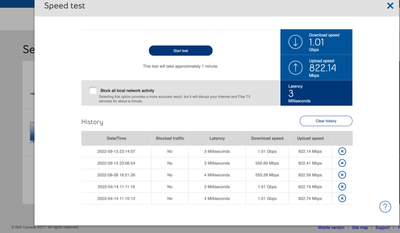
Solved! Go to Solution.
1
293
48.8K
293 REPLIES 293

Options
- Mark as New
- Bookmark
- Subscribe
- Mute
- Subscribe to RSS Feed
- Permalink
- Report Inappropriate Content
12-17-2024 04:16 PM - last edited on 12-18-2024 05:40 PM by BellPatricia
I'm experiencing the same issue. My internet speed initially starts between 800-900 Mbps but then drops dramatically. I've read that this is a known issue and may require a Bell engineer to update customer accounts. I've already spoken to several Bell technicians, but no one has been able to resolve the problem. Could you please point me in the right direction?
Thank you!

Options
- Mark as New
- Bookmark
- Subscribe
- Mute
- Subscribe to RSS Feed
- Permalink
- Report Inappropriate Content
12-19-2024 12:27 PM
Hi there @Montreal1
Thanks for reaching out to the Bell Community 🙂
Can you clarify which Internet package & modem you have and if you are connected via Ethernet or Wi-Fi?
Please also share a speed test with us so we can check it out further.
Options
- Mark as New
- Bookmark
- Subscribe
- Mute
- Subscribe to RSS Feed
- Permalink
- Report Inappropriate Content
12-19-2024 01:03 PM
Hi Patricia
I have a Gigabyte fiber connection with 2 Bell Pods.
- When downloading on my PC, the speed is erratic:
- Starts at 900-800 Mbps for the first 5 minutes.
- Drops to 600 Mbps in the next 5 minutes.
- Drops further to between 300-100 Mbps.
- Then it drops to between 50-10 Mbps.
The modem either stays in this state or loses connection (red modem light with no error code). A reboot is required to restore the speed, but the problem reoccurs.
If the modem doesn't hang, I still need to reboot it to restore the speed.
Bell Technician asked me to reset the configuration(Dec 17), but this made things worse. Now, I can’t even update my WiFi settings on the router home page. As a result, they issues a new modem Giga Hub 4000
I’ve received a new modem (Giga Hub 4000) yesterday Dec 18. Will be installing it today(Dec 19) around 4pm.
The issue with the speed has been ongoing, even before the reset configuration(FYI I've gone through 3 modems now).
I'm guessing it has something to do with my account setup on Bell's end.
I’m looking for guidance on how to resolve this issue.
Options
- Mark as New
- Bookmark
- Subscribe
- Mute
- Subscribe to RSS Feed
- Permalink
- Report Inappropriate Content
12-20-2024 05:27 PM
Hi there @Montreal1
Thank you for the additional information.
Which configurations did the Bell Technician ask you to reset, and are you using any third party equipment such as a router?
Have you had any more trouble since you installed the new modem yesterday?
Options
- Mark as New
- Bookmark
- Subscribe
- Mute
- Subscribe to RSS Feed
- Permalink
- Report Inappropriate Content
12-20-2024 05:36 PM
They asked me to do a hard reset on the Modem.
Regardless, I installed the new Gigabit router yesterday.
Ran a test. For the first 15mins it held steady between 500 to 800mps.
After that, same issue as before. It dropped down to 100, 50 and the 0.
It's completely frustrating.
Options
- Mark as New
- Bookmark
- Subscribe
- Mute
- Subscribe to RSS Feed
- Permalink
- Report Inappropriate Content
12-23-2024 10:30 AM
Hey there @Montreal1 🙂
Is that the speed to your modem, or to your device?
As previously requested please share a screen shot of your speed test from the modem GUI, and let us know if you are using any third party equipment (e.g. router, switch, Ethernet adapter etc).
Thank you,

Options
- Mark as New
- Bookmark
- Subscribe
- Mute
- Subscribe to RSS Feed
- Permalink
- Report Inappropriate Content
02-12-2025 07:29 PM
Good evening, I had a bad windstorm and had to get techs nonstop trying to fix my net. My internet had work for a week but my speed is capped at 95 mbps. I am paying for 1.5gb @BellPatricia may you please help me and thank you!

Options
- Mark as New
- Bookmark
- Subscribe
- Mute
- Subscribe to RSS Feed
- Permalink
- Report Inappropriate Content
02-13-2025 11:15 AM
I had the same problem for most of the year, and somehow I got lucky with the correct CSR that was thinking outside the box. They ran test, exchanged the modem, same issue after modem swap with the correct profile applied, and determined it was terminal equipment for the area, shortly after a week or so the terminal equipment was changed out, and speed went back to what I was paying for.
Options
- Mark as New
- Bookmark
- Subscribe
- Mute
- Subscribe to RSS Feed
- Permalink
- Report Inappropriate Content
02-14-2025 02:34 PM
Hi @Johnston90
Thank you for reaching out to the Bell Community.
Has the service outage in your area been resolved? If you are still experiencing slow speeds please let us know, and be sure to share a screen shot of your speed test from the modem GUI (192.168.2.1).
Hope to hear from you soon,
Options
- Mark as New
- Bookmark
- Subscribe
- Mute
- Subscribe to RSS Feed
- Permalink
- Report Inappropriate Content
02-14-2025 04:47 PM
I called support and they sent me a new modem and i just ran a speed test and am only still getting 95.mbps.

Options
- Mark as New
- Bookmark
- Subscribe
- Mute
- Subscribe to RSS Feed
- Permalink
- Report Inappropriate Content
02-16-2025 12:08 PM
@BellPatricia and yes the internet is back up. With the same capped 95mbps even though I'm on a 1.5gb plan.

Options
- Mark as New
- Bookmark
- Subscribe
- Mute
- Subscribe to RSS Feed
- Permalink
- Report Inappropriate Content
02-18-2025 11:40 AM
Hi there @Johnston90
We'd like to take a closer look into this and have sent you a private message.
Please check your Messages within your profile avatar in the top right corner.
Unsure how to check or send a private message? See How to send a private message
Options
- Mark as New
- Bookmark
- Subscribe
- Mute
- Subscribe to RSS Feed
- Permalink
- Report Inappropriate Content
02-18-2025 01:44 PM
I believe the root cause to the speed drops reported by everyone is to do with the terminal equipment servicing the affected neighborhoods. Since the replacement of the terminal equipment for our neighborhood my speed has been consistent at 7Gbps to 8Gbps since then.

Options
- Mark as New
- Bookmark
- Subscribe
- Mute
- Subscribe to RSS Feed
- Permalink
- Report Inappropriate Content
03-07-2025 09:03 PM - last edited on 03-08-2025 11:26 AM by BellNick
I have bell fibre 3.0
It has been running at 45mbs during the day, I am the only person on it. I work for a Engineering Company at home, its so bad I cant even hear what thye are saying in the meetings. This has been like this for a Month.
Each time I asked for help, they would do something on thier end, and temp fix it, 1/2 hour later back to 45mbs, I have spent a total of 8 hours+ talking to people from bell, they sent me a new modem, worked for a short time ( around hour ), then back to 45mbs, went thru this same routine 6 or 7 times with bell. Finally sent a Tech, he did some stuff, worked long enough to watch him leave my house, then back to 45mbs. I called and tried to get him back as he just left, but they booked another apt for tommorrow, I assume the same thing will happen, I think I am going to post on Face book and get others on my street to check thier speed, if the tech cant correct tommorrow, I will be going back to Cogeco, I will loose my job if I am unable to use my Internet. And yes, I have tried differnt adapters only so they could not say it was my adapter, nothing helps.


Options
- Mark as New
- Bookmark
- Subscribe
- Mute
- Subscribe to RSS Feed
- Permalink
- Report Inappropriate Content
03-08-2025 01:52 PM
When the speed is 45 Mbps, do a speed test from within the modem.
This should show your profile speed, 3/3. This will provide insight if it's a profile issue, or a network issue.
I am a Community All-Star and customer. I'm here to help by sharing my knowledge and experience. My views on Bell and the Community Forum are my own and not the views of Bell or any of its affiliates.

Getting started
New to our forum? These guides will help you find your way around quickly.
- Welcome to the Community!
- Log in/Register
- Community guidelines
- Community help
- Meet the Moderators
- Bell Community All-Stars
- How to send a private message
- Existing customers, login to MyBell to see exclusive offers
- What's on Crave
- What's on Free Preview
- Mobility phone & device catalog
- Latest in the Community


