- Community Home
- Internet
- Re: How do i recover my sympatico password
Options
- Subscribe to RSS Feed
- Mark Topic as New
- Mark Topic as Read
- Float this Topic for Current User
- Bookmark
- Subscribe
- Mute
- Printer Friendly Page

Options
- Mark as New
- Bookmark
- Subscribe
- Mute
- Subscribe to RSS Feed
- Permalink
- Report Inappropriate Content
08-27-2024 03:17 PM - last edited on 09-03-2024 04:49 PM by BellPatricia
0
8
6,859
2 helpful replies
Accepted Solutions


Options
- Mark as New
- Bookmark
- Subscribe
- Mute
- Subscribe to RSS Feed
- Permalink
- Report Inappropriate Content
08-27-2024 06:07 PM
Good Day & Welcome to the Bell Community Forum.
Could you please elaborate & explain: How do I recover my Sympatico password? If you are using a web browser, to access your webmail, you can do so by logging in to: https://webmail.bell.net/
At the login screen, there is an option to select: I forgot my Email Address or Password. Select > Password. This will open up another web link: Log in to MyBell . Select > this link. This will take you to the web page: Manage email address(es). Follow the onscreen instructions to change your password & save this change.
If more convenient, you can also change your email password by logging in to your MyBell account. Select > My profile. Select > MyBell. Scroll down the Services list & select > Internet. On the right side of the page, select > Manage your Bell email addresses. Select > Edit. Once again, follow the onscreen directions.
Take care.
I am a Community All-Star and customer. I'm here to help by sharing my knowledge and experience. My views on Bell and the Community Forum are my own and not the views of Bell or any of its affiliates.

Options
- Mark as New
- Bookmark
- Subscribe
- Mute
- Subscribe to RSS Feed
- Permalink
- Report Inappropriate Content
04-14-2025 09:36 AM - edited 04-14-2025 09:37 AM
Hi there @TheHashmonkey
Thank you for your post and welcome to the Bell community.
Are you able to share at what point you are experiencing the issue?
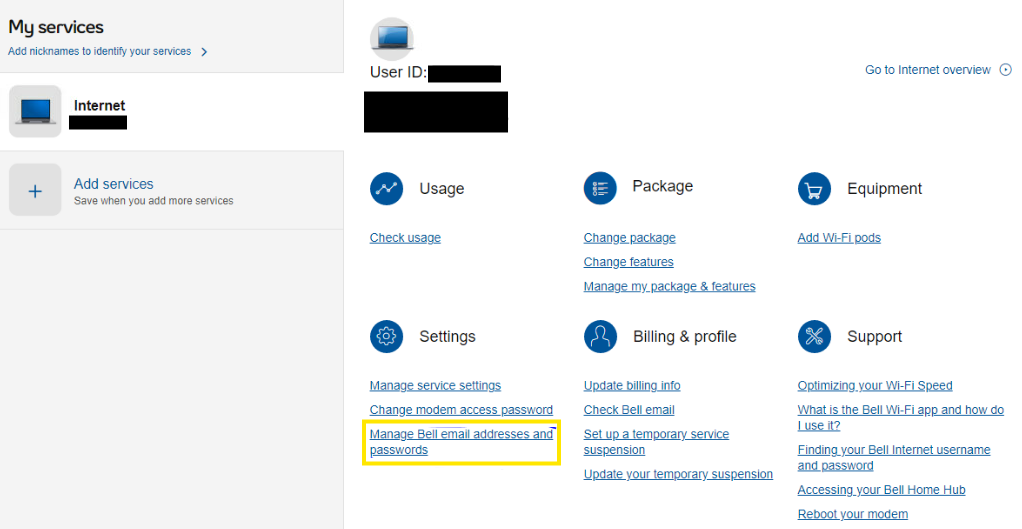
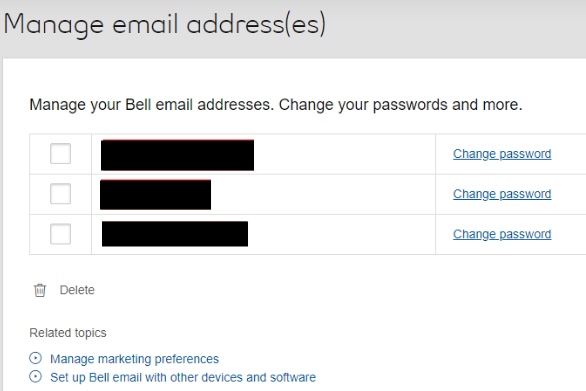
You can also attempt the following: Log in to your MyBell profile, select your internet service from the My services section, then select Manage Bell email addresses and passwords. From there you will see your active email addresses with a Change password link beside each one.
Let us know how everything goes,
8 REPLIES 8
Options
- Mark as New
- Bookmark
- Subscribe
- Mute
- Subscribe to RSS Feed
- Permalink
- Report Inappropriate Content
08-27-2024 06:07 PM
Good Day & Welcome to the Bell Community Forum.
Could you please elaborate & explain: How do I recover my Sympatico password? If you are using a web browser, to access your webmail, you can do so by logging in to: https://webmail.bell.net/
At the login screen, there is an option to select: I forgot my Email Address or Password. Select > Password. This will open up another web link: Log in to MyBell . Select > this link. This will take you to the web page: Manage email address(es). Follow the onscreen instructions to change your password & save this change.
If more convenient, you can also change your email password by logging in to your MyBell account. Select > My profile. Select > MyBell. Scroll down the Services list & select > Internet. On the right side of the page, select > Manage your Bell email addresses. Select > Edit. Once again, follow the onscreen directions.
Take care.
I am a Community All-Star and customer. I'm here to help by sharing my knowledge and experience. My views on Bell and the Community Forum are my own and not the views of Bell or any of its affiliates.

Options
- Mark as New
- Bookmark
- Subscribe
- Mute
- Subscribe to RSS Feed
- Permalink
- Report Inappropriate Content
03-21-2025 06:08 PM
Hi There. I have a similar issue. I've tried both of these options but I do not see the "Internet" option on my Services list. It isn't there. I've been playing with this for hours and I cannot see anywhere where I can edit my email addressees.
Options
- Mark as New
- Bookmark
- Subscribe
- Mute
- Subscribe to RSS Feed
- Permalink
- Report Inappropriate Content
03-21-2025 06:34 PM
Good Day & Welcome to the bell Community Forum.
If you have an existing Bell email address, you are able to continue to use it as long as it is maintained on an active account. You will need to maintain a Bell Internet account or a Bell Mobility account device with data, e.g. Turbo Hub, Turbo Stick or MiFi on a continuous basis.
If you have cancelled your Bell Internet service: your Bell email address can no longer be used / accessed, and all emails will be lost. In order to transfer an existing Bell email address to a different account, you would need to get in touch with Bell Customer Service. "You need to do this prior to disconnecting your Internet service." This cannot be completed after the service is disconnected.
If you deleted it or wish to change it to another email address or move it to another account, this cannot be done. You can no longer add a new Bell email address.
You mentioned that you do not have an Internet account linked to your MyBell account. Do you have an internet account with Bell? If so, do you an active email address? If so, then, to access your webmail, you can do so by logging in to: https://webmail.bell.net/
At the login screen, there is an option to select: I forgot my Email Address or Password. Select > Password. This will open up another web link: Log in to MyBell . Select > this link. This will take you to the web page: Manage email address(es). Follow the onscreen instructions to change your password & save this change.
Let us know if we can be of further assistance.
Take care.
I am a Community All-Star and customer. I'm here to help by sharing my knowledge and experience. My views on Bell and the Community Forum are my own and not the views of Bell or any of its affiliates.

Options
- Mark as New
- Bookmark
- Subscribe
- Mute
- Subscribe to RSS Feed
- Permalink
- Report Inappropriate Content
04-12-2025 11:15 AM
This doesn’t work it just keeps cycling you through the same web pages and app it’s so frustrating just put a link in the support that says email password reset
Options
- Mark as New
- Bookmark
- Subscribe
- Mute
- Subscribe to RSS Feed
- Permalink
- Report Inappropriate Content
04-12-2025 01:43 PM
Good Day.
Thank you for your reply. I do not work for Bell! I am only a community member as you are, trying to assist in solving your problem. I have checked, double checked & retested all of the links and instructions that are included in my previous replies. The links as shown do work as they should.
- Have you continuously maintained a Bell Internet account or a Bell Mobility account device with data,
- If yes, do you have an active Bell email account?
- If yes, are you are using a web browser, to access your webmail? If no, then please open a web browser.
- Which browser are you using? Is it up to date?
- Have you cleared your cache, cookies, history, etc.?
- Have you closed your browser, restarted your computer, device, etc.
- Have you tried to access the web link I have provided with a different browser? Edge vs Chrome or vice versa
- Please verify that you are using your MyBell Username & Password to login.
Please follow these instructions.
- Open your web browser: copy & paste or enter the following web link into the location address bar at the top of page in your web browser: https://webmail.bell.net/ (This will take you to the Bell email login page.)
- At the login screen, there is an option to select: I forgot my Email Address or Password. Please Select > Password.
- This will open up another web link: Log in to MyBell . Select this link.
- Log in to MyBell with your Username and Password.
- This will take you to the web page: Manage email address(es). Follow the onscreen instructions to change your password & save this change.
Take care.
I am a Community All-Star and customer. I'm here to help by sharing my knowledge and experience. My views on Bell and the Community Forum are my own and not the views of Bell or any of its affiliates.
Options
- Mark as New
- Bookmark
- Subscribe
- Mute
- Subscribe to RSS Feed
- Permalink
- Report Inappropriate Content
04-14-2025 09:36 AM - edited 04-14-2025 09:37 AM
Hi there @TheHashmonkey
Thank you for your post and welcome to the Bell community.
Are you able to share at what point you are experiencing the issue?
You can also attempt the following: Log in to your MyBell profile, select your internet service from the My services section, then select Manage Bell email addresses and passwords. From there you will see your active email addresses with a Change password link beside each one.
Let us know how everything goes,
Options
- Mark as New
- Bookmark
- Subscribe
- Mute
- Subscribe to RSS Feed
- Permalink
- Report Inappropriate Content
04-29-2025 10:52 AM - last edited on 04-29-2025 10:53 AM by BellPatricia
I am abroad, and my Bell email is not working so I cannot get account verifications back in order to log into My Bell on web. Ironically, I can log into My Bell through the app, but it doesn’t have the functionality I need to reset my mail password. I went into my account and redirected all my account verifications to a gmail account but still when I log into the web it still wants to send a verification email to my sympatico email which is not working. I either need a way to access Bell mail through the Bell app or somehow get my Bell web login to send a verification code to my gmail account. Help. Please.
Options
- Mark as New
- Bookmark
- Subscribe
- Mute
- Subscribe to RSS Feed
- Permalink
- Report Inappropriate Content
05-02-2025 09:04 AM
Good day @Titanium and thank you for reaching out to the Bell community.
To update your Bell Webmail password while traveling abroad, simply go to the Bell Webmail portal and follow these steps
Let the Community know if you need anything else.

Getting started
New to our forum? These guides will help you find your way around quickly.
- Welcome to the Community!
- Log in/Register
- Community guidelines
- Community help
- Meet the Moderators
- Bell Community All-Stars
- How to send a private message
- Existing customers, login to MyBell to see exclusive offers
- What's on Crave
- What's on Free Preview
- Mobility phone & device catalog
- Latest in the Community



