- Community Home
- Internet
- Re: In Webmail, my "reply all" and "...
Options
- Subscribe to RSS Feed
- Mark Topic as New
- Mark Topic as Read
- Float this Topic for Current User
- Bookmark
- Subscribe
- Mute
- Printer Friendly Page

Options
- Mark as New
- Bookmark
- Subscribe
- Mute
- Subscribe to RSS Feed
- Permalink
- Report Inappropriate Content
08-03-2023 08:17 PM
If I want to reply all or reply, I cannot do that in webmail, only forward an email, it's a bit of a pain
Solved! Go to Solution.
0
7
1,299
1 helpful reply
Accepted Solutions

Options
- Mark as New
- Bookmark
- Subscribe
- Mute
- Subscribe to RSS Feed
- Permalink
- Report Inappropriate Content
03-09-2024 08:52 PM
Patricia, to answer your insightful questions. It happens on multiple instances from multiple days for at least 2 correspondents. I am able to send messages to the accounts in a new message. I have determined that the common factor is that my email is a BCC from the sender. This is why the "To:" field appears empty. I guess this must just be a quirk of Bell Webmail that I hadn't noticed before!
Thanks (also for blacking out the identifying address which I had thought about too late).
7 REPLIES 7


Options
- Mark as New
- Bookmark
- Subscribe
- Mute
- Subscribe to RSS Feed
- Permalink
- Report Inappropriate Content
08-06-2023 09:19 AM
Try this: 1. Login to Bell webmail. 2. You need to select a message in order to view the Reply & Reply all arrows on the Toolbar. These arrows are next to the Forward arrow. Try changing your Preview screen view to one of the other Preview pane selections. 3. Select a message from your Inbox., open it & you should see the Reply & Reply All & Forward options highlighted.
If this does not work, have you tried clearing your browser cache & cookies? Verified your default browser settings? Closed your browser & did a reboot of your computer?
If all of this does not solve your problem with your current browser, then I would try using a different browser.
You may also have a corrupt system file or browser issue & it may be as simple as re-installing the browser.
I am a Community All-Star and customer. I'm here to help by sharing my knowledge and experience. My views on Bell and the Community Forum are my own and not the views of Bell or any of its affiliates.
Options
- Mark as New
- Bookmark
- Subscribe
- Mute
- Subscribe to RSS Feed
- Permalink
- Report Inappropriate Content
03-04-2024 07:49 PM - last edited on 03-05-2024 03:25 PM by BellPatricia
I am experiencing the same problem as @Kelly03 described. Some details:
- this happens to most messages, but the reply/replay all indicators are still active in some messages;
- I tried two different browsers (Chrome & Edge) that I had not used often and never for Bell Webmail
- this was on Windows 10, Firefox and my wife had a similar problem on her Windows tablet with Chrome
- I have shutdown and restarted my laptop but the problem remains
- the problem does not occur on my Android tablet using the native mail application
Are there any other suggestions?

Options
- Mark as New
- Bookmark
- Subscribe
- Mute
- Subscribe to RSS Feed
- Permalink
- Report Inappropriate Content
03-06-2024 09:30 AM - edited 03-06-2024 09:32 AM
Hey there @Wheels,
Welcome to the Bell Community, and thank you for sharing this information with us 🙂
Have you also tried clearing your cookies/caches on the web browser as suggested by @WelshTerrier above?
Can you share a screen shot of when the reply/reply all button is not active so we can take a closer look?
Does this affect a certain email address that you are replying to, or does this appear to happen randomly? And, do you notice anything else that stands out in the email that you cannot reply/reply all (such as an image or document attached)?
We hope to hear back from you.
- Patricia
Options
- Mark as New
- Bookmark
- Subscribe
- Mute
- Subscribe to RSS Feed
- Permalink
- Report Inappropriate Content
03-06-2024 04:46 PM - last edited on 03-07-2024 08:57 AM by BellPatricia
@BellPatricia, thank you for your suggestions. I did not try clearing my cookies and cache as I had the same problem in browsers that I seldom use. I have taken a couple screen shots which I will upload. This problem only happens to a couple of senders, and has & has not happened to one of them in particular. Note the placement of the sender name and the empty "To:" field in the problematic messages.
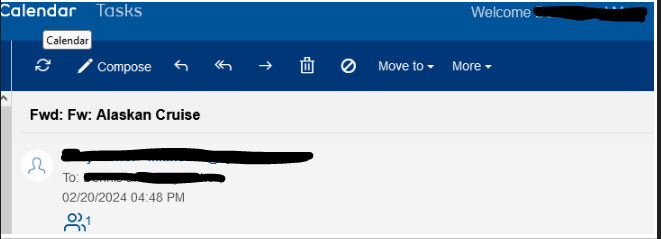
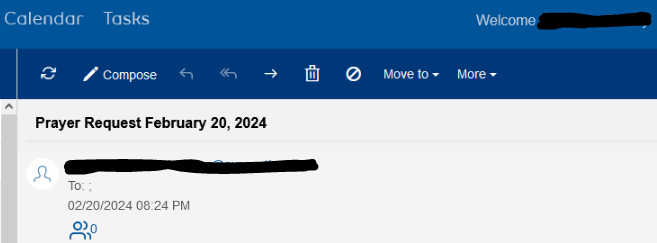
Sorry if this is a little awkward, as it is my first time in any forum.
Options
- Mark as New
- Bookmark
- Subscribe
- Mute
- Subscribe to RSS Feed
- Permalink
- Report Inappropriate Content
03-06-2024 04:53 PM
I should also correct my original post of the issue - most messages are OK, only a few have this problem. And my wife's problem was with the same messages in the same account but a different browser on her Windows tablet.
Options
- Mark as New
- Bookmark
- Subscribe
- Mute
- Subscribe to RSS Feed
- Permalink
- Report Inappropriate Content
03-07-2024 01:20 PM
Good day @Wheels,
Thanks for getting back to us
Does this happen every time you try to reply/reply all to an email from that particular email address, or just that instance on February 20th? Is there any issue with sending them an email in a brand new message?
- Patricia
Options
- Mark as New
- Bookmark
- Subscribe
- Mute
- Subscribe to RSS Feed
- Permalink
- Report Inappropriate Content
03-09-2024 08:52 PM
Patricia, to answer your insightful questions. It happens on multiple instances from multiple days for at least 2 correspondents. I am able to send messages to the accounts in a new message. I have determined that the common factor is that my email is a BCC from the sender. This is why the "To:" field appears empty. I guess this must just be a quirk of Bell Webmail that I hadn't noticed before!
Thanks (also for blacking out the identifying address which I had thought about too late).

Getting started
New to our forum? These guides will help you find your way around quickly.
- Welcome to the Community!
- Log in/Register
- Community guidelines
- Community help
- Meet the Moderators
- Bell Community All-Stars
- How to send a private message
- Existing customers, login to MyBell to see exclusive offers
- What's on Crave
- What's on Free Preview
- Mobility phone & device catalog
- Latest in the Community



