- Community Home
- Internet
- Packet loss on wireless (gigahub)
Options
- Subscribe to RSS Feed
- Mark Topic as New
- Mark Topic as Read
- Float this Topic for Current User
- Bookmark
- Subscribe
- Mute
- Printer Friendly Page
Packet loss on wireless (gigahub)

Options
- Mark as New
- Bookmark
- Subscribe
- Mute
- Subscribe to RSS Feed
- Permalink
- Report Inappropriate Content
05-07-2024 01:09 AM
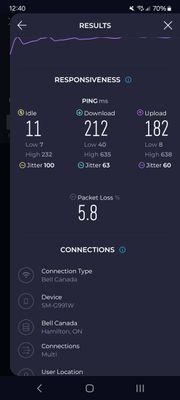
I've tried everything I can think of to fix, i also tried changing the wireless channels shut off every Bluetooth device in my home and the packetloss has not disappeared I'm having a very difficult time getting this fixed is there anyone that can recommend me something to get rid of this packetloss? I have the gigahub with the latest firmware on it.
Yes I separated all the SSIDs & put bandwidth intensive devices on 5 GHz I have only security cameras on 2.4 I temporarily connected my phone that's connected to 2.4 and packetloss is persistent regardless of the time of day. I tried it on multiple devices on 2.4 and I get the packet loss on there too.
Is there something wrong with the GigaHub?
This is very bad I never had this problem with cable internet and a eero 6
Labels:
- Labels:
-
2.4 GHz
-
Giga hub
-
Home Hub 4000
-
Packet Loss
-
Wi-Fi 6
0
43
3,078
43 REPLIES 43


Options
- Mark as New
- Bookmark
- Subscribe
- Mute
- Subscribe to RSS Feed
- Permalink
- Report Inappropriate Content
05-07-2024 04:19 AM
Thank you for your question. What symptoms are you seeing that suggests packet loss? How are you measuring it?
I am a Community All-Star and customer. I'm here to help by sharing my knowledge and experience. My views on Bell and the Community Forum are my own and not the views of Bell or any of its affiliates.

Options
- Mark as New
- Bookmark
- Subscribe
- Mute
- Subscribe to RSS Feed
- Permalink
- Report Inappropriate Content
05-07-2024 09:42 AM
Perform a speed test from within the modem, to rule out any hardware issues.
Please post the results of that test here.
I am a Community All-Star and customer. I'm here to help by sharing my knowledge and experience. My views on Bell and the Community Forum are my own and not the views of Bell or any of its affiliates.
Options
- Mark as New
- Bookmark
- Subscribe
- Mute
- Subscribe to RSS Feed
- Permalink
- Report Inappropriate Content
05-07-2024 11:35 AM
Speedtest.net app using the closest bell server
Options
- Mark as New
- Bookmark
- Subscribe
- Mute
- Subscribe to RSS Feed
- Permalink
- Report Inappropriate Content
05-07-2024 11:35 AM
Unfortunately it's full speed never any losses regardless of the time and day
Options
- Mark as New
- Bookmark
- Subscribe
- Mute
- Subscribe to RSS Feed
- Permalink
- Report Inappropriate Content
05-07-2024 12:16 PM
That rules out the equipment. Can you perform a speed test with a wired device, to rule out WiFi issues?
I am a Community All-Star and customer. I'm here to help by sharing my knowledge and experience. My views on Bell and the Community Forum are my own and not the views of Bell or any of its affiliates.
Options
- Mark as New
- Bookmark
- Subscribe
- Mute
- Subscribe to RSS Feed
- Permalink
- Report Inappropriate Content
05-07-2024 12:19 PM
Again I am concerned with wireless not with wired I don't care what's happening with wired my main concern is with wireless
Options
- Mark as New
- Bookmark
- Subscribe
- Mute
- Subscribe to RSS Feed
- Permalink
- Report Inappropriate Content
05-07-2024 12:24 PM
I understand that, but to troubleshoot WiFi issues we first would have to establish your internet connection works properly.
If it works from within the modem, that indicated the connection works properly within the Bell network.
A wired connection would indicate if the issue is congestion, or a WiFi issue if the speed is fine wired.
I am a Community All-Star and customer. I'm here to help by sharing my knowledge and experience. My views on Bell and the Community Forum are my own and not the views of Bell or any of its affiliates.
Options
- Mark as New
- Bookmark
- Subscribe
- Mute
- Subscribe to RSS Feed
- Permalink
- Report Inappropriate Content
05-07-2024 12:28 PM
I only have a gigabit connection NIC on the computer so I won't be the full utilize the connection, is there any programs you recommend me I can test and mess around with I just got off the phone after four agents with the ring around the Rosie and now I'm being sent a replacement modem , I'll see how good that's going to be
Options
- Mark as New
- Bookmark
- Subscribe
- Mute
- Subscribe to RSS Feed
- Permalink
- Report Inappropriate Content
05-07-2024 12:28 PM
Packet loss on an external test suggests it may not be between the modem and the computer. To absolutely eliminate packet loss, a traceroute from the modem out will help us.
I am a Community All-Star and customer. I'm here to help by sharing my knowledge and experience. My views on Bell and the Community Forum are my own and not the views of Bell or any of its affiliates.
Options
- Mark as New
- Bookmark
- Subscribe
- Mute
- Subscribe to RSS Feed
- Permalink
- Report Inappropriate Content
05-07-2024 12:29 PM
What ip address should I use to test it?
Options
- Mark as New
- Bookmark
- Subscribe
- Mute
- Subscribe to RSS Feed
- Permalink
- Report Inappropriate Content
05-07-2024 12:51 PM
Try 8.8.8.8 and 1.1.1.1
I am a Community All-Star and customer. I'm here to help by sharing my knowledge and experience. My views on Bell and the Community Forum are my own and not the views of Bell or any of its affiliates.
Options
- Mark as New
- Bookmark
- Subscribe
- Mute
- Subscribe to RSS Feed
- Permalink
- Report Inappropriate Content
05-07-2024 12:52 PM
The gigabit NIC should show around 940 Mbps on a good speed test.
Best is to use the same speed test as the one you already used, to make a direct comparison between the results.
I am a Community All-Star and customer. I'm here to help by sharing my knowledge and experience. My views on Bell and the Community Forum are my own and not the views of Bell or any of its affiliates.
Options
- Mark as New
- Bookmark
- Subscribe
- Mute
- Subscribe to RSS Feed
- Permalink
- Report Inappropriate Content
05-07-2024 12:53 PM
Ok testing.
Options
- Mark as New
- Bookmark
- Subscribe
- Mute
- Subscribe to RSS Feed
- Permalink
- Report Inappropriate Content
05-07-2024 12:54 PM
But my concern isn't speed though.

Getting started
New to our forum? These guides will help you find your way around quickly.
- Welcome to the Community!
- Log in/Register
- Community guidelines
- Community help
- Meet the Moderators
- Bell Community All-Stars
- How to send a private message
- Existing customers, login to MyBell to see exclusive offers
- What's on Crave
- What's on Free Preview
- Mobility phone & device catalog
- Latest in the Community


