- Community Home
- Internet
- Packet loss on wireless (gigahub)
Options
- Subscribe to RSS Feed
- Mark Topic as New
- Mark Topic as Read
- Float this Topic for Current User
- Bookmark
- Subscribe
- Mute
- Printer Friendly Page
Packet loss on wireless (gigahub)

Options
- Mark as New
- Bookmark
- Subscribe
- Mute
- Subscribe to RSS Feed
- Permalink
- Report Inappropriate Content
05-07-2024 01:09 AM
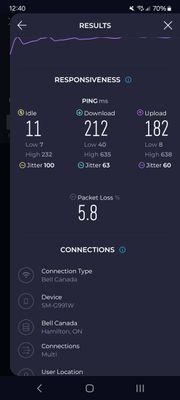
I've tried everything I can think of to fix, i also tried changing the wireless channels shut off every Bluetooth device in my home and the packetloss has not disappeared I'm having a very difficult time getting this fixed is there anyone that can recommend me something to get rid of this packetloss? I have the gigahub with the latest firmware on it.
Yes I separated all the SSIDs & put bandwidth intensive devices on 5 GHz I have only security cameras on 2.4 I temporarily connected my phone that's connected to 2.4 and packetloss is persistent regardless of the time of day. I tried it on multiple devices on 2.4 and I get the packet loss on there too.
Is there something wrong with the GigaHub?
This is very bad I never had this problem with cable internet and a eero 6
Labels:
- Labels:
-
2.4 GHz
-
Giga hub
-
Home Hub 4000
-
Packet Loss
-
Wi-Fi 6
0
43
3,102
43 REPLIES 43


Options
- Mark as New
- Bookmark
- Subscribe
- Mute
- Subscribe to RSS Feed
- Permalink
- Report Inappropriate Content
05-07-2024 01:53 PM
Yes, I noticed your speeds are a bit low, but you also have high ping times when under load.
That does not necessarily mean you have packet loss, as high latency can have multiple reasons.
I am a Community All-Star and customer. I'm here to help by sharing my knowledge and experience. My views on Bell and the Community Forum are my own and not the views of Bell or any of its affiliates.
Options
- Mark as New
- Bookmark
- Subscribe
- Mute
- Subscribe to RSS Feed
- Permalink
- Report Inappropriate Content
05-07-2024 07:13 PM
The speeds are not slow.
On the 5th hop in pingplotter using ethernet and pinging 1.1.1.1 & 8.8.8.8 I got over %50 loss on more than 1 computer & on both Wi-Fi bands.
Options
- Mark as New
- Bookmark
- Subscribe
- Mute
- Subscribe to RSS Feed
- Permalink
- Report Inappropriate Content
05-07-2024 07:23 PM
I used speedtest.net app and website, ping plotter says %50 loss on 5th hop.
While pinging 1.1.1.1 & 8.8.8.8 with ethernet obviously.

Options
- Mark as New
- Bookmark
- Subscribe
- Mute
- Subscribe to RSS Feed
- Permalink
- Report Inappropriate Content
05-07-2024 08:01 PM
If loss is on the 5th hop, your issue may be the internet and not Bell, the modem or your network. Can you tell us where the 5th hop is?
I am a Community All-Star and customer. I'm here to help by sharing my knowledge and experience. My views on Bell and the Community Forum are my own and not the views of Bell or any of its affiliates.
Options
- Mark as New
- Bookmark
- Subscribe
- Mute
- Subscribe to RSS Feed
- Permalink
- Report Inappropriate Content
05-07-2024 08:02 PM
Let me quickly rerun the test and I can upload a picture it starts with the 142 address
Options
- Mark as New
- Bookmark
- Subscribe
- Mute
- Subscribe to RSS Feed
- Permalink
- Report Inappropriate Content
05-08-2024 10:58 AM
Might be faster to just list the IP address rather than a picture as pictures take a while to show up on the forum.
But if it is starting with 142. it likely is a Bell routing point and they do not always respond to ICMP requests due to their functionality.
I am a Community All-Star and customer. I'm here to help by sharing my knowledge and experience. My views on Bell and the Community Forum are my own and not the views of Bell or any of its affiliates.
Options
- Mark as New
- Bookmark
- Subscribe
- Mute
- Subscribe to RSS Feed
- Permalink
- Report Inappropriate Content
02-21-2025 11:02 AM - last edited on 02-21-2025 12:41 PM by BellDRock
Hello,
I am experiencing severe packet loss of up to 50% but the download and upload speeds seem to be working normally.
I'm using Jump Desktop on a M1 Max mac studio running Sonoma and an M4 Macbook Pro running Sequoia and have the same problem on both machines through ethernet and wifi.
I would appreciate any advice since technical support is unable to help me over the phone.
Many thanks!
Lucas
Options
- Mark as New
- Bookmark
- Subscribe
- Mute
- Subscribe to RSS Feed
- Permalink
- Report Inappropriate Content
02-21-2025 01:05 PM

Options
- Mark as New
- Bookmark
- Subscribe
- Mute
- Subscribe to RSS Feed
- Permalink
- Report Inappropriate Content
02-21-2025 01:30 PM
Thank you for your concern. Speed tests are actually snapshots of an internet connection. Are you seeing any specific issues in your internet experience? Slow loading? Stalling? Jerkiness in video? Please say more.
I am a Community All-Star and customer. I'm here to help by sharing my knowledge and experience. My views on Bell and the Community Forum are my own and not the views of Bell or any of its affiliates.
Options
- Mark as New
- Bookmark
- Subscribe
- Mute
- Subscribe to RSS Feed
- Permalink
- Report Inappropriate Content
02-21-2025 01:35 PM
Yes, I'm running Avid Media Composer over Jump Desktop and there is so much lag on any operation that it is unusable. Jump desktop reports packet loss constantly and several packet lost tests confirm packet loss of up to 50% at a given time.
Options
- Mark as New
- Bookmark
- Subscribe
- Mute
- Subscribe to RSS Feed
- Permalink
- Report Inappropriate Content
02-21-2025 01:37 PM
I have tried two different computers with two different os versions with the same result. Logging on to the same machine on Jump Desktop from a different internet connection doesn't have the same issue.
Options
- Mark as New
- Bookmark
- Subscribe
- Mute
- Subscribe to RSS Feed
- Permalink
- Report Inappropriate Content
02-21-2025 02:33 PM
Thank you for the clarification. To comment further, I would need a traceroute to your destination. Can you run that from the modem? In addition, is your computer connected directly to the Giga Hub or have you inserted your own router into the modem and your computer into your router?
I am a Community All-Star and customer. I'm here to help by sharing my knowledge and experience. My views on Bell and the Community Forum are my own and not the views of Bell or any of its affiliates.
Options
- Mark as New
- Bookmark
- Subscribe
- Mute
- Subscribe to RSS Feed
- Permalink
- Report Inappropriate Content
02-21-2025 02:43 PM
Hi thanks for your reply.
It's just the gigahub, no router.
I can run whatever is necessary, but I don't know how. Happy to follow your instructions.
Options
- Mark as New
- Bookmark
- Subscribe
- Mute
- Subscribe to RSS Feed
- Permalink
- Report Inappropriate Content
02-21-2025 02:54 PM
Unfortunately I am not familiar with the Mac computer. However, this link will give you directions on how to run a traceroute on the Mac. Just paste the text here. You can use any IP in your traceroute, including the one suggested. What is of interest is the list and timings of the hops to the destination.
I am a Community All-Star and customer. I'm here to help by sharing my knowledge and experience. My views on Bell and the Community Forum are my own and not the views of Bell or any of its affiliates.
Options
- Mark as New
- Bookmark
- Subscribe
- Mute
- Subscribe to RSS Feed
- Permalink
- Report Inappropriate Content
02-21-2025 03:03 PM
1 mynetwork (192.168.2.1) 6.661 ms 2.609 ms 3.040 ms
2 142.124.32.125 (142.124.32.125) 4.021 ms 3.371 ms 4.042 ms
3 * * *
4 * * *
5 64.230.36.68 (64.230.36.68) 12.149 ms 4.245 ms
64.230.36.64 (64.230.36.64) 6.025 ms
6 142.124.127.1 (142.124.127.1) 5.266 ms
142.124.126.253 (142.124.126.253) 4.164 ms
142.124.127.1 (142.124.127.1) 3.434 ms
7 142.250.166.254 (142.250.166.254) 5.173 ms 4.858 ms 3.884 ms
8 192.178.86.251 (192.178.86.251) 4.051 ms 4.147 ms
192.178.86.87 (192.178.86.87) 4.909 ms
9 142.250.236.113 (142.250.236.113) 9.576 ms 5.320 ms
142.250.237.11 (142.250.237.11) 6.692 ms
10 dns.google (8.8.8.8) 4.701 ms 4.414 ms 4.975 ms

Getting started
New to our forum? These guides will help you find your way around quickly.
- Welcome to the Community!
- Log in/Register
- Community guidelines
- Community help
- Meet the Moderators
- Bell Community All-Stars
- How to send a private message
- Existing customers, login to MyBell to see exclusive offers
- What's on Crave
- What's on Free Preview
- Mobility phone & device catalog
- Latest in the Community


