- Community Home
- Internet
- Re: Download speed drops to 340mbps on 1.5gbps pla...
Options
- Subscribe to RSS Feed
- Mark Topic as New
- Mark Topic as Read
- Float this Topic for Current User
- Bookmark
- Subscribe
- Mute
- Printer Friendly Page

Options
- Mark as New
- Bookmark
- Subscribe
- Mute
- Subscribe to RSS Feed
- Permalink
- Report Inappropriate Content
09-13-2022 11:34 PM
My 1 Gb download speed regularly goes down to 550 Mb, and seemed to be limited there until I restart my modem. It stays fine for a few days, but eventually seemingly goes back to the 550 Mb limits... restarting the modem re-established the download speed I am subscribed for... anyone else noticed this issue?
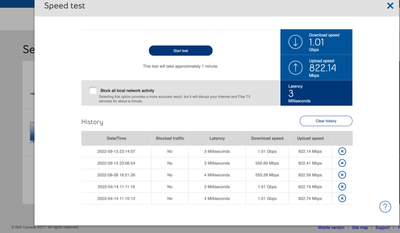
Solved! Go to Solution.
1
293
48.7K
293 REPLIES 293

Options
- Mark as New
- Bookmark
- Subscribe
- Mute
- Subscribe to RSS Feed
- Permalink
- Report Inappropriate Content
08-31-2023 08:57 PM
Good evening, since the last few days I have noticed my Internet being slow, sometimes a reboot of the gigahub fixes the problem, where as at other times speeds remain slow. For example I have rebooted the modem multiple tiles right now (10:20pm EST) but my download speed is not exceeded 689 Mbps (I subscribe to 1.5 Gb package), whereas the upload speeds are just fine at around 1 Gb. The tests have been done directly on the gigahub and through the Bell app.I’m wondering if the slow download speeds is because of a firmware issue? Thanks a bunch!

Options
- Mark as New
- Bookmark
- Subscribe
- Mute
- Subscribe to RSS Feed
- Permalink
- Report Inappropriate Content
09-02-2023 11:21 AM
Hi there @Sabrina8
Thank you for your post.
We'd like to take a closer look into this and have sent you a private message.
Please check your Messages within your profile avatar in the top right corner.
Unsure how to check or send a private message? See How to send a private message

Options
- Mark as New
- Bookmark
- Subscribe
- Mute
- Subscribe to RSS Feed
- Permalink
- Report Inappropriate Content
10-12-2023 12:23 PM
I have noticed the same thing. I have 3GBPS plan. I can usually get full 3GBPS Download and Upload under best circumstances (From a computer which is Wired with 10 Gbits nic). I can also download at 300 Mega Bytes / sec(roughly 3Gbit/s). But after a while (Days to weeks), I always notice my connection started to cap at exactly 200Mbits. I though it was on my end. But then, I tried the speed test directly on GigaHub, so that I can exclude my network as the issue. And I do see that the model is, itself, limited to 200MBPS. This shows that something at Bell's end is limited the download speed to 200Mbit/s. Would be nice to understand why, and how to fix this.
Upload speed however seems unaffected (It's 2GBPS and +, which is fine to me)

Options
- Mark as New
- Bookmark
- Subscribe
- Mute
- Subscribe to RSS Feed
- Permalink
- Report Inappropriate Content
10-14-2023 11:23 AM
Good afternoon @FrancoisD,
Thank you for reaching out to the Bell Community 🙂
We have sent you a quick private message so we can dig into this a bit deeper. Please check your Messages within your profile avatar in the top right corner.
Unsure how to check or send a private message? See How to send a private message
- Patricia

Options
- Mark as New
- Bookmark
- Subscribe
- Mute
- Subscribe to RSS Feed
- Permalink
- Report Inappropriate Content
10-20-2023 02:58 PM
Hello again, Patricia:
Thank you for your efforts on finding a solution.
I was waiting to see if a new firmware would fix my own problem with the Gigahub dropping speed every few days, but unfortunately, it has not. I am now on firmware 1.19.5.1 (my Gigahub upgraded automatically recently from 1.16.5).
It looked good for the first couple of days where there was no slow down in speed after the new firmware was installed, however, I just tested the speed now using the modem interface and the upload speed has again dropped to 1.89Gbps:
Date / Heure Trafic bloqué Latence Vitesse en aval Vitesse en amont
| 2023-10-20 14:47:58 | Oui | 2 Millisecondes | 3,25 Gbit/s | 3,24 Gbit/s | after reboot |
| 2023-10-20 14:39:48 | Oui | 1 Millisecondes | 3,25 Gbit/s | 1,89 Gbit/s | before reboot |
Rebooting the Gigahub brings the upload speed back to 3.24Gbps.
I note as well that with the old firmware, the latency was 6-7 ms, whereas now with firmware 1.19.5.1, the latency is 1-2 ms. This is great.
Do you have any further suggestions for me to fix this once and for all?
Thank you kindly for your assistance.
Options
- Mark as New
- Bookmark
- Subscribe
- Mute
- Subscribe to RSS Feed
- Permalink
- Report Inappropriate Content
10-20-2023 04:39 PM - edited 10-20-2023 04:40 PM
I have just reset my Gigahub to factory settings and re-entered my configuration. We'll see if the new firmware makes a difference. The speed and latency are good so far:
Date / Heure Trafic bloqué Latence Vitesse en aval Vitesse en amont
| 2023-10-20 16:36:45 | Oui | 2 Millisecondes | 3,25 Gbit/s | 3,24 Gbit/s | after factory reset |
I will report back if this fixes the problem.
Options
- Mark as New
- Bookmark
- Subscribe
- Mute
- Subscribe to RSS Feed
- Permalink
- Report Inappropriate Content
10-26-2023 04:45 PM
After 6 days, it looks like the speed on my Gigahub has remained steady. Perhaps resetting the router to factory settings has fixed the problem once and for all. I will report again in a week.
Date / Heure Trafic bloqué Latence Vitesse en aval Vitesse en amont
| 2023-10-26 16:42:08 | Oui | 1 Millisecondes | 3,25 Gbit/s | 3,23 Gbit/s |

Options
- Mark as New
- Bookmark
- Subscribe
- Mute
- Subscribe to RSS Feed
- Permalink
- Report Inappropriate Content
10-26-2023 08:19 PM
Hello,
Over the last month, my download speeds have dropped to ~65mbps (I am on the 1.5Gbps plan); I've reached out to support multiple times, but every fix doesn't seem to last. I have tried multiple reboots and factory resets.
I would appreciate some help with this
Options
- Mark as New
- Bookmark
- Subscribe
- Mute
- Subscribe to RSS Feed
- Permalink
- Report Inappropriate Content
10-27-2023 12:37 PM
Hi there @LeeAl,
Welcome to the Bell Community.
In order for us to help further we need a bit more information, so we have reached out to you via private message. Please check your Messages within your profile avatar in the top right corner.
Unsure how to check or send a private message? See How to send a private message
- Patricia

Options
- Mark as New
- Bookmark
- Subscribe
- Mute
- Subscribe to RSS Feed
- Permalink
- Report Inappropriate Content
11-02-2023 09:06 AM
Hi,
My download speeds drops to 330-340mbps every other day, this can be fixed by rebooting the modem, but that isn’t ideal obviously considering I usually I’m assigned a new ip. I have read it’s an architecture issue with a profile or something and can be fixed manually
Hope I can resolve this issue promptly


Options
- Mark as New
- Bookmark
- Subscribe
- Mute
- Subscribe to RSS Feed
- Permalink
- Report Inappropriate Content
11-02-2023 11:13 AM
If it's consistently doing this and rebooting the modem each other day fixes it, you should likely Contact the Bell helpdesk to solve this for you. Might be a bad modem or some other hardware issue.
I am on the same plan with a HH3000 and I am not experiencing this issue.
I am a Community All-Star and customer. I'm here to help by sharing my knowledge and experience. My views on Bell and the Community Forum are my own and not the views of Bell or any of its affiliates.
Options
- Mark as New
- Bookmark
- Subscribe
- Mute
- Subscribe to RSS Feed
- Permalink
- Report Inappropriate Content
11-02-2023 12:58 PM
I’ll also add upload speeds remain at 1gbps
Options
- Mark as New
- Bookmark
- Subscribe
- Mute
- Subscribe to RSS Feed
- Permalink
- Report Inappropriate Content
11-02-2023 01:10 PM
You can try the speed test from within the modem if it drops again.
I am a Community All-Star and customer. I'm here to help by sharing my knowledge and experience. My views on Bell and the Community Forum are my own and not the views of Bell or any of its affiliates.
Options
- Mark as New
- Bookmark
- Subscribe
- Mute
- Subscribe to RSS Feed
- Permalink
- Report Inappropriate Content
11-02-2023 01:12 PM
Yup, that’s how I test the speed daily.
Options
- Mark as New
- Bookmark
- Subscribe
- Mute
- Subscribe to RSS Feed
- Permalink
- Report Inappropriate Content
11-02-2023 01:19 PM
In that case for sure contact Bell, as that is an issue for sure. That modem internal speed test should match the profile.
I am a Community All-Star and customer. I'm here to help by sharing my knowledge and experience. My views on Bell and the Community Forum are my own and not the views of Bell or any of its affiliates.

Getting started
New to our forum? These guides will help you find your way around quickly.
- Welcome to the Community!
- Log in/Register
- Community guidelines
- Community help
- Meet the Moderators
- Bell Community All-Stars
- How to send a private message
- Existing customers, login to MyBell to see exclusive offers
- What's on Crave
- What's on Free Preview
- Mobility phone & device catalog
- Latest in the Community


