- Community Home
- Internet
- Re: Download speed drops
Options
- Subscribe to RSS Feed
- Mark Topic as New
- Mark Topic as Read
- Float this Topic for Current User
- Bookmark
- Subscribe
- Mute
- Printer Friendly Page

Options
- Mark as New
- Bookmark
- Subscribe
- Mute
- Subscribe to RSS Feed
- Permalink
- Report Inappropriate Content
09-13-2022 11:34 PM
My 1 Gb download speed regularly goes down to 550 Mb, and seemed to be limited there until I restart my modem. It stays fine for a few days, but eventually seemingly goes back to the 550 Mb limits... restarting the modem re-established the download speed I am subscribed for... anyone else noticed this issue?
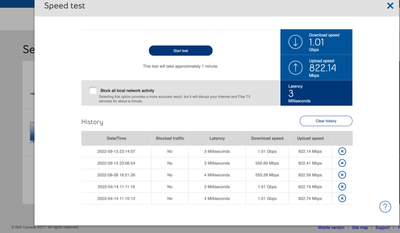
Solved! Go to Solution.
1
293
49.9K
293 REPLIES 293

Options
- Mark as New
- Bookmark
- Subscribe
- Mute
- Subscribe to RSS Feed
- Permalink
- Report Inappropriate Content
11-02-2023 01:23 PM
I thought I was contacting bell on this forum. lol. Thanks.

Options
- Mark as New
- Bookmark
- Subscribe
- Mute
- Subscribe to RSS Feed
- Permalink
- Report Inappropriate Content
11-13-2023 05:46 PM
Hi support, I'm facing the same issue again. I need to restart my modem every day to get my downloads speeds back to normal. Can I get some assistance again

Options
- Mark as New
- Bookmark
- Subscribe
- Mute
- Subscribe to RSS Feed
- Permalink
- Report Inappropriate Content
11-14-2023 08:44 AM
Good morning @vcee,
Thank you for keeping in touch with the Bell Community.
We've reached out to you via PM so we can take another look at this. Please check your Messages within your profile avatar in the top right corner.
Unsure how to check or send a private message? See How to send a private message
- Patricia

Options
- Mark as New
- Bookmark
- Subscribe
- Mute
- Subscribe to RSS Feed
- Permalink
- Report Inappropriate Content
11-15-2023 11:14 AM
Hello All,
I have been dealing with an issue for the past year that seems to be limiting by Gigabit Fibe service from Bell to 64 Mbps Down. The upload speed appears to be unaffected. So far Bell has replaced my modem twice but the issue persists. Searching online I found a thread on reddit from others who are having the same problem.
https://www.reddit.com/r/bell/comments/zqrxrq/psa_a_fix_for_the_rare_throttled_download_speed/
In the post, they mentioned that this issue is most likely caused by a bug where the hardware managing your speed policy gets confused and assigns the wrong speed to your connection.
The post mentioned that if I make a post here there is a possibility that someone here can fix this for me remotely as they did for everyone else listed in the thread.
I appreciate the time taken to read my post.

Thanks,
--
Dwayne

Options
- Mark as New
- Bookmark
- Subscribe
- Mute
- Subscribe to RSS Feed
- Permalink
- Report Inappropriate Content
11-17-2023 11:37 AM
Hi there @Kryptonal
We'd like to take a closer look into this and have sent you a private message.
Please check your Messages within your profile avatar in the top right corner.
Unsure how to check or send a private message? See How to send a private message

Options
- Mark as New
- Bookmark
- Subscribe
- Mute
- Subscribe to RSS Feed
- Permalink
- Report Inappropriate Content
11-18-2023 09:34 PM
it seems that I'm having very similar issues as many people are describing in this thread.
upgraded to 1.5 Gbps plan in September, given new GigaHub. All was well for a week or two, then all of a sudden download speeds dropped to 65 Mbps (while Upload speeds remained normal). Support sent me a new modem.
received that new modem 3 weeks ago. All was good until this week, and back to the same story. Download speeds will not go above 200 Mbps (while upload speeds remain normal).
these speedtests are being done at the modem level, NOT using random websites.
please Bell, "provision" my account (or whatever needs to be done) so that I can get the download speeds that I'm paying for!
Options
- Mark as New
- Bookmark
- Subscribe
- Mute
- Subscribe to RSS Feed
- Permalink
- Report Inappropriate Content
11-20-2023 10:21 AM
Hi there @tasmar09
Thank you for your post and welcome to the Community.
We'd like to have this looked into and have sent you a private message.
Please check your Messages within your profile avatar in the top right corner.
Unsure how to check or send a private message? See How to send a private message

Options
- Mark as New
- Bookmark
- Subscribe
- Mute
- Subscribe to RSS Feed
- Permalink
- Report Inappropriate Content
11-21-2023 10:15 PM
Looks like I am affected by this now too, 1.5gb plan and seeing gigahub tests of:
329.1 down
333.63 up
Hoping that my account can also be provisioned with the correct profile. Thanks!

Options
- Mark as New
- Bookmark
- Subscribe
- Mute
- Subscribe to RSS Feed
- Permalink
- Report Inappropriate Content
11-22-2023 07:05 PM
Hi,
I've seen multiple posts with this exact problem so this seems like a known issue:
Looking for some much needed help with my Fibe 500 connection. I've been having this issue on-and-off since I subscribed where my download speed will be capped at 64mbps (tested via both browser and modem UI speed tests). Upload is still at 500+. So far, modem resets have did the trick to fix the issue, but this time, no luck, despite multiple resets.
Issue seems exactly the same one as shared here:
»www.reddit.com/r/bell/co ··· d_speed/
Any help would be greatly appreciated
Options
- Mark as New
- Bookmark
- Subscribe
- Mute
- Subscribe to RSS Feed
- Permalink
- Report Inappropriate Content
11-23-2023 09:06 AM
Welcome to the Bell Community.
We would like to take a look so we have reached out to both of you via private message. Please check your Messages within your profile avatar in the top right corner.
Unsure how to check or send a private message? See How to send a private message
- Patricia

Options
- Mark as New
- Bookmark
- Subscribe
- Mute
- Subscribe to RSS Feed
- Permalink
- Report Inappropriate Content
11-29-2023 12:05 AM
Hi, similar issue here. Just upgraded from 500/500 fibe to 1G/750.
modem HH3000 Speedtest reports 1.1 / 800. Ok.
using the ADMZ feature to use my own Asus router. I get 550M download and 700M upload (directly from the router Speedtest) Very strange. Any solution ?
Options
- Mark as New
- Bookmark
- Subscribe
- Mute
- Subscribe to RSS Feed
- Permalink
- Report Inappropriate Content
11-29-2023 12:07 AM


Options
- Mark as New
- Bookmark
- Subscribe
- Mute
- Subscribe to RSS Feed
- Permalink
- Report Inappropriate Content
11-29-2023 07:23 PM
Quick update, someone fixed my issue and updated my account,
Best for anyone with the low speed issue that is temporary fixed by a modem restart is to post in this thread and not in dslreport since they are moving over here.
https://www.dslreports.com/forum/288?rules=Rules?
Thanks @Bell_Dom 🙏
Options
- Mark as New
- Bookmark
- Subscribe
- Mute
- Subscribe to RSS Feed
- Permalink
- Report Inappropriate Content
11-30-2023 08:11 AM
Found the issue : the internal speed test within the Asus router is not accurate, especially for download. I used a wired MacBook and got a normal speed test result, very close to 1G/750M.
Options
- Mark as New
- Bookmark
- Subscribe
- Mute
- Subscribe to RSS Feed
- Permalink
- Report Inappropriate Content
11-30-2023 10:47 PM
I use a https://docs.speedtest-tracker.dev/ using a docker container, pretty good! The speed is for sure affected by all my container, software, tv, etc.. so I use it as a reference and to confirm I always run the speed test using the button on the modem so it is 100% accurate.

Getting started
New to our forum? These guides will help you find your way around quickly.
- Welcome to the Community!
- Log in/Register
- Community guidelines
- Community help
- Meet the Moderators
- Bell Community All-Stars
- How to send a private message
- Existing customers, login to MyBell to see exclusive offers
- What's on Crave
- What's on Free Preview
- Mobility phone & device catalog
- Latest in the Community





