- Community Home
- Internet
- Re: Export emails to store them on a flash drive?
Options
- Subscribe to RSS Feed
- Mark Topic as New
- Mark Topic as Read
- Float this Topic for Current User
- Bookmark
- Subscribe
- Mute
- Printer Friendly Page

Options
- Mark as New
- Bookmark
- Subscribe
- Mute
- Subscribe to RSS Feed
- Permalink
- Report Inappropriate Content
08-02-2022 03:43 PM - last edited on 08-02-2022 04:30 PM by BellDRock
0
5
5,023
1 helpful reply
Accepted Solutions

Options
- Mark as New
- Bookmark
- Subscribe
- Mute
- Subscribe to RSS Feed
- Permalink
- Report Inappropriate Content
08-04-2022 10:41 AM
Hi there @8ender, thanks for reaching out to the Bell Community.
When using Bell webmail you can easily save an email message by selecting 'Save as EML file' under the dropdown menu within the email.
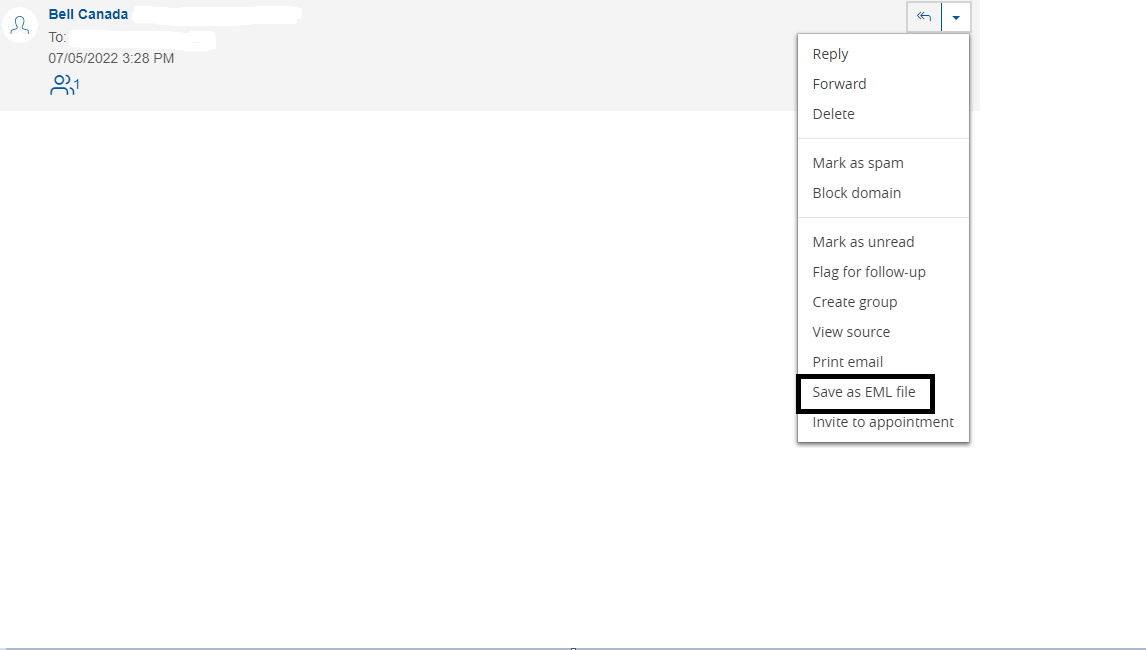 The process will vary if you are using a third party email client such as Outlook, or Aqua Mail.
Have a nice day 🙂
- Patricia
5 REPLIES 5
Options
- Mark as New
- Bookmark
- Subscribe
- Mute
- Subscribe to RSS Feed
- Permalink
- Report Inappropriate Content
08-04-2022 10:41 AM
Hi there @8ender, thanks for reaching out to the Bell Community.
When using Bell webmail you can easily save an email message by selecting 'Save as EML file' under the dropdown menu within the email.
The process will vary if you are using a third party email client such as Outlook, or Aqua Mail.
Have a nice day 🙂
- Patricia

Options
- Mark as New
- Bookmark
- Subscribe
- Mute
- Subscribe to RSS Feed
- Permalink
- Report Inappropriate Content
09-04-2024 09:17 AM
This method only allows me to save an individual email. How do I save more than one, that is, an entire folder? When I select all emails in a folder, the "Save as EML file" link cannot be accessed.


Options
- Mark as New
- Bookmark
- Subscribe
- Mute
- Subscribe to RSS Feed
- Permalink
- Report Inappropriate Content
09-04-2024 10:10 AM
Good Day & Welcome to the Bell Community Forum.
If you wish to save all of the emails that you have that are in a Bell Webmail folder to one file; Select > the webmail folder that you wish to have the emails saved from. Select > All box. Select > More. Select > Print. This will open your Window 10 or 11 Print Window. Select > Microsoft Print to PDF. Choose a file name & save. This saves all of the emails in the selected folder to one file on your computer.
FYI Only.
EML files are emails in file form. The easiest way to open them is to use an email client such as Outlook, Windows Mail, or Thunderbird. You can usually open it by double-clicking the EML file. If that doesn't work, right-click the file, select Open with, and select your mail client.
Take care.
I am a Community All-Star and customer. I'm here to help by sharing my knowledge and experience. My views on Bell and the Community Forum are my own and not the views of Bell or any of its affiliates.

Options
- Mark as New
- Bookmark
- Subscribe
- Mute
- Subscribe to RSS Feed
- Permalink
- Report Inappropriate Content
10-14-2024 01:45 PM - last edited on 10-14-2024 01:52 PM by BellPatricia
The solution offered by @WelshTerrier only allows 5 e-mails to be saved at a time. Are there any other solutions?
Options
- Mark as New
- Bookmark
- Subscribe
- Mute
- Subscribe to RSS Feed
- Permalink
- Report Inappropriate Content
10-14-2024 02:27 PM
Good Day.
That is correct. If you wish to print Bell webmail with a browser, you are limited to a maximum of 5 emails at a time.
There are a number of other printing solutions available. These require you to use an email client such as Microsoft Outlook, Apple Mail, etc.
Take care
I am a Community All-Star and customer. I'm here to help by sharing my knowledge and experience. My views on Bell and the Community Forum are my own and not the views of Bell or any of its affiliates.

Getting started
New to our forum? These guides will help you find your way around quickly.
- Welcome to the Community!
- Log in/Register
- Community guidelines
- Community help
- Meet the Moderators
- Bell Community All-Stars
- How to send a private message
- Existing customers, login to MyBell to see exclusive offers
- What's on Crave
- What's on Free Preview
- Mobility phone & device catalog
- Latest in the Community


