- Community Home
- Internet
- How do I activate my ethernet wall jack?
Options
- Subscribe to RSS Feed
- Mark Topic as New
- Mark Topic as Read
- Float this Topic for Current User
- Bookmark
- Subscribe
- Mute
- Printer Friendly Page

Options
- Mark as New
- Bookmark
- Subscribe
- Mute
- Subscribe to RSS Feed
- Permalink
- Report Inappropriate Content
09-26-2024 06:46 PM - last edited on 09-27-2024 12:14 PM by BellPatricia
Good day,
I just installed the Bell Giga Hub modem and tried to connect my desktop to the wall jack, but it doesn't work.
(wifi works perfectly)


Did I connect wrong or should I do anything else?
Thanks in advance,
Solved! Go to Solution.
Labels:
- Labels:
-
Ethernet
-
Giga hub
-
Internet Fibe
1
16
2,748
1 helpful reply
Accepted Solutions


Options
- Mark as New
- Bookmark
- Subscribe
- Mute
- Subscribe to RSS Feed
- Permalink
- Report Inappropriate Content
09-27-2024 12:58 PM - edited 09-27-2024 01:37 PM
Good Day & Welcome to the Bell Community Forum.
It is very difficult to tell what you have from the pictures you are showing. The blue cable you have plugged in to the modem, appears to be an ethernet cable but I do not believe it goes to the jacks in your unit. My best & very limited guess is the two jacks in your apartment are each wired to the connecting block as a selective choice for a telephone or ethernet connection & terminate in the white connection box, top left corner of your utility panel. The white cables look to be Cat 5 or 6 wiring terminating at this junction point. Depending on the type of box that was used, there may be a jack on the opposite side of the wiring entry point. You will need to check this out.
If there is jack, plug the modem ethernet cable into this outlet. If there is no jack. then, it is only a punch on point for a hardwire demarcation point that needs to be installed to connect a jack to the modem. Your modem would then plug in to the outlet at this point of connection.
This would be a self-install if you were not going to use the jacks for telephone or internet ethernet. The demarcation point to connect to the jacks does not show up in your photo unless of course there is jack connection at the connecting block at your panel.
The blue cable in the picture, see if you can locate the other end. It almost appears to be installed after the fact & may be of use to you somewhere else in your apartment. It should not go the wired outlets. Maybe a blank outlet for cable?
This is a wireless self-install. Unless everything in this picture has been previously connected, then this requires a tech visit to finish the final connections. You are missing a patch cable connection from the white box in the picture to the modem & is normally installed on the first wired installation with a demarcation point.
Take care.
I am a Community All-Star and customer. I'm here to help by sharing my knowledge and experience. My views on Bell and the Community Forum are my own and not the views of Bell or any of its affiliates.
16 REPLIES 16

Options
- Mark as New
- Bookmark
- Subscribe
- Mute
- Subscribe to RSS Feed
- Permalink
- Report Inappropriate Content
09-26-2024 08:02 PM
Can't see the pictures as they take a while to appear, but the general directions to establishing a wired connection to a home hub is located here starting at slide 2.
I am a Community All-Star and customer. I'm here to help by sharing my knowledge and experience. My views on Bell and the Community Forum are my own and not the views of Bell or any of its affiliates.

Options
- Mark as New
- Bookmark
- Subscribe
- Mute
- Subscribe to RSS Feed
- Permalink
- Report Inappropriate Content
09-26-2024 08:04 PM
Thank you for your question. You have to connect your computer to the modem with a network cord to make it work unless you have a wired home network. The the modem has to be connected to that network for a Ethernet wall jack to work. Can you clarify what you actually have? Your pictures are not visible.
I am a Community All-Star and customer. I'm here to help by sharing my knowledge and experience. My views on Bell and the Community Forum are my own and not the views of Bell or any of its affiliates.
Options
- Mark as New
- Bookmark
- Subscribe
- Mute
- Subscribe to RSS Feed
- Permalink
- Report Inappropriate Content
09-27-2024 10:01 AM
Thank you for the photos. I see a blue cable in the modem closet, but I am not clear about which jack it is plugged into. If it in the 10 GB socket, try the 1Gb (yellow) socket. The problem might also be in the network cable from the jack to the computer. The fact you gave wireless suggests the connection to the modem is fine, although a speed trust would be helpful.
I am a Community All-Star and customer. I'm here to help by sharing my knowledge and experience. My views on Bell and the Community Forum are my own and not the views of Bell or any of its affiliates.
Options
- Mark as New
- Bookmark
- Subscribe
- Mute
- Subscribe to RSS Feed
- Permalink
- Report Inappropriate Content
09-27-2024 10:40 AM
Unless your wall jack is wired directly to that cabinet, there will be a switch somewhere that should provide your wall jackets with ethernet links.
If you only have 1 jack in your home than it likely was wired directly.
I am a Community All-Star and customer. I'm here to help by sharing my knowledge and experience. My views on Bell and the Community Forum are my own and not the views of Bell or any of its affiliates.
Options
- Mark as New
- Bookmark
- Subscribe
- Mute
- Subscribe to RSS Feed
- Permalink
- Report Inappropriate Content
09-27-2024 10:51 AM
I guess wall jack is supposed to linked to the cabinet...i have 2 wall jack so will try other one. And spoke with building manager, and he said bell installed all cable related stuff in the building. I guess if other wall jack doesn't work either, should I ask for technician visit?
Options
- Mark as New
- Bookmark
- Subscribe
- Mute
- Subscribe to RSS Feed
- Permalink
- Report Inappropriate Content
09-27-2024 10:55 AM
White cable from the modem: came in connected to the modem (and bell self installation video shows to connect at there...but I will try to hook other ports). And cable from the desktop worked before I moved in...:( there is another wall jack in the unit so I will give it a try...and if it still doesn't work, I will need to call a technician i guess (building manager said bell installed all cable wire stuff).
Options
- Mark as New
- Bookmark
- Subscribe
- Mute
- Subscribe to RSS Feed
- Permalink
- Report Inappropriate Content
09-27-2024 11:04 AM
THIS IS IMPORTANT! DO NOT TOUCH the white cable! That is the fibre optic link. It is fragile. The BLUE cable can be plugged into the YELLOW port. Bell does not normally work on equipment beyond the modem. Ask the building superintendent who repairs the cabling now. It may or may not be Bell. Ask for the contact information.
I am a Community All-Star and customer. I'm here to help by sharing my knowledge and experience. My views on Bell and the Community Forum are my own and not the views of Bell or any of its affiliates.
Options
- Mark as New
- Bookmark
- Subscribe
- Mute
- Subscribe to RSS Feed
- Permalink
- Report Inappropriate Content
09-27-2024 11:33 AM
Oh danf okay. I actually switched to yellow port and same. Not working...i spoke with thw landlord and he said bell installed all wiring stuff so bell should take care this issue...hm.. and he said he doesn't have local bell contact. So weird.. I will try another wall jack and might give a call to bell...

Options
- Mark as New
- Bookmark
- Subscribe
- Mute
- Subscribe to RSS Feed
- Permalink
- Report Inappropriate Content
09-27-2024 12:15 PM
Hi there @inkyuk214
Thank you for your post and welcome to the Community.
Based on the pictures you have provided, we can only speculate the following:
Black circles: The White cable is going from the cabinet, directly into your modem. This is a very fragile cable and is what provides your modem access to the internet.
Red circles: On your wall, the ethernet jack would provide internet via ethernet cord, although, based upon looking at your modem, there is nothing plugged into that LAN ports to provide these wall ports with connection to the internet. I would speculate that there should be an ethernet cable that should go from your modem (yellow LAN ports), to another ethernet port somewhere nearby to provide your wall ports with internet access.
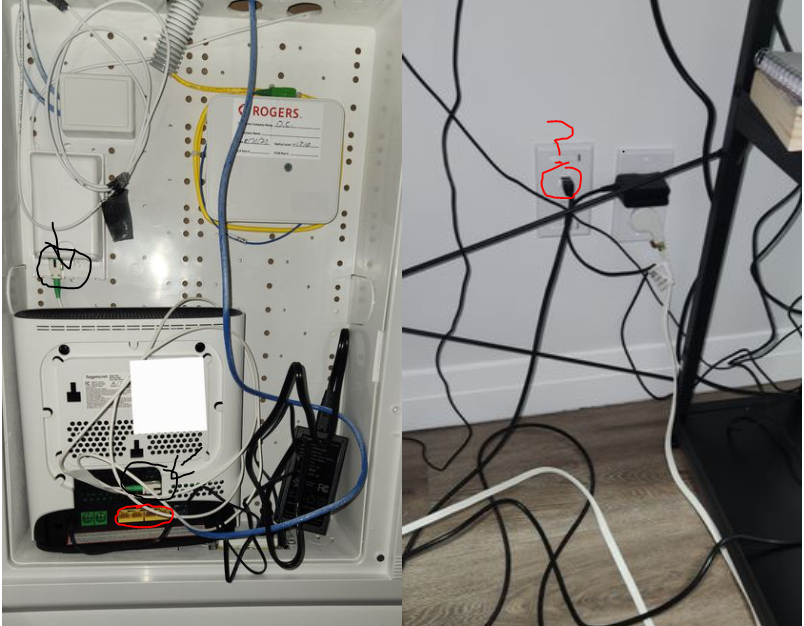
We'd recommend having a look around the cabinet and keep the Community updated how it goes.

Options
- Mark as New
- Bookmark
- Subscribe
- Mute
- Subscribe to RSS Feed
- Permalink
- Report Inappropriate Content
09-27-2024 12:35 PM
The customer says he has two wall jacks. Their most-likely ending in that large box is the top-left white connection box with two blue wires on its left. Therefore it seems that all that is missing is a short Ethernet patch cord between this box on its right and the modem.
Options
- Mark as New
- Bookmark
- Subscribe
- Mute
- Subscribe to RSS Feed
- Permalink
- Report Inappropriate Content
09-27-2024 12:41 PM
Interesting idea. I can’t see the side of the box but if there are jacks there a short network cable could be tested.
I am a Community All-Star and customer. I'm here to help by sharing my knowledge and experience. My views on Bell and the Community Forum are my own and not the views of Bell or any of its affiliates.
Options
- Mark as New
- Bookmark
- Subscribe
- Mute
- Subscribe to RSS Feed
- Permalink
- Report Inappropriate Content
09-27-2024 12:58 PM - edited 09-27-2024 01:37 PM
Good Day & Welcome to the Bell Community Forum.
It is very difficult to tell what you have from the pictures you are showing. The blue cable you have plugged in to the modem, appears to be an ethernet cable but I do not believe it goes to the jacks in your unit. My best & very limited guess is the two jacks in your apartment are each wired to the connecting block as a selective choice for a telephone or ethernet connection & terminate in the white connection box, top left corner of your utility panel. The white cables look to be Cat 5 or 6 wiring terminating at this junction point. Depending on the type of box that was used, there may be a jack on the opposite side of the wiring entry point. You will need to check this out.
If there is jack, plug the modem ethernet cable into this outlet. If there is no jack. then, it is only a punch on point for a hardwire demarcation point that needs to be installed to connect a jack to the modem. Your modem would then plug in to the outlet at this point of connection.
This would be a self-install if you were not going to use the jacks for telephone or internet ethernet. The demarcation point to connect to the jacks does not show up in your photo unless of course there is jack connection at the connecting block at your panel.
The blue cable in the picture, see if you can locate the other end. It almost appears to be installed after the fact & may be of use to you somewhere else in your apartment. It should not go the wired outlets. Maybe a blank outlet for cable?
This is a wireless self-install. Unless everything in this picture has been previously connected, then this requires a tech visit to finish the final connections. You are missing a patch cable connection from the white box in the picture to the modem & is normally installed on the first wired installation with a demarcation point.
Take care.
I am a Community All-Star and customer. I'm here to help by sharing my knowledge and experience. My views on Bell and the Community Forum are my own and not the views of Bell or any of its affiliates.
Options
- Mark as New
- Bookmark
- Subscribe
- Mute
- Subscribe to RSS Feed
- Permalink
- Report Inappropriate Content
09-27-2024 01:57 PM
Yo got me... blue cable was for rogers..i connected modem to top left one and now it is working...thanks...!

Options
- Mark as New
- Bookmark
- Subscribe
- Mute
- Subscribe to RSS Feed
- Permalink
- Report Inappropriate Content
09-27-2024 02:11 PM
Great! Glad you got it working. And thanks for sticking with us to solve your problem.
I am a Community All-Star and customer. I'm here to help by sharing my knowledge and experience. My views on Bell and the Community Forum are my own and not the views of Bell or any of its affiliates.

Getting started
New to our forum? These guides will help you find your way around quickly.
- Welcome to the Community!
- Log in/Register
- Community guidelines
- Community help
- Meet the Moderators
- Bell Community All-Stars
- How to send a private message
- Existing customers, login to MyBell to see exclusive offers
- What's on Crave
- What's on Free Preview
- Mobility phone & device catalog
- Latest in the Community



