- Community Home
- Internet
- Re: How to rename a folder and sub folder
Options
- Subscribe to RSS Feed
- Mark Topic as New
- Mark Topic as Read
- Float this Topic for Current User
- Bookmark
- Subscribe
- Mute
- Printer Friendly Page

Options
- Mark as New
- Bookmark
- Subscribe
- Mute
- Subscribe to RSS Feed
- Permalink
- Report Inappropriate Content
08-24-2022 01:06 AM
1
9
2,135
3 helpful replies
Accepted Solutions

Options
- Mark as New
- Bookmark
- Subscribe
- Mute
- Subscribe to RSS Feed
- Permalink
- Report Inappropriate Content
08-25-2022 10:23 AM
Hey there @Johnvu. Thanks for your post, and welcome to the Bell Community.
To rename a folder simply right click, and select Rename folder.
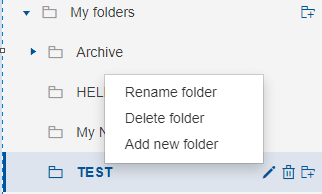
Let us know if you have any other questions 🙂
- Patricia
Options
- Mark as New
- Bookmark
- Subscribe
- Mute
- Subscribe to RSS Feed
- Permalink
- Report Inappropriate Content
09-21-2022 10:35 AM
Hey @Johnvu, thanks for reaching back out to us.
Once you've typed in the new folder name, are you hitting the Enter key? You will need to hit Enter to see the change take place.
Please keep me posted.
- Patricia
Options
- Mark as New
- Bookmark
- Subscribe
- Mute
- Subscribe to RSS Feed
- Permalink
- Report Inappropriate Content
11-10-2023 10:09 AM
Hey there @Hotspurfreddie 🙂
To add a new folder simply follow the same steps above, but select Add new folder from the drop down menu instead.
- Patricia
9 REPLIES 9
Options
- Mark as New
- Bookmark
- Subscribe
- Mute
- Subscribe to RSS Feed
- Permalink
- Report Inappropriate Content
08-25-2022 10:23 AM
Hey there @Johnvu. Thanks for your post, and welcome to the Bell Community.
To rename a folder simply right click, and select Rename folder.
Let us know if you have any other questions 🙂
- Patricia
Options
- Mark as New
- Bookmark
- Subscribe
- Mute
- Subscribe to RSS Feed
- Permalink
- Report Inappropriate Content
09-20-2022 02:13 PM
DOESN'T WORK ALWAYS COME BACK TO THE ORIGINAL NAME.
Options
- Mark as New
- Bookmark
- Subscribe
- Mute
- Subscribe to RSS Feed
- Permalink
- Report Inappropriate Content
09-21-2022 10:35 AM
Hey @Johnvu, thanks for reaching back out to us.
Once you've typed in the new folder name, are you hitting the Enter key? You will need to hit Enter to see the change take place.
Please keep me posted.
- Patricia

Options
- Mark as New
- Bookmark
- Subscribe
- Mute
- Subscribe to RSS Feed
- Permalink
- Report Inappropriate Content
05-04-2023 04:37 PM
how do you edit the folder name or delete a folder on email. I have tried the 'edit' pencil but will not save for me?
Options
- Mark as New
- Bookmark
- Subscribe
- Mute
- Subscribe to RSS Feed
- Permalink
- Report Inappropriate Content
05-04-2023 04:47 PM
Perfect! It worked

Options
- Mark as New
- Bookmark
- Subscribe
- Mute
- Subscribe to RSS Feed
- Permalink
- Report Inappropriate Content
11-08-2023 09:41 AM
How to add a folder
Options
- Mark as New
- Bookmark
- Subscribe
- Mute
- Subscribe to RSS Feed
- Permalink
- Report Inappropriate Content
11-10-2023 10:09 AM
Hey there @Hotspurfreddie 🙂
To add a new folder simply follow the same steps above, but select Add new folder from the drop down menu instead.
- Patricia

Options
- Mark as New
- Bookmark
- Subscribe
- Mute
- Subscribe to RSS Feed
- Permalink
- Report Inappropriate Content
01-05-2024 11:33 AM
I can't see what Has did that allowed the name change. Every time I try to rename it doesn't stick, it always returns to the same name...help!
Options
- Mark as New
- Bookmark
- Subscribe
- Mute
- Subscribe to RSS Feed
- Permalink
- Report Inappropriate Content
01-08-2024 08:13 AM


Getting started
New to our forum? These guides will help you find your way around quickly.
- Welcome to the Community!
- Log in/Register
- Community guidelines
- Community help
- Meet the Moderators
- Bell Community All-Stars
- How to send a private message
- Existing customers, login to MyBell to see exclusive offers
- What's on Crave
- What's on Free Preview
- Mobility phone & device catalog
- Latest in the Community





