- Community Home
- Internet
- Re: problem moving my email( Bell net ) to my fold...
Options
- Subscribe to RSS Feed
- Mark Topic as New
- Mark Topic as Read
- Float this Topic for Current User
- Bookmark
- Subscribe
- Mute
- Printer Friendly Page

Options
- Mark as New
- Bookmark
- Subscribe
- Mute
- Subscribe to RSS Feed
- Permalink
- Report Inappropriate Content
11-21-2021 09:14 AM - last edited on 01-15-2022 02:54 PM by BellDRock
I am trying to get used to the new email format. I love some of the changes but am having difficulty with others.
When I click on the square box next to the subject line when I first open my email link it now automatically opens to the email. In the past, I could click on the square box for several emails(they wouldn't automatically open again) and I could move them all at once to a select file folder. Now I have to move each one individually which is very time consuming. Is there a step I am missing or is this just the new way and if it is can this be addressed in an update?
I also find the font size smaller than before. I am not sure if it is because of the font size or if the colour was changed on the font but it is now hard to differentiate between unopened emails and opened emails. Is there some way I can change the colour of the font and the size? I have looked into my email settings as well as my browser settings but I couldn't see anything.
Would love any help anyone can give! Thank You
Solved! Go to Solution.
Labels:
- Labels:
-
Bell Email
3
195
87.3K
195 REPLIES 195

Options
- Mark as New
- Bookmark
- Subscribe
- Mute
- Subscribe to RSS Feed
- Permalink
- Report Inappropriate Content
11-29-2021 10:15 AM
What browser are you using? I tested double clicking to open a message in a separate browser window in Chrome, Edge and Firefox and it worked for me. Did the other options for increasing the size of the reading pane work for you?
Regarding the Calendar, this has been shared with the developer team - thank you for the feedback!
I am a former Bell employee and a customer. My views on the Community Forum are my own and may not be the views of Bell or any of its affiliates.
Options
- Mark as New
- Bookmark
- Subscribe
- Mute
- Subscribe to RSS Feed
- Permalink
- Report Inappropriate Content
11-29-2021 11:23 AM
With the new "move" function is there a way to click on the box beside the email (check mark), click on move and then click on a folder I have created in My Folders that is on the left side of my email screen. Now when I need to move a file I have to click on move then on my folders from the drop down menu then scroll down to find the folder I want to move the email into. The old way to do it was much easier and faster when dealing with multiple folders and sub-folders. I use to just click on the email hit move and click on the folder on the left side of my screen. Just thought I would ask. Thanks
Options
- Mark as New
- Bookmark
- Subscribe
- Mute
- Subscribe to RSS Feed
- Permalink
- Report Inappropriate Content
11-29-2021 12:18 PM
One easy option for moving messages you may want to consider is to click & drag the message to the folder you want to move it to:
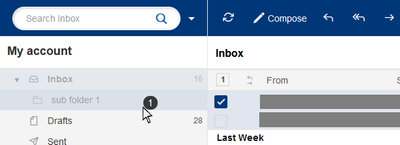
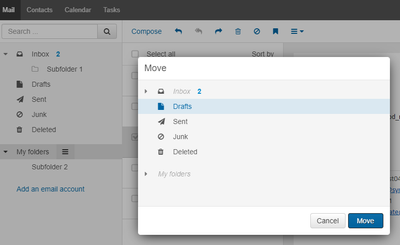
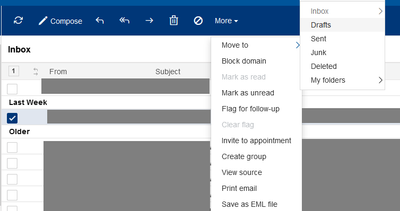
The 'move' menus are displayed a little bit differently, but it works in a similar way. You click on the check box of the email, click 'move' and then another menu opens up that lists the folders that you can choose to move it to. The difference between old and new was that in the old webmail, it would open a pop-up window to display your folders you can choose from and in the new webmail, its done through the drop-down menus.
Here's the old webmail:
Here's the new webmail:
I am a former Bell employee and a customer. My views on the Community Forum are my own and may not be the views of Bell or any of its affiliates.
Options
- Mark as New
- Bookmark
- Subscribe
- Mute
- Subscribe to RSS Feed
- Permalink
- Report Inappropriate Content
11-29-2021 01:36 PM
Thank you. I just don't find it as easy to use as before with the amount of folders and sub-folders I have. I'm sure I will get used to it in time.

Options
- Mark as New
- Bookmark
- Subscribe
- Mute
- Subscribe to RSS Feed
- Permalink
- Report Inappropriate Content
12-01-2021 02:59 PM
My distribution lists won't work anymore.
I often have to send e-mails out to large groups of people. I would make lists in excel because it was easy and the groups changed a lot.
Example
I would have the e-mail in the 1st column and a comma in the second.
I could just highlight the cells that I wanted, copy, click in the BCC of my e-mail.
Then I would just use CTRL-V to paste them and after I hit the tab, it would parse them all out and pick up the correct user names from my contact list.
This works in Hotmail and GMail, but is no longer works in Bell's Web Mail. When I do the cut and paste it takes the first name in the list and drops all of the rest.
As the lists change a lot, the spreadsheet approach worked well. I don't want to have to spend hours building formal distribution list. I couldn't even find a way to do that.
Help!!!!!!!
Options
- Mark as New
- Bookmark
- Subscribe
- Mute
- Subscribe to RSS Feed
- Permalink
- Report Inappropriate Content
12-02-2021 02:26 PM
Thank you for taking time to provide your feedback, it's greatly appreciated.
This has been shared with the developer team to investigate.
I am a former Bell employee and a customer. My views on the Community Forum are my own and may not be the views of Bell or any of its affiliates.

Options
- Mark as New
- Bookmark
- Subscribe
- Mute
- Subscribe to RSS Feed
- Permalink
- Report Inappropriate Content
12-05-2021 07:23 PM
One of my accounts email address was recently moved to the new platform and that account stopped receiving forwarded emails from my other accounts email addresses. Is this a known issue?
I lost 2 weeks worth of emails from one account which was not set to keep a copy. Have others experienced this loss?
Is there other known issues with Bell’s current email platform upgrade?
Options
- Mark as New
- Bookmark
- Subscribe
- Mute
- Subscribe to RSS Feed
- Permalink
- Report Inappropriate Content
12-06-2021 11:32 AM
Thank you for your feedback, I'm sorry to hear you've had some difficulties with your accounts. This has been shared with the developer team and is being investigated.
I am a former Bell employee and a customer. My views on the Community Forum are my own and may not be the views of Bell or any of its affiliates.

Options
- Mark as New
- Bookmark
- Subscribe
- Mute
- Subscribe to RSS Feed
- Permalink
- Report Inappropriate Content
12-08-2021 02:00 PM
Latest news - I can now open an email in a separate window if I click on it multiple times very fast. It shows up unformatted, then after about 20 seconds switches to a proper formatted email. It would be nice if I could switch back and forth between that window and the mail window. But no, I have to close the individual email window in order to get back into the mail window to find the information I need (which I do a lot because it doesn't believe in my email addresses), then open the individual email again (with multiple rapid clicks).
Sympatico has never been good on picking up email addresses. The same is happening with this version. It fails to recognize the addresses of people I've been emailing for over a decade. Which means I have to add them all in again, so I end up with multiple copies of the same person. Very laborious. It would have been nice to fix this.
The search function also sucks, as it always has. It would have been nice to fix this, too.
And my calendar still runs from noon to noon.

Options
- Mark as New
- Bookmark
- Subscribe
- Mute
- Subscribe to RSS Feed
- Permalink
- Report Inappropriate Content
12-08-2021 04:41 PM - last edited on 01-15-2022 02:01 PM by BellDRock
The recent update to Webmail has resulted in the loss of all my contact email addresses. Apparently, this has happened to other individuals as well. Has anyone found a method of restoring their lost contact information?

Options
- Mark as New
- Bookmark
- Subscribe
- Mute
- Subscribe to RSS Feed
- Permalink
- Report Inappropriate Content
12-13-2021 09:33 AM
Most of the new email format is fine and usable. However, it is difficult to distinguish between the unread and read emails. In the previous version (and on the mobile version), the unread emails were very bold, and easy to spot; in the new version, not so much. How can this be corrected? Is there a spot in settings to increase the difference in "boldness"?
Options
- Mark as New
- Bookmark
- Subscribe
- Mute
- Subscribe to RSS Feed
- Permalink
- Report Inappropriate Content
12-16-2021 02:30 PM
Thank you for providing your feedback, it's very helpful. For the items you mentioned:
- Opening an email in a separate window - can you confirm the device, operating system, browser and browser version you are using? What you are experiencing is not expected behavior and the team has not been able to reproduce it.
- Populating email addresses - can you provide a bit more detail? I think what you're explaining is when you are composing an email and you start to type the email address of the contact you want to add - it will detect contacts with those first few letters and a drop down will appear where you can add them. Is that what you are referencing or a different section?
- Search - Search has been updated to give users more search options to refine their search, but it sounds like something isn't working right for you. Can you provide more details on what isn't working as expected?
- Calendar running noon to noon - this is under investigation and is expected to be fixed
I am a former Bell employee and a customer. My views on the Community Forum are my own and may not be the views of Bell or any of its affiliates.
Options
- Mark as New
- Bookmark
- Subscribe
- Mute
- Subscribe to RSS Feed
- Permalink
- Report Inappropriate Content
12-16-2021 02:34 PM
Thank you for providing your feedback, it's very valuable.
Can you confirm if you are still seeing this issue? I know the team had been investigating this and working on a fix.
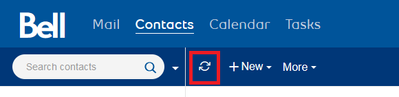
If it hasn't been fixed yet, there is a workaround you can try (the contacts are not actually 'lost' but there is a glitch causing them not to load). In the contacts section, if you hit the 'refresh' icon within the webmail UI (not the browser refresh), it should correct the glitch and load your contacts.
I am a former Bell employee and a customer. My views on the Community Forum are my own and may not be the views of Bell or any of its affiliates.
Options
- Mark as New
- Bookmark
- Subscribe
- Mute
- Subscribe to RSS Feed
- Permalink
- Report Inappropriate Content
12-16-2021 02:36 PM
Thank you for your feedback.
Both the old and new webmail use the same size, font, and bold on unread messages. However on the old webmail, it used to also have a blue 'envelope' icon next to the unread messages which made it more clear. We are investigating if we can bring this back.
I am a former Bell employee and a customer. My views on the Community Forum are my own and may not be the views of Bell or any of its affiliates.
Options
- Mark as New
- Bookmark
- Subscribe
- Mute
- Subscribe to RSS Feed
- Permalink
- Report Inappropriate Content
12-16-2021 03:04 PM
Hi John...
Thanks for asking. Here are my notes:
- Opening an email in a separate window. My operating system is Windows and my browser is Google Chrome. All software is up to date, as far as I can tell. I have the same problems with my laptop and desktop. As I mentioned, I can now open an email with multiple clicks (5+) and then it takes about 10-20 seconds to switch from raw text to formatted. Just in the last day or so I've found that I can minimize the email window so that I can work on the main email screen. So that's much better -- although the multiple clicks aren't doing my arthritis any good 😉
- Populating email addresses - I type in a person's name or email address and all sorts of similar names/addresses come up -- but not the one I want, even if I type in the full name/address. So then I have to create a new contact. Then I discover that I already have that contact in my contacts list (sometimes several contact listings), even though Sympatico wouldn't populate it. This happened all the time on the old format. And it's happening just as often if not more with the new format.
- Search - I do appreciate the return to the old Outlook feature where you can sort by date, from, etc. That's a big help. But when it comes to searching by a specific subject or name or whatever, Sympatico can't find it. I haven't been able to find any pattern to these failures (e.g. finds names but not subjects). I usually do searches on my iPhone, where it works much, much better.
- Calendar running noon to noon - I switched my calendar to 24 hour as opposed to 12/12 and that works... Uh-oh. I just checked and my calendar now starts at 12, 13, 14. So still not working, no matter how I set it. My calendar on my iPhone works fine.
Good luck with getting this stuff solved, and thanks for your interest.

Getting started
New to our forum? These guides will help you find your way around quickly.
- Welcome to the Community!
- Log in/Register
- Community guidelines
- Community help
- Meet the Moderators
- Bell Community All-Stars
- How to send a private message
- Existing customers, login to MyBell to see exclusive offers
- What's on Crave
- What's on Free Preview
- Mobility phone & device catalog
- Latest in the Community






