- Community Home
- Internet
- Re: Sorting unread e-mails
Options
- Subscribe to RSS Feed
- Mark Topic as New
- Mark Topic as Read
- Float this Topic for Current User
- Bookmark
- Subscribe
- Mute
- Printer Friendly Page

Options
- Mark as New
- Bookmark
- Subscribe
- Mute
- Subscribe to RSS Feed
- Permalink
- Report Inappropriate Content
02-14-2023 11:44 AM
I have trouble getting to the list that lets me call up the unread e-mails. How is this done?
Sometimes, rarely, I see a drop down list that I can click on "unread" so that the unread e-mails are displayed collected together. This is very helpful and useful.
Other times I search and search but cannot find this same drop down choice??? What step am I missing?
Solved! Go to Solution.
Labels:
- Labels:
-
Bell Email
1
9
2,775
2 helpful replies
Accepted Solutions

Options
- Mark as New
- Bookmark
- Subscribe
- Mute
- Subscribe to RSS Feed
- Permalink
- Report Inappropriate Content
02-16-2023 02:32 PM
Hey there @William2013, thanks for your post and welcome to the Bell Community 🙂
Great question! On the right hand side of your Inbox there is an up/down arrow. Simply click it to reveal the Sort by drop down menu.
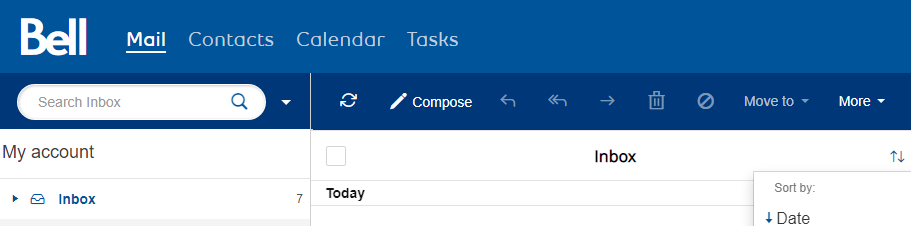
Let the Community know if you have any other questions.
- Patricia
Options
- Mark as New
- Bookmark
- Subscribe
- Mute
- Subscribe to RSS Feed
- Permalink
- Report Inappropriate Content
02-18-2023 08:39 PM
Thank you. HOWEVER IMPORTANT CLARIFICATION the arrows only show on my screen when I select "view vertical". For some reason the two arrows are missing from my preferred horizontal view so I could not find it most of the time. But now I use view vertical when i want to sort. Thank you so much.
9 REPLIES 9
Options
- Mark as New
- Bookmark
- Subscribe
- Mute
- Subscribe to RSS Feed
- Permalink
- Report Inappropriate Content
02-14-2023 11:57 AM
FYI - I am using Google chrome as my browser for bell e-mail.
Options
- Mark as New
- Bookmark
- Subscribe
- Mute
- Subscribe to RSS Feed
- Permalink
- Report Inappropriate Content
02-16-2023 02:32 PM
Hey there @William2013, thanks for your post and welcome to the Bell Community 🙂
Great question! On the right hand side of your Inbox there is an up/down arrow. Simply click it to reveal the Sort by drop down menu.
Let the Community know if you have any other questions.
- Patricia
Options
- Mark as New
- Bookmark
- Subscribe
- Mute
- Subscribe to RSS Feed
- Permalink
- Report Inappropriate Content
02-18-2023 08:39 PM
Thank you. HOWEVER IMPORTANT CLARIFICATION the arrows only show on my screen when I select "view vertical". For some reason the two arrows are missing from my preferred horizontal view so I could not find it most of the time. But now I use view vertical when i want to sort. Thank you so much.

Options
- Mark as New
- Bookmark
- Subscribe
- Mute
- Subscribe to RSS Feed
- Permalink
- Report Inappropriate Content
06-15-2023 09:41 AM
The Up/Down arrow only sorts the emails from 'newest' to 'oldest', or oldest to newest. It doesn't bring up the unread emails to the top. What if you have 5000 emails ? Should you spend the whole day scrolling through them and looking for what is unread ?

Options
- Mark as New
- Bookmark
- Subscribe
- Mute
- Subscribe to RSS Feed
- Permalink
- Report Inappropriate Content
05-26-2025 04:40 PM - last edited on 05-27-2025 08:23 AM by BellPatricia
I use bell.net for my email on my laptop. The messages in my Inbox have always been sorted by date from the most recent. I accidentally clicked on an icon (that I don't recall seeing before yesterday) that is located above and to the top right of the From/Subject/Date column headers above the list of messages in my Inbox (it's below the View option icon and on the same line as Compose/Reply, Reply All, and Forward arrows/Move To/More). The icon looks like a funnel consisting of short thick black lines (longest line is on top and the line length decreases to the final line of the icon that to me looks like a representation of a funnel). When I pressed this "funnel" icon, I activated a filter that I do NOT want to use because it sorts the messages in my Inbox by Read or Unread messages and nullifies the sort by most recent email. I've looked under Settings, hoping to find a way to disable the sort by read/unread messages, but I've not found anything (such as removing a check mark beside this filter option - I can't see anything that even mentions this filter in Settings). I have not been able to disable this filter; each time I click on it the sort will cycle from Read to Unread - the icon does not offer an "off" or "remove" or even "disable" option. I tried logging off and then logging back into to my bell.net email account, but doing so did not remove the filter (return to the way my Inbox sorts messages by date before I activated this unwanted filter).
I'm hoping that someone can help me to get rid of (turn off or disable) this particular sort option entirely, so I can return to sorting the messages in my inbox by date only, the setting I had before and is all that I want (the columns above the messages in my inbox are From/Subject and Date - and you can toggle the Date column by descending or ascending).
I'd really appreciate if anyone in the community can advise how I can turn off/disable/get rid of this Read/Unread sort option! Thank you very much!


Options
- Mark as New
- Bookmark
- Subscribe
- Mute
- Subscribe to RSS Feed
- Permalink
- Report Inappropriate Content
05-26-2025 05:03 PM - last edited on 05-27-2025 08:23 AM by BellPatricia
Good Day.
Thank you for reaching out to the Bell Community Forum. I will assume that y. You may find thatou are accessing your webmail by way of a web browser.
You cannot "turn off/disable/get rid of this Read/Unread sort option". You can use either, or, and both. You can change back by going from one to the other & selecting Date order > newest to oldest & vice versa.
Please log back in to webmail account. Go to your Inbox. The downward funnel you mention allows you to sort your Inbox mail by Read or Unread. You can choose to go back and forth from one to the other. Beside the funnel, there is an upward & downward arrow icon that will allows you to sort by Date, etc. Please select > Date.
Please check out all of the options for viewing & sorting your email messages.
This will bring you back to where I believe you wish to be.
Take care.
I am a Community All-Star and customer. I'm here to help by sharing my knowledge and experience. My views on Bell and the Community Forum are my own and not the views of Bell or any of its affiliates.
Options
- Mark as New
- Bookmark
- Subscribe
- Mute
- Subscribe to RSS Feed
- Permalink
- Report Inappropriate Content
05-26-2025 06:44 PM - last edited on 05-27-2025 08:24 AM by BellPatricia
Thank you @WelshTerrier, but I don't want to sort by Read or Unread. I leave MANY of the messages in my Inbox as unread, so I'll know to go back to them later (i.e. I want to revisit them). I don't want to have to mark ALL of the messages in my Inbox as READ (or unread) - I just want to go back to what I had yesterday before I accidentally hit that sort icon for read vs. unread, wherein my messages were sorted by Date (descending) ONLY. There MUST be a way to get back to the email sort by date ONLY that I had BEFORE I accidentally clicked on the unwanted Read/Unread icon!!

Options
- Mark as New
- Bookmark
- Subscribe
- Mute
- Subscribe to RSS Feed
- Permalink
- Report Inappropriate Content
05-27-2025 05:54 AM - last edited on 05-27-2025 08:23 AM by BellPatricia
Thank you for your question. Please be aware that leaving messages on the Bell mail server for any length of time can risk your messages being removed as your mail file increase in size. A short length of time is OK, but using web mail as a storage device for your e-mail poses a risk of loss.
Using a mail client such as Outlook Classic, Thunderbird or Proton Mail and POP3 is a lower risk for that happening, as you can set one device to download all you mail at the end of the say, for example, while you can still read your mail in other devices before that. Using an e-mail client also lowers your risk of losing mail in general.
I am a Community All-Star and customer. I'm here to help by sharing my knowledge and experience. My views on Bell and the Community Forum are my own and not the views of Bell or any of its affiliates.
Options
- Mark as New
- Bookmark
- Subscribe
- Mute
- Subscribe to RSS Feed
- Permalink
- Report Inappropriate Content
05-27-2025 06:06 AM - last edited on 05-27-2025 08:23 AM by BellPatricia
Good Day.
You do not have to sort by read & unread. You can choose read, unread or a combination of both. They can also be sorted by date newest to oldest & vice versa by read, unread or a combination of both
Once you check the message box it goes from unread to read. A message is considered read when this occurs whether it is opened fully or not.
You can choose to sort your messages as: read, unread, or as read / unread combined. Sort by date will give you newest to oldest & vice versa with read & and unread mixed together or in separate groupings. Please work with the sort settings.
Take care.
I am a Community All-Star and customer. I'm here to help by sharing my knowledge and experience. My views on Bell and the Community Forum are my own and not the views of Bell or any of its affiliates.

Getting started
New to our forum? These guides will help you find your way around quickly.
- Welcome to the Community!
- Log in/Register
- Community guidelines
- Community help
- Meet the Moderators
- Bell Community All-Stars
- How to send a private message
- Existing customers, login to MyBell to see exclusive offers
- What's on Crave
- What's on Free Preview
- Mobility phone & device catalog
- Latest in the Community


