- Community Home
- TV & Streaming
- Re: Speed of entry - VIP7802
Options
- Subscribe to RSS Feed
- Mark Topic as New
- Mark Topic as Read
- Float this Topic for Current User
- Bookmark
- Subscribe
- Mute
- Printer Friendly Page

Options
- Mark as New
- Bookmark
- Subscribe
- Mute
- Subscribe to RSS Feed
- Permalink
- Report Inappropriate Content
12-04-2024 05:42 PM - edited 12-04-2024 05:43 PM
My dad is 94 years old and not nimble of the fingers. When he uses the numbers on the remote to key in his desired channel, it takes him too long so he can't get to the channel he wants.
He's hunting and pecking so invariably he ends up on channel 15 (or even just 1) instead of 1500 because there's not nearly enough time for him to type 4 digits before the system automatically moves to 'enter' mode.
1. Is there a way to slow this down for him? 2. Is there voice control on this remote? I see 'Bell mic' at the top but no button to activate it.
Right now I'm advising him to go to guide and navigate that way. I've managed to have it show only his 17 channels so it's not too bad....but not ideal.
Thanks!
Solved! Go to Solution.
0
2
335
1 helpful reply
Accepted Solutions

Options
- Mark as New
- Bookmark
- Subscribe
- Mute
- Subscribe to RSS Feed
- Permalink
- Report Inappropriate Content
12-05-2024 10:54 AM
Hi there @OttawaRuth
Thank you for your post and welcome to the Community.
There currently is no way to increase the timeout when inputting channel numbers manually. The remote for the VIP7802 is a voice remote and you just need to press the button in between the volume and channel buttons once (don't hold it). After pressing it you'll see a voice screen pop up on the bottom of the TV screen indicating it's active. At that point, you would just need to speak out and say something like:
"Go to channel fifteen hundred" or "Go to channel 1-5-0-0", either phrase when speaking the numbers should work.
This is the Voice Assistance button:
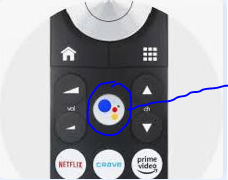
The mic button at the top left of the remote you're referring to is the volume mute button.
If you have any further questions, please let the Community know.
2 REPLIES 2
Options
- Mark as New
- Bookmark
- Subscribe
- Mute
- Subscribe to RSS Feed
- Permalink
- Report Inappropriate Content
12-05-2024 10:54 AM
Hi there @OttawaRuth
Thank you for your post and welcome to the Community.
There currently is no way to increase the timeout when inputting channel numbers manually. The remote for the VIP7802 is a voice remote and you just need to press the button in between the volume and channel buttons once (don't hold it). After pressing it you'll see a voice screen pop up on the bottom of the TV screen indicating it's active. At that point, you would just need to speak out and say something like:
"Go to channel fifteen hundred" or "Go to channel 1-5-0-0", either phrase when speaking the numbers should work.
This is the Voice Assistance button:
The mic button at the top left of the remote you're referring to is the volume mute button.
If you have any further questions, please let the Community know.
Options
- Mark as New
- Bookmark
- Subscribe
- Mute
- Subscribe to RSS Feed
- Permalink
- Report Inappropriate Content
12-05-2024 05:50 PM - last edited on 12-09-2024 06:09 PM by BellPatricia
Thanks @BellNick!I actually figured out the voice assist last night :-). But still great to know I just press once vs hold. Appreciate your response!

Getting started
New to our forum? These guides will help you find your way around quickly.
- Welcome to the Community!
- Log in/Register
- Community guidelines
- Community help
- Meet the Moderators
- Bell Community All-Stars
- How to send a private message
- Existing customers, login to MyBell to see exclusive offers
- What's on Crave
- What's on Free Preview
- Mobility phone & device catalog
- Latest in the Community





