- Community Home
- TV & Streaming
- Re: Fibe tv content on Home computer missing
Options
- Subscribe to RSS Feed
- Mark Topic as New
- Mark Topic as Read
- Float this Topic for Current User
- Bookmark
- Subscribe
- Mute
- Printer Friendly Page

Options
- Mark as New
- Bookmark
- Subscribe
- Mute
- Subscribe to RSS Feed
- Permalink
- Report Inappropriate Content
10-26-2023 12:07 AM - last edited on 02-14-2024 09:00 AM by BellPatricia
On the Fibe app program guide, there are programs with the house icon in the corner that say they can only be watched at home while connected to wi-fi, and I’m unable to watch them. But I am at home on wi-fi and without a VPN. Why would I be restricted from these?
Solved! Go to Solution.
Labels:
- Labels:
-
Fibe TV app
1
65
12.7K
65 REPLIES 65

Options
- Mark as New
- Bookmark
- Subscribe
- Mute
- Subscribe to RSS Feed
- Permalink
- Report Inappropriate Content
02-19-2024 06:24 PM
Yup, I’ve tried every possible solution I’ve found online and nothing has worked. Not even temporarily.

Options
- Mark as New
- Bookmark
- Subscribe
- Mute
- Subscribe to RSS Feed
- Permalink
- Report Inappropriate Content
02-20-2024 10:15 AM
Hi there @TeriB
Thank you for your post and welcome to the Community.
Do any stations work while watching on your computer or is it strictly only the American channels?
What devices (make and model) are you using that you experience this on?
Looking forward to hearing back.
Options
- Mark as New
- Bookmark
- Subscribe
- Mute
- Subscribe to RSS Feed
- Permalink
- Report Inappropriate Content
02-20-2024 06:07 PM
Hello @BellNick,
All other stations (such as CTV, Global, TSN, Sportsnet, Crave1-4, etc) work just fine except for the American networks (both regular and time shifted and including channels like KTLA, WGN, etc), all Omni channels, the CityTV channels, and a few various singular channels like NTV, aptn and a few in the 500’s like CHCOtv. All of the latter listed have the house icon and the “content is only available to watch at home while on your Bell Wi-Fi network” message while I AM at home on my Bell Wi-Fi.
I personally use an iPad (9th generation) and an iPhone (iPhone 12) and experience this on both and my son upstairs uses a Windows PC and experiences it as well. His computer also uses an Ethernet cable to connect to the internet and he still has this issue. We are both stumped on what is causing it.
I did upgrade my internet in September of 2022 from an older, outdated plan to the Wireless Home Internet 25 where a technician installed an antenna on the fence outside and my modem was changed (just a different one, same model, the Bell Home Hub 2000) but I can’t recall if this was an issue before this switch. In any case, my iPad was bought AFTER that internet switch, so I wouldn’t think it would be the cause since this iPad was never connected to my old wifi.
Here is a screenshot of what I see on my screen, looking specifically at the American channels.

Anything you can do to assist would be appreciated! Thanks!
Options
- Mark as New
- Bookmark
- Subscribe
- Mute
- Subscribe to RSS Feed
- Permalink
- Report Inappropriate Content
02-22-2024 01:22 PM
Hi there @TeriB
Thank you for the details. As you subscribe to WHI (Wireless Home Internet) your "in home" service availability will be limited. Wireless Home Internet is an ‘away from home’ internet service and therefore subscribers will be unable to view any ‘at home’ channels on the Fibe TV app. Channels will still be available on your home receiver though. See What is Fibe TV app and how do I use it? for further details on using the Fibe TV app with different services.
Options
- Mark as New
- Bookmark
- Subscribe
- Mute
- Subscribe to RSS Feed
- Permalink
- Report Inappropriate Content
02-22-2024 11:03 PM
I don’t understand what that means. Wireless Home Internet 25 is my HOME internet service that I subscribe to at home because I didn’t have Fibe in the area when I switched (could be there now, no idea, can’t afford to switch again) so what do you mean by “away from home” service? The FibeTV app says “included with Fibe tv and Satellite TV services” and I have satellite tv so why would certain channels be blocked on my home wifi (the only wifi I have)? This information you’re giving about “in home” and “away from home” is absolutely nowhere to be found anywhere in the descriptions of the Wireless Home Internet 25 package nor the FibeTV app. Clicking the link you gave me says nothing about channels being limited depending on which wifi package you have.
Options
- Mark as New
- Bookmark
- Subscribe
- Mute
- Subscribe to RSS Feed
- Permalink
- Report Inappropriate Content
02-27-2024 11:58 AM
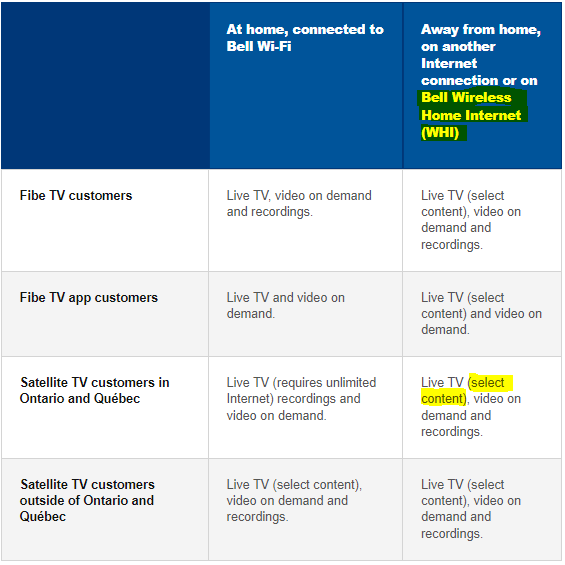
Options
- Mark as New
- Bookmark
- Subscribe
- Mute
- Subscribe to RSS Feed
- Permalink
- Report Inappropriate Content
02-27-2024 06:25 PM
The problem is, though, at least some of the channels (I didn’t check all) in the graph that say they’re available while at home are ones that are NOT for me, for example NTV (live, in this case, not on demand, however live programming still has the house icon and error message).

Also, why is this even a thing? Wifi is wifi, it shouldn’t matter which way it gets into my home (through WHI or Fibe) whether or not I’m able to view channels I pay for.
Options
- Mark as New
- Bookmark
- Subscribe
- Mute
- Subscribe to RSS Feed
- Permalink
- Report Inappropriate Content
02-28-2024 01:06 PM
Hi there @TeriB
As per the screenshot you have provided, "NTV - St.Johns" is only available Live, At Home. For your situation whereas you have Satellite and WHI, any stations listed "Live" under "At Home" will require the use of the receiver to view the content.
Options
- Mark as New
- Bookmark
- Subscribe
- Mute
- Subscribe to RSS Feed
- Permalink
- Report Inappropriate Content
02-28-2024 05:43 PM
You’re ignoring the important part of my question… why. Why is WHI (the only available internet in my area, I checked) treated differently when I pay the same amount for the channels? Also, why is it so difficult to find this info? The graph you showed, which is difficult to find, behind multiple hyperlinks and the only thing on the website that I can find stating this info, completely contradicts other parts of the website. For example, multiple “fine print” areas don’t mention this limitation, saying that either live or on demand programming just requires a Bell internet connection (which WHI would be, would it not?) like in this screenshot.

And the screenshot in the reply above that I gave didn’t include the top of that graph where the headers do NOT specify what “At Home” vs “On The Go” means. It’s incredibly misleading.

If Bell Wireless Home Internet somehow isn’t a “Bell Internet Service” that is also incredibly misleading, confusing and frankly, ridiculous and should be made MUCH clearer in many, many more places on the Bell website, including the description of that particular package and on the FibeTV app download description. There’s also multiple threads in this forum, on Reddit and other forums that ask this question (why they’re seeing the house icon and getting the error message asked about) and this is the FIRST answer I’ve seen in months of searching these forums explaining that this is a limitation. I’ve even contacted support and asked this question and not received this explanation. Bell needs to make this info MUCH more accessible and obvious to paying customers.

Options
- Mark as New
- Bookmark
- Subscribe
- Mute
- Subscribe to RSS Feed
- Permalink
- Report Inappropriate Content
02-29-2024 02:00 PM
I use the streamer when I am on in home on my Bell Wi-fi and still says Out-Of-wifi

Options
- Mark as New
- Bookmark
- Subscribe
- Mute
- Subscribe to RSS Feed
- Permalink
- Report Inappropriate Content
03-02-2024 03:50 PM
Hi there @Phylip92,
Thanks for reaching out to the Bell Community 🙂
Is this affecting just a certain channel, or all of them?
Can you clarify what type of Internet service you are using (Fibe Internet, Bell Wireless Home Internet), and if you're connected through a VPN?
Please also check out the thread above for additional information on using the Bell Fibe TV app.
We are looking forward to your reply.
- Patricia
Options
- Mark as New
- Bookmark
- Subscribe
- Mute
- Subscribe to RSS Feed
- Permalink
- Report Inappropriate Content
03-02-2024 07:14 PM - edited 03-02-2024 07:16 PM
It’s affecting most of the channels while using the Bell streamer
Options
- Mark as New
- Bookmark
- Subscribe
- Mute
- Subscribe to RSS Feed
- Permalink
- Report Inappropriate Content
03-03-2024 10:41 AM
Hello @Phylip92,
Can you also please clarify which Internet service you are using (Fibe Internet, Bell Wireless Home Internet), and if you're connected through a VPN?
- Patricia
Options
- Mark as New
- Bookmark
- Subscribe
- Mute
- Subscribe to RSS Feed
- Permalink
- Report Inappropriate Content
03-03-2024 11:27 AM
Bell wireless home internet and no vpn home hub 3000 does the same thing with my iPhone and iPad with the fibe tv app I am not Sorensen mentioned this but I have satellite
Options
- Mark as New
- Bookmark
- Subscribe
- Mute
- Subscribe to RSS Feed
- Permalink
- Report Inappropriate Content
03-03-2024 05:38 PM
Thank you for clarifying @Phylip92,
Wireless Home Internet subscribers are unable to view any ‘at home’ channels while using the Fibe TV app. However, all channels will still be available on your home receiver.
For additional information please check out our posts here and here
Let the Community know if you have any other questions.
- Patricia

Getting started
New to our forum? These guides will help you find your way around quickly.
- Welcome to the Community!
- Log in/Register
- Community guidelines
- Community help
- Meet the Moderators
- Bell Community All-Stars
- How to send a private message
- Existing customers, login to MyBell to see exclusive offers
- What's on Crave
- What's on Free Preview
- Mobility phone & device catalog
- Latest in the Community





