- Community Home
- TV & Streaming
- How to see which TV channels you are subscribed to...
Options
- Subscribe to RSS Feed
- Mark Topic as New
- Mark Topic as Read
- Float this Topic for Current User
- Bookmark
- Subscribe
- Mute
- Printer Friendly Page

Options
- Mark as New
- Bookmark
- Subscribe
- Mute
- Subscribe to RSS Feed
- Permalink
- Report Inappropriate Content
11-30-2022 03:49 AM - last edited on 10-24-2023 11:49 AM by BellDRock
How can I find the channels I’m subscribed to on my bell account. I’m questioning because I never used to have TSN sports channel and now I have access to them unless now they’re free channels? Can anyone help me with this please? I would call and find out but their office is closed and can’t chat with customer service!
Solved! Go to Solution.
Labels:
- Labels:
-
Bell Fibe TV
-
Channel Guide
-
Channels
-
MyBell
-
Packages
0
13
8,485
3 helpful replies
Accepted Solutions

Options
- Mark as New
- Bookmark
- Subscribe
- Mute
- Subscribe to RSS Feed
- Permalink
- Report Inappropriate Content
11-30-2022 03:21 PM

Options
- Mark as New
- Bookmark
- Subscribe
- Mute
- Subscribe to RSS Feed
- Permalink
- Report Inappropriate Content
12-01-2022 03:02 PM
Hi there @Mzmar,
Thank you for your post and welcome to the Community.
@AlexS is correct. You can check your subscribed channels through your MyBell profile. On the main page under the television section there is "View channel line-up", once you click that a new page will load and there will be an option to "View all my channels".
Hope this helps!

Options
- Mark as New
- Bookmark
- Subscribe
- Mute
- Subscribe to RSS Feed
- Permalink
- Report Inappropriate Content
03-31-2023 01:21 PM
Hey there @Oksie,
Welcome to the Bell Community.
There are some available HD Sportsnet channels. To see the channels included in your current subscription check out the steps @BellNick posted above.
If you wish to subscribe to additional channels I recommend this helpful How To: How to change your Bell TV programming using the MyBell app
Let the Community know if you have any other questions.
- Patricia
13 REPLIES 13
Options
- Mark as New
- Bookmark
- Subscribe
- Mute
- Subscribe to RSS Feed
- Permalink
- Report Inappropriate Content
11-30-2022 03:21 PM
Login your account via the MyBell app or Bell’s website.
Options
- Mark as New
- Bookmark
- Subscribe
- Mute
- Subscribe to RSS Feed
- Permalink
- Report Inappropriate Content
12-01-2022 03:02 PM
Hi there @Mzmar,
Thank you for your post and welcome to the Community.
@AlexS is correct. You can check your subscribed channels through your MyBell profile. On the main page under the television section there is "View channel line-up", once you click that a new page will load and there will be an option to "View all my channels".
Hope this helps!
Options
- Mark as New
- Bookmark
- Subscribe
- Mute
- Subscribe to RSS Feed
- Permalink
- Report Inappropriate Content
12-01-2022 03:10 PM
Thanks BellNick for your help. I will definitely check that out. You were helpful with this information. Thank god for our community, looking out for eachother! 😊
Options
- Mark as New
- Bookmark
- Subscribe
- Mute
- Subscribe to RSS Feed
- Permalink
- Report Inappropriate Content
12-01-2022 03:12 PM
Thanks AlexS for your help!! 😊

Options
- Mark as New
- Bookmark
- Subscribe
- Mute
- Subscribe to RSS Feed
- Permalink
- Report Inappropriate Content
03-30-2023 09:02 AM - last edited on 03-30-2023 11:51 AM by BellDRock
How come there"s no HD sportsnet in the programming
Options
- Mark as New
- Bookmark
- Subscribe
- Mute
- Subscribe to RSS Feed
- Permalink
- Report Inappropriate Content
03-31-2023 01:21 PM
Hey there @Oksie,
Welcome to the Bell Community.
There are some available HD Sportsnet channels. To see the channels included in your current subscription check out the steps @BellNick posted above.
If you wish to subscribe to additional channels I recommend this helpful How To: How to change your Bell TV programming using the MyBell app
Let the Community know if you have any other questions.
- Patricia

Options
- Mark as New
- Bookmark
- Subscribe
- Mute
- Subscribe to RSS Feed
- Permalink
- Report Inappropriate Content
08-12-2023 04:39 PM - last edited on 08-13-2023 07:29 AM by BellKris
I just reduced my tv schedule, how can I check my stations I still get?


Options
- Mark as New
- Bookmark
- Subscribe
- Mute
- Subscribe to RSS Feed
- Permalink
- Report Inappropriate Content
08-12-2023 06:26 PM
Login to MyBell > Go to TV > My Channel Line up > View Your channel lineup.
That is it!
Enjoy!
I am a Community All-Star and customer. I'm here to help by sharing my knowledge and experience. My views on Bell and the Community Forum are my own and not the views of Bell or any of its affiliates.
Options
- Mark as New
- Bookmark
- Subscribe
- Mute
- Subscribe to RSS Feed
- Permalink
- Report Inappropriate Content
08-13-2023 08:30 PM
Thank you very much...have a good week. Don

Options
- Mark as New
- Bookmark
- Subscribe
- Mute
- Subscribe to RSS Feed
- Permalink
- Report Inappropriate Content
09-27-2023 03:12 PM
I tried that but the "View channel line-up" is not on my profile. Is it because I have a bundle?
Very limited information on my profile.
Options
- Mark as New
- Bookmark
- Subscribe
- Mute
- Subscribe to RSS Feed
- Permalink
- Report Inappropriate Content
09-28-2023 12:03 PM
Hi there @MAR22,
Thank you for reaching out to the Bell Community 🙂
As long as your TV service has been linked in your MyBell account you will be able to modify your TV package.
When you log into MyBell via a browser you would just need to select your TV service on the left, and then to right you will see a few options to choose from, including View channel line-up.
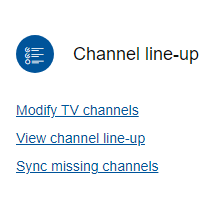
Can you share if you are logging in to MyBell via a web browser, or are you using the MyBell app?
Let us know if you have any further trouble, or questions.
- Patricia
Options
- Mark as New
- Bookmark
- Subscribe
- Mute
- Subscribe to RSS Feed
- Permalink
- Report Inappropriate Content
05-28-2025 07:59 PM - last edited on 05-29-2025 08:20 AM by BellPatricia
Where do I find the list of my 10 a la carte
Options
- Mark as New
- Bookmark
- Subscribe
- Mute
- Subscribe to RSS Feed
- Permalink
- Report Inappropriate Content
05-28-2025 08:37 PM - last edited on 05-29-2025 08:20 AM by BellPatricia
Good Day & Welcome to the Bell Community Forum
To find a complete listing of your TV channels, login to you MyBell web account using any web browser.
Scroll down & select your TV service on the opening page. Select > View channel line. You can now choose to:
- View all my channels. You can choose to View or Print your complete channel line-up. You can also choose to: Modify channels.
- Modify channel line-up. Select > "A la carte", you will be able to view your previous selections that are marked with a checkmark. From here, you can choose to add, change or remove your "A la carte" selections.
Take care.
I am a Community All-Star and customer. I'm here to help by sharing my knowledge and experience. My views on Bell and the Community Forum are my own and not the views of Bell or any of its affiliates.

Getting started
New to our forum? These guides will help you find your way around quickly.
- Welcome to the Community!
- Log in/Register
- Community guidelines
- Community help
- Meet the Moderators
- Bell Community All-Stars
- How to send a private message
- Existing customers, login to MyBell to see exclusive offers
- What's on Crave
- What's on Free Preview
- Mobility phone & device catalog
- Latest in the Community


