
- Community Home
- Internet
- Re: Bell Home Hub 4000 Error 1201
Options
- Subscribe to RSS Feed
- Mark Topic as New
- Mark Topic as Read
- Float this Topic for Current User
- Bookmark
- Subscribe
- Mute
- Printer Friendly Page

Options
- Mark as New
- Bookmark
- Subscribe
- Mute
- Subscribe to RSS Feed
- Permalink
- Report Inappropriate Content
02-28-2022 06:20 PM - last edited on 02-19-2026 12:23 PM by BellAlexander
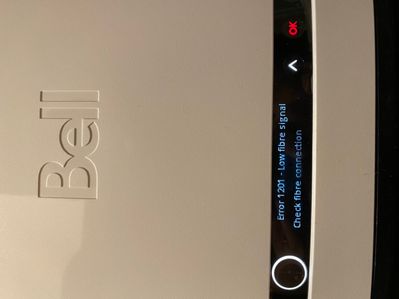
Today my bell internet Fibre 50 FTTH stopped working. My device still showed connection to the Wifi but there was no internet. The modem showed “Error 1201 - Low fibre signal Check fibre connection”. Restarting modem couldn’t fix the problem.
❗AI Summary:
Users experiencing the "Error 1201 - Low fibre signal " have identified several potential causes and solutions, primarily pointing to issues with the physical fibre optic connection. The error indicates that the modem is receiving a weak or no light signal through the fibre optic cable, preventing internet access.
Key causes identified by the Bell Community:
Discussions in the Bell Community Forum and other online platforms highlight a range of possible reasons for the error:
- Damaged or disconnected fibre optic cable: This is the most commonly cited cause. The cable could be cut, bent, or damaged externally, such as by landscaping activities. It could also be disconnected at the street-level utility box.
- Faulty or improper connections: The error can occur if the fibre optic cable is not securely connected to the modem or the wall socket. Additionally, the end of the fibre optic cable that plugs into the modem can become dirty and obstruct the signal. In some cases, the connector itself may be faulty.
- External infrastructure or equipment problems: Issues with your Bell modem or other network equipment can lead to this error. Issues may originate from outside the home, such as a problem at a node or demarcation point.
- Incorrect provisioning: A less common but possible cause is a "speed profile" or programming error on the user's account, which would require correction by Bell.
Solutions and troubleshooting steps from the Bell Community:
Forum members and Bell moderators have suggested several troubleshooting steps, ranging from simple checks to requiring technical help:
- Basic troubleshooting: The initial steps include rebooting the modem and ensuring the fibre optic cable is securely connected. However, users often report that a simple reboot does not resolve this specific error.
- Cleaning the fibre connector: Some users have had success by carefully unplugging the fibre optic cable from the modem (holding it by the green housing) and cleaning the tip with a lint-free cloth and rubbing alcohol.
- Use Virtual Repair: The Bell Community Manager recommended using Virtual Repair. This tool can check for local outages, inspect external equipment, reboot your system, and optimize settings. If the issue persists, the tool can help schedule a technician visit.
- Check for outages: It's worth checking if there is a known service outage in your area. How to check for Internet outages in your area or Outage Check.
- Contact Bell Support: Should the above fail to identify or resolve the issue, a technician may be required. Technicians can diagnose and repair issues with the external wiring, connectors, or other infrastructure problems that are beyond the user's control. Should you need to book a technician, reach out using Live Chat or you can dial *611 from any Bell mobile device.
Labels:
4
30
223K
30 REPLIES 30

Options
- Mark as New
- Bookmark
- Subscribe
- Mute
- Subscribe to RSS Feed
- Permalink
- Report Inappropriate Content
11-22-2023 03:30 PM
So it is now fixed but definitely 6 hours of my time I won’t get back lol! It was determined by an online tech that it was the modem and I made appt to replace it with his support. But during the next day a Bell service truck was across the street and my friend noticed it and went to ask and tell them what had happened to mine. He told her that he was there to replace the lines becuase someone had pulled them down off the pole across the road. He said everything should work fine now. I therefore did not change the modem and took it back home at the end of my work day and plugged it in and followed the steps on the Bell app and everything is great!

Options
- Mark as New
- Bookmark
- Subscribe
- Mute
- Subscribe to RSS Feed
- Permalink
- Report Inappropriate Content
12-08-2023 02:10 PM
If you have a 1201 Error and the Bell agent suggests a new modem please do not listen and immediately request a service appointment. My internet stopped working on a Tuesday morning. Modem was reporting a 1201 error, I did all of the traditional fixes and nothing. The online agent said replacing the modem would fix the issue. I was without internet until Friday morning when the new modem arrived. Plugged it in, same error code, called bell, now have to wait until Monday for a tech to come out and fix the lines. Don't waste your time on the new modem, have a tech come out asap to fix the line.

Options
- Mark as New
- Bookmark
- Subscribe
- Mute
- Subscribe to RSS Feed
- Permalink
- Report Inappropriate Content
01-11-2024 05:23 PM - last edited on 12-02-2025 02:46 PM by BellPatricia
If nothing happened to your modem or changed in your house, I think you should always request a technician. I had the error when I returned from vacation. They recommended replacing the modem. Full service outage for three days waiting for the modem. This did not work. Technician could not come for another three days total 6 days without service. Result was I was accidentally disconnected at the junction box. Thankfully I had a good phone plan that helped me through the outage.

Options
- Mark as New
- Bookmark
- Subscribe
- Mute
- Subscribe to RSS Feed
- Permalink
- Report Inappropriate Content
03-16-2024 09:52 PM - last edited on 03-18-2024 09:45 AM by BellAlexander
Tried debugging through virtual tour tool, noticed network outage area and I am unable to connect to my new modem.. and also nobody is ready to resolve the issue through contact center..since I cannot access this modem.. I would request to cancel my Internet service. also cannot book an appointment through Bell application and the application quality is very bad…


Options
- Mark as New
- Bookmark
- Subscribe
- Mute
- Subscribe to RSS Feed
- Permalink
- Report Inappropriate Content
03-17-2024 12:24 PM
Try a power cycle of the modem. It usually takes 5 minutes or so for the modem to get online the first time it's used.
What is the error code on the modem, if any?
I am a Community All-Star and customer. I'm here to help by sharing my knowledge and experience. My views on Bell and the Community Forum are my own and not the views of Bell or any of its affiliates.
Options
- Mark as New
- Bookmark
- Subscribe
- Mute
- Subscribe to RSS Feed
- Permalink
- Report Inappropriate Content
03-17-2024 05:06 PM
I am getting 1201 error code low fibre signal

Options
- Mark as New
- Bookmark
- Subscribe
- Mute
- Subscribe to RSS Feed
- Permalink
- Report Inappropriate Content
03-18-2024 02:57 PM
Hi there @Harish Kumar
Thank you for reaching out to the Bell Community.
Can you clarify which modem you have?
In some cases error 1201 will require a technician visit to restore the service.
If you are still having trouble we recommend using our Virtual repair tool to help detect and fix the issue. You can find a link to virtual repair in our post here
There is also a bit more information available right on our website Troubleshooting error codes with my Home Hub modem
Let the Community know if you need further assistance,
- Patricia
Options
- Mark as New
- Bookmark
- Subscribe
- Mute
- Subscribe to RSS Feed
- Permalink
- Report Inappropriate Content
03-18-2024 07:36 PM
I am getting 1201 error low fibre signal..tried restarting the device still have the same issue

Options
- Mark as New
- Bookmark
- Subscribe
- Mute
- Subscribe to RSS Feed
- Permalink
- Report Inappropriate Content
03-18-2024 07:46 PM
Harish,
Don't loose your time trying to solve this issue rebooting your modem more than once or following all the steps the support agent will ask to you perform. Ask for a immediately visit from a technician because 99,99% chances of your cable is disconnected in the entrance panel of your place.
Options
- Mark as New
- Bookmark
- Subscribe
- Mute
- Subscribe to RSS Feed
- Permalink
- Report Inappropriate Content
04-20-2024 08:45 PM

It happened the day before yesterday. I have reset it for some times, but it didn’t work. I have read the article shared in this forum and it seems that such a situation requires the technicien’s assistance
Options
- Mark as New
- Bookmark
- Subscribe
- Mute
- Subscribe to RSS Feed
- Permalink
- Report Inappropriate Content
04-20-2024 09:10 PM
Error 1201 – Low fibre signal
- Error message: Check fibre connection
What to do: Try our Virtual repair tool, which detects and fixes most issues.
If the virtual repair tool does not work, you will more than likely need a field visit from a repair technician.
I am a Community All-Star and customer. I'm here to help by sharing my knowledge and experience. My views on Bell and the Community Forum are my own and not the views of Bell or any of its affiliates.
Options
- Mark as New
- Bookmark
- Subscribe
- Mute
- Subscribe to RSS Feed
- Permalink
- Report Inappropriate Content
08-21-2025 11:59 PM - last edited on 08-22-2025 07:20 AM by BellAlexander
I am getting An error Code1201.. Lower Fibe connection issue..
Any.one else face the same connectivity issue?

Options
- Mark as New
- Bookmark
- Subscribe
- Mute
- Subscribe to RSS Feed
- Permalink
- Report Inappropriate Content
08-22-2025 06:25 AM - last edited on 08-22-2025 07:21 AM by BellAlexander
Good Day.
Error code 1201 signifies a low or lost fiber optic signal, preventing internet, TV, and phone services. Which Bell modem do you have?
Have you tried to run the Bell Virtual repair tool ? This detects and fixes most issues.
The Virtual repair tool will:
- Look for service outages in your area
- Check the equipment outside your home
- Reboot all your hardware
- Optimize the settings for your service
If it can’t solve the problem, the tool will even help you book a technician appointment.
If you are unable to run this tool, or it does not work, reboot your modem, by powering it completely off, unplug it from the power source, wait 30 seconds, & plug it back in. This process can take upwards of 5 minutes to complete.
If you still get error 1201 after completing these steps, please call Bell Internet Tech support: 1 866 310-BELL (2355)
Troubleshooting Tools & Help
Internet: troubleshooting tools, virtual repair tool and support
Take care.
I am a Community All-Star and customer. I'm here to help by sharing my knowledge and experience. My views on Bell and the Community Forum are my own and not the views of Bell or any of its affiliates.

Options
- Mark as New
- Bookmark
- Subscribe
- Mute
- Subscribe to RSS Feed
- Permalink
- Report Inappropriate Content
12-02-2025 02:15 PM
Hi there @BF14
Thank you for your post and welcome to the Community.
We wanted to check in to see if you're still experiencing issues with error 1201? If so, can you please provide some further information?
What model modem do you have?
Have you tried rebooting your modem?
Are you able to disconnect the Fibre Optic cord from the back of the modem, wipe off the tip of the cord gently to ensure the cord is clean and plug it back in (repeat this on the other end of the cord) to see if it resolves the issue? Additionally, have you checked the cord to ensure there is no visible damage?
Looking forward to hearing back.

Options
- Mark as New
- Bookmark
- Subscribe
- Mute
- Subscribe to RSS Feed
- Permalink
- Report Inappropriate Content
09-09-2026 05:06 PM - last edited on 09-10-2026 06:42 AM by BellAlexander
I have been getting error 1201 every four months since switching to Bell a year an a half ago.
Is this normal? I have lost my appetite for waiting on customer service calls which routinely drop, which have me go through the same motions every single time even though I've come to know that they won't work, all while paying for a service that I'm routinely losing.
Anyone else? Advice?
I'm seriously considering Cogeco or Rogers, at this point. I switched to bell from Cogeco and this literally never happened with them.

Getting started
New to our forum? These guides will help you find your way around quickly.
- Welcome to the Community!
- Log in/Register
- Community guidelines
- Community help
- Meet the Moderators
- Bell Community All-Stars
- How to send a private message
- Existing customers, login to MyBell to see exclusive offers
- What's on Crave
- What's on Free Preview
- Mobility phone & device catalog
- Latest in the Community



