- Community Home
- Internet
- Re: Download speed drops
Options
- Subscribe to RSS Feed
- Mark Topic as New
- Mark Topic as Read
- Float this Topic for Current User
- Bookmark
- Subscribe
- Mute
- Printer Friendly Page

Options
- Mark as New
- Bookmark
- Subscribe
- Mute
- Subscribe to RSS Feed
- Permalink
- Report Inappropriate Content
09-13-2022 11:34 PM
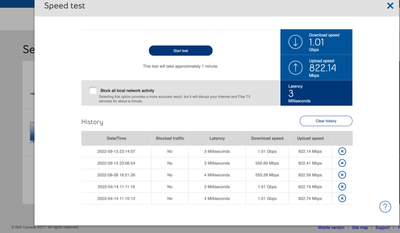
My 1 Gb download speed regularly goes down to 550 Mb, and seemed to be limited there until I restart my modem. It stays fine for a few days, but eventually seemingly goes back to the 550 Mb limits... restarting the modem re-established the download speed I am subscribed for... anyone else noticed this issue?
Solved! Go to Solution.
1
293
49K
293 REPLIES 293
Options
- Mark as New
- Bookmark
- Subscribe
- Mute
- Subscribe to RSS Feed
- Permalink
- Report Inappropriate Content
01-22-2023 05:27 PM - edited 01-22-2023 05:28 PM
Status update: since a Bell Network Engineer did a manual workaround to prevent my client profile to be switched to a lower speed, my Internet download speed has remained stable for nearly a month; a clear improvement since it was usually dropping after 2-3 days following a reboot.
Reporting the fact that I had recuring download speed drops to the https://www.dslreports.com/forum/sympatdirect forum was a great move.

Options
- Mark as New
- Bookmark
- Subscribe
- Mute
- Subscribe to RSS Feed
- Permalink
- Report Inappropriate Content
02-16-2023 11:23 AM
Anyone else in the same boat? I had 1g then 1.5g then 3g and my modem always tested at the full speed or higher both up and down. Now on 8g service my down is always 3.65 and upload is all over the place from 3-8. I feel like something on bells backend can’t handle it or there is a problem with my line. My gigahub is on firmware 1.16. Any help or suggestions would be greatly appreciated. And yes I have a hardwired 10g to desktop setup and no I don’t really “need” it but I’m paying extra for the speed and not receiving it.

Options
- Mark as New
- Bookmark
- Subscribe
- Mute
- Subscribe to RSS Feed
- Permalink
- Report Inappropriate Content
02-17-2023 04:24 PM
Hey there @BDAS, thanks for your post!
Just to clarify, are you referring to the modem or device speed?
Can you please do a Speed test and share the results with us so the Community can take closer look?
We also recommend running Virtual Repair It helps detect and fix issues, checks your equipment and optimizes your service.
Hope to hear from you,
- Patricia
Options
- Mark as New
- Bookmark
- Subscribe
- Mute
- Subscribe to RSS Feed
- Permalink
- Report Inappropriate Content
02-17-2023 05:09 PM

Thanks, ya I am referring to the modem speed. I have a 10G link to the modem. Any help would be greatly appreciated 🙂
Options
- Mark as New
- Bookmark
- Subscribe
- Mute
- Subscribe to RSS Feed
- Permalink
- Report Inappropriate Content
02-20-2023 01:28 PM
Thanks so much for sharing @BDAS,
I have sent you a private message in order to further assist. Please check your Messages within your profile avatar in the top right corner.
Unsure how to check or send a private message? See How to send a private message
- Patricia

Options
- Mark as New
- Bookmark
- Subscribe
- Mute
- Subscribe to RSS Feed
- Permalink
- Report Inappropriate Content
03-22-2023 10:58 AM
Hello,
While searching for anyone who was experiencing issues wih dropped speed I stumbled upon this thread.
I am currently subscribed to Bells 3gb up and down service. Modem is HH4000. I run advanced dmz and use the 10 gb link to attach to my pfsense server. Server and switches are all 10 gb fiber. System has worked flawlessly until about 10 days ago. My daughter asked me if I was doing anything to the server as connection was wonky according to her.
I jumped on my terminal and first thing I noticed was my ppoe ip had dropped to 76.xxx.xxx.x. I thought that weird as quite frankly It is always in the 178.xxx.xxx.x range. Performed speed tet from terminal and it was 192mbps down and 3175mbps up. repeated and approx. same. Went to modem and did speed test from there and it was the same. rebooted modem and it did not correct. Unplugged modem for 5 minutes and speed was back. I thought problem solved. 15 hours later speed drops out. Called tech support to explain problem. I will sum it up quickly instead of giving you the daily breakdown.
Speed on download drops off every day. Modem reboot fixes issue but several times received eror 2000 or 2001 which requires factory rest to connect. This includes new modem.
Summary,
first tech visit check light -19
Clean all connection ends. Inspect box in front of house. Clean connection points. Go to main box up street and inspect. Didn't like look of cable at termination point inside house. Redid end. Replace patch cord from termination point to modem. Light check -18. Reboot modem good to go. He stated after see modem tests that he had never seen anything like that and if it happened again to call in and hve it escalated.
Next day speed gone. Call into support and backend stated they could see something wrong and suspected issue at central server. After an hour tech says problem is at my end and they will send a tech . I asked how we went from problem at central server to my end and he said previos tech did not change to different pigtail on main box. tech came. witnessed speed on modem. He was stumped as well. Light reading -18. He went and switched pigtail and inspect my connections. reboot modem good to go. We already know that that fixes it. He stated the same thing He is limited to what he can do and it appears to be issue on backend. Call in to have it escalated if it happens again.
Next day failed. Called in and it was a disaster. Woman wouldn't escalate and did some programming and told me the problem wont come back. Spent next 2 hours dealing with factory resets trying to connect. Once going somehow my ppoe password was gone. Call back in and tech put it in and said for some reason it had beed disabled.
Monday night failed again. Called in and tech was great took it up the ladder and they couldn't find anything on the line to cause the issue. They could see the slow speed from the speed test off the modem but couldn't detect an issue. Said they were going to send a level 3 tech out on Tuesday.
Internet failed yesterday morning (download drop off) by 10am. Tech arrived by 11. Showed him speed test from modem. He didnt haave an answer for that. Went outside and checked light strength at box on side of house. -15.
Decided to run new patch cable from box into house. He did not terminate in patch box inside house. tested light. - 15. Plugged direct into modem. Modem would authorize. Reboot, modem gave error 2000. Reboot error 2000 and 2001. Factory rest and it connected or at least said it did but had no access outside. Speed test failed. Rebooted again and good to go. He said he didnt know what to do. Everything checks out and he can explain the speed drop on on leg only. Again, call in if it fails again.
Failed this morning when I checked. I don't know what to do or how to ramp this up.
I have made a couple of observations.
I have had to call in 3 times now to get my ppoe password functional in order for my pfsense box to authenticate wan.
Each time it drops Wan ip will change from 178.xxx.xxx.xx to 76.xxx.xxx.xx.
Don't know if any of those observations are relevant or not.
I did use the virtual repair tool. It advised it made some tweeks but detected a speed issue and call tech support.
If anyone can suggest who I can reach out to at bell or request escalation it would be appreciated.
As a side note, nothing in my firewall configuration has changed or been changed prior to this problem starting nor after.
Thanks in advance.
Options
- Mark as New
- Bookmark
- Subscribe
- Mute
- Subscribe to RSS Feed
- Permalink
- Report Inappropriate Content
03-23-2023 12:27 PM
Hi there @rob400, welcome to the Bell Community 🙂
Thank you for the details, and for all of the troubleshooting that you've done already. We want an opportunity to take a closer look, and have sent you a private message. Please check your Messages within your profile avatar in the top right corner.
Unsure how to check or send a private message? See How to send a private message
- Patricia
Options
- Mark as New
- Bookmark
- Subscribe
- Mute
- Subscribe to RSS Feed
- Permalink
- Report Inappropriate Content
03-27-2023 07:30 AM - last edited on 03-27-2023 09:48 AM by BellPatricia
Status update,
A big shout out to @BellPatricia for assisting me with my issue. She passed my concern to a colleague of hers and a fix was applied to my account. Not sure what the issue was or what fix was applied but I have steady 3GB up and down for the last three days. That,\'s a huge improvement from dropping out every 10 hours or so daily.
Hopefully this is the fix. I would like to know more about what the problem was if possible.
Anyhow, thanks again Patricia. Greatly appreciated.
Cheers
Options
- Mark as New
- Bookmark
- Subscribe
- Mute
- Subscribe to RSS Feed
- Permalink
- Report Inappropriate Content
03-27-2023 08:57 AM
Awesome news!
It turns out that quite a bit of clients are experiencing the same issue, I would argue most (if not all) clients do but only a select few pay attention to their internet speed. The problem seems to be with Bell's integrated solution to manage internet package for client accounts; something in the workflow overides the bandwith clients are subscribing for and it get switched to a different (typically slower) speed.
This is by now a known issue that Bell engineers can patch manually for you. I got my problem fixed at the time by reporting my issue to the https://www.dslreports.com/forum/sympatdirect. This forum is monitored by technicians and someone should be able to help relatively quickly.
I am hoping that Bell will fix this backend automation issue for good, but in the meantime I am glad to see that people like @BellPatricia are intercepting these messages and are relaying the information to the appropriate support staff!

Options
- Mark as New
- Bookmark
- Subscribe
- Mute
- Subscribe to RSS Feed
- Permalink
- Report Inappropriate Content
06-25-2023 07:41 PM
Hi there -
I’m having the exact same issue, download dropping to 14mbps every day or so, fixed by a reboot. I’ve had the 3bit fibe for a while now and it’s been fantastic until this started a week or so ago.
tried a new modem, didn’t help.
Was told to post here after posting on dslreport.
please help!

Options
- Mark as New
- Bookmark
- Subscribe
- Mute
- Subscribe to RSS Feed
- Permalink
- Report Inappropriate Content
06-26-2023 10:10 AM - last edited on 03-06-2024 03:33 PM by BellPatricia
My HH3000 started sporadically having low download limits (drops all the way to 15-18 Mbps) the last few months from 1gb. I always have to unplug the modem for a min or so and plug it back in for the full speed to kick in again.
If I don't fix it, sometimes the next day might get better but it makes more sense to restart to get my full speed when I need to watch 4k or HD content but it's super inconvenient esp. if I'm in the middle of a Zoom call for example.
I was doing some research myself and came across some comments saying it may be related to an issue with the hardware assigning the wrong speed profile after pppoe session refresh. Could I get some help here? (PS: I don't want to upgrade to a HH4000 either because I am using my own mesh router)

Options
- Mark as New
- Bookmark
- Subscribe
- Mute
- Subscribe to RSS Feed
- Permalink
- Report Inappropriate Content
06-28-2023 02:47 PM
Hi there @vcee
Thank you for your post and welcome to the Community.
We just wanted to check in to see if you are still experiencing these internet drops?
Looking forward to hearing back.
Options
- Mark as New
- Bookmark
- Subscribe
- Mute
- Subscribe to RSS Feed
- Permalink
- Report Inappropriate Content
06-28-2023 02:50 PM
Hi there @Tammybarrett
Thank you for your post and welcome to the Community.
We'd like to take a closer look into this and have sent you a private message. Please check your Messages within your profile avatar in the top right corner.
Unsure how to check or send a private message? See How to send a private message

Options
- Mark as New
- Bookmark
- Subscribe
- Mute
- Subscribe to RSS Feed
- Permalink
- Report Inappropriate Content
06-29-2023 11:34 AM
Hi,
I have this same issue and was redirected here from the Bell dsl site.
Options
- Mark as New
- Bookmark
- Subscribe
- Mute
- Subscribe to RSS Feed
- Permalink
- Report Inappropriate Content
06-29-2023 04:39 PM
Hi there @Qinnie
Thank you for your post and welcome to the Community.
We'd like to have this looked into and have sent you a private message.
Please check your Messages within your profile avatar in the top right corner.
Unsure how to check or send a private message? See How to send a private message

Getting started
New to our forum? These guides will help you find your way around quickly.
- Welcome to the Community!
- Log in/Register
- Community guidelines
- Community help
- Meet the Moderators
- Bell Community All-Stars
- How to send a private message
- Existing customers, login to MyBell to see exclusive offers
- What's on Crave
- What's on Free Preview
- Mobility phone & device catalog
- Latest in the Community





