- Community Home
- Internet
- Re: Giga Hub - modem speed vs wifi
Options
- Subscribe to RSS Feed
- Mark Topic as New
- Mark Topic as Read
- Float this Topic for Current User
- Bookmark
- Subscribe
- Mute
- Printer Friendly Page

Options
- Mark as New
- Bookmark
- Subscribe
- Mute
- Subscribe to RSS Feed
- Permalink
- Report Inappropriate Content
09-13-2022 11:34 PM
My 1 Gb download speed regularly goes down to 550 Mb, and seemed to be limited there until I restart my modem. It stays fine for a few days, but eventually seemingly goes back to the 550 Mb limits... restarting the modem re-established the download speed I am subscribed for... anyone else noticed this issue?
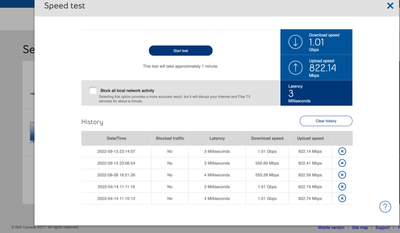
Solved! Go to Solution.
1
293
49.3K
293 REPLIES 293

Options
- Mark as New
- Bookmark
- Subscribe
- Mute
- Subscribe to RSS Feed
- Permalink
- Report Inappropriate Content
01-26-2024 10:20 AM
" I can unhook everything and the tech can test it from the modem and the problem is there."
Options
- Mark as New
- Bookmark
- Subscribe
- Mute
- Subscribe to RSS Feed
- Permalink
- Report Inappropriate Content
01-26-2024 10:24 AM
I was told by the last tech I spoke to on the phone that there is regular maintenance on my node that happens at the end of the month. Asked me if there were any months that I didn't have the issue, to which I replied, October which he then confirmed that the "maintenance" was skipped that month.
I was told by a different tech that my demand to not have to call in to get this fixed was unreasonable, and that there is no reason I should expect the service to work as I expect it to, which is... my line speed being what I pay for. And yes, I know the difference between line speed and Internet speed.
Last night was the 9th time since I moved into this house in April that I have had this issue.
*EVERY MONTH*, except October.
Options
- Mark as New
- Bookmark
- Subscribe
- Mute
- Subscribe to RSS Feed
- Permalink
- Report Inappropriate Content
01-26-2024 10:30 AM
| 2023-11-25 22:33:40 | Yes | 1 Milliseconds | 1.14 Gbps | 3.24 Gbps |
| 2023-12-23 09:53:01 | No | 1 Milliseconds | 1.72 Gbps | 3.23 Gbps |
| 2024-01-25 21:21:17 | No | 1 Milliseconds | 1.74 Gbps | 3.24 Gbps |
Direct from the modem

Options
- Mark as New
- Bookmark
- Subscribe
- Mute
- Subscribe to RSS Feed
- Permalink
- Report Inappropriate Content
01-30-2024 03:55 PM
Hi there @bob
Thank you for your post and welcome to the Community.
We wanted to check in to see if you had time to review the thread and have done a speed test via the modem? If so, are you able to share the results?
Looking forward to hearing back.

Options
- Mark as New
- Bookmark
- Subscribe
- Mute
- Subscribe to RSS Feed
- Permalink
- Report Inappropriate Content
02-03-2024 09:11 AM
Hi there,
I had contacted Bell_Dom through DSLReports 2 months ago about this (down limit to 64 Mbps instead 1 Gbps) and he applied a fix. The fix worked.
So, thanks for for doing the fix of my download limited to 64 MPBS every few days. It worked perfectly for 2 months, and I had 1Gbps upload / download correctly.
Now it has just gone down to 4 Mbps download, while still having 500 Mbps upload ! Same problem again, but worse...
Please help again to fix this, it seems the fix you applied may be only temporary ?
I need this fixed ASAP as I am a business company developing video games and nobody can work without the 1 Gbps download that we need. Thank you.
I appreciate your help.

Options
- Mark as New
- Bookmark
- Subscribe
- Mute
- Subscribe to RSS Feed
- Permalink
- Report Inappropriate Content
02-05-2024 09:13 AM
Hi there @500mbpsNow60,
Thank you for reaching out to the Bell Community again 🙂
We do want to take another look, and we have sent you a private message. Please check your Messages within your profile avatar in the top right corner.
Unsure how to check or send a private message? See How to send a private message
- Patricia

Options
- Mark as New
- Bookmark
- Subscribe
- Mute
- Subscribe to RSS Feed
- Permalink
- Report Inappropriate Content
02-05-2024 11:17 AM
I too have been getting lower download speeds. I am on the 3 GBps plan but my DL speed has been around 330 Mbps for at least a week.
I ran seedtests with my laptop connected to the Giga Hub via WI-Fi and ran speedtests from the modem itself - still download is around 330 Mbps while the upload is still solid (2.8 - 3.2 Gbps).
I understand that this is something a regular user won't notice but if I pay for the DL/UL speed I agreed to I expect it to be in the agreed range (of course with some minor speed fluctuations).
I restarted the Giga Hub a couple of times and that did not change the picture - download is still 10x lower than it used to be.
Please advise on the issue.
Thank you
Options
- Mark as New
- Bookmark
- Subscribe
- Mute
- Subscribe to RSS Feed
- Permalink
- Report Inappropriate Content
02-05-2024 11:36 AM - edited 02-05-2024 11:57 AM
I have been getting lower download speeds. I am on the 3 GBps plan but my DL speed has been around 330 Mbps for at least a weeksince around Feb 2nd (I have a built-in speedtest utility that showed me the drop around February 2nd. I use this utility on my router that is connected to GH4000).
I ran seedtests with my laptop connected to the Giga Hub 4000 via WI-Fi and ran speedtests from the modem itself - still download is around 330 Mbps while the upload is still solid (2.8 - 3.2 Gbps).
I understand that this is something a regular user won't notice but if I pay for the DL/UL speed I agreed to I expect it to be in the agreed range (of course with some minor speed fluctuations).
I restarted the Giga Hub a couple of times and that did not change the picture - download is still 10x lower than it used to be.
Here's what I've been getting
| 2024-02-05 11:25:55 | No | 3 Milliseconds | 336.07 Mbps | 3.24 Gbps | |
| 2024-02-05 11:07:52 | Yes | 4 Milliseconds | 336.08 Mbps | 3.23 Gbps | |
| 2024-02-05 10:50:07 | Yes | 4 Milliseconds | 336.08 Mbps | 3.24 Gbps | |
| 2024-02-05 10:47:20 | Yes | 3 Milliseconds | 335.78 Mbps | 2.91 Gbps |
Please advise on the issue.
Thank you
Correction: timeframe
Options
- Mark as New
- Bookmark
- Subscribe
- Mute
- Subscribe to RSS Feed
- Permalink
- Report Inappropriate Content
02-06-2024 03:39 PM
Hi there @ihorcv,
Thank you for reaching out to the Bell Community.
We would like to take a closer look, so we have sent you a private message in order to get more information. Please check your Messages within your profile avatar in the top right corner.
Unsure how to check or send a private message? See How to send a private message
- Patricia

Options
- Mark as New
- Bookmark
- Subscribe
- Mute
- Subscribe to RSS Feed
- Permalink
- Report Inappropriate Content
02-21-2024 02:55 PM
I just had the Gigabit Fibe 3.0 installed at my home, but my upload and download speeds on wifi for speed tests seem to tap out at around 546mbps download, and 425mbps upload. Is there a reason for this? This occurs even if I have only 1 device connected, rather than 3.

MyBell app via my phone is also suggesting 'The speed in (my) internet package' as being 5mbps up and 1mbps down - this seems weird?

Options
- Mark as New
- Bookmark
- Subscribe
- Mute
- Subscribe to RSS Feed
- Permalink
- Report Inappropriate Content
02-22-2024 10:30 AM
Hi there @surgeonkerosene,
Welcome to the Bell Community, and thanks for your post.
The Download/Upload speed to your modem in the photo above looks great.
What type of device are you using, and can you check out the devices speed capability?
Are you connected through a VPN, or any third party equipment such as a router or a switch?
Looking forward to your reply,
- Patricia
Options
- Mark as New
- Bookmark
- Subscribe
- Mute
- Subscribe to RSS Feed
- Permalink
- Report Inappropriate Content
02-22-2024 11:01 AM
It would be great if we could have a self support option that doesn't involve an overly locked down device. Before I moved, I had the HH3000 and I could pull the SFP and plug it directly into my modem. Now, I use an SFP-RJ45 module in my router and run a cat6 cable between the modem and the router. The modem likes to randomly require a reboot, and when it does I have to reboot my router after or I don't get an IP from the DMZ, I get it from DHCP on the modem. And if I disable DHCP, I don't get e DMZ address.
A self supported DHCP option would be something I would jump all over.
Options
- Mark as New
- Bookmark
- Subscribe
- Mute
- Subscribe to RSS Feed
- Permalink
- Report Inappropriate Content
02-23-2024 12:46 PM
Hi Patricia,
I’m on an Apple MacBook Pro M1, no VPN running. It should be capable of handling a maximum of 1200mbps. I was getting closer to 1000mbps before switching to the 3gbps plan, so I don’t understand why it’s slower now.
Options
- Mark as New
- Bookmark
- Subscribe
- Mute
- Subscribe to RSS Feed
- Permalink
- Report Inappropriate Content
02-26-2024 11:20 AM - edited 02-26-2024 11:21 AM
Good day @surgeonkerosene.
Thank you for getting back to us.
Can you also clarify if you are using any third party equipment such as a router?
There are various factors that could impact receiving the Wi-Fi speeds you are expecting. Such as how far away you are from the modem, neighboring Wi-Fi interference and even your homes building material as well as other electronic devices within the home.
How far away is your laptop from the modem, and when you move it closer or use an Ethernet connection can you see an improvement? Is your modem/laptop close to any other electronics that may cause interference?
- Patricia
Options
- Mark as New
- Bookmark
- Subscribe
- Mute
- Subscribe to RSS Feed
- Permalink
- Report Inappropriate Content
02-26-2024 11:32 AM
Hi @BellPatricia ,
I'm not using any third party equipment such as a router. My laptop is basically around the corner (1 wall) from the Gigahub, and previously I didn't experience any issues with speeds using the Home Hub... anything that was previously nearby (such as an external monitor) didn't cause issues before.
I will check the ethernet and proximity when I am home later. I imagine the ethernet will be fast, but if nothing changes with proximity using wifi, is there another solution?

Getting started
New to our forum? These guides will help you find your way around quickly.
- Welcome to the Community!
- Log in/Register
- Community guidelines
- Community help
- Meet the Moderators
- Bell Community All-Stars
- How to send a private message
- Existing customers, login to MyBell to see exclusive offers
- What's on Crave
- What's on Free Preview
- Mobility phone & device catalog
- Latest in the Community





