- Community Home
- Internet
- Re: Download speed drops
Options
- Subscribe to RSS Feed
- Mark Topic as New
- Mark Topic as Read
- Float this Topic for Current User
- Bookmark
- Subscribe
- Mute
- Printer Friendly Page

Options
- Mark as New
- Bookmark
- Subscribe
- Mute
- Subscribe to RSS Feed
- Permalink
- Report Inappropriate Content
09-13-2022 11:34 PM
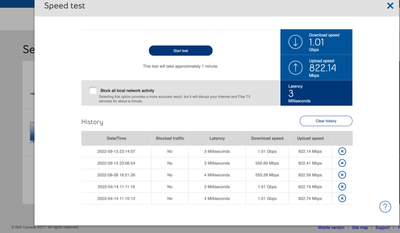
My 1 Gb download speed regularly goes down to 550 Mb, and seemed to be limited there until I restart my modem. It stays fine for a few days, but eventually seemingly goes back to the 550 Mb limits... restarting the modem re-established the download speed I am subscribed for... anyone else noticed this issue?
Solved! Go to Solution.
1
293
49.1K
293 REPLIES 293


Options
- Mark as New
- Bookmark
- Subscribe
- Mute
- Subscribe to RSS Feed
- Permalink
- Report Inappropriate Content
10-30-2024 06:19 PM
There is currently a bug with the home hub where the embedded speed test might show incorrect speed measurements.
I am a Community All-Star and customer. I'm here to help by sharing my knowledge and experience. My views on Bell and the Community Forum are my own and not the views of Bell or any of its affiliates.

Options
- Mark as New
- Bookmark
- Subscribe
- Mute
- Subscribe to RSS Feed
- Permalink
- Report Inappropriate Content
10-30-2024 06:27 PM - edited 10-30-2024 06:28 PM
It isn't just the speed test, ping is 10000ms. device's struggle to connect or don't connect to any sites. speed test from a browser on a computer are slow or fail.

Options
- Mark as New
- Bookmark
- Subscribe
- Mute
- Subscribe to RSS Feed
- Permalink
- Report Inappropriate Content
10-30-2024 08:08 PM
Can you provide your speed profile? Bell does not put limits on speed beyond your profile. A speed test from Ookla would also be helpful.
I am a Community All-Star and customer. I'm here to help by sharing my knowledge and experience. My views on Bell and the Community Forum are my own and not the views of Bell or any of its affiliates.

Options
- Mark as New
- Bookmark
- Subscribe
- Mute
- Subscribe to RSS Feed
- Permalink
- Report Inappropriate Content
11-06-2024 03:59 PM
@BellPatricia I've read that you were able to help another user with a similar issue to mine. Essentially my speeds drop down to around 200mbs and wont go higher than that (I pay for 1.5gbs). Modem was replaced and this fixed the issue for a few weeks but now we are back down to lower speeds.
Speed test history directly from modem:

Below is the fix details you shared with another Bell user:
My colleague got back to me, and advised they were able to apply a fix to your internet profile. We expect the fix to stay in place and for your internet speed to remain stable. However, if you do notice any issues with slow speed please let me know and we will check for you right away.
Thanks in advance!

Options
- Mark as New
- Bookmark
- Subscribe
- Mute
- Subscribe to RSS Feed
- Permalink
- Report Inappropriate Content
11-07-2024 04:13 PM
Hey there @SlowSpeedMike
Welcome to the Bell Community, and thank you for reaching out to us.
I have sent you a private message so we can dig into this a bit more. Please check your Messages within your profile avatar in the top right corner.
Unsure how to check or send a private message? See How to send a private message
Options
- Mark as New
- Bookmark
- Subscribe
- Mute
- Subscribe to RSS Feed
- Permalink
- Report Inappropriate Content
11-08-2024 04:59 PM
I am still have the same issue's. tech was here today and reset the modem to default, ran a speed test and said its fixed, Then connection issues all day. This is so frustrating. The worst Service I have ever had with Internet. Thats saying a lot. at least no one from bell ever replied.
Options
- Mark as New
- Bookmark
- Subscribe
- Mute
- Subscribe to RSS Feed
- Permalink
- Report Inappropriate Content
11-08-2024 05:08 PM
Were you able to do a Speedtest from Ookla and post the results here?
Even a traceroute to 8.8.8.8 will be a valuable tool to troubleshoot your issue.
I am a Community All-Star and customer. I'm here to help by sharing my knowledge and experience. My views on Bell and the Community Forum are my own and not the views of Bell or any of its affiliates.

Options
- Mark as New
- Bookmark
- Subscribe
- Mute
- Subscribe to RSS Feed
- Permalink
- Report Inappropriate Content
11-22-2024 09:18 PM - last edited on 11-23-2024 10:36 AM by BellNick
Hello @BellPatricia @BellNick !
Hope I'm tagging the right folks.
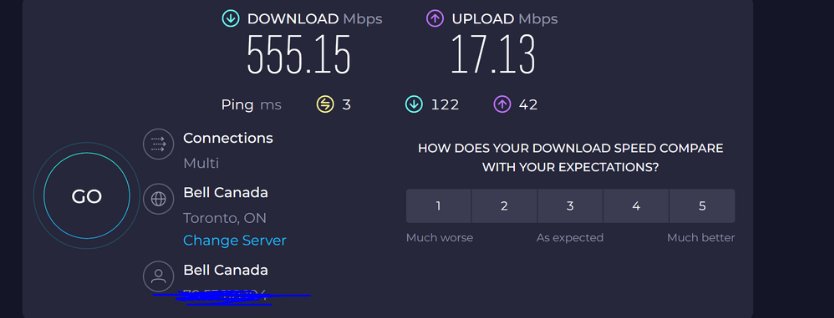
I have noticed that I seem to be capped at half of my what my current package is (1gbps) - and that my upload speed is constantly at 20/kbps tonight. It doesn't matter how many times I test it, these are the numbers I am getting.
My equipment is the Gigahub 4000.
I live in a condo that is about 778 sq feet - and my Gigahub is just around the corner, but pretty much in the same room. Apparently I was upgraded to a 3gbps package as well, but right now I'd be happy with just the 1gpbs!
Speed test image below:
Any help would be appreciated - thanks.
Options
- Mark as New
- Bookmark
- Subscribe
- Mute
- Subscribe to RSS Feed
- Permalink
- Report Inappropriate Content
11-23-2024 05:58 AM
Thank you for your question and concern. Your image is not visible until Bell staff approve it, unfortunately. However, I have some ideas to offer.
- You can confirm your speed tier by going to the MyBell web page or app and checking under your Internet service.
- You can confirm your profile is properly configured by running a speed test from this Support web page.
- You can also run the Virtual Repair tool and the WiFi checkup tool from the same page or by scanning the QR codes on that page.
Let us know what the results are so we can offer other suggestions. Thanks for contacting us.
I am a Community All-Star and customer. I'm here to help by sharing my knowledge and experience. My views on Bell and the Community Forum are my own and not the views of Bell or any of its affiliates.
Options
- Mark as New
- Bookmark
- Subscribe
- Mute
- Subscribe to RSS Feed
- Permalink
- Report Inappropriate Content
11-23-2024 12:18 PM
Hi @dks ,
1) My speed tier is the Gigabit Fibe package (1 Gbps) but I was recently told via a message on my account that I had been upgraded to 3 Gbps.
2) Later last night, after I posted my message - my download/upload speeds were good. 1 Gbps download, and about 700 mbps upload. Just want the 1 Gpbs should be - not close to the 3 gig upgrade though. And now, again - I seem to be throttled around 600 mbps download, and a whopping 20 mbps upload. When this happens, the upload will not budge past 20. VERY frustrating.
3) Virtual repair tool isn't helping.
Hope that helps!
Options
- Mark as New
- Bookmark
- Subscribe
- Mute
- Subscribe to RSS Feed
- Permalink
- Report Inappropriate Content
11-23-2024 12:37 PM
...actually sorry. I should say that the virtual repair tool reboots the modem, then the speeds are good for another day or so - then back to 550/20. Seems like the issue that others have had.
Thanks!
Options
- Mark as New
- Bookmark
- Subscribe
- Mute
- Subscribe to RSS Feed
- Permalink
- Report Inappropriate Content
11-23-2024 12:46 PM
However, this time within 10 minutes of rebooting and getting great speeds I am back to the capped speed mentioned above.
Options
- Mark as New
- Bookmark
- Subscribe
- Mute
- Subscribe to RSS Feed
- Permalink
- Report Inappropriate Content
11-23-2024 04:09 PM
Thank you for your questions.
- What is the speed of your network connection on your computer?
- What is the speed test result from the modem?
- Have you run the Virtual Repair tool and then done a speed test?
I am a Community All-Star and customer. I'm here to help by sharing my knowledge and experience. My views on Bell and the Community Forum are my own and not the views of Bell or any of its affiliates.
Options
- Mark as New
- Bookmark
- Subscribe
- Mute
- Subscribe to RSS Feed
- Permalink
- Report Inappropriate Content
11-23-2024 04:18 PM
Thank you for your comments. Bell does not cap speeds. There is likely a technical issue for what is happening. I suggest you call 1-866-310-2355 and ask for technical support.
I am a Community All-Star and customer. I'm here to help by sharing my knowledge and experience. My views on Bell and the Community Forum are my own and not the views of Bell or any of its affiliates.
Options
- Mark as New
- Bookmark
- Subscribe
- Mute
- Subscribe to RSS Feed
- Permalink
- Report Inappropriate Content
11-25-2024 06:05 PM - edited 11-26-2024 01:39 PM
Hey there @michaeloh6
Welcome to the Bell Community.
We would be happy to review this further, and have reached out to you via private message. Please check your Messages within your profile avatar in the top right corner.
Unsure how to check or send a private message? See How to send a private message

Getting started
New to our forum? These guides will help you find your way around quickly.
- Welcome to the Community!
- Log in/Register
- Community guidelines
- Community help
- Meet the Moderators
- Bell Community All-Stars
- How to send a private message
- Existing customers, login to MyBell to see exclusive offers
- What's on Crave
- What's on Free Preview
- Mobility phone & device catalog
- Latest in the Community


