- Community Home
- Internet
- IMPORTANT issue with HUB4000 and firmware 1.16 if ...
Options
- Subscribe to RSS Feed
- Mark Topic as New
- Mark Topic as Read
- Float this Topic for Current User
- Bookmark
- Subscribe
- Mute
- Printer Friendly Page

Options
- Mark as New
- Bookmark
- Subscribe
- Mute
- Subscribe to RSS Feed
- Permalink
- Report Inappropriate Content
02-12-2023 08:18 AM - edited 02-12-2023 08:24 AM
I have been installed firmware 1.16 a few days ago and while doing failover test on my network, I discovered an important problem that might be a big issue.
First, let me describe my setup, I have a UNIFI UDM-Pro router configured to provide DHCP over 192.168.1 network to my house devices. this router is connected to my HUB4000 via the 10GB port.
While doing failover testing, I disconnected the optic fiber between the HUB4000 and Bell connector. The result was as I expeted it to be on my Unifi UDP router so I reconnected the optic fiber between the HUB4000 and the Bell connection box
After doing so, TV stopped working and refused to connect asking to restart the android device wich I did and that did not solve the problem . Continuing my investigation, I connected my iphone via WIFI to the HUB4000 instead of my own UNIFI network and found out that the HUB4000 was now providing 192.168.1.X ranges address to devices instead of 192.168.2.X. (192.168.1.X in my network range ip adresses)
To fix the issue I had to disconnect my 10GB line from my Unifi UDM-PRO of the HUB4000, unplug power from the HUB4000, plugged back HUB4000 wait until HUB4000 completely reboots. I the reconnected my iphione to the Bell wifi to make sure DHCP was providing a 192.168.2.X adress, once I confirmed, only then I reconnect my 10GB line between my router and HUB4000 and everything was back to normal.
I have tried this a second time to confirm the behavior and it is constant.
HUB4000 NEVER SHOULD REACT TAKING a LAN DHCP adress, it should always stick with its configured network which is 192.168.2.x
Solved! Go to Solution.
0
24
10.3K
1 helpful reply
Accepted Solutions

Options
- Mark as New
- Bookmark
- Subscribe
- Mute
- Subscribe to RSS Feed
- Permalink
- Report Inappropriate Content
03-02-2023 03:14 PM - edited 03-02-2023 03:16 PM
Good afternoon @goldriver, thanks very much for the additional testing you've done.
We do not think that the Home Hub is providing the 192.168.1.160 IP address.
Another option you could try to reproduce this is to connect a PC (instead of your iPhone) loaded with Wireshark packet capture running, and observe which device based on the MAC address is offering that IP address.
The UDM device should be configured to not offer a DHCP address on a port that should be operating in WAN mode.
- Patricia
24 REPLIES 24
Options
- Mark as New
- Bookmark
- Subscribe
- Mute
- Subscribe to RSS Feed
- Permalink
- Report Inappropriate Content
02-13-2023 04:08 PM
Hey there @goldriver, thanks for your post.
Our modems are on IP address 192.168.2.1. It sounds like you may have two active DHCP servers running on your LAN at once, but you should only have one. If you have two DHCP servers active at the same time it could cause this type of issue.
- Patricia
Options
- Mark as New
- Bookmark
- Subscribe
- Mute
- Subscribe to RSS Feed
- Permalink
- Report Inappropriate Content
02-14-2023 03:38 PM
Hi Patricia,
I do understand perfectly how DHCP works, and I confirm I don't have a DHCP issue on my network here, it is the HUB4000 that wrongly request a DHCP adress from LAN when disconnected from fiber.
I had the EXACT same setup 2 week ago before my HUB3000 was replaced with the HUB4000 and when I was doing failover switching by unpluging fiber from the 3000 and replugging it in, it kept it's 192.168.2.1 adresss and it was not grabbing a DHCP adress from my router.
Please see my network diagram attached, you will understand my setup correctly.

Options
- Mark as New
- Bookmark
- Subscribe
- Mute
- Subscribe to RSS Feed
- Permalink
- Report Inappropriate Content
02-15-2023 04:03 PM
Hi @goldriver, thanks very much for your reply 🙂
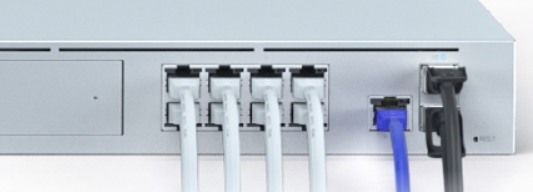
Can you share which Ethernet port the HH4000 is connected to on your UNIFI UDM-Pro? Is it on one of the 8 Ethernet port (white Ethernet cable in the picture below) or the WAN port (blue Ethernet cable in the picture below)?
Also, regarding your cellular back up solution, is that connected to the LAN ports (white) or WAN (blue)?
- Patricia
Options
- Mark as New
- Bookmark
- Subscribe
- Mute
- Subscribe to RSS Feed
- Permalink
- Report Inappropriate Content
02-15-2023 07:30 PM
The Hub4000 is connected via the it’s 10gig port to port WAN port 10 on the UniFi UDM on a FSP. The LTE is connected on port WAN port 9.


Options
- Mark as New
- Bookmark
- Subscribe
- Mute
- Subscribe to RSS Feed
- Permalink
- Report Inappropriate Content
02-15-2023 10:38 PM
"I have a UNIFI UDM-Pro router configured to provide DHCP over 192.168.1 network to my house devices. this router is connected to my HUB4000 via the 10GB port."
Hi @goldriver
Are you using PPPoE to connect your router to the Giga modem?
I am a Community All-Star and customer. I'm here to help by sharing my knowledge and experience. My views on Bell and the Community Forum are my own and not the views of Bell or any of its affiliates.
Options
- Mark as New
- Bookmark
- Subscribe
- Mute
- Subscribe to RSS Feed
- Permalink
- Report Inappropriate Content
02-16-2023 08:06 PM
Yes I am connecting to the ISP through the giga via PPPoE
Options
- Mark as New
- Bookmark
- Subscribe
- Mute
- Subscribe to RSS Feed
- Permalink
- Report Inappropriate Content
02-17-2023 10:21 AM
@goldriver I'm wondering if you were able to resolve this issue.
I am a Community All-Star and customer. I'm here to help by sharing my knowledge and experience. My views on Bell and the Community Forum are my own and not the views of Bell or any of its affiliates.
Options
- Mark as New
- Bookmark
- Subscribe
- Mute
- Subscribe to RSS Feed
- Permalink
- Report Inappropriate Content
02-18-2023 05:57 AM
No I am still waiting to hear from Bell
Options
- Mark as New
- Bookmark
- Subscribe
- Mute
- Subscribe to RSS Feed
- Permalink
- Report Inappropriate Content
02-18-2023 08:53 AM
I highly recommend you post the details of your problem in Bell's public forum on DSLR.
Many people who participate on that forum have deep technical knowledge and skills, and a lot of them have the UDM-Pro. You may get valuable advice and suggestions based on their own experience with Ubiquity and the Giga modem. https://www.dslreports.com/forum/sympat
I am a Community All-Star and customer. I'm here to help by sharing my knowledge and experience. My views on Bell and the Community Forum are my own and not the views of Bell or any of its affiliates.
Options
- Mark as New
- Bookmark
- Subscribe
- Mute
- Subscribe to RSS Feed
- Permalink
- Report Inappropriate Content
02-18-2023 04:43 PM - last edited on 02-20-2023 12:06 PM by BellPatricia
Thanks @ZaneP , I already did post over there Thursday
I think they are already looking into this, let's give them sometime...
Options
- Mark as New
- Bookmark
- Subscribe
- Mute
- Subscribe to RSS Feed
- Permalink
- Report Inappropriate Content
02-18-2023 04:47 PM
Makes sense.
I am a Community All-Star and customer. I'm here to help by sharing my knowledge and experience. My views on Bell and the Community Forum are my own and not the views of Bell or any of its affiliates.
Options
- Mark as New
- Bookmark
- Subscribe
- Mute
- Subscribe to RSS Feed
- Permalink
- Report Inappropriate Content
02-25-2023 10:45 AM
Hey there @goldriver.
It may not be the Home Hub 4000 modem, and could be another device offering that IP address. Can you please test by disabling DHCP on your Home Hub 4000, and then recreate your scenario to see what happens?
Keep the community posted,
- Patricia
Options
- Mark as New
- Bookmark
- Subscribe
- Mute
- Subscribe to RSS Feed
- Permalink
- Report Inappropriate Content
02-28-2023 03:31 PM
Sorry for the HUGE post but it is required …
As requested, I went ahead and redid the test while DHCP was disabled on the HUB4000 and effectively, the HUB4000 kept it’s 192,.168.2.1 address.
I did the test, this is exactly what I was saying, there is a problem in the HUB4000 firmware, IT SHOULD NOT GRAB AN IP ADDRESS FROM A LAN PORT !, this only demonstrates that when the DHCP is deactivate the HUB4000 does it’s job and does not grab an IP from it’s LAN port and when it is ON and a cable is connected on a LAN port it gets an IP from that LAN port.
I’ll re-explain my setup and try make sur the technical team understand exactly the problem cause I am not sure they understood to request the test I was asked to do.
Here is the exact base setup:
- I have a UDPPRO with latest 2.47 firmware installed, it is configured as DHCP server with a 192.168.1.1 gateway address.
- This UDMPRO connects to the HUB4000 10 G port via it’s port #10 with a regular patch cord
- The primary WAN connection on the UDMPRO to internet is via PPPoE throught the port 10 on BELL HUB3000
- The secondary WAN connection (in my case FailOver) connection is from port 9 of the UDM pro through DHCP via a Telus 4g modem.
- No VLAN configures on the UDMPRO, all devices connecting to the UDMPRO default network gest a DHCP address starting by 192.168.1.X
- The UDMPRO serves one 24 port switch and 4 UDM Access point all serving Default network 192.168.1.X (SSID BELL134)
- The HUB4000 is “stock” with no changes: DHCP on, router ip address set to 192.168.2.1 with 255.255.255.0 as netmask running firmware 1.16 and interface 7.3.28
- Only ONE device is connected to the HUB4000 and it is via the Télé-Fibe Wi-Fi (SSID BELL667) (an Android Fibe TV decoder set to DHCP also and the server gave 192.168.2.13)
While doing failover testing, I disconnected the optic fiber between the HUB4000 and Bell connector. The result was as I expected it to be on my Unifi UDP router (it switched to secondary network on port 9) so I reconnected the optic fiber between the HUB4000 and the Bell connection box.
After doing so, the one Android Fiver TV I have stopped working and refused to connect asking to restart the android device which I did and that did not solve the problem. Continuing my investigation, I connected my iPhone via WIFI to the HUB4000 instead of my own UNIFI network and found out that the HUB4000 was now providing 192.168.1.X ranges address to devices instead of 192.168.2.X. (see image 1 where you can see my iphone is connected to BELL667, HUB4000, who provided the ip 192.168.1.60 from it gateway 192.168.1.1).
To fix the issue I had to disconnect my 10GB line from my Unifi UDM-PRO of the HUB4000, unplug power from the HUB4000, plugged back HUB4000 wait until HUB4000 completely reboots. I the reconnected my iPhone to the Bell HUB4000 Wi-Fi to make sure DHCP was providing a 192.168.2.X address, once I confirmed, only then I reconnect my 10GB line between my router and HUB4000 and everything was back to normal. (see image 2 where you can see my iphone is connected to BELL667, HUB4000, who now provided 192.168.2.47 from it’s gateway 192.1638.2.1)
This behavior tends to let me think that for an unknown reason, the HUB4000 when it looses it’s WAN connection and DHCP is On seems to either request a DHCP address via it’s LAN or it’s sets it’s own IP address to 192.168.1.1 !
That being said, I guess temporarily I could disable DHCP on the HUB4000 while this issue is fixed, my only problem with this is that I’ll be loosing my guest network as I was using the HUB4000 as a guest DMZ.
Options
- Mark as New
- Bookmark
- Subscribe
- Mute
- Subscribe to RSS Feed
- Permalink
- Report Inappropriate Content
02-28-2023 10:14 PM
Hi @goldriver ,
When you posted the issue to the private Bell forum on DSLR, would you share some of their reply? It's been ten days.
"The secondary WAN connection (in my case FailOver) connection is from port 9 of the UDM pro through DHCP via a Telus 4g modem"
I don't have your technical background, so please consider this question in that regard. When you are not doing any failover testing, are both WAN sessions live? I'm just wondering if you have completely eliminated the Telus modem as having any impact on your issues. So when you're not doing any "failover" testing, the Bell modem + UDM combination is working as expected, as is the Telus modem + UDM combination...?
I am a Community All-Star and customer. I'm here to help by sharing my knowledge and experience. My views on Bell and the Community Forum are my own and not the views of Bell or any of its affiliates.

Getting started
New to our forum? These guides will help you find your way around quickly.
- Welcome to the Community!
- Log in/Register
- Community guidelines
- Community help
- Meet the Moderators
- Bell Community All-Stars
- How to send a private message
- Existing customers, login to MyBell to see exclusive offers
- What's on Crave
- What's on Free Preview
- Mobility phone & device catalog
- Latest in the Community


