- Community Home
- Internet
- Re: New Webmail - Format and Feature Issues
Options
- Subscribe to RSS Feed
- Mark Topic as New
- Mark Topic as Read
- Float this Topic for Current User
- Bookmark
- Subscribe
- Mute
- Printer Friendly Page

Options
- Mark as New
- Bookmark
- Subscribe
- Mute
- Subscribe to RSS Feed
- Permalink
- Report Inappropriate Content
11-21-2021 09:14 AM - last edited on 01-15-2022 02:54 PM by BellDRock
I am trying to get used to the new email format. I love some of the changes but am having difficulty with others.
When I click on the square box next to the subject line when I first open my email link it now automatically opens to the email. In the past, I could click on the square box for several emails(they wouldn't automatically open again) and I could move them all at once to a select file folder. Now I have to move each one individually which is very time consuming. Is there a step I am missing or is this just the new way and if it is can this be addressed in an update?
I also find the font size smaller than before. I am not sure if it is because of the font size or if the colour was changed on the font but it is now hard to differentiate between unopened emails and opened emails. Is there some way I can change the colour of the font and the size? I have looked into my email settings as well as my browser settings but I couldn't see anything.
Would love any help anyone can give! Thank You
Solved! Go to Solution.
Labels:
- Labels:
-
Bell Email
3
195
87.5K
195 REPLIES 195

Options
- Mark as New
- Bookmark
- Subscribe
- Mute
- Subscribe to RSS Feed
- Permalink
- Report Inappropriate Content
03-06-2022 07:13 AM
"May I assume these problems are known and will soon be resolved"? My experience with BELL - sadly most probably not. I have only had one email back from them - get this - asking for my email address. Go figure.

Options
- Mark as New
- Bookmark
- Subscribe
- Mute
- Subscribe to RSS Feed
- Permalink
- Report Inappropriate Content
03-06-2022 07:29 AM
Took nearly six weeks to fix major problems,still have minor one,getting used to living with it not worth the ongoing hassle to continually going from expert to expert .Always believed that an expert was a former pert.
I am a Bell employee and a customer. My views on the Community Forum are my own and may not be the views of Bell or any of its affiliates.

Options
- Mark as New
- Bookmark
- Subscribe
- Mute
- Subscribe to RSS Feed
- Permalink
- Report Inappropriate Content
03-11-2022 04:36 PM
Hi Community,
Thank you for continuing to share and detail any bugs or issues you experience with the new Webmail.
We can confirm that the calendar date/time displaying as noon to noon or 12PM to 12PM has been resolved.
If anyone is still experiencing this, please let us know.
Thanks for all your feedback.

Options
- Mark as New
- Bookmark
- Subscribe
- Mute
- Subscribe to RSS Feed
- Permalink
- Report Inappropriate Content
03-11-2022 07:32 PM
Good evening,
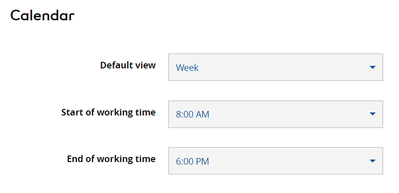
Yes, the date/time display of the calendar does indeed now have the proper AM/PM construct. However, the display begins at 12 Midnight. I'm not sure about you but I don't have a lot of meetings or events between 12 midnight and 8:00 AM. A real calendar would look at the specified Calendar setting in Options as to when the work day begins and start the calendar display at that specified time.
Hope we can go the next step soon.
Tnx...Paul...
Options
- Mark as New
- Bookmark
- Subscribe
- Mute
- Subscribe to RSS Feed
- Permalink
- Report Inappropriate Content
03-12-2022 12:58 PM
One supplemental in reply to my earlier comment,
Ideally, the "All Day" entries should still be at the top of the web display, followed by the calendar hours beginning at the "Start of Working Time" calendar option specified.

Options
- Mark as New
- Bookmark
- Subscribe
- Mute
- Subscribe to RSS Feed
- Permalink
- Report Inappropriate Content
03-19-2022 07:25 AM
I have been trying to set up email forwarding on Bell mail.
Ever email address I enter get the same response, "An error occurred when saving the destination address" when I try to save or activate the mail forwarding feature.
Even when I delete what is there and try to save, the same response.
Does this feature even work?
Options
- Mark as New
- Bookmark
- Subscribe
- Mute
- Subscribe to RSS Feed
- Permalink
- Report Inappropriate Content
03-19-2022 03:31 PM
I cannot display settings in my bell mail when using my ipad, only get error message telling me to check with my help desk if error persists. Can someone help as the customer services and chat line needs a lot of work
Options
- Mark as New
- Bookmark
- Subscribe
- Mute
- Subscribe to RSS Feed
- Permalink
- Report Inappropriate Content
03-23-2022 02:46 PM
Much to frequently when I am typing an sympatico e-mail message or reply, everything freezes. I can neither continue typing or delete what I have just finished typing. I also have to frequently close my browser and leave the site and return and unless a copy is saved in draft, start all over typing my message. I called some time ago about this and was told it would be passed on to the TEAM .
The TEAM has done nothing to fix this issue.What is the solution.
I am not at all happy with the changes to the e-mail system. I see nothing I like about. I am faced with several other frustrating problems with it.

Options
- Mark as New
- Bookmark
- Subscribe
- Mute
- Subscribe to RSS Feed
- Permalink
- Report Inappropriate Content
03-25-2022 03:24 PM
Yes, same here! I use excel for mailing lists to groups as well to copy/paste into webmail and that is not possible now with this new version. Please BELL fix this!!
Options
- Mark as New
- Bookmark
- Subscribe
- Mute
- Subscribe to RSS Feed
- Permalink
- Report Inappropriate Content
03-27-2022 11:34 AM
When I am typing an e-mail and then delete a portion of what I have typed, where have you hidden the Undo function that would save me having to re-type the deleted line? It was in the old unimproved sympatico e-mail. I find no improvements in this new system.

Options
- Mark as New
- Bookmark
- Subscribe
- Mute
- Subscribe to RSS Feed
- Permalink
- Report Inappropriate Content
04-06-2022 05:27 PM
I have in past, used email web clients that have allowed me to paste a moderate sized Excel Spreadsheet into the body my email while retaining full formatting of the Excel file. My current Bell Email client allows this HOWEVER loses all horizontal and some of the vertical formatting. I can add in 100's of spaces to re-align the columns if I wish however this looks bad and is very time consuming and never accurate.
Is there a correct method to accomplish this that I need to learn ?
Options
- Mark as New
- Bookmark
- Subscribe
- Mute
- Subscribe to RSS Feed
- Permalink
- Report Inappropriate Content
04-18-2022 09:21 AM
When I reply to an email, usually to someone who originally sent from an iPhone, formatting characters are inserted in my reply, making it very difficult to read. example:
<div><font>="font-size:10pt;" face="null"> message text etc.

Options
- Mark as New
- Bookmark
- Subscribe
- Mute
- Subscribe to RSS Feed
- Permalink
- Report Inappropriate Content
04-21-2022 11:21 AM
Hello - Bell's new email interface is awful. It freezes/times out continually, it blanks out as you type, hard to move emails to folders, hard to open emails fully - that's all I can think of off the top of my head. Can we a/ receive our bell email in outlook, or something that doesn't freeze etc.? or b/ Can we return to the more functional previous interface?
Options
- Mark as New
- Bookmark
- Subscribe
- Mute
- Subscribe to RSS Feed
- Permalink
- Report Inappropriate Content
04-21-2022 02:52 PM
On iOS ( iPad Air), there is no button available to change the InBox frame layout, just a log out button, and the Settings Button generates an error pop up message.


Options
- Mark as New
- Bookmark
- Subscribe
- Mute
- Subscribe to RSS Feed
- Permalink
- Report Inappropriate Content
04-21-2022 03:36 PM
I alternate between using Bell webmail and a Thunderbird email client downloaded on my desktop. Thunderbird has options to View > Message Source, View > Headers > All and Message > Forward As > Attachment. It also has options to Tag emails with colours and many of the other features posters here have missed from other email clients. It has versions available for Windows, Mac & Linux.

Getting started
New to our forum? These guides will help you find your way around quickly.
- Welcome to the Community!
- Log in/Register
- Community guidelines
- Community help
- Meet the Moderators
- Bell Community All-Stars
- How to send a private message
- Existing customers, login to MyBell to see exclusive offers
- What's on Crave
- What's on Free Preview
- Mobility phone & device catalog
- Latest in the Community





