- Community Home
- Internet
- [SPEED] Download speed dropped from 1500mbps to 56...
Options
- Subscribe to RSS Feed
- Mark Topic as New
- Mark Topic as Read
- Float this Topic for Current User
- Bookmark
- Subscribe
- Mute
- Printer Friendly Page

Options
- Mark as New
- Bookmark
- Subscribe
- Mute
- Subscribe to RSS Feed
- Permalink
- Report Inappropriate Content
09-13-2022 11:34 PM
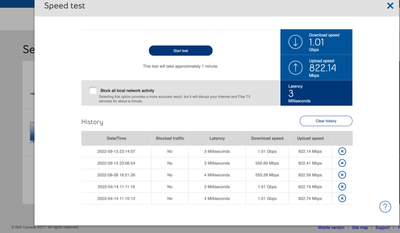
My 1 Gb download speed regularly goes down to 550 Mb, and seemed to be limited there until I restart my modem. It stays fine for a few days, but eventually seemingly goes back to the 550 Mb limits... restarting the modem re-established the download speed I am subscribed for... anyone else noticed this issue?
Solved! Go to Solution.
1
293
48.8K
293 REPLIES 293


Options
- Mark as New
- Bookmark
- Subscribe
- Mute
- Subscribe to RSS Feed
- Permalink
- Report Inappropriate Content
06-11-2024 07:51 AM
Recycle power to the router and try again. If that does not work, you will need to contact Bell for technical assistance. You could also try unchecking the checkbox that blocks all local traffic on that test, although I don't think that will matter.
I am a Community All-Star and customer. I'm here to help by sharing my knowledge and experience. My views on Bell and the Community Forum are my own and not the views of Bell or any of its affiliates.

Options
- Mark as New
- Bookmark
- Subscribe
- Mute
- Subscribe to RSS Feed
- Permalink
- Report Inappropriate Content
06-11-2024 10:20 AM
Hi there @Username2501
Thank you for your post and welcome to the Community.
We'd like to take a closer look into this and have sent you a private message.
Please check your Messages within your profile avatar in the top right corner.
Unsure how to check or send a private message? See How to send a private message

Options
- Mark as New
- Bookmark
- Subscribe
- Mute
- Subscribe to RSS Feed
- Permalink
- Report Inappropriate Content
06-14-2024 09:40 PM
Similar issue here. Paying for 500 / 500 and have been consistently getting ~ 100Mbps / 1.1Gbps for the past few weeks. See screenshots below ⬇️


Options
- Mark as New
- Bookmark
- Subscribe
- Mute
- Subscribe to RSS Feed
- Permalink
- Report Inappropriate Content
06-17-2024 01:11 AM
On the 3gb profile and the speeds start getting slower and slower after a few days.
I gather this is on bell's end and has something to do with profiles no applying correctly and the account getting dropped down to slower profiles
Rather annoying to put it mildly.
Options
- Mark as New
- Bookmark
- Subscribe
- Mute
- Subscribe to RSS Feed
- Permalink
- Report Inappropriate Content
06-17-2024 02:26 PM
Hi there @UserVaughan @Magnus33
Thank you for your posts and welcome to the Community.
We'd like to take a closer look into this and have sent you a private message.
Please check your Messages within your profile avatar in the top right corner.
Unsure how to check or send a private message? See How to send a private message

Options
- Mark as New
- Bookmark
- Subscribe
- Mute
- Subscribe to RSS Feed
- Permalink
- Report Inappropriate Content
06-18-2024 08:09 AM
Hope you're both doing well.
Had download speed issues in Jan 2024 which you resolved, but seems the problem is back again.
Service 1.5GB/1GB
Modem GH4000
Download is limited to 192.46Mb. No improvement after rebooting the GH.

Thanks for your help.

Options
- Mark as New
- Bookmark
- Subscribe
- Mute
- Subscribe to RSS Feed
- Permalink
- Report Inappropriate Content
06-20-2024 04:03 PM
We have the Bell Fibe 1.5Gbps service and the Giga hub. Our Bell internet speed keep dropping to 64 Mbps and won’t go above that speed unless we reboot the modem, sometimes more than once. bell has already changed our modem more than once. Just wondering if others have had this issue and what can be done to resolve it.
Thank you,
Options
- Mark as New
- Bookmark
- Subscribe
- Mute
- Subscribe to RSS Feed
- Permalink
- Report Inappropriate Content
06-20-2024 04:05 PM
Sounds like a profile issue. Typically a Bell rep will pick this up and fix it for you.
I am a Community All-Star and customer. I'm here to help by sharing my knowledge and experience. My views on Bell and the Community Forum are my own and not the views of Bell or any of its affiliates.

Options
- Mark as New
- Bookmark
- Subscribe
- Mute
- Subscribe to RSS Feed
- Permalink
- Report Inappropriate Content
06-21-2024 04:35 PM
Good evening @SuperMario 🙂
Welcome to the Bell Community.
We would like to help and we will reach out to you via private message soon. Please check your Messages within your profile avatar in the top right corner.
Unsure how to check or send a private message? See How to send a private message
- Patricia

Options
- Mark as New
- Bookmark
- Subscribe
- Mute
- Subscribe to RSS Feed
- Permalink
- Report Inappropriate Content
07-09-2024 02:14 PM - last edited on 07-09-2024 02:29 PM by BellPatricia
Linking post here and resolution carried out by @BellPatricia as stated by rob400
https://forum.bell.ca/t5/Internet/Download-speed-drops/td-p/7863/page/3
To summarise my situation/scenario:
- Currently subscribed to Bell's 3GB up and down service
- Using a HH4000 modem
- Running advanced DMZ
- System worked fine for a few days after initial install, noticed connection issues after that - extremely high latency, very slow download/upload speeds
- PPPoE IP had changed from the usual 178.xxx.xxx.x range to 76.xxx.xxx.x
- Rebooting the modem temporarily resolves the issue. Returns to the same high latency, low speeds 12-15 hours later
- Contacted tech support and received error codes 2000 or 2001 multiple times, requiring a factory reset to reconnect
- Issue persists with the download speed dropping daily
- Rebooting the modem temporarily fixes the issue, but it reoccurs
If my issue is the same, would appreciate you looking into it and applying the same fix @BellPatricia. Thank you.
Options
- Mark as New
- Bookmark
- Subscribe
- Mute
- Subscribe to RSS Feed
- Permalink
- Report Inappropriate Content
07-10-2024 12:45 PM
Hey @EEkkers 🙂
Welcome to the Bell Community.
I would be glad to look into this, and I have sent you a quick PM so we can review. Please check your Messages within your profile avatar in the top right corner.
Unsure how to check or send a private message? See How to send a private message
- Patricia

Options
- Mark as New
- Bookmark
- Subscribe
- Mute
- Subscribe to RSS Feed
- Permalink
- Report Inappropriate Content
07-23-2024 02:45 PM
I checked other posts and they said they needed a Bell Engineer to manually fix their profile at Bell remotely.
I posted on DSL reports and waiting for any sort of help.
I have the Bell Fibre 3gbps but getting at best 70mbps download now. It was such a sudden drop. Upload went down from 1000 to 800mbps so not that bad.
Under another post, @BellPatricia helped the poster. I am wondering if they can help out here. I’d really appreciate it.
Any idea?
Thanks in advance.
Options
- Mark as New
- Bookmark
- Subscribe
- Mute
- Subscribe to RSS Feed
- Permalink
- Report Inappropriate Content
07-24-2024 04:39 PM
Hey there @AO7
Welcome to the Bell Community.
We'd be happy to review this further, and I will send you a private message soon. Please check your Messages within your profile avatar in the top right corner.
Unsure how to check or send a private message? See How to send a private message
- Patricia
Options
- Mark as New
- Bookmark
- Subscribe
- Mute
- Subscribe to RSS Feed
- Permalink
- Report Inappropriate Content
08-09-2024 09:03 PM
Like others i noticed that the profile i am on doesn't hold and the internet slow down to the lowest profile or lower.
Presently the the fiber 3.0 i am on is at 1.5 speed and now and then fiber 500 speeds.
They applied the fix multiple times which does work for a period but ends up failing over time.
It's worrisome that they cant seem to get things fixed after this much time.
Options
- Mark as New
- Bookmark
- Subscribe
- Mute
- Subscribe to RSS Feed
- Permalink
- Report Inappropriate Content
08-10-2024 11:15 AM
Try a speed test directly from within the modem to see your fibre link speed profile.
I am a Community All-Star and customer. I'm here to help by sharing my knowledge and experience. My views on Bell and the Community Forum are my own and not the views of Bell or any of its affiliates.

Getting started
New to our forum? These guides will help you find your way around quickly.
- Welcome to the Community!
- Log in/Register
- Community guidelines
- Community help
- Meet the Moderators
- Bell Community All-Stars
- How to send a private message
- Existing customers, login to MyBell to see exclusive offers
- What's on Crave
- What's on Free Preview
- Mobility phone & device catalog
- Latest in the Community


