- Community Home
- Internet
- Re: Packet loss on wireless (gigahub)
Options
- Subscribe to RSS Feed
- Mark Topic as New
- Mark Topic as Read
- Float this Topic for Current User
- Bookmark
- Subscribe
- Mute
- Printer Friendly Page
Packet loss on wireless (gigahub)

Options
- Mark as New
- Bookmark
- Subscribe
- Mute
- Subscribe to RSS Feed
- Permalink
- Report Inappropriate Content
05-07-2024 01:09 AM
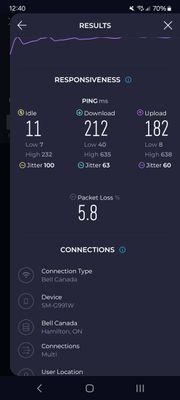
I've tried everything I can think of to fix, i also tried changing the wireless channels shut off every Bluetooth device in my home and the packetloss has not disappeared I'm having a very difficult time getting this fixed is there anyone that can recommend me something to get rid of this packetloss? I have the gigahub with the latest firmware on it.
Yes I separated all the SSIDs & put bandwidth intensive devices on 5 GHz I have only security cameras on 2.4 I temporarily connected my phone that's connected to 2.4 and packetloss is persistent regardless of the time of day. I tried it on multiple devices on 2.4 and I get the packet loss on there too.
Is there something wrong with the GigaHub?
This is very bad I never had this problem with cable internet and a eero 6
Labels:
- Labels:
-
2.4 GHz
-
Giga hub
-
Home Hub 4000
-
Packet Loss
-
Wi-Fi 6
0
43
3,004
43 REPLIES 43

Options
- Mark as New
- Bookmark
- Subscribe
- Mute
- Subscribe to RSS Feed
- Permalink
- Report Inappropriate Content
02-24-2025 11:49 AM
Hi there @lvillegas
Thank you for your post and welcome to the Community.
Are you able to share when you noticed this issue had started occurring?
Are you able to share a speed test result done directly through the modem GUI?
Are you able to share where you are performing that speed test you shared and did you notice anywhere else you were losing packets or just from that test?
Can you try the same test connected to ethernet?
Are you able to share what other internet connection you tested this on where it worked?
Are you able to install MTR on your device and share the results? You can run it against remote destinations (run it against where you are losing the packet loses). There's a great article we'd recommend checking called What is My Traceroute (MTR)?
Looking forward to hearing back.
Options
- Mark as New
- Bookmark
- Subscribe
- Mute
- Subscribe to RSS Feed
- Permalink
- Report Inappropriate Content
02-24-2025 12:02 PM
Hi @BellNick, thanks for your response!
It started happening on Thursday.
I'm not sure how to run a speed test from the modem GUI, but let me know and I'll do it. Bell technical support ran speed tests and said there were no issues.
The speed test was done here https://packetlosstest.com/ on the advice of Jump Desktop technical support. Jump Desktop itself also reports packet loss while trying to use it.
That test I shared was connected to ethernet, both wired and wifi report lost packets.
The internet connection that worked was my IT support at work, but I used Jump Desktop on other connections I had access to and no issues.
I'm reading about MTR but it seems above my knowledge... I did run a trace route from the terminal as suggested by another person on the forum and posted my results on Friday. Does that tell you something?
Let me know what I should do.
Thanks!
Lucas


Options
- Mark as New
- Bookmark
- Subscribe
- Mute
- Subscribe to RSS Feed
- Permalink
- Report Inappropriate Content
02-24-2025 06:29 PM
Thank you for this. I see no obvious issues outside of your computer to explain your packet loss. All ping trace results are normal. It would suggest that there is an issue between the computer and modem. What type of network cable are you using? Cat 5 or Cat 6?
I am a Community All-Star and customer. I'm here to help by sharing my knowledge and experience. My views on Bell and the Community Forum are my own and not the views of Bell or any of its affiliates.
Options
- Mark as New
- Bookmark
- Subscribe
- Mute
- Subscribe to RSS Feed
- Permalink
- Report Inappropriate Content
02-24-2025 06:46 PM
Hi @dks, thanks for your message.
It’s a cat 8 cable. Note that two different computers have similar issues wired and over wifi if that tells you anything.
Options
- Mark as New
- Bookmark
- Subscribe
- Mute
- Subscribe to RSS Feed
- Permalink
- Report Inappropriate Content
02-25-2025 06:39 PM
Hi @BellNick, I was able to install MTR and got the following results. Any chance they tell you anything useful? Thanks!!
~ % sudo mtr --report --report-cycles=50 jumpdesktop.com
Start: 2025-02-25T18:36:15-0500
HOST: LucassMacStudio Loss% Snt Last Avg Best Wrst StDev
1.|-- mynetwork.home 0.0% 50 0.5 0.9 0.4 2.3 0.3
2.|-- 142.124.32.125 0.0% 50 2.3 6.1 1.1 34.6 7.4
3.|-- ??? 100.0 50 0.0 0.0 0.0 0.0 0.0
4.|-- ??? 100.0 50 0.0 0.0 0.0 0.0 0.0
5.|-- 64.230.36.66 0.0% 50 9.6 10.9 9.6 13.5 0.8
6.|-- 142.124.127.254 0.0% 50 10.1 10.8 9.2 13.6 0.9
7.|-- 142.124.127.211 0.0% 50 10.0 10.6 9.1 12.4 0.8
8.|-- 64.230.97.147 0.0% 50 9.7 10.0 9.1 16.4 1.1
9.|-- ??? 100.0 50 0.0 0.0 0.0 0.0 0.0
10.|-- ??? 100.0 50 0.0 0.0 0.0 0.0 0.0
11.|-- ??? 100.0 50 0.0 0.0 0.0 0.0 0.0
12.|-- ??? 100.0 50 0.0 0.0 0.0 0.0 0.0
13.|-- ??? 100.0 50 0.0 0.0 0.0 0.0 0.0
14.|-- ??? 100.0 50 0.0 0.0 0.0 0.0 0.0
15.|-- ??? 100.0 50 0.0 0.0 0.0 0.0 0.0
16.|-- server-3-164-92-120.yto53 0.0% 50 10.0 9.9 9.0 11.1 0.5

Options
- Mark as New
- Bookmark
- Subscribe
- Mute
- Subscribe to RSS Feed
- Permalink
- Report Inappropriate Content
02-25-2025 06:46 PM
That shows 0.0% packet loss at the destination and in between hops.
Also shows perfectly acceptable ping times. I don't see an issue with this from a connectivity perspective.
I am a Community All-Star and customer. I'm here to help by sharing my knowledge and experience. My views on Bell and the Community Forum are my own and not the views of Bell or any of its affiliates.
Options
- Mark as New
- Bookmark
- Subscribe
- Mute
- Subscribe to RSS Feed
- Permalink
- Report Inappropriate Content
02-25-2025 06:49 PM
Hi @Vanadiel,
Would you have an idea where the issue could be then? Jump Desktop software?
Options
- Mark as New
- Bookmark
- Subscribe
- Mute
- Subscribe to RSS Feed
- Permalink
- Report Inappropriate Content
02-25-2025 06:57 PM
Also, should I disregard the results from this test from packetlosstest.com? Thanks again!

Options
- Mark as New
- Bookmark
- Subscribe
- Mute
- Subscribe to RSS Feed
- Permalink
- Report Inappropriate Content
02-26-2025 06:09 AM
Yes, it could be in the software. I agree, your report shows no issues with packet loss and a less than 20ms delay in transfer, which is normal. I can’t see or comment on your latest post as the image has to be approved by the moderators.
I am a Community All-Star and customer. I'm here to help by sharing my knowledge and experience. My views on Bell and the Community Forum are my own and not the views of Bell or any of its affiliates.
Options
- Mark as New
- Bookmark
- Subscribe
- Mute
- Subscribe to RSS Feed
- Permalink
- Report Inappropriate Content
02-26-2025 08:02 AM
Thanks @dks,
The image is a 3 minute test from packetlosstest.com reporting 30.4% packet loss. I get those results consistently from that site on both computers
Options
- Mark as New
- Bookmark
- Subscribe
- Mute
- Subscribe to RSS Feed
- Permalink
- Report Inappropriate Content
02-26-2025 08:31 AM
The problem is that the test doesn't tell us where the packet loss is occurring. I just ran it on my own fibre and got 0%.
I am a Community All-Star and customer. I'm here to help by sharing my knowledge and experience. My views on Bell and the Community Forum are my own and not the views of Bell or any of its affiliates.
Options
- Mark as New
- Bookmark
- Subscribe
- Mute
- Subscribe to RSS Feed
- Permalink
- Report Inappropriate Content
02-26-2025 08:55 AM
Right. I'm really at a loss. Thanks for taking the time!
I'll bring the laptop over to a different connection to try to rule out the computer.

Options
- Mark as New
- Bookmark
- Subscribe
- Mute
- Subscribe to RSS Feed
- Permalink
- Report Inappropriate Content
11-27-2025 03:21 PM - last edited on 11-27-2025 03:44 PM by BellPatricia
Hi:
This is the PingPlotter result I obtained when testing my connection to an overseas website. As shown in the graph, all packet loss and ping spikes occur at node 6 (IP: 184.150.181.**), which is part of Bell Canada’s network. I would appreciate it if a technician could look into this issue and resolve it. Thank you.
Options
- Mark as New
- Bookmark
- Subscribe
- Mute
- Subscribe to RSS Feed
- Permalink
- Report Inappropriate Content
11-28-2025 08:23 AM
Thank you for your comment. Unfortunately the reality of the internet is that these packet losses and ping spikes are overwhelmingly transient and usually clear up quickly. A run or readings once an hour over 24 hours can usually determine the transient nature of the routing. In addition, any ping/traceroute going through the US on a major holiday, as November 27th was, is almost guaranteed to be slower, simply because of sheer volume of traffic. While I note that there is no location attached to your IP, it is quite possible the IP is actually located in a data centre not in Canada. The IP range suggests it is in the US. Bell does monitor their systems continuously to ensure best system performance, but Bell has no control over traffic once it leaves Bell's core network.
I am a Community All-Star and customer. I'm here to help by sharing my knowledge and experience. My views on Bell and the Community Forum are my own and not the views of Bell or any of its affiliates.

- « Previous
- Next »
Getting started
New to our forum? These guides will help you find your way around quickly.
- Welcome to the Community!
- Log in/Register
- Community guidelines
- Community help
- Meet the Moderators
- Bell Community All-Stars
- How to send a private message
- Existing customers, login to MyBell to see exclusive offers
- What's on Crave
- What's on Free Preview
- Mobility phone & device catalog
- Latest in the Community



