- Community Home
- My account
- Re: Internal server error
Options
- Subscribe to RSS Feed
- Mark Topic as New
- Mark Topic as Read
- Float this Topic for Current User
- Bookmark
- Subscribe
- Mute
- Printer Friendly Page

Options
- Mark as New
- Bookmark
- Subscribe
- Mute
- Subscribe to RSS Feed
- Permalink
- Report Inappropriate Content
11-02-2022 09:26 AM - last edited on 01-15-2024 11:11 AM by BellNick
1
59
39.6K
59 REPLIES 59

Options
- Mark as New
- Bookmark
- Subscribe
- Mute
- Subscribe to RSS Feed
- Permalink
- Report Inappropriate Content
01-09-2023 07:59 PM
I contact them last week, they said someone will call me by january 7th....here i am still waiting and cant make any modifications. Is there any update?

Options
- Mark as New
- Bookmark
- Subscribe
- Mute
- Subscribe to RSS Feed
- Permalink
- Report Inappropriate Content
01-09-2023 09:17 PM
There was a “scheduled” maintenance today before 6 am. It probably sorted out some users’ issues.

Options
- Mark as New
- Bookmark
- Subscribe
- Mute
- Subscribe to RSS Feed
- Permalink
- Report Inappropriate Content
01-10-2023 08:32 AM
I am back with channels changing again now. We will see if it stays up.

Options
- Mark as New
- Bookmark
- Subscribe
- Mute
- Subscribe to RSS Feed
- Permalink
- Report Inappropriate Content
01-13-2023 07:45 PM
I can now see my channel lineup! Finally. I hope it continues to work.
I got bell fiber optic installed with a new modem today.
I had an issue with previous tenants new address showing up on a confirmation e-mail I received after
ordering a new service from my TV. My Tv service was not linked to my other two Bell services for some
reason. Maybe that caused a glitch in MyBell and installing a new modem and whatver else the tech did
caused the services to link together.
Keeping fingers crossed.
Got great customer service from Desta at Bell. Very professional.
Options
- Mark as New
- Bookmark
- Subscribe
- Mute
- Subscribe to RSS Feed
- Permalink
- Report Inappropriate Content
01-13-2023 09:14 PM
How did you get them to link? I still cant change my channels or see what I have. Its really frustrating and no one is giving me an update.
Options
- Mark as New
- Bookmark
- Subscribe
- Mute
- Subscribe to RSS Feed
- Permalink
- Report Inappropriate Content
01-13-2023 09:34 PM
I didn't do anything on my end.
I don't know if the techs enter addresses when they work on lines and install new modems,
You can usually see techs enter stuff on the their PCs in their trucks and going to those big
grey boxes that bell has in every neighbourhood.
Maybe it's a sort of reset when they do this type of work and the wrong address in my file was corrected.
Good Luck finding a solution. I know how frustrating it can be.

Options
- Mark as New
- Bookmark
- Subscribe
- Mute
- Subscribe to RSS Feed
- Permalink
- Report Inappropriate Content
01-26-2023 11:29 AM
For all of you impacted by this problem I am happy to report that my issue has been resolved. I have struggled with the problem since moving to Bell back in October 2022, I submitted multiple tickets and worked with 1st level and second level support personnel only to be told it only affect some Bell customers and there is no forecast on the resolution of the issue.
I had been also struggling with a billing issue on my homophone so I reached out to Bell again and had them escalate to an escalation manager. The escalation manager informed me that there was an issue with my profile and she would look into it and get back to me. She contacted me 2 days later and let me know the billing issue was resolved and the fix to my profile had also resolved my inability to manage my channels via the Bell App and the MyBell portal.
Happy to report and confirm I can now update any channels listing. A huge thank you to Jennifer from Bell for taking this on and resolving all my issues! For those of you still struggling with this keep contacting them and have them escalate.

Options
- Mark as New
- Bookmark
- Subscribe
- Mute
- Subscribe to RSS Feed
- Permalink
- Report Inappropriate Content
02-01-2023 03:54 PM
Good afternoon 🙂
We wanted to follow up to see if anyone is still experiencing an issue when modifying their channel selection in MyBell.
Keep the Community posted!
- Patricia

Options
- Mark as New
- Bookmark
- Subscribe
- Mute
- Subscribe to RSS Feed
- Permalink
- Report Inappropriate Content
02-01-2023 07:41 PM
I still can't make any changes 😞
Options
- Mark as New
- Bookmark
- Subscribe
- Mute
- Subscribe to RSS Feed
- Permalink
- Report Inappropriate Content
02-02-2023 09:54 AM
Good morning @Rebecca00788, thank you for letting me know.
Can you please try logging out of your MyBell profile (on every device) and ensure the MyBell App is up to date?
Hope to hear from you soon.
- Patricia
Options
- Mark as New
- Bookmark
- Subscribe
- Mute
- Subscribe to RSS Feed
- Permalink
- Report Inappropriate Content
02-03-2023 08:05 AM
Im logged out every where, apps are up to date. I tried on my tablet, phone and computer (via website) and nothing.
Options
- Mark as New
- Bookmark
- Subscribe
- Mute
- Subscribe to RSS Feed
- Permalink
- Report Inappropriate Content
02-03-2023 08:55 AM - last edited on 06-24-2025 01:04 PM by BellPatricia
As I mentioned before, my problem was that my TV service's address was not on the same address as my internet and phone service. There was no link there. The internet and phone were at my current address and my TV was as the previous owner's new address. I only found that out when I ordered "Time Shifting" from my TV screen. I got a confirmation e-mail showing the previous tenant's new address. Who knows how that happened?
So I suggest as an experiment to order "Time Shifting" ($5/month) from your TV screen and see what address is listed on the confirmation e-mail. You can always cancel the "Time Shifting" if you don't want to keep it.
Conact Bell again if that's the case.
I also had bell Fibe Optical cable installed which included getting a new modem. Maybe addresses were reset when that was installed?

Options
- Mark as New
- Bookmark
- Subscribe
- Mute
- Subscribe to RSS Feed
- Permalink
- Report Inappropriate Content
02-05-2023 02:03 AM
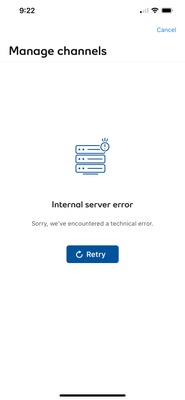
Hi Patricia, it’s still not working for me. I continue to get the same “Internal Server Error” message (screenshot below). I have been trying about once a week on the app, and on Chrome (laptop PC), same result. This has been ongoing since early Dec 2022.

Options
- Mark as New
- Bookmark
- Subscribe
- Mute
- Subscribe to RSS Feed
- Permalink
- Report Inappropriate Content
02-15-2023 10:57 AM - edited 08-21-2025 01:08 PM
Thank you for testing
We are working towards a resolution and will let you know right away when new updates are available.
Have a nice day 🙂
- Patricia
Options
- Mark as New
- Bookmark
- Subscribe
- Mute
- Subscribe to RSS Feed
- Permalink
- Report Inappropriate Content
06-05-2023 05:45 AM
My bell app use to allow me change my channels right through the app or on the site, but now it won’t allow me to do that. It shows ‘ Pending Change’ on the home screen and when I select change it shows ‘internal server error’.


Getting started
New to our forum? These guides will help you find your way around quickly.
- Welcome to the Community!
- Log in/Register
- Community guidelines
- Community help
- Meet the Moderators
- Bell Community All-Stars
- How to send a private message
- Existing customers, login to MyBell to see exclusive offers
- What's on Crave
- What's on Free Preview
- Mobility phone & device catalog
- Latest in the Community





