- Community Home
- My account
- Can't change channel line up
Options
- Subscribe to RSS Feed
- Mark Topic as New
- Mark Topic as Read
- Float this Topic for Current User
- Bookmark
- Subscribe
- Mute
- Printer Friendly Page

Options
- Mark as New
- Bookmark
- Subscribe
- Mute
- Subscribe to RSS Feed
- Permalink
- Report Inappropriate Content
11-02-2022 09:26 AM - last edited on 01-15-2024 11:11 AM by BellNick
1
59
39.5K
59 REPLIES 59

Options
- Mark as New
- Bookmark
- Subscribe
- Mute
- Subscribe to RSS Feed
- Permalink
- Report Inappropriate Content
06-05-2023 12:39 PM
Good afternoon @AK11,
Welcome to the Bell Community.
We have sent you a private message so we can take a closer look. Please check your Messages within your profile avatar in the top right corner.
Unsure how to check or send a private message? See How to send a private message
- Patricia
Options
- Mark as New
- Bookmark
- Subscribe
- Mute
- Subscribe to RSS Feed
- Permalink
- Report Inappropriate Content
01-05-2024 10:04 AM - last edited on 01-08-2024 12:00 PM by BellNick
Hello everyone,
Thank you for sharing this information with the Bell community.
Our technical team is actively working to resolve this issue and we will update you as soon as new details become available.
In the meantime, if you're experiencing this issue and need help modifying your TV channels, please send a private message to myself (@BellPatricia) or @BellNick.
- Patricia

Options
- Mark as New
- Bookmark
- Subscribe
- Mute
- Subscribe to RSS Feed
- Permalink
- Report Inappropriate Content
01-09-2024 09:46 AM
Anyone else’s randomly start working? I checked today and it was good to go on the bell app. Finally

Options
- Mark as New
- Bookmark
- Subscribe
- Mute
- Subscribe to RSS Feed
- Permalink
- Report Inappropriate Content
01-14-2024 07:21 PM - last edited on 01-15-2024 11:04 AM by BellNick
I am going to pile on with this post as I too have the same issue as so many others. All of them received replies "we are looking into it..." and hopefully my post will add to the urgency of getting it fixed!
I have attempted to modify my channels through MyBell on a PC and on the mobile app. The online site has the "modify channels" button greyed out. I have tried on Microsoft Edge and on Google Chrome.
I called 310-BELL and spoke to someone earlier on and they said Don't worry it should be available soon for you and offered to make the changes I wanted. I don't want to call to make changes!
The mobile app has a pop up message (over the button) that says: We cannot make the changes you requested online. Please call 1 888 SKY-DISH (759-3474) to get help from a customer service representative.
Please resolve this issue!!
Options
- Mark as New
- Bookmark
- Subscribe
- Mute
- Subscribe to RSS Feed
- Permalink
- Report Inappropriate Content
03-25-2024 02:02 PM
Hi there @Eddee,
Thank you for reaching out to the Bell Community.
We appreciate your patience while our teams work towards a solution.
As mentioned in our post here don't hesitate to reach out to me (@BellPatricia) directly via PM if you need any help modifying your channel subscription in the meantime.
- Patricia

Options
- Mark as New
- Bookmark
- Subscribe
- Mute
- Subscribe to RSS Feed
- Permalink
- Report Inappropriate Content
04-26-2024 11:00 AM - last edited on 04-26-2024 11:33 AM by BellPatricia
Why can't I update my channels online?


Options
- Mark as New
- Bookmark
- Subscribe
- Mute
- Subscribe to RSS Feed
- Permalink
- Report Inappropriate Content
04-26-2024 11:47 AM
Good day & Welcome to the Bell Community Forum.
Let us start from the beginning & I will do my best to help you.
- Which Bell TV Service do you subscribe to? Fibe TV, Fibe App or Bell Satellite?
- Which plan do you subscribe to? Good, better, Best, or Starter?
- If you have a Bell modem, could you provide me the model number?
- How are you accessing your subscription? Fibe HD PVR, receivers, Fibe TV box , streamer, computer, Fibe TV App, etc.
- Have you tried logging in to MyBell with your web browser & selecting your TV service? You should be able to select > Modify TV channels.
- Have you contacted Bell Customer Service to discuss this problem?
Contact Bell | Bell Mobility, Internet, TV and Home phone | Bell Canada
There are many other reasons for not being able to be access & update your online channels. Can you assist me in providing some further specifics?
Let us know & we will work with you.
Take care.
I am a Community All-Star and customer. I'm here to help by sharing my knowledge and experience. My views on Bell and the Community Forum are my own and not the views of Bell or any of its affiliates.

Options
- Mark as New
- Bookmark
- Subscribe
- Mute
- Subscribe to RSS Feed
- Permalink
- Report Inappropriate Content
09-12-2024 04:08 PM - last edited on 08-21-2025 01:20 PM by BellPatricia
I have great news to report: the problem has been solved and corrected. I was contacted by Geoff who is with a higher level of client support within the Bell customer service office, and he escalated the issue and had it corrected and resolved. From what I understand it is some kind of billing/programming hiccup that can happen when clients upgrade their Internet service to fiber-to-the-home. I have tried 2 example program changes on my own: I first added a new channel directly by selecting add program on my TV screen, and then I deleted the change using the Bell mobile app. Both features worked as I expected.
I do hope Bell can find an easier solution/fix than having to escalate this issue up the chain of command. It would save a lot of time and frustration on behalf of the customer.
By thanks again to everyone in the Forum and to Geoff with Bell. I've returned to a happy customer.
marcco
Options
- Mark as New
- Bookmark
- Subscribe
- Mute
- Subscribe to RSS Feed
- Permalink
- Report Inappropriate Content
09-12-2024 05:21 PM - edited 09-12-2024 05:23 PM
Not for me. On MyBell.ca site, the "modify channels" button is still greyed out. Problem is NOT solved.

Options
- Mark as New
- Bookmark
- Subscribe
- Mute
- Subscribe to RSS Feed
- Permalink
- Report Inappropriate Content
09-12-2024 07:34 PM
You are getting the same msg that I was receiving. I can understand your frustration ....I have walked that same path.
I will share the process that I used to get resolution. First, do not contact Bell Tech Support ...I was told it is not a technical issue, as such. I was told to work through the Billing department ...which, on its own, may or may not be helpful (it really depends on the person you talk to). So, when you hit a wall with Bell CS, you need to follow a path of escalating the issue, as I did.
If you go to bell.ca ......scroll to the very bottom of the page to where it says Contact Us. Select Contact and then scroll on that page to the paragraph to where it says Resolve a Concern, and click on the link that takes you to a form where you can spell out your issue. Then, be patient.
Honestly, I was skeptical that I would get anywhere ....however, I was surprised when I received a call from a higher level CS person who committed to getting the problem fixed for me. And it was fixed.
In conclusion ....this is a fixable problem on the Bell end. However, you do have to work through the process diligently. In time, I expect Bell will find an easier to correct the problem through a simple conversation with their Billing Dept. Hopefully.
Good luck!!

Options
- Mark as New
- Bookmark
- Subscribe
- Mute
- Subscribe to RSS Feed
- Permalink
- Report Inappropriate Content
09-23-2024 05:02 PM - last edited on 09-23-2024 05:38 PM by BellNick
It is today 23 Sept 2024, and the issue persists. Bell even cut 2 channels 1109, 1110. I can only take it for a while till I cut this umbilical cord and go to the competitor. Sleep on that!! Watch me do it!! A 20 loyal customer!! Now frustrated client, customer!!
Options
- Mark as New
- Bookmark
- Subscribe
- Mute
- Subscribe to RSS Feed
- Permalink
- Report Inappropriate Content
09-23-2024 07:54 PM
I was approaching the same level of despair ....and I asked myself: is my only option to change service providers, or can I persist and find a way to get the issue fixed. I suspected the issue was fixable ....and I learned that it can be fixed. But you have to engage with a higher level of tech support at Bell, and that process takes time and patience. Fortunately, I had both ....but I know everyone is different. If you can stay with the process, go to the bell.ca website ....find the Contact Us menu item, scroll through to the escalate option, and proceed. I was at first a bit skeptical, but I did get a call from Bell CS, and the people I talked with knew what they were doing and knew how to fix the problem. These were not call centre people .....these were people who have a mandate to retain customers and fix problems. I was pleasantly surprised .....and I went from frustration to no frustration.
In the end, the decision is yours .....if you dislike the process of switching providers on a regular basis, consider working through the headaches and push through to an answer. It is possible.
Hope this helps. And sorry I can't offer any quick fixes for the problem. It is what it is.

Options
- Mark as New
- Bookmark
- Subscribe
- Mute
- Subscribe to RSS Feed
- Permalink
- Report Inappropriate Content
01-06-2025 11:28 AM - last edited on 01-06-2025 11:58 AM by BellNick
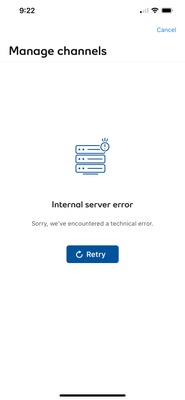
How do I modify the my channel line up? Now before you say through the app or online it DOES NOT WORK, i have called Bell and told them that I can not see my channel line up or modify my channel line up either through the app - where I get a message that say "Internal server error - sorry we encountered a technical error" and online I get a message stating that states - The information you're looking for is currently unavailable online - Please contact us to get help from a customer service rep". Now this issue has been going on since October/ November 2024. So I contact Bell tech support and they could not help me.
I am frustrated that I can not see the channels I have in my package - Good - package and the a la carte channels. I am pretty sure I am paying for extra channels that I no longer want with all the channel changes that Bell is doing.
Any suggestions would be greatly appreciated. Is Rogers the way to go now? Since Bell no longer has the Food Network or HGTV?

Options
- Mark as New
- Bookmark
- Subscribe
- Mute
- Subscribe to RSS Feed
- Permalink
- Report Inappropriate Content
01-06-2025 11:50 AM
Did you try logging with a computer, you mentioned an app, if so, try chrome sometimes edge is finicky, you should be able to change packages then or change your Alacarte channels
Options
- Mark as New
- Bookmark
- Subscribe
- Mute
- Subscribe to RSS Feed
- Permalink
- Report Inappropriate Content
01-06-2025 12:05 PM
Hi Nash - yes I have tried different browsers - thank you for your suggestion.

Getting started
New to our forum? These guides will help you find your way around quickly.
- Welcome to the Community!
- Log in/Register
- Community guidelines
- Community help
- Meet the Moderators
- Bell Community All-Stars
- How to send a private message
- Existing customers, login to MyBell to see exclusive offers
- What's on Crave
- What's on Free Preview
- Mobility phone & device catalog
- Latest in the Community



