- Community Home
- TV & Streaming
- Re: My tv receiver has been going off and on for a...
Options
- Subscribe to RSS Feed
- Mark Topic as New
- Mark Topic as Read
- Float this Topic for Current User
- Bookmark
- Subscribe
- Mute
- Printer Friendly Page

Options
- Mark as New
- Bookmark
- Subscribe
- Mute
- Subscribe to RSS Feed
- Permalink
- Report Inappropriate Content
05-18-2023 09:32 AM - last edited on 12-19-2024 05:03 PM by BellPatricia
I have the same problem. Over the past 4-5 days, my receiver (or modem) shuts down suddenly. I unplug the power cable at the back of the modem, wait 30seconds, then plug it back in. In about 2min. everything comes up as it should, but I don't believe the random shutdowns are normal.
Solved! Go to Solution.
1
19
10.7K
2 helpful replies
Accepted Solutions

Options
- Mark as New
- Bookmark
- Subscribe
- Mute
- Subscribe to RSS Feed
- Permalink
- Report Inappropriate Content
05-22-2023 09:48 AM
Hi there @Goldengirl,
Thank you for getting back to us.
Is the receiver located in an enclosed space, or getting warm to the touch? If it is an enclosed area, please ensure it is moved to an open space.
If the receiver (VIP5662) is just shutting down on it's own, we would recommend a factory reset. If that does not resolve this, a replacement may be required. For the VIP5662, the reset can be done by using a paperclip and pushing down on the DR button located on the back of the receiver. Please be aware all recorded content will be lost with either of the options (reset or replacement).
Please keep the Community updated on how everything is going goes.
- Patricia
Options
- Mark as New
- Bookmark
- Subscribe
- Mute
- Subscribe to RSS Feed
- Permalink
- Report Inappropriate Content
05-25-2023 01:28 PM - edited 04-24-2025 11:45 AM
Hi there @Goldengirl,
I wanted to see if you've experienced any other random reboots since posting last?
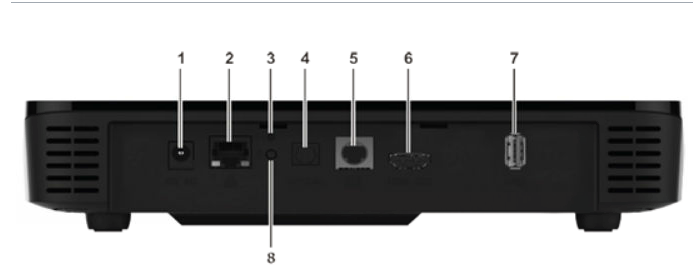
Check out the photo below, the little button associated with number three is the reset button on your receiver, and you will need a push pin to access it.
19 REPLIES 19

Options
- Mark as New
- Bookmark
- Subscribe
- Mute
- Subscribe to RSS Feed
- Permalink
- Report Inappropriate Content
05-20-2023 03:35 PM
HI there @Goldengirl
Thank you for your post.
Have you tried the troubleshooting steps listed above?
Which receiver model(s) do you have? If multiple, does this issue occur on them all or just a specific one?
We would also recommend trying out our Virtual Repair Tool while the issue is occurring. It is great for remotely detecting and resolving issues.
Looking forward to hearing back.
Options
- Mark as New
- Bookmark
- Subscribe
- Mute
- Subscribe to RSS Feed
- Permalink
- Report Inappropriate Content
05-21-2023 08:49 AM
I have checked all the cables...they are as they should be. My modem is Arris Model VIP5662W. I also have a larger "modem" Bell3000 but I think that's more for my wi-fi. Everything there is as it should be as well where cables, etc. are concerned. What happens is, I can be sitting watching a tv program, then there's a "click", & the modem shuts down. I then pull the power wire out of the back, wait 30second, then plug it back in. Of course, there's the 2min. wait for everything to load again. Last week, it happened twice. This is beginning to be quite frustrating. I'd appreciate any suggestions you might offer. I do have a further question though. With regard to the Bell 3000, should I unplug then plug back in as well?
Options
- Mark as New
- Bookmark
- Subscribe
- Mute
- Subscribe to RSS Feed
- Permalink
- Report Inappropriate Content
05-22-2023 09:48 AM
Hi there @Goldengirl,
Thank you for getting back to us.
Is the receiver located in an enclosed space, or getting warm to the touch? If it is an enclosed area, please ensure it is moved to an open space.
If the receiver (VIP5662) is just shutting down on it's own, we would recommend a factory reset. If that does not resolve this, a replacement may be required. For the VIP5662, the reset can be done by using a paperclip and pushing down on the DR button located on the back of the receiver. Please be aware all recorded content will be lost with either of the options (reset or replacement).
Please keep the Community updated on how everything is going goes.
- Patricia
Options
- Mark as New
- Bookmark
- Subscribe
- Mute
- Subscribe to RSS Feed
- Permalink
- Report Inappropriate Content
05-22-2023 01:03 PM
The receiver does feel a little warm, but it is not in an enclosed area & has always been there allowing optimum airflow.
As for the little button you mention...I don't see one, & I've looked very closely. There IS a little button on the side of the Hub3000 but I don't think that's the receiver. The receiver hasn't shut off now for a number of days, but I shouldn't rely on that.
Options
- Mark as New
- Bookmark
- Subscribe
- Mute
- Subscribe to RSS Feed
- Permalink
- Report Inappropriate Content
05-25-2023 01:28 PM - edited 04-24-2025 11:45 AM
Hi there @Goldengirl,
I wanted to see if you've experienced any other random reboots since posting last?
Check out the photo below, the little button associated with number three is the reset button on your receiver, and you will need a push pin to access it.
Options
- Mark as New
- Bookmark
- Subscribe
- Mute
- Subscribe to RSS Feed
- Permalink
- Report Inappropriate Content
05-25-2023 04:18 PM
No random reboots since my note to you. I did check the back of the modem, & just as you "said"., #3 is the button needing a pin. So, if I do experience a random reboot, do I just push that little button, & the modem will reboot, rather than me unplugging & it booting up in just under 2 min? Thanks, I appreciate your assistance.!! 🙂
Options
- Mark as New
- Bookmark
- Subscribe
- Mute
- Subscribe to RSS Feed
- Permalink
- Report Inappropriate Content
05-25-2023 05:02 PM
Glad to hear that @Goldengirl 🙂
Yes, just push and hold the button for around 3 seconds until the equipment starts the factory reset.
Don't hesitate to update the Community if you have any further trouble.
- Patricia

Options
- Mark as New
- Bookmark
- Subscribe
- Mute
- Subscribe to RSS Feed
- Permalink
- Report Inappropriate Content
10-24-2023 01:59 PM
Did this issue ever go away completely? Friend having same issues for months now. Reciever in open air, plugged into separate plug, tried 2 other circuits. Recordings are chopped into segments because it's doing it even when tv is off but recording times set. Bell has sent a second receiver, same issue. Thinking maybe it's power supply, don't think we changed that when new reciever came.
Options
- Mark as New
- Bookmark
- Subscribe
- Mute
- Subscribe to RSS Feed
- Permalink
- Report Inappropriate Content
10-24-2023 02:13 PM
As well, it's seems to be a streaming issue, buffering, but set top box going totally out and power cycling.
Model 5662w
Options
- Mark as New
- Bookmark
- Subscribe
- Mute
- Subscribe to RSS Feed
- Permalink
- Report Inappropriate Content
10-26-2023 12:09 PM - edited 10-26-2023 12:09 PM
Hi there @Joez,
Welcome to the Bell Community 🙂
Thank you for the different troubleshooting steps you've tried so far.
Are you able to test using a different HDMI cord/port as well to see if that may be the culprit?
Please keep the Community posted.
- Patricia

Options
- Mark as New
- Bookmark
- Subscribe
- Mute
- Subscribe to RSS Feed
- Permalink
- Report Inappropriate Content
11-04-2024 04:06 PM
I too have the VIP5662 receiver that keep resetting. It used to work fine then started to reset all the time, I got a new on and it too keeps resetting.
is there a problem with the units? Because it’s getting to a point where Rogers is starting to look better.
we keep having are rates go up and service goes down.
Options
- Mark as New
- Bookmark
- Subscribe
- Mute
- Subscribe to RSS Feed
- Permalink
- Report Inappropriate Content
11-06-2024 11:45 AM - edited 11-06-2024 11:51 AM
Hey there @Richard Mac,
Welcome to the Bell Community 🙂
Where is the equipment located (e.g in an enclosed space like a cupboard, or in the open with no other equipment on top/beneath it)?
Do you ever see an error or are you doing anything in particular when the receiver shuts down (watching live TV/Recording, browsing the Guide/On Demand menu)?
A few things that you can try to start are a simple reboot of the equipment, a new HDMI cord and you could also try testing a different HDMI port on your TV set.
If you continue to have trouble we suggest that you perform a factory reset. Note, all recorded content and saved preferences will be lost when a factory reset is done. The reset can be done by using a paperclip and pushing down on the DR button located on the back of the receiver.
Let the Community know if you have any more trouble.
Options
- Mark as New
- Bookmark
- Subscribe
- Mute
- Subscribe to RSS Feed
- Permalink
- Report Inappropriate Content
11-07-2024 04:44 PM
I have it on a top shelf opened at all sides. I have even tried it in a different room completely.
There is never an error message, happens at anytime of the day usually while just watching normal TV it goes blank all of a sudden and I have to wait for it to reboot and reconnect. Happens while we are not even watching TV either as I have had time where my recorded shows stop recording and pick up 5-10 mins later after what seems to be a reboot.
I have tried different HDMI ports and cables and even a new power cord after resetting it a few times hoping it would make a difference, to a point we got a new box and never change any settings but still had the same problems. Some days its good, where others days it can reboot multiple times. I have had it reboot on me twice while trying to watch one movie.
The only answer I have gotten is that I should use the app, that does not work on my one TV as it can't be found to install, and on the other TV that it works its stupid slow and the volume is way to low.
Options
- Mark as New
- Bookmark
- Subscribe
- Mute
- Subscribe to RSS Feed
- Permalink
- Report Inappropriate Content
11-08-2024 05:03 PM
Hi there @Richard Mac
Thank you for your reply.
Did you try doing a factory reset? If you continue to have this issue even after a factory reset has been done a replacement receiver may be needed.
Keep the Community posted.

Getting started
New to our forum? These guides will help you find your way around quickly.
- Welcome to the Community!
- Log in/Register
- Community guidelines
- Community help
- Meet the Moderators
- Bell Community All-Stars
- How to send a private message
- Existing customers, login to MyBell to see exclusive offers
- What's on Crave
- What's on Free Preview
- Mobility phone & device catalog
- Latest in the Community





