- Community Home
- Internet
- Re: Keyword Search Web EMail on Bell.net
Options
- Subscribe to RSS Feed
- Mark Topic as New
- Mark Topic as Read
- Float this Topic for Current User
- Bookmark
- Subscribe
- Mute
- Printer Friendly Page

Options
- Mark as New
- Bookmark
- Subscribe
- Mute
- Subscribe to RSS Feed
- Permalink
- Report Inappropriate Content
07-10-2022 04:45 PM - last edited on 07-14-2022 12:19 PM by BellPatricia
I couldn't find any other posts on this subject so wondering if it is some settings im missing.
Since the new format change from Nov, 21 there is no keywords search for emails.
I called technical service and was told they are working on it - after hours installing, logging in differently, and testing everything. No solution after many call backs to Bell.
Does everyone else have this problem, or is it just me?
Solved! Go to Solution.
Labels:
- Labels:
-
Bell Email
0
36
3,208
3 helpful replies
Accepted Solutions

Options
- Mark as New
- Bookmark
- Subscribe
- Mute
- Subscribe to RSS Feed
- Permalink
- Report Inappropriate Content
07-12-2022 01:30 PM - edited 08-22-2025 09:37 AM
Hi there @DakotaJim. Welcome to the Bell Community.
Thank you for all of the troubleshooting steps that you've completed with our Technical team.
Unless I am misunderstanding, there is a search bar at the top left hand side.
You can type the subject of your search, and click enter to see results. A search can be done using the from, recipients and subject but not for the display name.
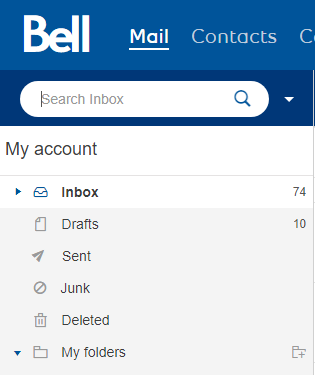
Let the Community know if you have any other questions.


Options
- Mark as New
- Bookmark
- Subscribe
- Mute
- Subscribe to RSS Feed
- Permalink
- Report Inappropriate Content
06-10-2024 07:15 AM
Good Day.
Sorry, this method of message search is not available. There is no word search for words in the body of the message. This feature is not built in to Bell Webmail.
You can set up your email account on a mail client that does include this search option. E.g. Outlook, etc.
Take care.
I am a Community All-Star and customer. I'm here to help by sharing my knowledge and experience. My views on Bell and the Community Forum are my own and not the views of Bell or any of its affiliates.

Options
- Mark as New
- Bookmark
- Subscribe
- Mute
- Subscribe to RSS Feed
- Permalink
- Report Inappropriate Content
11-08-2024 01:57 PM - last edited on 11-08-2024 02:20 PM by BellPatricia
Typing in the entire email address does work.. I stand corrected. But it is too bad it does not work for Names like Search "RJH" instead of typing in "RJH@***.com"
36 REPLIES 36
Options
- Mark as New
- Bookmark
- Subscribe
- Mute
- Subscribe to RSS Feed
- Permalink
- Report Inappropriate Content
07-12-2022 01:30 PM - edited 08-22-2025 09:37 AM
Hi there @DakotaJim. Welcome to the Bell Community.
Thank you for all of the troubleshooting steps that you've completed with our Technical team.
Unless I am misunderstanding, there is a search bar at the top left hand side.
You can type the subject of your search, and click enter to see results. A search can be done using the from, recipients and subject but not for the display name.
Let the Community know if you have any other questions.

Options
- Mark as New
- Bookmark
- Subscribe
- Mute
- Subscribe to RSS Feed
- Permalink
- Report Inappropriate Content
06-09-2024 11:38 AM - last edited on 06-10-2024 08:04 AM by BellDRock
Seems that the saving settings in block images has been corrected, for me.
I wanted to do a search for a certain persons email in my in box, and this doesn't work. A few email in the box are dropped in the search, but almost all are still listed. All meaning 98%.
I like to have the search to find older emails.
Tks jackd
Options
- Mark as New
- Bookmark
- Subscribe
- Mute
- Subscribe to RSS Feed
- Permalink
- Report Inappropriate Content
06-09-2024 03:51 PM
Well, I posted this almost 2 years ago and nobody else seems to have this problem or a solution.
On the webmail search function I can search on "subject" and "addresses" for all folders. It does not include finding specific words or terms inside a message. Believe me, I tried with very obscure wording to produce limited search results.
The problem is that the "key word" search field is now gone. Maybe I am using the wrong terminology. I used to be able to look for words or phrases inside the body of email messages. Text strings or Boolean search?
That choice for searching key words no longer comes up inside the search function.
This is available on all my other email programs that I have used and now switched too instead. However, I have many old messages in Webmail I still need to access and searching for the one I'm looking for is very difficult and time consuming.
I have to conclude this is just something peculiar to my account, or no one else needs this option.
Options
- Mark as New
- Bookmark
- Subscribe
- Mute
- Subscribe to RSS Feed
- Permalink
- Report Inappropriate Content
06-09-2024 04:04 PM - edited 06-09-2024 04:05 PM
Unfortunately I don't have a screen shot of the old menu before it changed to the new format back in Nov. 2021. There were 3 or 4 search option fields dealing with...
Addresses; Subject; Keyword
then the date filter fields.
It is odd to me that nobody else seems to remember this, or needs it. Have to surmise that it is just me that now doesn't see it.
Options
- Mark as New
- Bookmark
- Subscribe
- Mute
- Subscribe to RSS Feed
- Permalink
- Report Inappropriate Content
06-09-2024 06:13 PM
Good Day.
Unless I am misunderstanding, there is a search bar at the top left hand side. You can do a search by keyword in the search box. You need to Select a folder first, E.g. Inbox, Sent, etc. Now type your key word in the same Search box. It will search for the key word in the folder you have selected & pull up only those messages that include the search key word if it is included in the email Subject field.
There are other options that are more specific if you select the down arrow to search on To, From, Subject, Folder, date, etc.
Take care.
I am a Community All-Star and customer. I'm here to help by sharing my knowledge and experience. My views on Bell and the Community Forum are my own and not the views of Bell or any of its affiliates.
Options
- Mark as New
- Bookmark
- Subscribe
- Mute
- Subscribe to RSS Feed
- Permalink
- Report Inappropriate Content
06-09-2024 07:14 PM
Thank you
This is a screen grab of my search window with the custom fields available.

I don’t see where I can enter a keyword for searching.
The top search bar only gives search results on subject or address that match in the selected folder, not key words. (I have tried numerous times)
When clicking on the custom search for more options, the top search bar is inactive. I don’t see another field available for key words, which was present 2 years ago before Nov. 19, 2021 in my area, but is now missing.
Options
- Mark as New
- Bookmark
- Subscribe
- Mute
- Subscribe to RSS Feed
- Permalink
- Report Inappropriate Content
06-09-2024 07:53 PM - edited 06-09-2024 07:54 PM
Do not select custom search. Do not scroll down to the search sub categories. Please read my earlier reply. Stay on the main folder screen. Select the folder name first. It will show up in the Search box at the top. Next, type over the folder name in the Search box with your key word. Select the the magnifying glass. This will now do a search of that word in the specific folder that you asked for it to search on the main page. If the word appears in the subject field of any messages in trhat folder, they will show up on the right side of the screen.
You can also do a word search in the Custom chosen catorigies as long as you select a Folder and a category that is listed and type a word or a portion of the Subject , Name & exact Date in the correct: To, From, Subject, or Date
Take care.
I am a Community All-Star and customer. I'm here to help by sharing my knowledge and experience. My views on Bell and the Community Forum are my own and not the views of Bell or any of its affiliates.
Options
- Mark as New
- Bookmark
- Subscribe
- Mute
- Subscribe to RSS Feed
- Permalink
- Report Inappropriate Content
06-09-2024 08:19 PM - edited 06-09-2024 08:20 PM
Thank you, maybe it is terminology as I misread your message.
Yes, I can get search results on multiple words that are in the subject line.
What I am missing is the ability to search for words that are inside the body of individual email messages. For example, results for all emails that have the phrase "hydraulic circulating pump", or the word "hydraulic" within a paragraph inside the message.
Of the other email programs I use, Webmail is the only one that doesn't do it, but it used too.
Options
- Mark as New
- Bookmark
- Subscribe
- Mute
- Subscribe to RSS Feed
- Permalink
- Report Inappropriate Content
06-10-2024 07:15 AM
Good Day.
Sorry, this method of message search is not available. There is no word search for words in the body of the message. This feature is not built in to Bell Webmail.
You can set up your email account on a mail client that does include this search option. E.g. Outlook, etc.
Take care.
I am a Community All-Star and customer. I'm here to help by sharing my knowledge and experience. My views on Bell and the Community Forum are my own and not the views of Bell or any of its affiliates.

Options
- Mark as New
- Bookmark
- Subscribe
- Mute
- Subscribe to RSS Feed
- Permalink
- Report Inappropriate Content
06-11-2024 12:34 PM
Hi there @jackd
Thank you for your post.
Are you using Bell Webmail or a third party client?
Are you accessing through a browser? If so, have you tried clearing your cookies / cache or using a different browser?
Looking forward to hearing back.
Options
- Mark as New
- Bookmark
- Subscribe
- Mute
- Subscribe to RSS Feed
- Permalink
- Report Inappropriate Content
06-11-2024 07:04 PM
I retried the search and maybe it is working as before. If I uses fewer words for the search it it selects mail more accurately. Maybe it was my error. too long a search word or words. Jack
Options
- Mark as New
- Bookmark
- Subscribe
- Mute
- Subscribe to RSS Feed
- Permalink
- Report Inappropriate Content
06-11-2024 09:06 PM
I use webmail on Bell.net . I had tried multiple browsers with the same result,
I have reloaded and upgraded my browsers. Cleared my history cookies and cache which resulted in losing all my preferences.
As I understand it, the reply I received before explained that the feature I'm looking for is not available on the current version of webmail and to switch to Outlook.
Options
- Mark as New
- Bookmark
- Subscribe
- Mute
- Subscribe to RSS Feed
- Permalink
- Report Inappropriate Content
06-11-2024 09:22 PM - edited 06-11-2024 09:26 PM
Thanks, I have tried using a very unique single word I know is only in a few emails and then again also filtered it further by folder and dates. It didn't work for me.
The old version on bell.net I had used prior to Nov. of 2021 did have the keyword search option, but it was finicky. It was limited to 1 folder at a time, and small ranges of emails, that it would search on, or it would time out and give me an error. However, multiple words worked better.
Since that time 2021, after the webmail was improved, I was disappointed that it had disappeared and was just hoping that I just couldn't find that option for some reason.
So - seems that option has now been removed.
Options
- Mark as New
- Bookmark
- Subscribe
- Mute
- Subscribe to RSS Feed
- Permalink
- Report Inappropriate Content
11-08-2024 01:03 PM - last edited on 11-08-2024 01:04 PM by BellPatricia
I use that search inbox and continually get
"ERROR: Your search could not be completed. Please refine your search criteria."
RJH

Getting started
New to our forum? These guides will help you find your way around quickly.
- Welcome to the Community!
- Log in/Register
- Community guidelines
- Community help
- Meet the Moderators
- Bell Community All-Stars
- How to send a private message
- Existing customers, login to MyBell to see exclusive offers
- What's on Crave
- What's on Free Preview
- Mobility phone & device catalog
- Latest in the Community


