- Community Home
- Internet
- Re: Home Hub 4000 SSID broadcast off
Options
- Subscribe to RSS Feed
- Mark Topic as New
- Mark Topic as Read
- Float this Topic for Current User
- Bookmark
- Subscribe
- Mute
- Printer Friendly Page

Options
- Mark as New
- Bookmark
- Subscribe
- Mute
- Subscribe to RSS Feed
- Permalink
- Report Inappropriate Content
07-16-2022 03:49 PM - last edited on 07-18-2022 02:40 PM by BellDRock
Why doesn't the Home Hub 4000 have the option to turn off SSID broadcast? It is a security issue.
Solved! Go to Solution.
Labels:
0
16
21.2K
2 helpful replies
Accepted Solutions

Options
- Mark as New
- Bookmark
- Subscribe
- Mute
- Subscribe to RSS Feed
- Permalink
- Report Inappropriate Content
07-18-2022 02:35 PM - last edited on 10-20-2022 01:30 PM by BellDRock
Hey there @Pauls,
Welcome to the Community and thanks for your post.
Rest assured that your Wireless Home Network is secure and is protected by industry standard wireless encryption.
Check out this support article titled Is my Wireless Home Network secure? for more details.
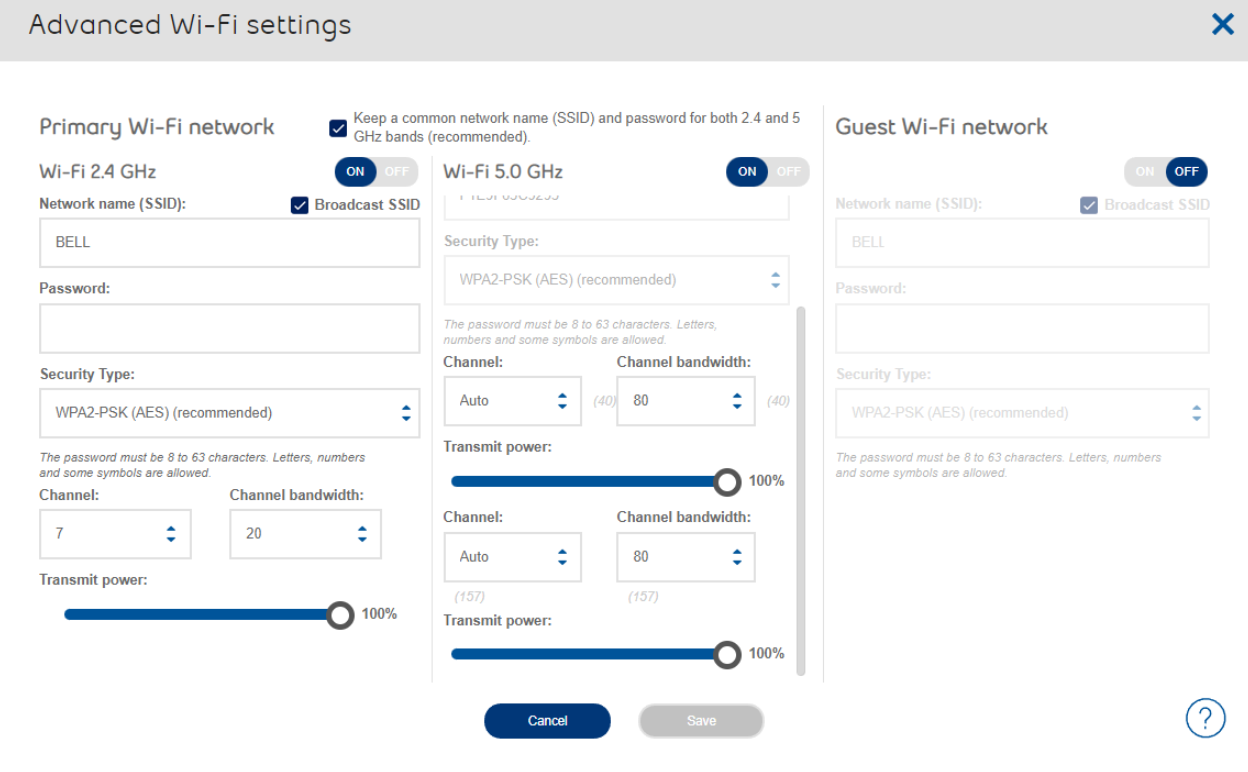
To turn off your SSID broadcast, log into your modem portal via 192.168.2.1 Select Manage my Wi-Fi to turn Whole Home Wi-Fi ON & OFF. Slide Whole Home Wi-Fi to OFF.
You should then see the Advanced Wi-Fi Setting menu. From there you can unselect the box titled Broadcast SSID.


Options
- Mark as New
- Bookmark
- Subscribe
- Mute
- Subscribe to RSS Feed
- Permalink
- Report Inappropriate Content
09-10-2024 10:54 AM - edited 09-10-2024 10:55 AM
When you log into your modem portal via 192.168.2.1 select Manage my Wi-Fi to turn Whole Home Wi-Fi ON & OFF.
You should then see the Advanced Wi-Fi Setting menu. From there you can turn off the SSID broadcast by unticking the boxes.
First picture in this thread.
I am a Community All-Star and customer. I'm here to help by sharing my knowledge and experience. My views on Bell and the Community Forum are my own and not the views of Bell or any of its affiliates.
16 REPLIES 16
Options
- Mark as New
- Bookmark
- Subscribe
- Mute
- Subscribe to RSS Feed
- Permalink
- Report Inappropriate Content
07-18-2022 02:35 PM - last edited on 10-20-2022 01:30 PM by BellDRock
Hey there @Pauls,
Welcome to the Community and thanks for your post.
Rest assured that your Wireless Home Network is secure and is protected by industry standard wireless encryption.
Check out this support article titled Is my Wireless Home Network secure?for more details.
To turn off your SSID broadcast, log into your modem portal via 192.168.2.1 Select Manage my Wi-Fi to turn Whole Home Wi-Fi ON & OFF. Slide Whole Home Wi-Fi to OFF.
You should then see the Advanced Wi-Fi Setting menu. From there you can unselect the box titled Broadcast SSID.

Options
- Mark as New
- Bookmark
- Subscribe
- Mute
- Subscribe to RSS Feed
- Permalink
- Report Inappropriate Content
10-05-2022 11:38 AM
But by doing this, we can't use the mesh network pods. Is there no way to use the pods and also not broadcast our SSID?

Options
- Mark as New
- Bookmark
- Subscribe
- Mute
- Subscribe to RSS Feed
- Permalink
- Report Inappropriate Content
10-05-2022 01:20 PM
Hi @GBurchell
You can't disable the SSID broadcast unless you turn off Whole Home Wi-Fi (See @BellAntgio July 18th post) .
However, to use the mesh network/pods "Whole Home Wi-fi" needs to be active. You can strengthen the SSID password, and change it regularly.
I am a Community All-Star and customer. I'm here to help by sharing my knowledge and experience. My views on Bell and the Community Forum are my own and not the views of Bell or any of its affiliates.
Options
- Mark as New
- Bookmark
- Subscribe
- Mute
- Subscribe to RSS Feed
- Permalink
- Report Inappropriate Content
10-05-2022 11:27 PM
I don't have any pods nor do I need them for my small apartment.
Options
- Mark as New
- Bookmark
- Subscribe
- Mute
- Subscribe to RSS Feed
- Permalink
- Report Inappropriate Content
10-06-2022 11:58 AM
Hi @Pauls
You can disable the broadcast of SSIDs, if you don't need Whole Home Wi-fi. Just follow the instructions in this thread provided by @BellAntgio . The tradeoff is the inconvenience of setting up new devices on your network.
I am a Community All-Star and customer. I'm here to help by sharing my knowledge and experience. My views on Bell and the Community Forum are my own and not the views of Bell or any of its affiliates.

Options
- Mark as New
- Bookmark
- Subscribe
- Mute
- Subscribe to RSS Feed
- Permalink
- Report Inappropriate Content
10-20-2022 12:16 PM
I want to set up our SSID to not broadcast. I went through the modem admin interface and did the necessary steps to disable it:

But it's still showing up in the Networks list. Did "Forget this Network", rebooted the modem, restarted the phone, etc. So maybe a problem with the interface?

Options
- Mark as New
- Bookmark
- Subscribe
- Mute
- Subscribe to RSS Feed
- Permalink
- Report Inappropriate Content
10-31-2022 09:36 AM
I think I figured out what's going on. In the UI, to get to Broadcast SSID, you go through two screens to get there. Each has Cancel / Save options. You have to do Save for each of them, and not Cancel or ✖ (Close). Otherwise, the second screen will show SSID is disabled, but it might not get saved in the hardware until you confirm in the first screen on the "way back out". I think the first time I disabled Broadcast SSID, Saved in the second window, but then I clicked ✖ in the first window. Anyway, it's working now. /Russell

Options
- Mark as New
- Bookmark
- Subscribe
- Mute
- Subscribe to RSS Feed
- Permalink
- Report Inappropriate Content
12-04-2022 10:30 PM
Hello Everyone, im not sure if this is a dumb question, but i have been trying to modify the settings for my Home Hub as i prefer to have my Wi-Fi without SSID broadcasting so that its not picked randomly in the vicinity and im not seeing that option on the Home Hub itself or in the Bell Wi-Fi App, if someone can find me a please were i can submit feedback so i can leave my 2 cents on that app because it feels unnecessary and extremely convoluted to have an app for that at the expense of removing the option to modify the wifi setting on the modem/router.
Thank you in advance and have a great day!

Options
- Mark as New
- Bookmark
- Subscribe
- Mute
- Subscribe to RSS Feed
- Permalink
- Report Inappropriate Content
12-05-2022 12:06 AM
Just open your wifi settings and disable bell's WiFi optimization on the top right corner and then click on advanced settings button at the middle bottom of the window. That's it!

Options
- Mark as New
- Bookmark
- Subscribe
- Mute
- Subscribe to RSS Feed
- Permalink
- Report Inappropriate Content
03-21-2024 01:09 AM
SSID broadcast is safer than having your SSID hidden. When the SSID is broadcast, your end device remains hidden. While when your SSID is hidden and thus not broadcasted, it is your end devices that needs to broadcast and then they become visible. That is much worse security as your end devices don't have the network protection the Hub 4000 has.
Options
- Mark as New
- Bookmark
- Subscribe
- Mute
- Subscribe to RSS Feed
- Permalink
- Report Inappropriate Content
03-21-2024 08:59 AM
Hi @Fritzz
I may be misunderstanding your post.
When SSID broadcast is turned off on the router (or on a combo gateway modem/router like Bell's Home Hubs), each LAN device which you want to connect must be configured manually. This includes the SSID and the security mode.
The devices on a LAN don't broadcast an SSID. And if the SSID is being hidden as a "security measure", it's relatively straightforward for a someone with a tool like Wireshark to get the SSID.
I am a Community All-Star and customer. I'm here to help by sharing my knowledge and experience. My views on Bell and the Community Forum are my own and not the views of Bell or any of its affiliates.
Options
- Mark as New
- Bookmark
- Subscribe
- Mute
- Subscribe to RSS Feed
- Permalink
- Report Inappropriate Content
03-21-2024 01:12 PM - last edited on 04-02-2025 09:40 AM by BellPatricia
Any WiFi scanner will find your hidden SSID in seconds, thx to your manually configured end devices that will provide it when it is trying to connect to any hidden network they come across everywhere they go - that's the end device broadcast I was talking about. It is not a SSID broadcast like the AP is usually doing, it is a connection request one that let your end device be visible and easier to attack. The end device becomes the beacon instead of the AP. This is not good.
So no, hidden SSIDs is a false sense of security.
Options
- Mark as New
- Bookmark
- Subscribe
- Mute
- Subscribe to RSS Feed
- Permalink
- Report Inappropriate Content
03-21-2024 01:23 PM
We agree. Sorry that I misread the first sentence of your post.
There is no good reason to turn off the router's broadcast of the SSID. It does make a network less secure and requires more work for the LAN admin/home user: all devices would need to be manually configured in order to connect to the LAN wirelessly.
I am a Community All-Star and customer. I'm here to help by sharing my knowledge and experience. My views on Bell and the Community Forum are my own and not the views of Bell or any of its affiliates.

Options
- Mark as New
- Bookmark
- Subscribe
- Mute
- Subscribe to RSS Feed
- Permalink
- Report Inappropriate Content
09-10-2024 10:43 AM - last edited on 09-10-2024 11:00 AM by BellDRock
How to disable ssid broadcast for Bell Giga hub? I didn't find the ssid disable option on 192.168.2.1

Getting started
New to our forum? These guides will help you find your way around quickly.
- Welcome to the Community!
- Log in/Register
- Community guidelines
- Community help
- Meet the Moderators
- Bell Community All-Stars
- How to send a private message
- Existing customers, login to MyBell to see exclusive offers
- What's on Crave
- What's on Free Preview
- Mobility phone & device catalog
- Latest in the Community


