- Community Home
- My account
- Re: Bill Notification - Not receiving notification...
Options
- Subscribe to RSS Feed
- Mark Topic as New
- Mark Topic as Read
- Float this Topic for Current User
- Bookmark
- Subscribe
- Mute
- Printer Friendly Page

Options
- Mark as New
- Bookmark
- Subscribe
- Mute
- Subscribe to RSS Feed
- Permalink
- Report Inappropriate Content
02-07-2024 06:09 PM - last edited on 03-15-2025 05:49 PM by BellPatricia
Its frustrating that I no longer receive notification about bills being due. Has the process changed? I shouldn't have to go digging to find out this information. I really hope this service is no longer available so Bell can charge extra late fee charges.
Solved! Go to Solution.
Labels:
3
27
8,290
3 helpful replies
Accepted Solutions


Options
- Mark as New
- Bookmark
- Subscribe
- Mute
- Subscribe to RSS Feed
- Permalink
- Report Inappropriate Content
02-08-2024 06:42 AM
Thank you for your question. You should confirm that Bell has your correct e-mail and that your communication preferences are your choices. In the MyBell app, click on the silhouette icon on the top right. You can edit your settings there. Select the Head icon in the upper right corner > Profile > Profile Information > Contact e-mail. That is the e-mail your billing notifications will be sent to. There is no charge for this service.
I am a Community All-Star and customer. I'm here to help by sharing my knowledge and experience. My views on Bell and the Community Forum are my own and not the views of Bell or any of its affiliates.

Options
- Mark as New
- Bookmark
- Subscribe
- Mute
- Subscribe to RSS Feed
- Permalink
- Report Inappropriate Content
03-15-2025 09:56 AM
Hi there, @wallydug. Thanks for your post!
There has recently been a change to our billing platform and it's possible that some customers bill dates may have changed by a few days during the migration process. Are your bills themselves still visible in MyBell?
Once the migration is done there is typically a notice on your bill right after the change occurs. There should be a note on your current bill, and it will say "Welcome to your new and improved bill. We've moved to a new billing system, which results in an updated look and the following change to your bill. Your bill is now available a few days later each month; the new date is reflected on this bill. Note, this change does not affect your current services or rates."
If the issue of a lack of a notification continues to persist after this migration is completed for you, we'd recommend reviewing the questions asked of users earlier in this thread to help narrow down and hopefully treat the issue. 🙂
Best wishes.
— Kris

Options
- Mark as New
- Bookmark
- Subscribe
- Mute
- Subscribe to RSS Feed
- Permalink
- Report Inappropriate Content
09-09-2025 04:24 PM - edited 09-09-2025 04:27 PM
Hi all,
Payment (bill) reminders can be turned on / off through your MyBell profile. Once logged into your MyBell you would select "My Profile" and then "MyBell":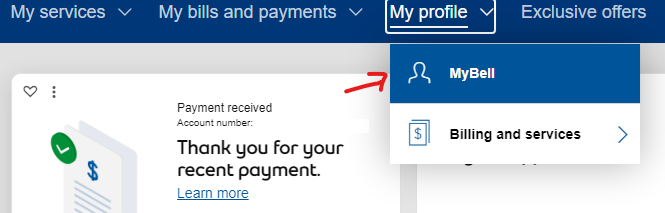
Go down under the "Billing profile" section and select "My bill":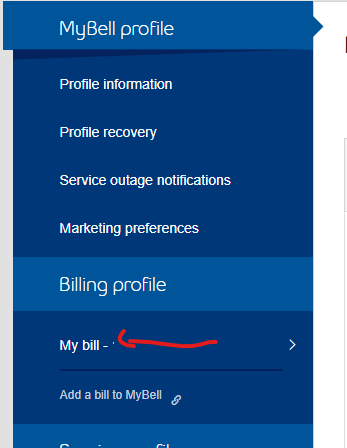
Select the "Edit" button beside "Payment reminders":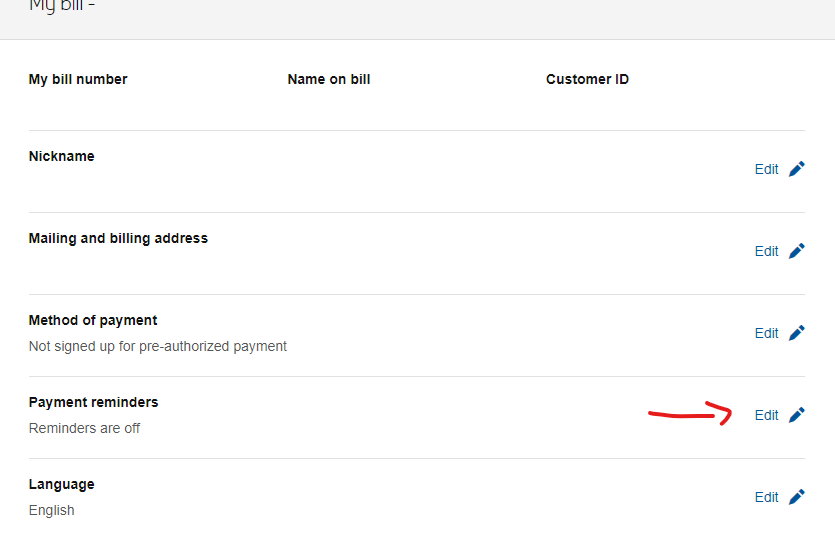
Select "Turn on reminders" and click "Save"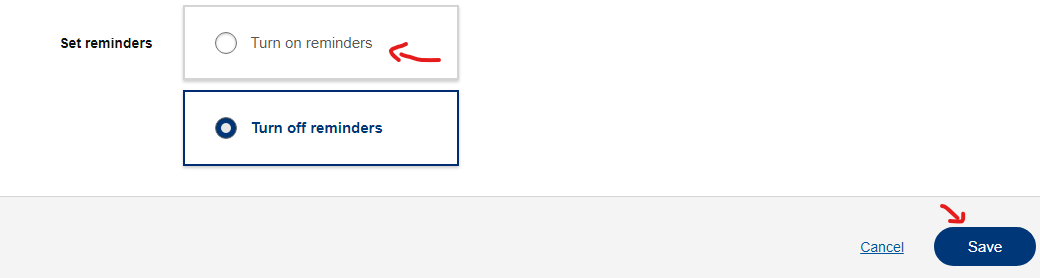
If you're getting stuck somewhere and unable to do this, please share at which point you are encountering issues and please share any error messages you may receive.
27 REPLIES 27
Options
- Mark as New
- Bookmark
- Subscribe
- Mute
- Subscribe to RSS Feed
- Permalink
- Report Inappropriate Content
02-08-2024 06:42 AM
Thank you for your question. You should confirm that Bell has your correct e-mail and that your communication preferences are your choices. In the MyBell app, click on the silhouette icon on the top right. You can edit your settings there. Select the Head icon in the upper right corner > Profile > Profile Information > Contact e-mail. That is the e-mail your billing notifications will be sent to. There is no charge for this service.
I am a Community All-Star and customer. I'm here to help by sharing my knowledge and experience. My views on Bell and the Community Forum are my own and not the views of Bell or any of its affiliates.

Options
- Mark as New
- Bookmark
- Subscribe
- Mute
- Subscribe to RSS Feed
- Permalink
- Report Inappropriate Content
03-14-2025 02:02 PM
Same here for the past few months. Support confirmed correct email. No help after!
Options
- Mark as New
- Bookmark
- Subscribe
- Mute
- Subscribe to RSS Feed
- Permalink
- Report Inappropriate Content
03-15-2025 09:56 AM
Hi there, @wallydug. Thanks for your post!
There has recently been a change to our billing platform and it's possible that some customers bill dates may have changed by a few days during the migration process. Are your bills themselves still visible in MyBell?
Once the migration is done there is typically a notice on your bill right after the change occurs. There should be a note on your current bill, and it will say "Welcome to your new and improved bill. We've moved to a new billing system, which results in an updated look and the following change to your bill. Your bill is now available a few days later each month; the new date is reflected on this bill. Note, this change does not affect your current services or rates."
If the issue of a lack of a notification continues to persist after this migration is completed for you, we'd recommend reviewing the questions asked of users earlier in this thread to help narrow down and hopefully treat the issue. 🙂
Best wishes.
— Kris
Options
- Mark as New
- Bookmark
- Subscribe
- Mute
- Subscribe to RSS Feed
- Permalink
- Report Inappropriate Content
03-19-2025 05:57 AM - last edited on 03-19-2025 06:49 AM by BellDRock
Why don't I receive a notice that me bill is ready for viewing anymore until it is now sent through for the auto payment?
Options
- Mark as New
- Bookmark
- Subscribe
- Mute
- Subscribe to RSS Feed
- Permalink
- Report Inappropriate Content
03-19-2025 06:13 AM - last edited on 03-19-2025 06:50 AM by BellDRock
Thank you for your feedback. I can't give you any reason why you are not receiving your e-mail notices, but there two potential causes.
The first is that you billing date may have changed. This happened recently. Your billing date was moved back and the e-mail was not sent until the new date was established.
The second possibility is that the e-mail is caught in Bell's spam filters and is in your junk file. If you are using a Bell e-mail address, church your junk e-mail through the web interface.
Both happened to me in the last month. If this continues, please post again.
I am a Community All-Star and customer. I'm here to help by sharing my knowledge and experience. My views on Bell and the Community Forum are my own and not the views of Bell or any of its affiliates.

Options
- Mark as New
- Bookmark
- Subscribe
- Mute
- Subscribe to RSS Feed
- Permalink
- Report Inappropriate Content
03-19-2025 06:16 AM - last edited on 03-19-2025 06:51 AM by BellDRock
Good Day & Welcome to the Bell Community Forum.
I am not quite sure I fully understand your question. Could you please provide us with further specific details?
Have you verified the email address you have registered with Bell on your MyBell web account? Have you checked your Junk mail folder?
When did you stop receiving your billing notifications? Have you made changes to your billing such as setting up pre-authorized payments?
If you just signed up for pre-authorized payments, your billing date may have changed. You should make a manual payment for your first payment to be safe. If you overpay, your account will be credited & any overpayment will be applied to your next monthly bill. Do not adjust your pre-authorized payment.
Please make a one-time payment if you have an outstanding balance on your current bill. Your pre-authorized payments will take one to two bill cycles to get set up in Bell's billing system.
How long does it take for my Bell payment to be processed?
For further assistance, please call Bell Customer Service Accounts & Billing: 1 866 310-BELL (2355) or dial #611 from any Bell mobile device.
Take care.
I am a Community All-Star and customer. I'm here to help by sharing my knowledge and experience. My views on Bell and the Community Forum are my own and not the views of Bell or any of its affiliates.

Options
- Mark as New
- Bookmark
- Subscribe
- Mute
- Subscribe to RSS Feed
- Permalink
- Report Inappropriate Content
08-28-2025 08:30 PM
Hello: I appreciate your response! The answer from the Bell tech is currently the best solution - at least, for me right now. The billing reminders feature still does not work.
I am able to view my current and previous bills, access my email the same way as I have done for several years, registered my email in my profile, bell is not one of my blocked senders. I have just now added bell.ca as a safe sender, though.
Thanks for the FYI; I have also just now added a reminder each month in my calendar. I would prefer having the reminder from Bell, however.

Options
- Mark as New
- Bookmark
- Subscribe
- Mute
- Subscribe to RSS Feed
- Permalink
- Report Inappropriate Content
09-07-2025 08:16 PM - last edited on 09-08-2025 08:44 AM by BellDRock
Bell stopped sending paper bills years ago despite me asking to keep them. Up until July this year I would get an email notification that my bill was ready. Now suddenly, without me changing anything, all I got was a text message. This nearly resulted in me missing my payment deadline. I can’t find anywhere to fix this on either the app or the website. How can I fix this?
Options
- Mark as New
- Bookmark
- Subscribe
- Mute
- Subscribe to RSS Feed
- Permalink
- Report Inappropriate Content
09-08-2025 05:44 AM - last edited on 09-08-2025 08:45 AM by BellDRock
Good Day & Welcome.
Bell made some recent changes earlier this year resulting in changes to the bill format. This may have changed your billing slightly and affected the timing of your last billing notification. This should self-adjust on your next billing cycle.
In the interim, a Bell moderator may reach out to you in a private message to gather some further information.
- Could you login to your MyBell account to verify if your current and previous historical bills are available for you to view online?
- Any changes in how you are you accessing your email messages? Email client, Bell webmail, application, computer, device, etc.
- Could you verify the email address you have registered with Bell on your MyBell web account?
- Please check your Junk mail folder. Blocked senders? Please add the domain: bell.ca, to your Safe senders list & remove any reference to: bell.ca in your Blockers senders list.
- Any recent changes to your account or billing information?
FYI only!
- Your Bell billing date is the same each month and can be found in your MyBell account. Your specific billing cycle is fixed and based on the date your service began, so your bill will always have the same billing date each month. You have 30 days from the billing date to pay your bill to avoid a late fee.
Take care.
I am a Community All-Star and customer. I'm here to help by sharing my knowledge and experience. My views on Bell and the Community Forum are my own and not the views of Bell or any of its affiliates.
Options
- Mark as New
- Bookmark
- Subscribe
- Mute
- Subscribe to RSS Feed
- Permalink
- Report Inappropriate Content
09-08-2025 08:59 AM
Thank you for your kind response. Nothing changed on my end. I checked everything prior to making my post. It appears to have been an error on the part of Bell. I took an unbelievable amount of time on a chat last evening to find this out, and I have been assured that I will get an email notification next month.
Options
- Mark as New
- Bookmark
- Subscribe
- Mute
- Subscribe to RSS Feed
- Permalink
- Report Inappropriate Content
09-08-2025 09:10 AM
Good Day.
Hi @User853 more than glad to have been of assistance to you.
Thank you for updating the community on the status of your email notification.
Let us know if we can be of any further help.
Take care.
I am a Community All-Star and customer. I'm here to help by sharing my knowledge and experience. My views on Bell and the Community Forum are my own and not the views of Bell or any of its affiliates.
Options
- Mark as New
- Bookmark
- Subscribe
- Mute
- Subscribe to RSS Feed
- Permalink
- Report Inappropriate Content
09-08-2025 09:21 AM
Hello: I was heartened to read that the issue had been resolved. However, when I returned to my billing profile in MyBell I found I was still not able to turn on the bill payment notification option. This is very frustrating.
Options
- Mark as New
- Bookmark
- Subscribe
- Mute
- Subscribe to RSS Feed
- Permalink
- Report Inappropriate Content
09-08-2025 09:40 AM
I can't even find a place to turn on or off bill payment notifications. I am, perhaps stupidly, assuming the person I chatted with last evening was able to fix the problem for me. In any event, I downloaded a transcript of the chat, so that I have a record. I also did a screen shot of what my plan looks like, so that I can look for a similar plan with another provider if Bell can't fix this mess. I don't believe it is acceptable to tell people to just put it in your own personal calendar as a solution to their issue. And how much confidence can you have in a telecommunications company that can't fix a simple communication issue?
Options
- Mark as New
- Bookmark
- Subscribe
- Mute
- Subscribe to RSS Feed
- Permalink
- Report Inappropriate Content
09-08-2025 10:42 AM
Hi: The option (which doesn't work, at least for me) is under your Bill Payment Profile. I agree; not very reassuring at all that Bell can't resolve this.

Getting started
New to our forum? These guides will help you find your way around quickly.
- Welcome to the Community!
- Log in/Register
- Community guidelines
- Community help
- Meet the Moderators
- Bell Community All-Stars
- How to send a private message
- Existing customers, login to MyBell to see exclusive offers
- What's on Crave
- What's on Free Preview
- Mobility phone & device catalog
- Latest in the Community


