- Community Home
- My account
- Re: Bill Notification - Not receiving notification...
Options
- Subscribe to RSS Feed
- Mark Topic as New
- Mark Topic as Read
- Float this Topic for Current User
- Bookmark
- Subscribe
- Mute
- Printer Friendly Page

Options
- Mark as New
- Bookmark
- Subscribe
- Mute
- Subscribe to RSS Feed
- Permalink
- Report Inappropriate Content
02-07-2024 06:09 PM - last edited on 03-15-2025 05:49 PM by BellPatricia
Its frustrating that I no longer receive notification about bills being due. Has the process changed? I shouldn't have to go digging to find out this information. I really hope this service is no longer available so Bell can charge extra late fee charges.
Solved! Go to Solution.
Labels:
3
27
8,315
27 REPLIES 27

Options
- Mark as New
- Bookmark
- Subscribe
- Mute
- Subscribe to RSS Feed
- Permalink
- Report Inappropriate Content
09-08-2025 11:36 AM
I looked everywhere for this option. Maybe it is because I am using an iPhone, but what it is for me is under push notifications and only on the app. I never allow those anywhere, but I know I haven't changed anything like that for Bell because I didn't even know where to find it or what to look for or where for that matter. It did allow me to flip the switch to on, but given that I was receiving bill notifications by email as well as text up until this past July, I am not confident this was the issue. In any event, thanks for your response. I hope you get your issue sorted out.

Options
- Mark as New
- Bookmark
- Subscribe
- Mute
- Subscribe to RSS Feed
- Permalink
- Report Inappropriate Content
09-09-2025 04:24 PM - edited 09-09-2025 04:27 PM
Hi all,
Payment (bill) reminders can be turned on / off through your MyBell profile. Once logged into your MyBell you would select "My Profile" and then "MyBell":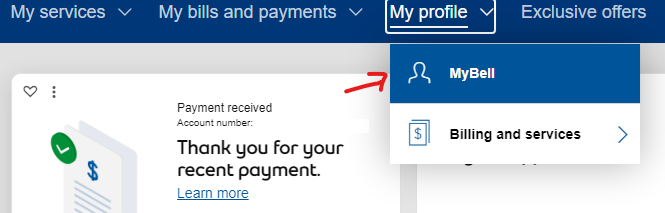
Go down under the "Billing profile" section and select "My bill":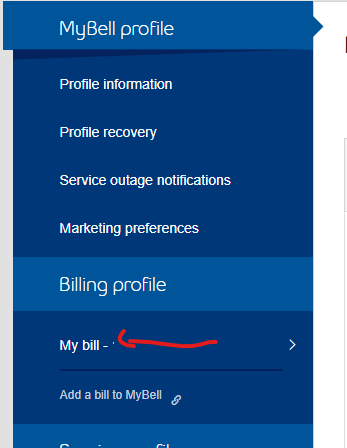
Select the "Edit" button beside "Payment reminders":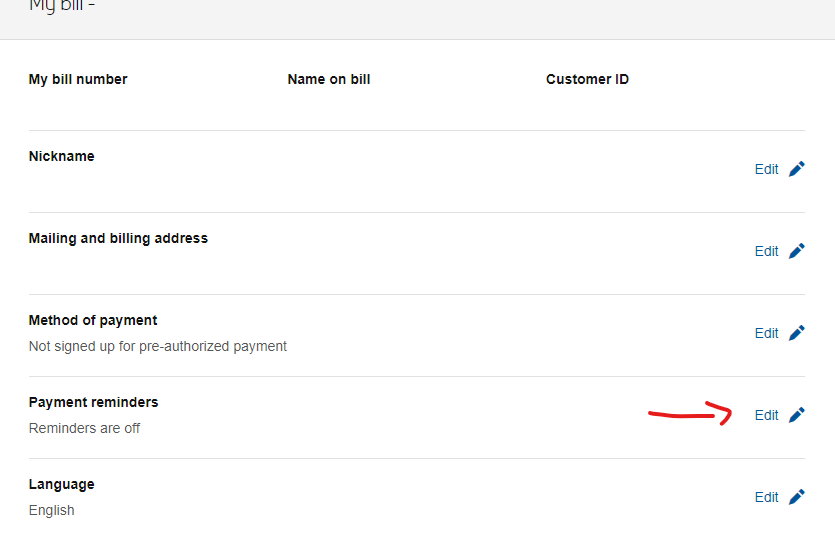
Select "Turn on reminders" and click "Save"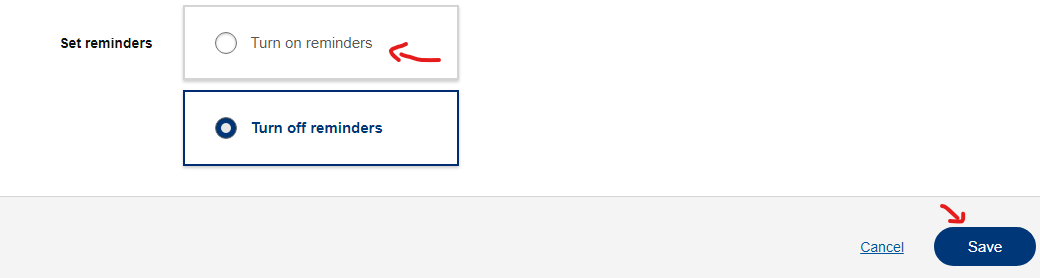
If you're getting stuck somewhere and unable to do this, please share at which point you are encountering issues and please share any error messages you may receive.

Options
- Mark as New
- Bookmark
- Subscribe
- Mute
- Subscribe to RSS Feed
- Permalink
- Report Inappropriate Content
11-02-2025 10:46 AM - last edited on 11-03-2025 04:30 PM by BellPatricia
I am receiving text messages stating you are unable to deliver my stateent at my email address. However I have verified that you do have te correct email address. How can I resolve this issue?


Options
- Mark as New
- Bookmark
- Subscribe
- Mute
- Subscribe to RSS Feed
- Permalink
- Report Inappropriate Content
11-02-2025 12:44 PM - last edited on 11-03-2025 04:31 PM by BellPatricia
Good Day & Welcome.
Kudos to you for recognizing this anomaly! This is a Scam! What makes you think that Bell is sending you text messages advising you that they are unable to delivery your Bell bill statement by email?
Bell does not send billing statements by email! Bell does notify you by email when your statement is available for you to view on your MyBell account.
If you have been receiving monthly email notifications that your monthly bill is now ready, then there is nothing more for you to do. You have already verified that Bell has your correct email address. Treat theses text messages as "Junk" & delete.
If you receive a suspicious text message (SMS) or multimedia message (MMS), follow the steps below to report it to Bell.
Reporting security issues : Reporting potential security issues
Please have a look at the following web link. It will explain to you just what I am saying with much more details.
Service provider impersonation scam - Bell
It is far better for you to be safe than sorry!
Take care.
I am a Community All-Star and customer. I'm here to help by sharing my knowledge and experience. My views on Bell and the Community Forum are my own and not the views of Bell or any of its affiliates.
Options
- Mark as New
- Bookmark
- Subscribe
- Mute
- Subscribe to RSS Feed
- Permalink
- Report Inappropriate Content
11-03-2025 03:31 PM - last edited on 11-05-2025 02:07 PM by BellAntgio
You may have misunderstood my problem. What I am receiving from you are text messages which you regularly send me. To confirm this isn't pishing emails, I have not been receiving my statements by email as I am accustomed to receive. I tried accessing my profile to update my email adress but it simply won't let me

Options
- Mark as New
- Bookmark
- Subscribe
- Mute
- Subscribe to RSS Feed
- Permalink
- Report Inappropriate Content
11-05-2025 10:09 AM
Welcome to the Bell community 🙂
We will reach out to your via private message soon so that we can review this further. Please check your Messages within your profile avatar in the top right corner.
Unsure how to check or send a private message? See How to send a private message

Options
- Mark as New
- Bookmark
- Subscribe
- Mute
- Subscribe to RSS Feed
- Permalink
- Report Inappropriate Content
11-10-2025 04:27 PM
There's a new twist to the problem. I actually got a "Your Bell e-Bill is ready" email last week (07 November). However I found it in the "Deleted" folder marked as unread. Like I have noted previously, no Bell email address or domain name is blocked or on my spam list. Bell has been using my same email address for over 20 years.
Even weirder, after I moved the email into my Inbox the system moves it back into the Deleted folder within seconds. This is unstoppable.
It is also ridiculous. There were fewer problems when my Bell bill arrived by post and included an old-fashioned punch card. As an added benefit the envelope never included a pitch to up-sell me a service I didn't need or want.

Options
- Mark as New
- Bookmark
- Subscribe
- Mute
- Subscribe to RSS Feed
- Permalink
- Report Inappropriate Content
11-10-2025 05:19 PM
Mine is ok now. Received email notification (in Inbox!). Bill reminder turned on which I didn't do! Wonder if it will be ok next month? What were you supposed to do with the punched card?

Options
- Mark as New
- Bookmark
- Subscribe
- Mute
- Subscribe to RSS Feed
- Permalink
- Report Inappropriate Content
11-10-2025 05:36 PM
I just checked MyBell and see that the bill reminder has been turned on, as well! But, my bill is due in a week and I haven't received a reminder. How far in advance of your due date did you receive your email notification? Thanks!
Options
- Mark as New
- Bookmark
- Subscribe
- Mute
- Subscribe to RSS Feed
- Permalink
- Report Inappropriate Content
11-10-2025 05:43 PM
My billing cycle is the 5th. Bill was available in MyBell on the 8th and the email notification was posted on the 9th! Go figure. Safest way is to check MyBell.
Options
- Mark as New
- Bookmark
- Subscribe
- Mute
- Subscribe to RSS Feed
- Permalink
- Report Inappropriate Content
11-10-2025 07:54 PM
Or ask for a paper bill! Getting a bill notification 4 days after the bill is due is not helpful. Thanks for following up!
Options
- Mark as New
- Bookmark
- Subscribe
- Mute
- Subscribe to RSS Feed
- Permalink
- Report Inappropriate Content
11-11-2025 01:23 PM
The punch card was the old-fashioned way to store data. It contained your Bell account details and information about that particular month's bill . (The information was also on a separate printed piece of paper.) There were two choices: take the punch card to a Bell office and pay the bill by cash or cheque, or mail the punch card and a cheque back to Bell in the return envelope provided. As long as you didn't damage the punch card there were never any problems. It was kinda pleasant to chat with the tellers at the Bell office, and they never tried to sell you anything.
Options
- Mark as New
- Bookmark
- Subscribe
- Mute
- Subscribe to RSS Feed
- Permalink
- Report Inappropriate Content
11-12-2025 10:10 AM
Yes I also am old enough to have used punch cards on early mainframe computers in the '60s! Yikes

- « Previous
-
- 1
- 2
- Next »
Getting started
New to our forum? These guides will help you find your way around quickly.
- Welcome to the Community!
- Log in/Register
- Community guidelines
- Community help
- Meet the Moderators
- Bell Community All-Stars
- How to send a private message
- Existing customers, login to MyBell to see exclusive offers
- What's on Crave
- What's on Free Preview
- Mobility phone & device catalog
- Latest in the Community


