- Community Home
- TV & Streaming
- Re: Fibe TV: Issues with pixelation
Options
- Subscribe to RSS Feed
- Mark Topic as New
- Mark Topic as Read
- Float this Topic for Current User
- Bookmark
- Subscribe
- Mute
- Printer Friendly Page

Options
- Mark as New
- Bookmark
- Subscribe
- Mute
- Subscribe to RSS Feed
- Permalink
- Report Inappropriate Content
01-30-2023 07:54 PM - last edited on 11-14-2024 10:17 AM by BellPatricia
Fibe tv pixilation with bell android tv box
I have random times when the fibe tv haves pixilation and even a reboot doesn't help what else can I do to resolve this problem?
Solved! Go to Solution.
Labels:
- Labels:
-
7802
-
Fibe TV
-
Troubleshooting
2
56
11.2K
56 REPLIES 56

Options
- Mark as New
- Bookmark
- Subscribe
- Mute
- Subscribe to RSS Feed
- Permalink
- Report Inappropriate Content
04-23-2025 11:56 PM
I started experiencing the same thing today, have only had Fibe for three weeks, so I’m disappointed. Switching channels fixes it, short term, but is annoying. What is the reason for this? Is it damaged line, poor internet? Appreciate feedback. Thank you!

Options
- Mark as New
- Bookmark
- Subscribe
- Mute
- Subscribe to RSS Feed
- Permalink
- Report Inappropriate Content
04-25-2025 08:36 AM - edited 01-08-2026 11:04 AM
Hi @ellaJasmine, thanks for reaching out to the Bell community 🙂
We would like to get more details so the community can help.
- Are you experiencing this on multiple receivers or just one?
- Does this affect a certain channel?
- Is the equipment connected via Wi-Fi or Ethernet?
- What is the distance between the modem and TV receiver?
- When the pixilation occurs have you tried any other troubleshooting besides changing the channel (e.g. reboot receiver/Virtual repair tool
 )
)
We also recommend that you try moving the equipment closer together to see if that helps improve your signal. Additionally, if the modem and receiver are already close to each other try testing a direct Ethernet connection.
Let us know how everything is going.

Options
- Mark as New
- Bookmark
- Subscribe
- Mute
- Subscribe to RSS Feed
- Permalink
- Report Inappropriate Content
04-25-2025 08:45 AM - edited 04-25-2025 08:46 AM
@ellaJasmineI had the same issue, but only on the VIP7802; did a factory reset on the box and haven't had the issue since.
Options
- Mark as New
- Bookmark
- Subscribe
- Mute
- Subscribe to RSS Feed
- Permalink
- Report Inappropriate Content
04-28-2025 08:20 AM
Hi
I have only one receiver, connected by Ethernet, occurs on all channels and Fibe box and modem are less than 2” apart.
I have only tried a reboot, not the tv fix,I’ll try next.
thanks!

Options
- Mark as New
- Bookmark
- Subscribe
- Mute
- Subscribe to RSS Feed
- Permalink
- Report Inappropriate Content
05-12-2025 03:10 PM
I'll add another datapoint. Will get random pixelation that looks like what others have reported here from time to time. I had not made the connection before, but this definitely started after the upgrade. Nothing else about my setup changed.
For me what tends to put it right is rebooting the Android TV box. That seems to make it go away for a week or two, but it eventually comes back.

Options
- Mark as New
- Bookmark
- Subscribe
- Mute
- Subscribe to RSS Feed
- Permalink
- Report Inappropriate Content
06-04-2025 03:33 PM - last edited on 01-08-2026 11:11 AM by BellPatricia
I've been getting the same pixilation mess on both my Tv's connected to the wifi boxes. Change the channel and it goes away, but comes back in 15 minutes. This started happening after the app/guide was changed to the new version a few months ago. I've tried all suggestions, reboot, change hdmi cable, etc... but for it to be on 2 tv's is a problem with the signal coming in. Anybody find a true fix to the problem? Thanks.

Options
- Mark as New
- Bookmark
- Subscribe
- Mute
- Subscribe to RSS Feed
- Permalink
- Report Inappropriate Content
06-04-2025 04:15 PM - last edited on 01-08-2026 11:12 AM by BellPatricia
I haven't found any other solution other than rebooting the TV box; that seems to make it go away for a week or two. Touch wood....lately I have not had any pixelation issues (for about two weeks now).

Options
- Mark as New
- Bookmark
- Subscribe
- Mute
- Subscribe to RSS Feed
- Permalink
- Report Inappropriate Content
07-08-2025 08:25 AM - last edited on 07-08-2025 09:03 AM by BellPatricia
We have been having issues with our Bell receiver all year on and off. We have had to change it 4 different times as after a month of use the picture starts to pixelate on and off. We have to reboot the receiver and it fixes the issue for awhile. It’s been very frustrating because nothing Bell does fixes the issue completely.
We can’t be the only people experiencing this issue and we are getting to the end of our patience. Please advise if anyone else is experiencing this as we are on the verge of changing providers.
Options
- Mark as New
- Bookmark
- Subscribe
- Mute
- Subscribe to RSS Feed
- Permalink
- Report Inappropriate Content
07-09-2025 11:24 AM
Hey @CB16
Welcome to the Bell community 🙂
Please share a few more details so the community can help. Such as, which receiver and modem do you have? Does the pixilation occur on multiple channels/recordings or does it affect a show in particular? How are you connected, via Wi-Fi or Ethernet?
We recommend that you run Virtual repair tool the next time you notice pixilation as it can help detect if there is anything specific causing the issue and it will reboot your equipment too.
Keep us posted,
Options
- Mark as New
- Bookmark
- Subscribe
- Mute
- Subscribe to RSS Feed
- Permalink
- Report Inappropriate Content
07-10-2025 03:26 PM
We have the white Giga Modem and the receiver is the small flat square receiver. I believe it’s the newest receiver. The pixelation occurs on multiple channels and even the streaming services we have with Netflix and Prime and Crave are affected. The picture will freeze when we are watching any of the streaming services also. We have wifi
we have to keep resetting the receiver to clear and it is usually short lived. It may last a week or a couple of days or weeks before it happens again. It fixes the problem short term. I have run the virtual repair tool. This seems to be a reoccurring problem and it only started this year. Bell has to look into this and fix it.

Options
- Mark as New
- Bookmark
- Subscribe
- Mute
- Subscribe to RSS Feed
- Permalink
- Report Inappropriate Content
07-11-2025 08:51 AM
Hi there @CB16
Thank you for the information.
When you use the Virtual Repair Tool while the issue is occurring, does it indicate any issues?
Have you tried setting up your receiver with an ethernet connection instead of Wi-Fi to see if the issue persists?
Do you happen to have any of our Wi-Fi pods hooked up within your home?
When the issue occurs, do you notice any other connection issues on any of your other devices?
Looking forward to hearing back.
Options
- Mark as New
- Bookmark
- Subscribe
- Mute
- Subscribe to RSS Feed
- Permalink
- Report Inappropriate Content
07-11-2025 09:18 AM
The virtual repair tool never indicates any issues. We haven’t tried Ethernet connection because we are not sure how to do that but we have never had any issues with our other devices when this issue occurs. We didn’t think we would need pods as the Modem is 8-10 feet away from the receiver.
Options
- Mark as New
- Bookmark
- Subscribe
- Mute
- Subscribe to RSS Feed
- Permalink
- Report Inappropriate Content
07-11-2025 09:53 AM - edited 07-11-2025 09:54 AM
Hi @CB16
To hook up an ethernet connection, you would need to plug in an ethernet cord into the port on the back of your receiver (where I've indicated with the red mark).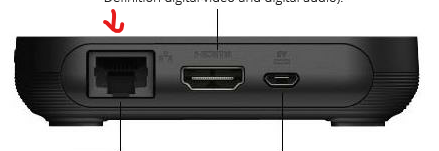
The other end of the ethernet cord would plug into one of the 4 ports on the back of your modem (as circled in red).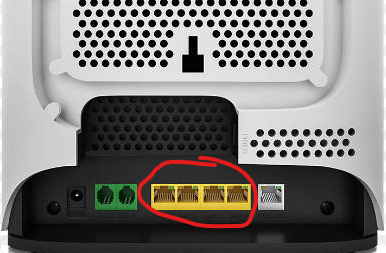
If for some reason you're unable to test an ethernet connection, is your receiver enclosed or is it in a well ventilated, open area? Are there any large obstructions between your receiver and modem (such as walls, ceiling / floor, couches, etc.) that could be impeding the signal? It also best to keep other electronic devices a short distance away from the receiver, to rule out device interference.
Additionally we'd recommend checking out our Wi-Fi Checkup Toolas it will show the connection strength of your connected devices.
Options
- Mark as New
- Bookmark
- Subscribe
- Mute
- Subscribe to RSS Feed
- Permalink
- Report Inappropriate Content
08-29-2025 11:58 AM - last edited on 08-29-2025 12:03 PM by BellPatricia
I have 4 TV’s and 4 receivers same models 7802. Two Tv’s the newest ones being smart will not turn off until I press the power button on the remote 3 times. Also, as I’m writing to you I just noticed the the receiver giving me the most trouble has just lost wifi again but all other receivers are green . Also this newer TV - 2 yrs old has pixel issues periodically on CTV channels. I was told when I changed to Fibe from satellite two years ago that these 4 receivers were old. I did contact Bell Tech support two weeks ago and they told me to follow-up if it continues. Honestly, I dread calling on the phone because it takes so long for the tech to understand and then there is no resolution and the customer has to pursue it again. Can you make any suggestions .
Options
- Mark as New
- Bookmark
- Subscribe
- Mute
- Subscribe to RSS Feed
- Permalink
- Report Inappropriate Content
08-31-2025 03:33 PM
Hi there @PITA77
Thanks for your post.
When you indicate the TV won't turn off until you press the power button 3 times, are you referring to your actual TV with the TV remote, the receiver with the receiver remote or did you pair your receiver remote to your TV? If you have paired your VIP7802 remote to your TV and you have to press the power button 3 times, we'd recommend re-pairing the remote to see if that resolves the issue.
For your receiver losing Wi-Fi, can you share which model modem you have?
How far away is your receiver from the modem? Are there any large obstacles in between (walls, floors, appliances, etc..)?
Have you attempted to use an ethernet connection on the receiver losing Wi-Fi?
Is the receiver experiencing pixilation issues the same receiver that is experiencing Wi-Fi disconnections?
When experiencing the pixilation issues, we'd recommend running our Virtual Repair Tool. It's great for remotely detecting and resolving issues.
Looking forward to hearing back,

Getting started
New to our forum? These guides will help you find your way around quickly.
- Welcome to the Community!
- Log in/Register
- Community guidelines
- Community help
- Meet the Moderators
- Bell Community All-Stars
- How to send a private message
- Existing customers, login to MyBell to see exclusive offers
- What's on Crave
- What's on Free Preview
- Mobility phone & device catalog
- Latest in the Community





